Public monitoring for enterprises generally available
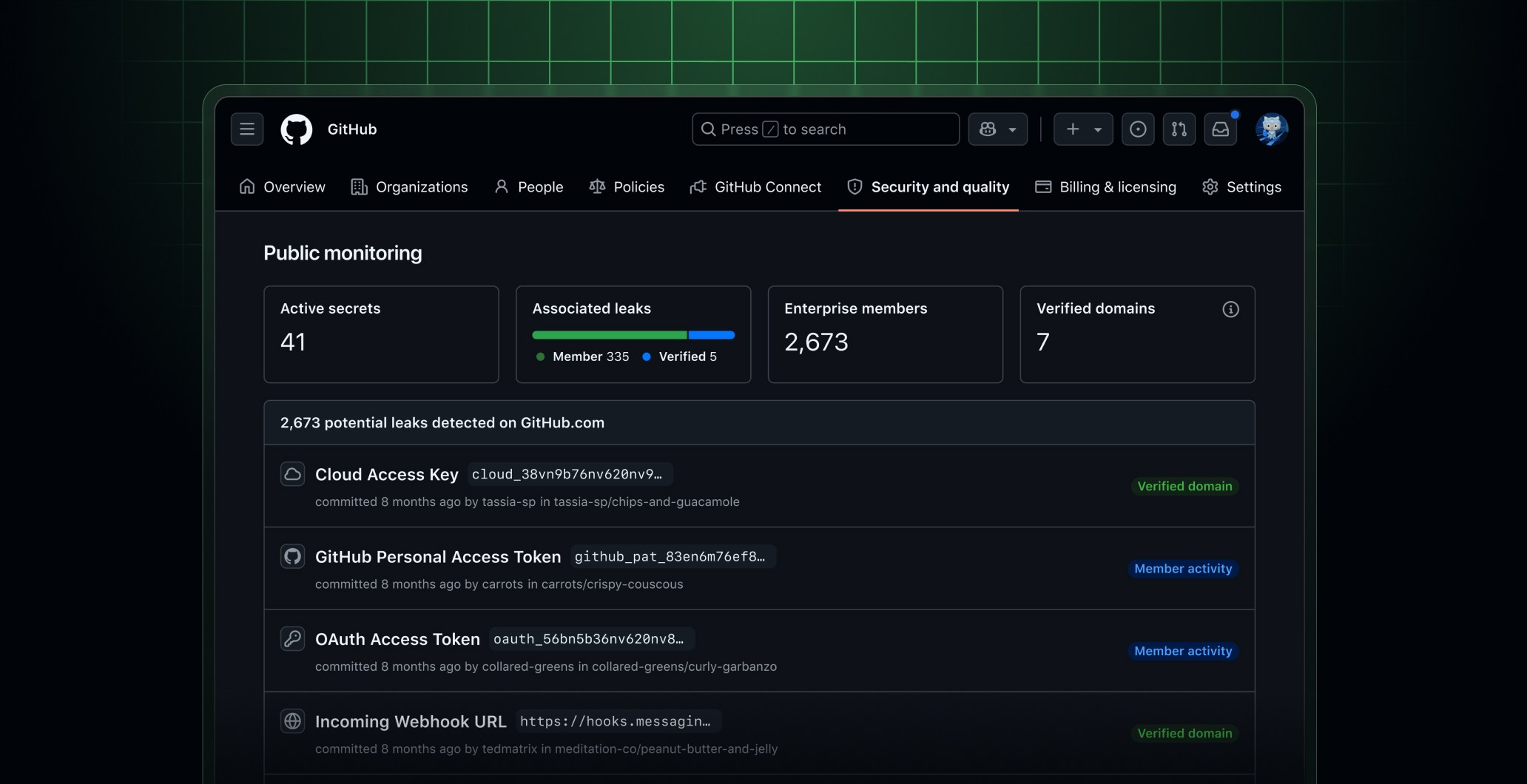
GitHub public monitoring alerts enterprises when their secrets are publicly exposed anywhere on GitHub, helping teams respond quickly to leaks wherever they happen. It’s now generally available to enterprises with GitHub Secret Protection at no additional cost.
What is public monitoring?
GitHub monitors the entire public surface of github.com for leaked secrets in real time. Public monitoring attributes those secrets back to your enterprise, based on where your people commit.
Secret scanning has always protected the repositories you own, but secrets leak beyond that boundary. For example, a developer commits to a personal fork or an open source project or they paste a token into a public issue or pull request. This often happens from an account your security team isn’t tracking. Exposures like these were nearly impossible to find and often only surfaced after they’d been abused by bad actors.
Public monitoring closes that gap. It finds these vulnerabilities and attributes them to your enterprise so you can respond quickly. The feature scans for secrets exposed anywhere in public content across github.com (e.g., git content, pull request comments, and user-created gists) and natively attributes each one back to your enterprise through GitHub’s identity layer and verified domains.
Because the activity happens on GitHub, so does the attribution: in real time (not a nightly async crawl), definitively with native platform metadata (not on a guess from a commit email), and across arbitrary public repositories (not just surfaces where you tell us to look).
Public monitoring will never scan private repositories; it surfaces only secrets that are already exposed publicly, so you can revoke leaked secrets before they’re abused by bad actors. Secret scanning for enterprises remains available for scanning all repositories owned by your organization or enterprise, including public, private, or internal repositories.
Public monitoring works out of the box with no setup or configuration required. Just enable it and start seeing results.
Why are we doing this?
GitHub is committed to empowering the developer community by helping organizations recognize and address the risks of secret leaks wherever they happen. We believe every enterprise should know the moment its secrets leak in public, no matter where it happens on GitHub. That’s why public monitoring is now generally available for enterprises with GitHub Secret Protection, at no additional cost.
Secrets don’t respect boundaries; scanning for them shouldn’t either.
How does attribution work?
GitHub attributes a public finding to your enterprise using two main heuristics: verified domain matching and enterprise membership. Both leverage metadata across GitHub’s identity layer, including emails verified for a user’s account, to match findings to an enterprise.
| Method | What it checks | Catches |
|---|---|---|
| Member-based attribution | The committer’s GitHub account belongs to your enterprise as an enterprise member | Leaks from managed accounts and known members |
| Verified domain matching | The committer’s email is on a domain your organization or enterprise has verified | Leaks from personal accounts using a work email |
Verified domain matching applies even when the account isn’t linked to your enterprise and even when the email isn’t public. Each finding shows which method attributed it, along with the secret type, the public location (e.g. file, issue, pull request, discussion, etc.), and the committer.
Is public monitoring with data residency available?
Yes, public monitoring is supported for GitHub Enterprise Cloud customers with data residency.
For enterprises hosted in data residency regions, attribution is powered exclusively by verified domain matching. Because data residency environments maintain strict tenant isolation from github.com, enterprise membership rosters are not shared across the boundary. Instead, when a commit author’s email matches a domain your enterprise has verified, the alert is encrypted and delivered directly to your enterprise dashboard while ensuring data stays within your designated geography.
How to enable public monitoring
Enterprise owners and enterprise security managers can enable public monitoring from their Security tab. Once enabled, you’ll see recently leaked secrets, and GitHub will begin scanning for future matches.
Public monitoring is available for GitHub Enterprise Cloud customers with Secret Protection or Advanced Security, including support for Cloud with data residency. Public monitoring is included with your GitHub Advanced Security or GitHub Secret Protection license at no additional cost.
Learn more
Learn more about secret scanning and verifying domains for your enterprise, or share your feedback in the community discussion.
