LightTreeFM
A downloadable tool
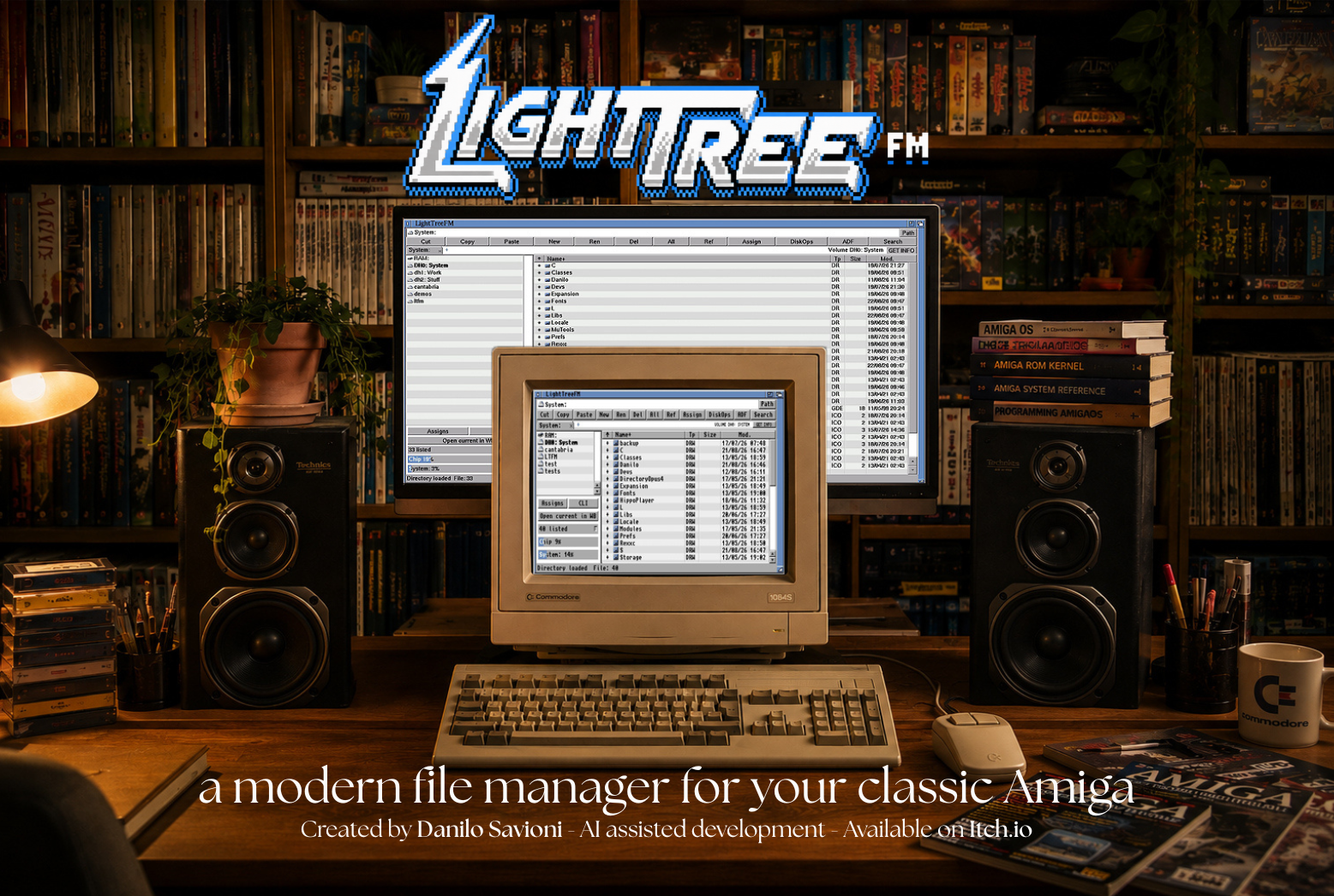
LightTreeFM
https://algernon72.github.io/LightTreeFM/
A modern dual-pane file manager for AmigaOS, built with the Classic Amiga in mind.
LightTreeFM combines a traditional Amiga file-management experience with features usually found in much more modern applications.
It is designed to run on a wide range of machines, from classic Motorola 68000 systems to accelerated and RTG-equipped Amigas, while keeping the same philosophy.
Main Features
Dual-pane File Manager
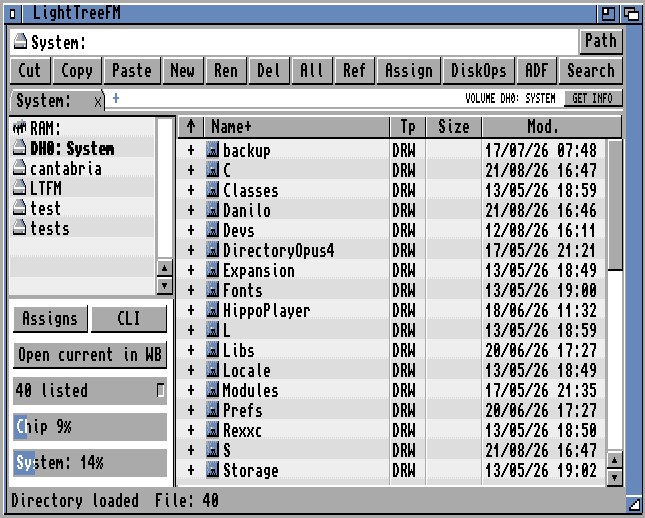
Browse, copy, move, rename and organize files using a fast and familiar dual-pane interface.
LightTreeFM includes:
- Tree and file views
- Drag & Drop
- Multiple selection
- Bookmarks
- Assigns
- Sorting and filtering
- File associations
- Preferred applications
- Detailed file and drawer properties
Scalable RTG Interface
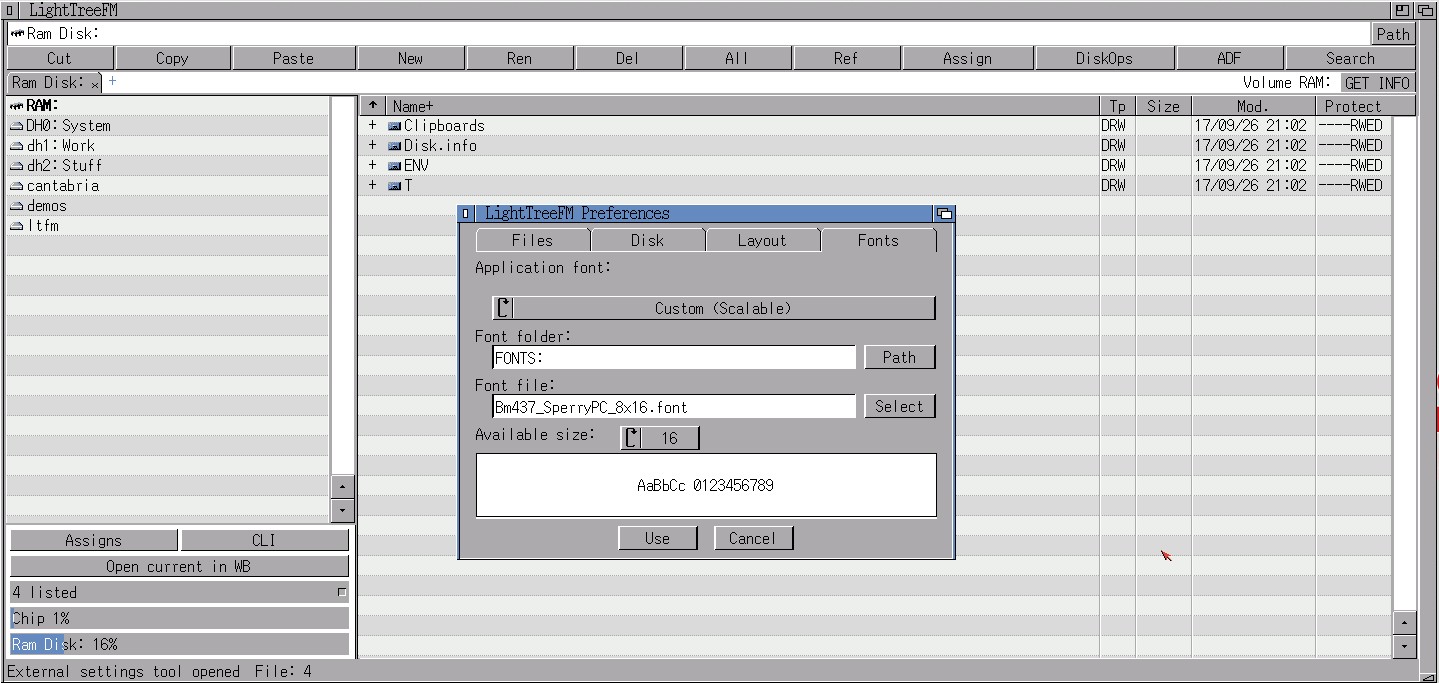
LightTreeFM can run in the traditional Classic layout or use a scalable interface for RTG resolutions.
The interface supports:
- Custom fonts
- Scalable controls
- Custom themes
- Own Screen
- 4, 8 and 16-colour configurations
- Different visual styles for Classic and modern setups
The same application can therefore feel at home on both a low-resolution PAL screen and a modern RTG desktop.
Visual Multi Rename
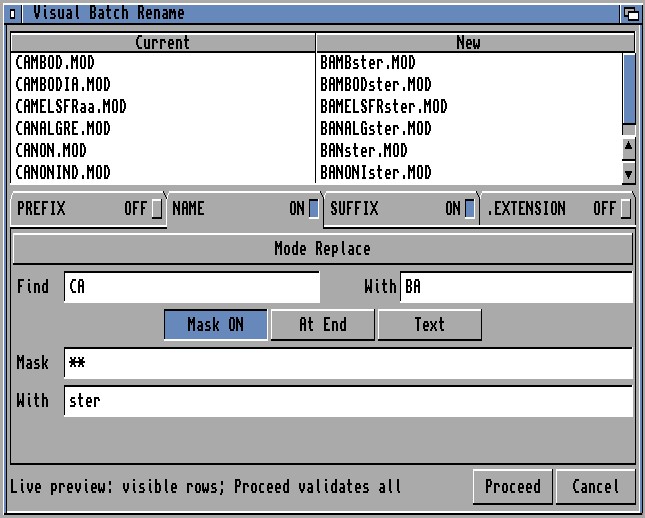
Rename multiple files and drawers through a dedicated visual interface.
Operations include:
- Prefix
- Suffix
- Find & Replace
- Extension editing
- Numeric sequences
- Alphabetic sequences
- Uppercase / lowercase conversion
- Rename preview
- Collision detection
- Transactional rename and rollback
You can see the final names before anything is changed.
TreeDuo
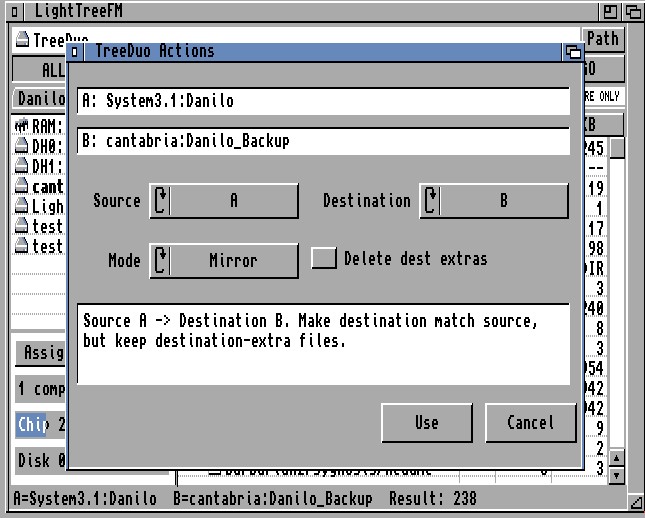
TreeDuo compares two directory structures and helps synchronize them.
It can identify:
- Identical files
- Files available only on one side
- Newer files
- Different sizes
- Conflicts
You can then generate an Update or Mirror plan, inspect the proposed operations and execute them only when you are satisfied with the result.
TreeDuo projects can also be saved and loaded again.
Archive Support
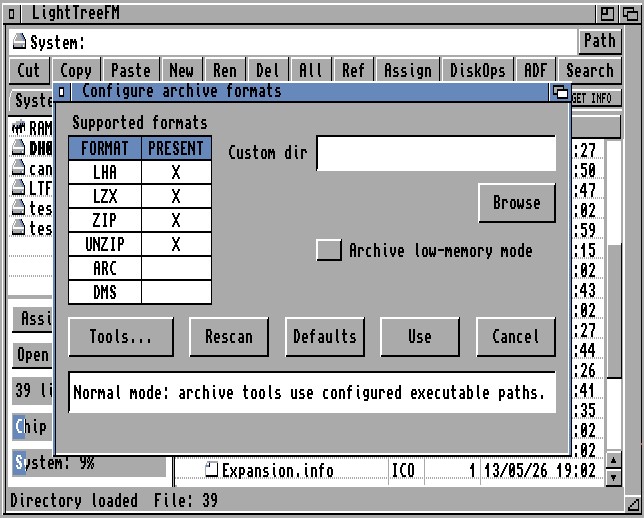
LightTreeFM integrates archive handling directly into the file manager.
Depending on the tools installed on your system, it supports formats such as:
- LHA / LZH
- LZX
- ZIP
- ARC
- DMS
Archives can be browsed inside the tree and individual files can be selected, copied or extracted through normal file-manager operations.
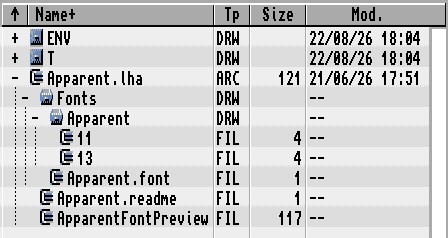
Archive creation and extraction also include dedicated handling for memory-constrained Amiga systems.
ADF & Disk Tools
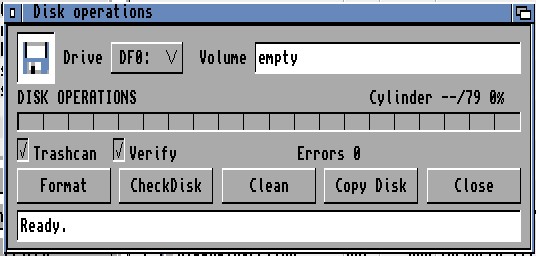
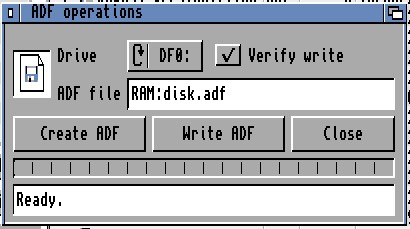
LightTreeFM includes several utilities for floppy disks and ADF images:
- Create ADF images
- Write ADF images to floppy
- Read floppy disks to ADF
- Browse ADF contents
- Format disks
- Copy disks
- Check disks
- Clean disks
- Progress and verification feedback
ADF images can be explored directly from the file tree.
Properties & Volume Information
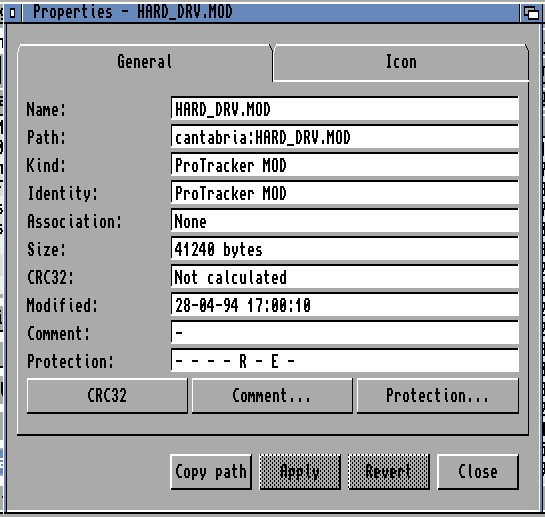
The Properties window provides information and controls for:
- File attributes
- Protection bits
- Comments
- Icons
- ToolTypes
- CRC32 calculation
- Multiple selections
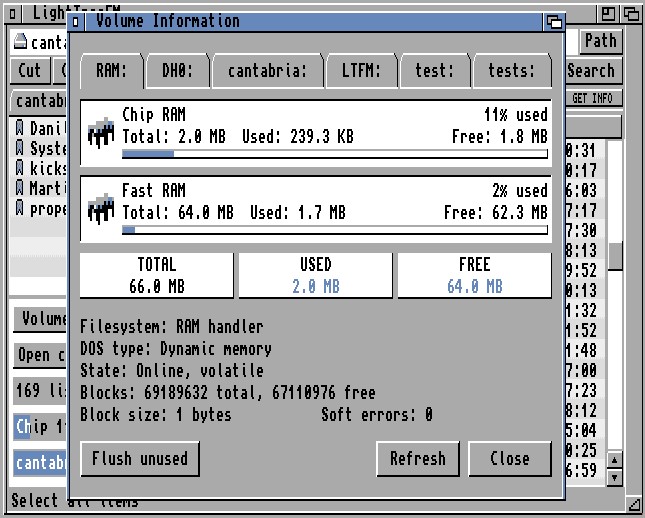
Volume Information provides detailed information about mounted devices, filesystems, capacity, blocks and available memory.
Designed for Real Amigas
LightTreeFM is developed with compatibility and efficiency as core goals. Supported configurations range from classic AmigaOS systems to much faster modern setups.
Minimum target
- Motorola 68000
- AmigaOS / Workbench 2.05
- Approximately 2 MB RAM minimum / some fast ram recommended.
- No MUI required
LightTreeFM also supports later Kickstart and Workbench releases, faster CPUs and RTG systems. Particular attention is given to memory usage and to keeping the application usable on low-specification machines.
Philosophy
LightTreeFM tries to bring useful modern concepts to the Amiga while respecting the way the system works.
That means keeping things:
- Fast
- Direct
- Lightweight
- Understandable
A One-Man Project
LightTreeFM is a one-man independent project.
I am not a professional programmer. The project started from a personal idea: creating the kind of file manager I always wanted to have on my Amiga. What began as a relatively small utility has gradually grown into a much larger project, requiring a considerable amount of time, testing and dedication. LightTreeFM has been tested on many configurations and is designed to work on a wide range of Amiga systems, but the Amiga ecosystem is extremely diverse.
For this reason, I cannot guarantee perfect operation on every possible hardware, emulator, filesystem or third-party configuration. If you experience a problem, please use the Support form available on the LightTreeFM website and include as much information as possible about your Amiga configuration.
Bug reports and real-world testing are extremely useful for improving future versions.
Autumn 2026 Release
The latest release introduces major improvements including:
- Scalable RTG interface
- Custom fonts
- New themes
- Visual Multi Rename
- Expanded TreeDuo
- Improved archive handling
- Enhanced ADF and disk tools
- Volume Information
- Numerous compatibility fixes
- Improved support for low-memory systems
LightTreeFM continues to evolve, but its original objective remains unchanged:
make everyday file management on the Amiga faster, easier and more enjoyable.
Download
Click download now to get access to the following files:
Development log
- LightTreeFM – Image Viewer + Fixes & Improvements2 days ago
- LightTreeFM Development Update51 days ago
- LightTreeFM – Community Feedback Update: First Improvements Already Implemente...57 days ago
- New Autumn Release Out Now !58 days ago
- One LightTreeFM, from Workbench 2.05 to RTGAug 08, 2026
- WIP - LightTreeFM file/application associationsJun 16, 2026
- Thank You !! Please consider rating LightTreeFM on itch.ioJun 15, 2026
- Big update released for LightTreeFMJun 14, 2026


Comments
Log in with itch.io to leave a comment.
When I select .adf file and select from Disk - meny "write selected adf" I then get a requester if I want to write the file I click ok and another requester that show the file to write and I click "ok"
This is to much confirming.
spotted ! already fixed in the next release...Thank You!
Great :) Looking forward to next version. Keep on the great work.
Thanks for the update. I would prefer if I could use the "Delete" key to Delete and when I delete something I get the requester to confirm and then another requester to click "ok" and the last requester I can not use the keyboard to click "ok"
I would prefer if I could just use the Delete button and the file would be deleted. Could you make that as an option?
Thanks
HI , a few days ago I implemented a timer to autoclose the copy/delete progress windows, etc. This is precisely to reduce the number of clicks. And now the delete button deletes the selected items, it only asks once if you are sure. Thank you for your feedback !
That is great :) Thank you.
Awesome! A modern file browser for our beloved Amiga that works exactly as you'd expect from modern software. Keep up the great work!
Thanks a lot! I’m really glad you like it. That’s exactly what I’m aiming for with LightTreeFM! Thanks for your support, and if you ever need help or have a feature request, feel free to hit the Support button on the website! https://algernon72.github.io/LightTreeFM/
GREAT software!!! finally a file manager that does not need lots of dependencies to run!!!
Yes this FINALLY has replaced Dopus for me. fantastic app
Thank you...stay tuned for the new upcoming release !!!!
WOW this app is fantastic. I think it is my favorite new Amiga Utility. Excellent work
Hi Bill, Thank you !! Be ready for a very BIG Autumn update...New "premium" features and many many adjustments done !! Almost everything is ready now. LightTreeFM, in the version that will be released soon, has made incredible improvements compared to the version currently available. I've also created a website that will be online soon where all the new features will be illustrated. Thanks for the support!!!
Good stuff hehe.
What screen does the prog.. open. How many colors?
On standard 68000@7MHz OCS the refresh is a little slow and I am pretty sure
it is because of the amount of colors. Love the program :) Keep on the great work!
Public Screen... I must implement its own screen. Many improvements are ongoing...
Cool! I will for sure support this great program more :)
thank you so much nikosidis !!!!
Está increíble! buen trabajo.
Would you think it would be feasible to do an AROS port?
Maybe...in the future.. now i must implement more features i have in mind...like filetype/preferred application management, a dedicated trashcan / undelete , better high res support. thank you for your interest.
This is a very nice program. I tested now on my A500@7MHz and 9MB of RAM and even if a little slow on that configuration works very good! I will try on my Amiga 4000/030@25 soon. That will be great I think. Maybe clock and date in the top bar? Thanks for this great program. You put a lot of effort into this for sure :)
Thanks, nikosidis, for your support. I'm working right now to make this app even better. I'm trying to gather user feedback and fix the inevitable issues that will arise with the various different configurations.
Mes Amiga vous disent MERCI
Thank you for your video !!! i'm gald you like it...try the drag and drop feature to extract selected files inside lha and adf !!
Hope you can submit this to the amiga tool jam!
https://itch.io/jam/amiga-tools-jam-2026
Unfortunately I can't participate, I relied heavily on codex for writing the code, and I would be breaking the first rule
Love it! Who knows, it could work under MorphOS.
Thank you for this new compact tool !
I briefly tested it under my AOS4.1FE X-5000 and it runs very fast and smooth. Impressive !
Excellent, I’ll try it on my CD32 and my MorphOS too ! 😉