For most of the life of the Raspberry Pi 5, price settled the argument against an Intel mini PC. The board cost about half as much, sipped a third of the power, and handled Pi-hole, Home Assistant and a few containers.
Four memory-driven price rises since December 2025 have taken most of that gap away. So the Raspberry Pi 5 vs N150 question now comes down to power, software and what you plan to run.
Raspberry Pi announced the latest round on October 1, 2026. We checked the prices and benchmarks below against that notice, the Intel spec page and live Amazon listings on October 13.
We did not test either machine. Every measured number is credited to the reviewer who took it, mostly Jeff Geerling, CNX Software and ServeTheHome. Prices come from Raspberry Pi notices and live listings, and the totals and running costs are our own arithmetic.
The short answer
For a general home server, buy the N150 box. The Beelink Mini S13 with 12GB, a 512GB SSD and 2.5GbE costs about $329 complete.
A Raspberry Pi 5 8GB costs about $346 on Amazon once you add a power supply, an NVMe case and a 512GB SSD. The N150 is also about 43% faster per core and has Quick Sync for Plex and Jellyfin.
Proxmox, TrueNAS and Unraid all run on it too. None of them officially support the Pi.
Buy the Pi 5 when idle power or GPIO matters more than raw speed. It idles at about 3 W against 7 to 11 W for an N150 box, and its 40-pin header takes sensors and HATs.
Already own an SSD, or happy to run from a microSD card? Then the CanaKit Pi 5 8GB Basic Kit (about $210) is still the cheapest way to start.
What a working Pi 5 server costs after four price rises
Raspberry Pi has raised board prices four times in ten months, and each notice blames memory costs. The April notice says LPDDR4 prices had gone up seven-fold in a year.
Larger memory sizes took the biggest hits, and those are exactly the ones a home server wants. Here are the official US prices through December, February, April and October. TechPowerUp and the PiShop.us reseller listings agree on the current figures.
| RAM | Launch | Dec 2025 | Feb 2026 | Apr 2026 | Oct 2026 (now) |
|---|---|---|---|---|---|
| 2GB | $50 | $55 | $65 | $65 | $77.50 |
| 4GB | $60 | $70 | $85 | $110 | $110 |
| 8GB | $80 | $95 | $125 | $175 | $175 |
| 16GB | $120 | $145 | $205 | $305 | $305 |
Board price is only part of the bill, and this is where comparisons usually go wrong. A bare Pi 5 has no case, no power supply and no storage, while an N150 mini PC ships with all three.
A home server also wants an NVMe drive rather than a microSD card. Cards wear out under database and log writes.
Price both machines with 512GB of storage and the gap closes completely, although the Beelink ships a slower M.2 SATA drive:
| Item | Pi 5 8GB build (Amazon) | Pi 5 8GB build (official resellers) | Beelink Mini S13 |
|---|---|---|---|
| Board or PC | CanaKit Basic Kit with 45W PSU, $209.99 | Pi 5 8GB, $175 | Mini S13 12GB / 512GB, $329.00 |
| Power supply | in kit | 27W official PSU, $12.95 | included |
| Cooling and case | Argon ONE V5 M.2 case with fan, $49.99 | Active Cooler $10.95 + M.2 HAT+ $12 | included |
| 512GB SSD | Patriot P320 NVMe, $85.99 | Raspberry Pi SSD 512GB (NVMe), $120 | included (M.2 SATA, spare M.2 slot) |
| Total | $345.97 | $330.90 (no case) | $329.00 |
| Memory | 8GB | 8GB | 12GB |
| Ethernet | 1GbE | 1GbE | 2.5GbE |
So the Pi only stays cheaper if you skip the SSD. With the 16GB board it is worse still: $305 for the board alone, roughly $460 built, against $349 for the Mini S13 with 16GB and dual 2.5GbE.
Amazon prices move daily. Treat these as a snapshot and check the live price before you buy.
How much faster the N150 actually is
Both chips have four cores and no hyper-threading, so the difference comes down to core design. Inside the Pi 5, the BCM2712 runs Arm Cortex-A76 cores at 2.4 GHz, a 2018 design.
Against that, the Intel N150 uses Gracemont efficiency cores that turbo to 3.6 GHz. Its base power budget is 6 W, and mini PC makers can let it run past that. That headroom shows up in every published benchmark we found for the pair.
| Benchmark | Raspberry Pi 5 | Intel N150 | Source |
|---|---|---|---|
| Geekbench 6 single-core | 904 | 1,294 | Geerling Pi 5, Geerling G3 Plus |
| Geekbench 6 multi-core | 2,164 | 3,169 | Same runs |
| Geekbench 6 single / multi | 789 / 1,523 | 1,201 / 2,364 | Geekbench browser result cited by CNX, CNX ZimaBoard 2 (fanless, throttled) |
| HPL (Linpack) | 37.9 Gflops | 62.1 Gflops | Geerling |
| PassMark CPU Mark | 3,284 (only 6 samples) | 5,343 (2,236 samples) | PassMark |
Geerling took his Pi 5 numbers after the December 2024 Raspberry Pi OS updates, which lifted its Geekbench multi-core score from 1,805 to 2,164. Even so, the N150 is about 43% ahead single-threaded and 46% ahead multi-threaded.
ZimaBoard 2 is fanless and throttled in its multi-core runs, so it trails the G3 Plus. CNX Software ran the Pi 5 against the older N100 and found the same pattern, so this is not one outlier from one reviewer.
For a home server, single-thread speed matters most. Web dashboards, Home Assistant automations and package installs mostly run on one core.
Why idle power is the Pi’s real advantage
A home server spends most of its life waiting, so idle draw matters more than the stress-test peak. Here the Pi 5 wins clearly, and three independent testers agree within a watt:
| Machine | Idle at the wall | Full CPU load | Source |
|---|---|---|---|
| Raspberry Pi 5 8GB | 2.8 W | 9.7 W (stress-ng) | Geerling |
| Raspberry Pi 5, Active Cooler | 2.6 W | 6.8 W | Tom’s Hardware |
| Raspberry Pi 5, headless | 3.0 W | 8.8 W | CNX Software |
| GMKtec G3 Plus (N150) | 9.3 W | 25 W | Geerling |
| ZimaBoard 2 (N150) | 6.8 W | 20 to 21 W | CNX Software |
| CWWK 4x SSD NAS (N150) | 10 to 11 W | 17 to 18 W | ServeTheHome |
In money, the gap is smaller than it looks. An N150 box that idles 6 W higher than a Pi burns about 53 kWh more a year.
At 18 cents per kWh, a rate we picked for the arithmetic, that comes to roughly $9.50 a year. So the $17 gap between the Amazon Pi build and the Mini S13 would take nearly two years to swing either way.
None of these figures include an NVMe drive on the Pi, and no reviewer has isolated it. Expect the Pi build to idle a little above 3 W in practice.
Why transcoding decides it for Plex and Jellyfin
Transcoding is the biggest technical gap between these two, and it is not close. On the Pi 5, the only video hardware is a 4Kp60 HEVC decoder.
Raspberry Pi documents that every other codec runs in software. H.264 1080p60 decode alone takes 50 to 60% of the CPU.
There is no hardware encoder at all, and the Jellyfin docs say the project has deprecated its Raspberry Pi V4L2 support for exactly that reason.
Intel Quick Sync on the N150 handles H.264 and HEVC encode, plus HEVC, VP9 and AV1 decode. That comes from Intel media-driver feature tables for the Alder Lake-N family it belongs to. AV1 encode is missing.
Community runs on the QuickSync benchmark tracker show a median 3.3x realtime for H.264 1080p and 1.2x for H.264 4K. A separate concurrency test on the same tracker managed two to five 1080p streams at once. Weakest of the lot is 4K HEVC 10-bit at 0.45x realtime.
Those tests re-encode at full resolution, and the H.264 runs decode in software. A Plex or Jellyfin downscale to 1080p with hardware decode should do better, so read them as a conservative floor, not a stream count.
If transcoding is on your list, the Core 3 304 vs N150 vs N355 comparison covers the faster Intel options.
What storage and networking each one gives you
The Pi 5 exposes one PCIe 2.0 lane through its FFC connector. Geerling measured 454 MB/s sequential reads from NVMe at Gen 2 and 894 MB/s with Gen 3 forced on.
Raspberry Pi warns that Gen 3 is not certified and might be unstable.
Everything shares that one lane. A 2.5GbE HAT uses the same connector, so you choose between faster networking and NVMe unless you add a PCIe switch board. Onboard Ethernet is Gigabit and reaches about 940 Mbps in iperf3.
A typical N150 box has PCIe 3.0 to an M.2 slot, often a second M.2 slot, and Intel or Realtek 2.5GbE as standard. The GMKtec G3 Plus that Geerling tested read 1,572 MB/s from NVMe and pushed 2.35 Gbps through its Intel i226-V port.
ARK lists nine PCIe 3.0 lanes for the chip. That is why makers can wire two drives and two NICs without the either-or choice that the Pi forces.
Memory is the one hard limit. Intel caps the N150 at 16GB on a single channel, so buy the size you need.
Which home server software runs where
Software support is where an x86 box quietly saves the most time. Home server platforms split like this:
| Software | Raspberry Pi 5 | N150 mini PC |
|---|---|---|
| Proxmox VE | Arm64 build is official since August 2026, but single-board computers like the Pi are explicitly not supported | Fully supported |
| TrueNAS | Not supported; needs x86-64 | Supported |
| Unraid | Not supported; x86_64 only | Supported |
| Home Assistant OS | Officially supported | Officially supported (generic x86-64) |
| Docker | arm64 images only, amd64 needs emulation | Every amd64 image |
Proxmox arm64 is the release that catches people out. Geerling reports a user running it on a Pi 5 after a manual install.
Proxmox itself says device-tree boards like the Pi are not supported, so you are on your own when an update breaks it.
The Docker gap matters less than it used to. Most popular homelab images now publish arm64 builds, but the odd amd64-only image still turns up.
If Proxmox is the plan, our Proxmox mini PC guide goes further up the range.
The boxes we’d buy
Best overall: Beelink Mini S13, 12GB and 2.5GbE

For about $329, the Mini S13 ships with 12GB of LPDDR5, a 512GB SSD, a spare M.2 slot and 2.5GbE. Memory is soldered, so 12GB is what you live with. That still covers Docker, Home Assistant and a couple of light VMs.
For Proxmox or a router: Mini S13 with 16GB and dual 2.5GbE
Beelink’s 16GB Mini S13 trades LPDDR5 for 16GB of DDR4 and adds a second 2.5GbE port for about $349. Sixteen gigabytes is the ceiling for the N150.
With a second port, one box can act as a firewall, or as a VM host with a separate management network. Stock was listed as limited when we checked.
Silent and fanless: MeLE Quieter DL

With no fan at all and two 2.5GbE ports, the MeLE Quieter DL is the closest x86 match to the silence of a Pi.
You only get 8GB of memory and 128GB of eMMC storage for about $356. It suits a firewall, DNS or Home Assistant better than a container host.
The Pi 5 build, if the Pi is the right fit
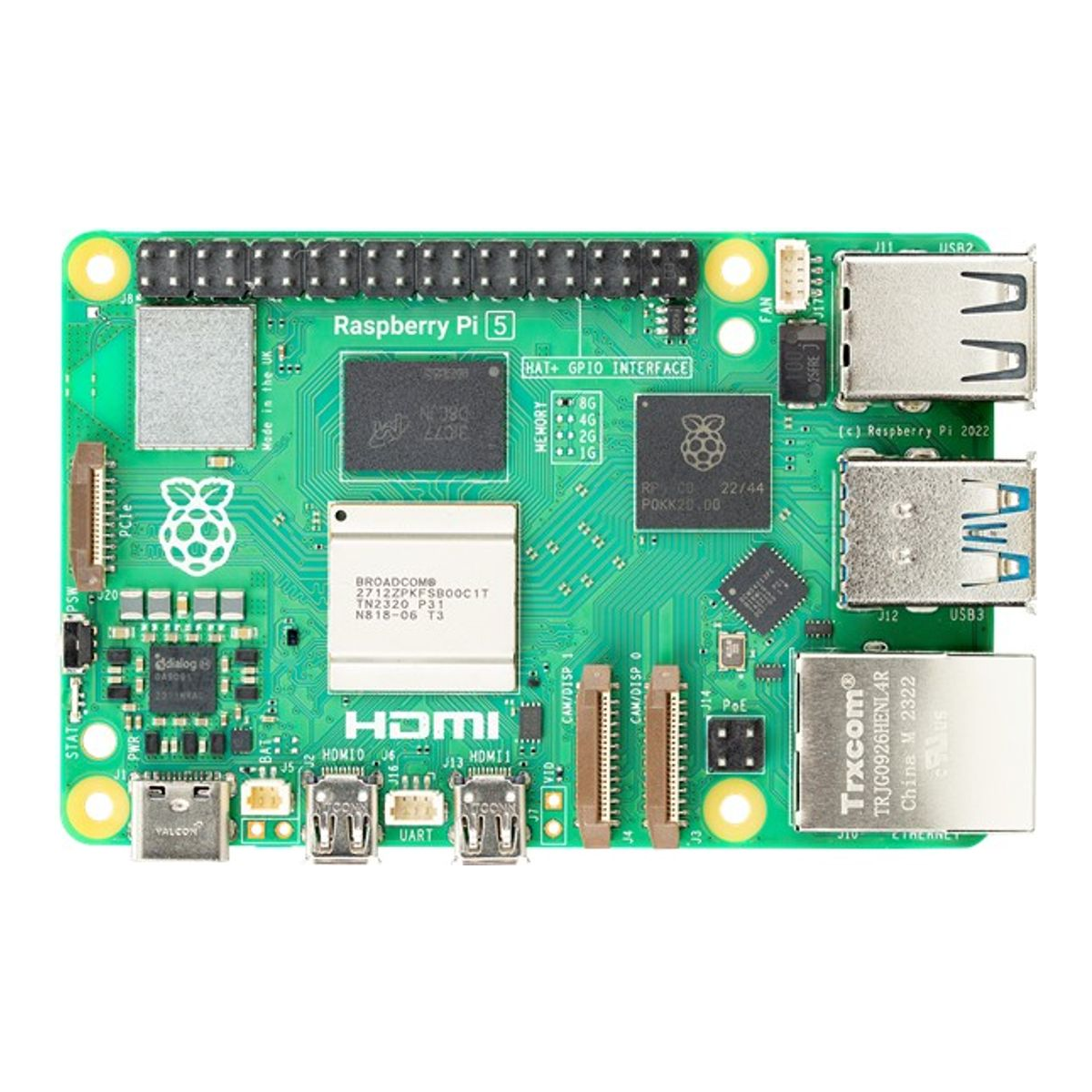
Start with the CanaKit Basic Kit, which bundles the 8GB board with a 45W power supply and heatsinks.
Add the Argon ONE V5 M.2 case, an aluminium case with a 30mm fan and a built-in NVMe slot. Then fit a 2280 drive such as the Patriot P320 512GB.
Our Raspberry Pi 5 kits guide covers the other kits, the Jetson and the Arm alternatives.
Where the Pi 5 still wins
Three cases still favour the Pi 5, and none of them is about price any more.
Battery or solar setups come first. There, 3 W against 7 to 11 W decides how long the box stays up.
Physical computing is the second. A mini PC has nothing like the 40-pin header, the camera connectors or the HAT ecosystem. That ecosystem includes AI boards, and our edge LLM comparison weighs the AI HAT+ 2 against a Jetson Orin Nano Super.
Third is a fleet of small single-purpose nodes, such as a Pi-hole, a print server and a sensor gateway. Each job needs little CPU, and the tiny idle draw adds up across several boards.
Many buyers still assume the Pi is the budget option. After the October price notice, that only holds for the 4GB and smaller boards running from a microSD card.
Once a home server needs 8GB, an SSD and a case, an N150 box costs about the same, runs faster, and takes every x86 server OS.
For a full-size NAS build around the same chip class, see our DIY NAS mini PC guide. For a dedicated Home Assistant box, see the Home Assistant mini PC picks.