



- 配置文件加载
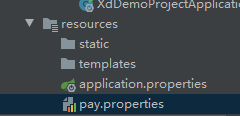
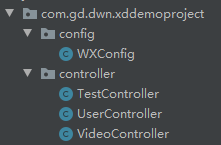
#微信支付的appid
wxpay.appid=w23432432432


#支付密钥
wxpay.sercret=sfweinkkk

#微信支付商户号
wx.mechid=324324
  方式一:
        ① controller上面配置@PropertySource("classpath:resource.properties")
        ② 增加属性@Value("${test.name}")
package com.gd.dwn.xddemoproject.controller;

import com.gd.dwn.xddemoproject.config.WXConfig;
import com.gd.dwn.xddemoproject.utils.JsonData;
import org.springframework.beans.factory.annotation.Autowired;
import org.springframework.beans.factory.annotation.Value;
import org.springframework.context.annotation.PropertySource;
import org.springframework.web.bind.annotation.GetMapping;
import org.springframework.web.bind.annotation.RequestMapping;
import org.springframework.web.bind.annotation.RestController;

import java.util.HashMap;
import java.util.Map;

@RestController
@RequestMapping("api/v1/test")
@PropertySource("classpath:pay.properties")
public class TestController {
    @Value("${wxpay.appid}")
    private String payAppid;
    @Value("${wxpay.sercret}")
    private String paySecret;

    //@Autowired
    //private WXConfig wxConfig;

    @GetMapping("get_config")
    public JsonData testConfig(){
        Map<String,String> map = new HashMap<>();
        map.put("appid",payAppid);
        map.put("secret",paySecret);
        //map.put("appid",wxConfig.getPayAppid());
        //map.put("secret",wxConfig.getPaySecret());
        //map.put("mechid",wxConfig.getPayMechid());
        return JsonData.buildSuccess(map);
    }
}
方法二:实体类配置文件
① 添加@Component注解。
② 使用@PropertySource注解指定配置文件位置。
③ 使用@ConfigurationProperties注解,设置相关属性。
④ 必须通过注入IOC对象Resource进来,才能在类中使用获取的配置文件值
package com.gd.dwn.xddemoproject.config;

import org.springframework.beans.factory.annotation.Value;
import org.springframework.context.annotation.Configuration;

@Configuration
public class WXConfig {

    @Value("${wxpay.appid}")
    private String payAppid;

    @Value("${wxpay.sercret}")
    private String paySecret;

    @Value("${wx.mechid}")
    private String payMechid;

    public String getPayAppid() {
        return payAppid;
    }

    public void setPayAppid(String payAppid) {
        this.payAppid = payAppid;
    }

    public String getPaySecret() {
        return paySecret;
    }

    public void setPaySecret(String paySecret) {
        this.paySecret = paySecret;
    }

    public String getPayMechid() {
        return payMechid;
    }

    public void setPayMechid(String payMechid) {
        this.payMechid = payMechid;
    }
}
package com.gd.dwn.xddemoproject.controller;

import com.gd.dwn.xddemoproject.config.WXConfig;
import com.gd.dwn.xddemoproject.utils.JsonData;
import org.springframework.beans.factory.annotation.Autowired;
import org.springframework.beans.factory.annotation.Value;
import org.springframework.context.annotation.PropertySource;
import org.springframework.web.bind.annotation.GetMapping;
import org.springframework.web.bind.annotation.RequestMapping;
import org.springframework.web.bind.annotation.RestController;

import java.util.HashMap;
import java.util.Map;

@RestController
@RequestMapping("api/v1/test")
@PropertySource("classpath:pay.properties")
public class TestController {
    @Value("${wxpay.appid}")
    private String payAppid;
    @Value("${wxpay.sercret}")
    private String paySecret;

    @Autowired
    private WXConfig wxConfig;

    @GetMapping("get_config")
    public JsonData testConfig(){
        Map<String,String> map = new HashMap<>();
        //map.put("appid",payAppid);
        //map.put("secret",paySecret);
        map.put("appid",wxConfig.getPayAppid());
        map.put("secret",wxConfig.getPaySecret());
        map.put("mechid",wxConfig.getPayMechid());
        return JsonData.buildSuccess(map);
    }
}


 扫一扫
扫一扫


 149
149

 被折叠的 条评论
为什么被折叠?
被折叠的 条评论
为什么被折叠?
 到【灌水乐园】发言


