



APACHE POI导出应用 – 导出PPT表格
文章目录
前言
在当今数字化办公与信息化管理飞速发展的时代,数据的高效处理与可视化展示愈发关键。Apache POI 作为一款强大的 Java 库,能够对 Microsoft Office 格式文件进行读写操作,而 Spring Boot 凭借其便捷的开发特性,极大地简化了 Java 应用程序的搭建与部署流程。当 Apache POI 4.1.2 与 Spring Boot 相结合,为在 Java 项目中实现复杂功能开辟了新途径。其中,导出 PPT 表格这一功能,不仅能将系统中的数据以直观、规范的表格形式呈现于 PPT 中,便于在会议汇报、数据分析展示等场景中使用,还能有效提升工作效率与数据展示的专业性。本文将详细阐述如何运用 Apache POI 4.1.2 和 Spring Boot 技术实现导出 PPT 表格的功能 ,为开发者提供清晰的技术指引与实践参考。
后续还有导出PPT简单图表、复杂图表、与JFreeChart结合导出图片等示例。
一、准备工作
引入库
<dependency>
     <groupId>org.apache.poi</groupId>
      <artifactId>poi-ooxml</artifactId>
      <version>4.1.2</version>
  </dependency>
  <dependency>
      <groupId>org.apache.poi</groupId>
      <artifactId>poi-ooxml-schemas</artifactId>
      <version>4.1.2</version>
  </dependency>
  <dependency>
      <groupId>org.apache.xmlbeans</groupId>
      <artifactId>xmlbeans</artifactId>
      <version>3.1.0</version>
  </dependency>
二、代码编写(仅参考)
1.代码实体、controller、service层
HouseMortgageLedge
// 提供查询条件 例如时间查询、类型查询等字段

// controller
@RequestMapping(value = "/exportWeek")
public void exportWeek(HttpServletRequest request, HttpServletResponse response, HouseMortgageLedge houseMortgageLedge) {
 	houseMortgageLedgeService.exportWeek(houseMortgageLedge, request, response);
}
// service
void exportWeek(HouseMortgageLedge houseMortgageLedge, HttpServletRequest request, HttpServletResponse response);
2.逻辑代码
代码如下(示例):
service.impl
@Override
    public void exportWeek(HouseMortgageLedge houseMortgageLedge, HttpServletRequest request, HttpServletResponse response) {
        // ppt导出
        try {
            // 模板文件位置
            String templateFolder = upLoadPath + File.separator + TEMPLE_URL + File.separator +  "houseLedger";
            String templateName = "exportWeek.pptx";
            // 检查模板文件是否存在
            FileUtils.checkFile(templateFolder, templateName);
            // 加载 PPT 模板
            XMLSlideShow ppt = new XMLSlideShow(new FileInputStream(templateFolder + File.separator + templateName));
            // 获取第一张幻灯片
            XSLFSlide slide = ppt.getSlides().get(0);
            WeekHelper.setPianOne(slide, houseMortgageLedge);
            // todo 后续添加其他幻灯片逻辑
            // 获取第二张幻灯片
            XSLFSlide slide2 = ppt.getSlides().get(1);
            WeekHelper.setPianTwo(slide2, houseMortgageLedge);


            FileUtils.close(response, ppt);
        } catch (UnsupportedEncodingException e) {
            e.printStackTrace();
        } catch (IOException e) {
            e.printStackTrace();
        } catch (Exception e) {
            e.printStackTrace();
        }
    }
工具方法
FileUtils 文件操作工具类
	@Slf4j
public class FileUtils {

    /**
     * @Title checkFile
     * @Description  检查文件是否存在,不存在则抛出异常
     * @param templateFolder
     * @param templateName
     * @return void
    */
    public static void checkFile(String templateFolder, String templateName){
        String templatePath = templateFolder + File.separator + templateName;
        File folder = new File(templateFolder);
        // 文件夹不存在则创建文件夹
        if(!folder.exists()){
            folder.mkdirs();
        }
        // 文件不存在 则联系管理员添加导出模板
        File file = new File(templatePath);
        if(!file.exists()){
            throw new JeecgBootException("导出模板不存在,请联系管理员在【" + templatePath + "】路径添加导出模板!");
        }
    }

    /**
     * @Title close
     * @Description 关闭资源,并导出ppt文件
     * @param response
     * @param ppt
     * @return void
    */
    public static void close(HttpServletResponse response, XMLSlideShow ppt) throws IOException {
        String fileName = "output.pptx";
        response.addHeader("filename", URLEncoder.encode(fileName,"utf-8"));
        response.addHeader("Access-Control-Expose-Headers","filename");
        response.setContentType("application/vnd.openxmlformats-officedocument.presentationml.presentation");
        response.setHeader("Content-Disposition", "attachment; fileName=" + URLEncoder.encode(fileName, "utf-8"));
        OutputStream out = response.getOutputStream();
        ppt.write(out);
        out.flush();
    }


}
WeekHelper 导出帮助类
	@Slf4j
public class WeekHelper {


    // 设置颜色值
    private static final String BACKGROUND_COLOR = "#E5F6FF";

    /**
     * @Title setPianOne
     * @Description 设置第一张幻灯片数据
     * @param slide
     * @param houseMortgageLedge
     * @return void
    */
    public static void setPianOne(XSLFSlide slide, HouseMortgageLedge houseMortgageLedge){
        // todo 填充其他信息
        // 查找表格占位符   (目的是为了表格位置确定,便于后续填充数据)
        XSLFTable placeholderTable = null;
        for (XSLFShape shape : slide.getShapes()) {
            if (shape instanceof XSLFTable) {
                placeholderTable = (XSLFTable) shape;
                break;
            }
        }
        if (placeholderTable != null) {
            // 清空占位符表格中的原有内容
            while (placeholderTable.getNumberOfRows() > 0) {
                placeholderTable.removeRow(0);
            }
            // 添加表头 todo 这里自定义表头
            PPTUtils.setTableHeader(placeholderTable, Arrays.asList("序号", "公司名称", "目标值", "完成率", "总完成量", "wqe", "本周 wqe", "本月 wqe"));
            // 填充表格数据
            // 模拟要导出的表格数据 todo 这里需改正为真实的表格数据,此处仅为模拟数据
            List<Map<String, Object>> dataList = PPTUtils.simulateList();
            int num = 1;
            DecimalFormat df = new DecimalFormat("#,##0.00");
            for (Map<String, Object> rowData : dataList) {
                XSLFTableRow row = placeholderTable.addRow();
                row.setHeight(20.0);

                XSLFTableCell indexCell = row.addCell();
                PPTUtils.setCellStyle(indexCell, num + "", Color.decode(BACKGROUND_COLOR), false);

                XSLFTableCell cell1 = row.addCell();
                PPTUtils.setCellStyle(cell1, rowData.get("companyName").toString(), Color.decode(BACKGROUND_COLOR), false);

                XSLFTableCell cell2 = row.addCell();
                PPTUtils.setCellStyle(cell2, df.format(rowData.get("target")), Color.decode(BACKGROUND_COLOR), false, true);

                XSLFTableCell cell3 = row.addCell();
                PPTUtils.setCellStyle(cell3, df.format(rowData.get("complateRate")), Color.decode(BACKGROUND_COLOR), false, true);

                XSLFTableCell cell4 = row.addCell();
                PPTUtils.setCellStyle(cell4, df.format(rowData.get("totalComplate")), Color.decode(BACKGROUND_COLOR), false, true);

                XSLFTableCell cell5 = row.addCell();
                PPTUtils.setCellStyle(cell5, df.format(rowData.get("wqe")), Color.decode(BACKGROUND_COLOR), false, true);

                XSLFTableCell cell6 = row.addCell();
                PPTUtils.setCellStyle(cell6, df.format(rowData.get("currentWeekWqe")), Color.decode(BACKGROUND_COLOR), false, true);

                XSLFTableCell cell7 = row.addCell();
                PPTUtils.setCellStyle(cell7, df.format(rowData.get("currentMonthWqe")), Color.decode(BACKGROUND_COLOR), false, true);
                num++;
            }
            // todo 添加总计数据
            XSLFTableRow row = placeholderTable.addRow();
            row.setHeight(20.0);

            XSLFTableCell totalCell = row.addCell();
            PPTUtils.setCellStyle(totalCell, "公司合计", Color.decode(BACKGROUND_COLOR), true);

            XSLFTableCell totalCell2 = row.addCell();
            PPTUtils.setCellStyle(totalCell2, "", Color.decode(BACKGROUND_COLOR), false);

            XSLFTableCell cell2 = row.addCell();
            PPTUtils.setCellStyle(cell2, df.format(0), Color.decode(BACKGROUND_COLOR), false, true);

            XSLFTableCell cell3 = row.addCell();
            PPTUtils.setCellStyle(cell3, df.format(0), Color.decode(BACKGROUND_COLOR), false, true);

            XSLFTableCell cell4 = row.addCell();
            PPTUtils.setCellStyle(cell4, df.format(0), Color.decode(BACKGROUND_COLOR), false, true);

            XSLFTableCell cell5 = row.addCell();
            PPTUtils.setCellStyle(cell5, df.format(0), Color.decode(BACKGROUND_COLOR), false, true);

            XSLFTableCell cell6 = row.addCell();
            PPTUtils.setCellStyle(cell6, df.format(0), Color.decode(BACKGROUND_COLOR), false, true);

            XSLFTableCell cell7 = row.addCell();
            PPTUtils.setCellStyle(cell7, df.format(0), Color.decode(BACKGROUND_COLOR), false, true);

            // 合并单元格
            row.mergeCells(0, 1);

            // 设置表格的样式
            PPTUtils.setTableStyle(placeholderTable);
        }
    }
  }
PPTUtils PPT操作工具类
	@Slf4j
public class PPTUtils {

    private static final String HEADER_COLOR = "#D9E1F4";


    public static List<Map<String, Object>> simulateList(){
        List<Map<String, Object>> list = Lists.newArrayList();
        Map<String, Object> map1 = Maps.newHashMap();
        map1.put("companyName", "第一分公司");
        map1.put("target", 324130122.63);
        map1.put("complateRate", 80);
        map1.put("totalComplate", 260104098.10);
        map1.put("wqe", 260104098.10);
        map1.put("currentWeekWqe", 260104098.10);
        map1.put("currentMonthWqe", 260104098.10);

        Map<String, Object> map2 = Maps.newHashMap();
        map2.put("companyName", "第二分公司");
        map2.put("target", 454130122.63);
        map2.put("complateRate", 67.54);
        map2.put("totalComplate", 4445333.55);
        map2.put("wqe", 260104098.10);
        map2.put("currentWeekWqe", 260104098.10);
        map2.put("currentMonthWqe", 260104098.10);

        Map<String, Object> map3 = Maps.newHashMap();
        map3.put("companyName", "济南分公司");
        map3.put("target", 454130122.63);
        map3.put("complateRate", 67.54);
        map3.put("totalComplate", 4424433.55);
        map3.put("wqe", 260104098.10);
        map3.put("currentWeekWqe", 260104098.10);
        map3.put("currentMonthWqe", 260104098.10);

        Map<String, Object> map4 = Maps.newHashMap();
        map4.put("companyName", "青岛分公司");
        map4.put("target", 454130122.63);
        map4.put("complateRate", 67.54);
        map4.put("totalComplate", 35677744.55);
        map4.put("wqe", 260104098.10);
        map4.put("currentWeekWqe", 260104098.10);
        map4.put("currentMonthWqe", 260104098.10);

        list.add(map1);
        list.add(map2);
        list.add(map3);
        list.add(map4);
        return list;
    }

    /**
     * @Title setTableStyle
     * @Description 设置表格的样式
     * @param placeholderTable
     * @return void
    */
    public static void setTableStyle(XSLFTable placeholderTable){
        // 设置表格边框
        for (XSLFTableRow row : placeholderTable.getRows()) {
            for (XSLFTableCell cell : row.getCells()) {
                cell.setBorderColor(TableCell.BorderEdge.left, Color.BLACK);
                cell.setBorderColor(TableCell.BorderEdge.right, Color.BLACK);
                cell.setBorderColor(TableCell.BorderEdge.top, Color.BLACK);
                cell.setBorderColor(TableCell.BorderEdge.bottom, Color.BLACK);
                cell.setBorderWidth(TableCell.BorderEdge.left, 1);
                cell.setBorderWidth(TableCell.BorderEdge.right, 1);
                cell.setBorderWidth(TableCell.BorderEdge.top, 1);
                cell.setBorderWidth(TableCell.BorderEdge.bottom, 1);
                for (XSLFTextParagraph para : cell.getTextParagraphs()) {
                    for (XSLFTextRun run : para.getTextRuns()) {
                        run.setFontSize(11.0);
                        run.setFontColor(Color.BLACK);
                    }
                }
            }
        }
    }

    /**
     * @Title setTableHeader
     * @Description 设置表格表头
     * @param placeholderTable
     * @param headers
     * @return void
    */
    public static void setTableHeader(XSLFTable placeholderTable, List<String> headers){
        XSLFTableRow headerRow = placeholderTable.addRow();
        for (String header : headers) {
            XSLFTableCell cell = headerRow.addCell();
            PPTUtils.setCellStyle(cell, header, Color.decode(HEADER_COLOR), true);
        }
    }

    /**
     * @Title setCellValue
     * @Description 设置单元格的值,并设置背景颜色和字体大小等样式
     * @param cell
     * @param value
     * @param bgColor
     * @param isHeader
     * @return void
    */
    public static void setCellStyle(XSLFTableCell cell, String value, Color bgColor, boolean isHeader) {
        XSLFTextParagraph paragraph = cell.addNewTextParagraph();
        XSLFTextRun run = paragraph.addNewTextRun();
        run.setText(value);
        run.setFontColor(Color.BLACK);
        if(isHeader){
            run.setFontSize(13.0);
            run.setBold(true);
        } else {
            run.setFontSize(11.0);
        }
        cell.setFillColor(bgColor);
        // 设置段落对齐方式为居中
        paragraph.setTextAlign(TextParagraph.TextAlign.CENTER);
    }
    /**
     * @Title setCellValue
     * @Description 设置单元格的值,并设置背景颜色和字体大小等样式, 并设置段落对齐方式为居右或居中
     * @param cell
     * @param value
     * @param bgColor
     * @param isHeader
     * @param isRight
     * @return void
    */
    public static void setCellStyle(XSLFTableCell cell, String value, Color bgColor, boolean isHeader, boolean isRight) {
        XSLFTextParagraph paragraph = cell.addNewTextParagraph();
        XSLFTextRun run = paragraph.addNewTextRun();
        run.setText(value);
        run.setFontColor(Color.BLACK);
        if(isHeader){
            run.setFontSize(13.0);
            run.setBold(true);
        } else {
            run.setFontSize(11.0);
        }
        cell.setFillColor(bgColor);
        // 设置段落对齐方式为居中
        if(isRight){
            paragraph.setTextAlign(TextParagraph.TextAlign.RIGHT);
        } else {
            paragraph.setTextAlign(TextParagraph.TextAlign.CENTER);
        }
    }
}
前端注备
前端需要各一个按钮和下载方法,这里不一一列举了
三、模板准备
在本地盘下的某一目录下 \houseLedger\目录下注备exportWeek.pptx
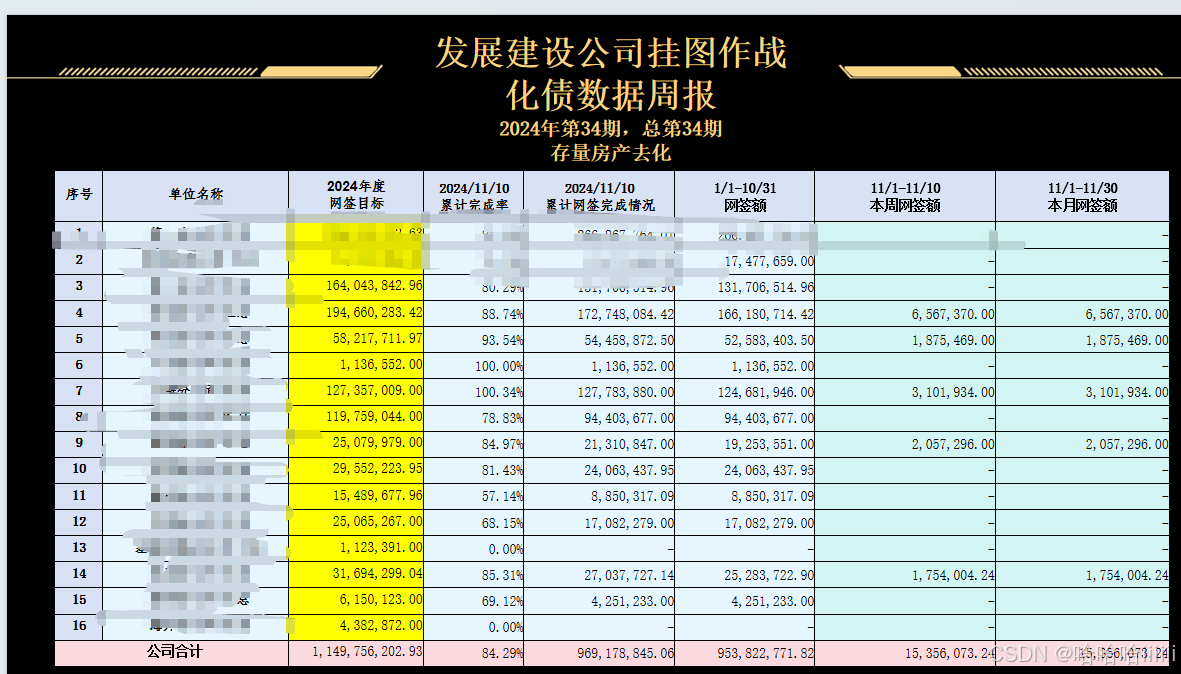
设置第一张幻定片为深色背景,因代码是根据占位表格来操作的,建立类似如下表格;
四、总结
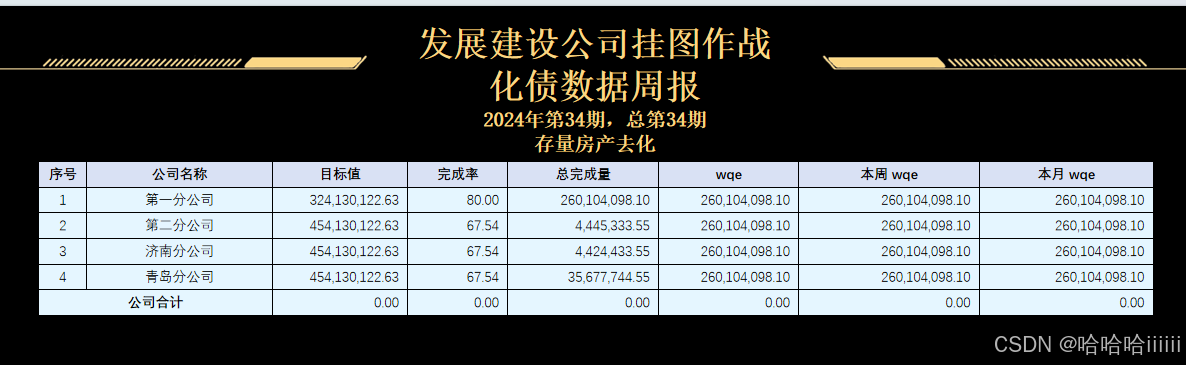
导出结果如下图:合计仅示例,没计算


 扫一扫
扫一扫


 1027
1027

 被折叠的 条评论
为什么被折叠?
被折叠的 条评论
为什么被折叠?
 到【灌水乐园】发言


