


In my previous article, we looked at how to use the CREATE VIEW SQL statement to create views. In this one, we are moving on and focusing on how to modify views. We will continue using examples on a sample database and data created in the first write-up so in order to follow along, head over and read the Creating views in SQL Server part before starting with this one.
在上一篇文章中,我们研究了如何使用CREATE VIEW SQL语句创建视图。 在这一篇中,我们将继续关注于如何修改视图。 我们将继续在示例数据库中使用示例,并在第一次撰写中创建数据,因此,在继续学习之前,请继续阅读并在SQL Server中创建视图 。
介绍 (Introduction)
The primary goal will be to get familiar with the ALTER VIEW command used to modify views and change the output. A view is based on the result set from a query, and this command allows us to change the structure and definition of a query.
主要目标是熟悉用来修改视图和更改输出的ALTER VIEW命令。 视图基于查询的结果集,该命令允许我们更改查询的结构和定义。
Ironically, before modifying a view, we will create another view with a bit more complex T-SQL using aggregates in it rather than having a simple SELECT statement that is pulling everything from a table. We will not go over the syntax again since T-SQL is exactly the same as in CREATE VIEW SQL statement except the fact that instead of the CREATE reserved keyword ALTER is used.
具有讽刺意味的是,在修改视图之前,我们将使用其中的聚合来创建另一个视图,该视图使用更复杂的T-SQL,而不是使用简单的SELECT语句从表中提取所有内容。 由于T-SQL与CREATE VIEW SQL语句完全相同,因此我们不再赘述语法,只是使用了代替CREATE保留关键字ALTER的事实。
创建视图 (Creating view)
As I mentioned earlier, let’s use the code from below to create a bit more complex view:
正如我之前提到的,让我们使用下面的代码创建一个更复杂的视图:
CREATE VIEW vTop3SalesByQuantity
AS
     SELECT TOP 3 --will only return first 3 records from query
     Sales.ProductID,
     Name AS ProductName,
     SUM(Sales.Quantity) AS TotalQuantity
     FROM Sales
          JOIN Products ON Sales.ProductID = Products.ProductID
     GROUP BY Sales.ProductID,
              Name
     ORDER BY SUM(Sales.Quantity) DESC;
But before we run the script, we can again just highlight the SELECT statement and see what it returns as shown below:
但是在运行脚本之前,我们可以再次突出显示SELECT语句并查看其返回结果,如下所示:
Basically, what we are doing here is for each product in the Product table, we are fetching all the quantities and add them together per product. As you can see, we have our Long-Sleeve Logo Jersey product in different sizes and sold quantities. We only have four products in our table, so that’s why we’re selecting only the top three records.
基本上,我们在这里所做的是针对“产品”表中的每个产品,我们获取所有数量并将其添加到每个产品中。 如您所见,我们有不同尺寸和已售数量的长袖徽标球衣产品。 我们的表中只有四个产品,所以这就是为什么我们只选择前三个记录。
Everything looks good, so we can execute the whole CREATE VIEW SQL statement to create the view with the SELECT statement that has SUM in it which is an aggregate:
一切看起来都很不错,因此我们可以执行整个CREATE VIEW SQL语句,以使用其中包含SUM的SELECT语句创建一个视图,该视图是一个聚合:
The SUM is considered an aggregate because, in general, it adds the numbers together. Therefore, we also have the GROUP BY clause, followed by ORDER BY or otherwise, we’d run into some errors. In this particular case, this is what we’d get:
之所以将SUM视为汇总,是因为通常将数字加在一起。 因此,我们还有GROUP BY子句,后面跟着ORDER BY,否则我们会遇到一些错误。 在这种情况下,这是我们得到的:
Msg 8120, Level 16, State 1, Line 4
Column ‘Sales.ProductID’ is invalid in the select list because it is not contained in either an aggregate function or the GROUP BY clause.
消息8120,第16级,状态1,第4行
选择列表中的“ Sales.ProductID”列无效,因为该列未包含在聚合函数或GROUP BY子句中。

Once created, we can query this view by saying select everything from the name of the view and we should get the same result as before:
创建视图后,我们可以通过说从视图名称中选择所有内容来查询该视图,我们应该得到与以前相同的结果:
SELECT * FROM vTop3SalesByQuantity;
Hopefully, all this rings the bell from the first article. The point being, the complexity of a view can be as much as the complexity of the SELECT statement can get.
希望所有这些都能引起第一篇文章的钟声。 关键是,视图的复杂度可能与SELECT语句的复杂度一样多。
修改视图 (Modifying view )
Let’s move on and take a look at how we can alter views. We will take the script of the first view as an example because it has a simple SELECT statement. If you remember the CREATE VIEW SQL syntax, a view can be modified by simply using the ALTER VIEW keyword instead, and then changing the structure of the SELECT statement.
让我们继续前进,看看如何改变视图。 我们将以第一个视图的脚本为例,因为它具有一个简单的SELECT语句。 如果您还记得CREATE VIEW SQL语法,则可以通过简单地使用ALTER VIEW关键字来修改视图,然后更改SELECT语句的结构。
To get started, in SQL Server Management Studio (SSMS) we can simply right-click the view from Object Explorer, and from the context menu navigate to Script View as | ALTER To | New Query Editor Window as shown below:
首先,在SQL Server Management Studio (SSMS)中,我们只需在Object Explorer中右键单击视图,然后从上下文菜单中导航为Script View as |。 更改为 | 新建查询编辑器窗口 ,如下所示:
SSMS will take the existing structure of the view and generate the following code in a new query editor:
SSMS将采用视图的现有结构,并在新的查询编辑器中生成以下代码:
USE [SQLShackDB]
GO

/****** Object:  View [dbo].[vEmployeesWithSales]    Script Date: 2/25/2020 10:49:32 PM ******/
SET ANSI_NULLS ON
GO

SET QUOTED_IDENTIFIER ON
GO

ALTER VIEW [dbo].[vEmployeesWithSales]
AS
     SELECT DISTINCT
            Employees.*
     FROM Employees
          JOIN Sales ON Employees.EmployeeID = Sales.EmployeeID;
GO
What we are interested in is the SELECT part of the code. Selecting everything is generally a bad thing. Why? For example, let’s say that we have an application using this view and that it’s relying on a specific output AKA the signature. There could be a problem if we change the underlying table e.g. add extra columns or remove some, etc. In other words, anything we do to the underlying table when saying select everything from (Employees.*) will shine through this view:
我们感兴趣的是代码的SELECT部分。 选择所有内容通常是一件坏事。 为什么? 例如,假设我们有一个使用此视图的应用程序,并且它依赖于特定输出(也就是签名)。 如果我们更改基础表(例如,添加额外的列或删除某些列等),可能会出现问题。换句话说,当说从(Employees。*)中选择所有内容时,我们对基础表所做的一切都会通过此视图显示:
Therefore, let’s change the previously created view with the CREATE VIEW SQL statement by using the ALTER VIEW statement. Note that changing the view using this command does not affect dependent stored procedures or triggers and does not change permissions.
因此,让我们通过使用ALTER VIEW语句,使用CREATE VIEW SQL语句更改以前创建的视图。 请注意,使用此命令更改视图不会影响相关的存储过程或触发器,也不会更改权限。
Previously, we generated a T-SQL script to modify our view within SSMS. This is the easiest and fastest way. But hey, if you like typing and doing it old school, just make sure that you’re connected to the appropriate database, type ALTER VIEW, followed by the name of the view, and then followed by an AS. After this, it goes the view definition:
以前,我们生成了一个T-SQL脚本来修改SSMS中的视图。 这是最简单,最快的方法。 但是,嘿,如果您喜欢打字并使用旧字体,只需确保已连接到适当的数据库,请输入ALTER VIEW,然后输入视图名称,然后输入AS。 之后,它进入视图定义:
ALTER VIEW vEmployeesWithSales
AS
    SELECT --statement that defines the view
As you can see, this is essentially the same thing as with the CREATE VIEW SQL syntax, we only change the definition of an existing view. So, let’s see what we can do with this SELECT statement and change the definition of the view to eliminate some potential problems.
如您所见,这与CREATE VIEW SQL语法基本相同,我们只更改现有视图的定义。 因此,让我们来看看如何使用此SELECT语句并更改视图的定义以消除一些潜在的问题。
For the purpose of this example, we can consider the code from below as one solution:
就本示例而言,我们可以将下面的代码视为一种解决方案:
ALTER VIEW vEmployeesWithSales
AS
     SELECT DISTINCT
            Employees.EmployeeID,
            FirstName,
            LastName
     FROM Employees
          INNER JOIN Sales ON Employees.EmployeeID = Sales.EmployeeID;
GO
Before we run the script, let’s go through the SELECT part to see what we changed. Instead of fetching all columns from the Employees table, we are returning just three columns:
在运行脚本之前,让我们遍历SELECT部分以查看所做的更改。 与其从Employees表中获取所有列,我们仅返回三列:
- Employees.EmployeeID 员工编号
- FirstName 名字
- LastName 姓
Notice that the EmployeeID column is fully qualified because EmployeeID exists in both tables that we are referencing. On the other hand, FirstName and LastName only exist in the Employees table, so we don’t need to fully qualify those.
请注意, EmployeeID列是完全合格的,因为在我们引用的两个表中都存在EmployeeID 。 另一方面, FirstName和LastName仅存在于Employees表中,因此我们不需要完全限定它们。
This is a very common mistake, and that’s why it’s always a good idea to run and check only the SELECT part in a batch to see what it returns. Simply remove the alias from the EmployeeID column and execute the SELECT part as shown below:
这是一个非常常见的错误,因此为什么总是运行并只检查批处理中的SELECT部件以查看其返回值始终是一个好主意。 只需从EmployeeID列中删除别名并执行SELECT部分,如下所示:
Msg 209, Level 16, State 1, Line 4
Ambiguous column name ‘EmployeeID’.
消息209,第16级,州1,第4行
列名称“ EmployeeID”不明确。
- Note: Now, that I’ve mentioned batches, bear in mind that CREATE VIEW SQL must be the only statement in a batch or the first statement in a query batch or you might get an error from SQL Server注意:现在,我已经提到了批处理,请记住,CREATE VIEW SQL必须是批处理中的唯一语句或查询批处理中的第一条语句,否则您可能会从SQL Server中得到错误消息
In our case, you’ll see the error message “Ambiguous column name ‘EmployeeID’”. This is the SQL Server way of saying that we have referenced more than one column with the same name in the FROM clause.
在我们的情况下,您将看到错误消息“模棱两可的列名'EmployeeID'”。 这是SQL Server的一种说法,即我们在FROM子句中引用了多个具有相同名称的列。
If you remember the view’s definition, views are pretty much just virtual tables. So, if we head over to Object Explorer, expand the Views folder, then vEmployeesWithSales, and then the Columns folder, we should see the following:
如果您还记得视图的定义,则视图几乎只是虚拟表。 因此,如果我们转到Object Explorer ,依次展开Views文件夹, vEmployeesWithSales和Columns文件夹,我们应该看到以下内容:
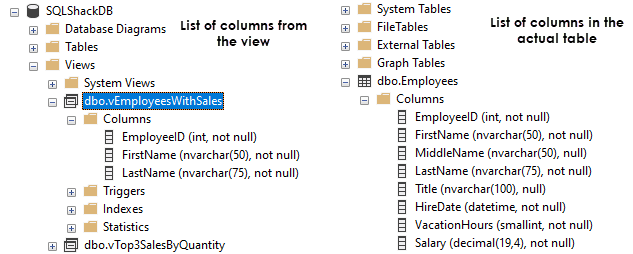
When we initially created this view using the CREATE VIEW SQL statement, we specified that all columns from the Employees table should be retrieved. However, now rather than eight columns we only fetch three.
最初使用CREATE VIEW SQL语句创建此视图时,我们指定应检索Employees表中的所有列。 但是,现在我们只需要获取三列,而不是八列。
结论 (Conclusion)
In this part of learning the CREATE VIEW SQL statement, we learned how to use the ALTER VIEW command to modify an existing view and change the output. I promised more in the first part, but rather than making this a long and boring article, we’ll continue our journey in the next one. We haven’t even touched how to use the DLM language for inserting data through a view, so that’s is what we’ll cover in the next part of the series.
在学习CREATE VIEW SQL语句的这一部分中,我们学习了如何使用ALTER VIEW命令来修改现有视图并更改输出。 我在第一部分中承诺过更多,但与其在篇幅冗长而无聊的文章中介绍,不如在下一篇文章中继续我们的旅程。 我们甚至还没有涉及如何使用DLM语言通过视图插入数据,因此这就是我们在本系列下一部分中将要介绍的内容。
I hope this article has been informative for you and I thank you for reading it. Stay tuned for the next one…
希望本文对您有所帮助,也谢谢您阅读。 请继续关注下一个…
目录 (Table of contents)
| CREATE VIEW SQL: Creating views in SQL Server |
| CREATE VIEW SQL: Modifying views in SQL Server |
| CREATE VIEW SQL: Inserting data through views in SQL Server |
| CREATE VIEW SQL: Working with indexed views in SQL Server |
| 创建视图SQL:在SQL Server中创建视图 |
| 创建视图SQL:在SQL Server中修改视图 |
| CREATE VIEW SQL:通过SQL Server中的视图插入数据 |
| CREATE VIEW SQL:在SQL Server中使用索引视图 |
翻译自: https://www.sqlshack.com/create-view-sql-modifying-views-in-sql-server/
 774
774


 扫一扫
扫一扫


 被折叠的 条评论
为什么被折叠?
被折叠的 条评论
为什么被折叠?
 到【灌水乐园】发言


