


复杂sql 查询编写方法
In my career, I’ve heard many times, things like “How to write a complex SELECT query?”, “Where to start from?” or “This query looks so complex. How you’ve learned to write such complex queries?”. While I would like to think of myself as of a brilliant mind or genius or add something like “query magician” to my social network profiles, well, writing complex SQL wouldn’t be the only thing required to do that. Therefore, in this article, I’ll try to cover the “magic” behind writing complex SELECT statements.
在我的职业生涯中,我听到过很多次,例如“如何编写一个复杂的SELECT查询?”,“从哪里开始?”。 或“此查询看起来如此复杂。 您如何学习编写这样的复杂查询?”。 尽管我想将自己想象成一个聪明的头脑或天才,或者在我的社交网络配置文件中添加诸如“查询魔术师”之类的东西,但是,编写复杂SQL并不是唯一要做的事情。 因此,在本文中,我将尝试介绍编写复杂的SELECT语句背后的“魔术”。
该模型 (The Model)
As always, I’ll start with the data model we’ll be using. Before you start to write (complex) queries you should understand what is where – which tables stored what data. Also, you should understand the nature of relations between these tables.
与往常一样,我将从我们将要使用的数据模型开始。 在开始编写(复杂)查询之前,您应该了解什么在哪里–哪些表存储了哪些数据。 另外,您应该了解这些表之间关系的性质。

If you don’t have these two on disposal, you have 3 options:
如果您没有这两个选项,则有3种选择:
- Ask somebody who created the model for the documentation (if that person is available). Same stands for understanding the business logic behind the data 询问为文档创建模型的人员(如果该人员可用)。 同样代表理解数据背后的业务逻辑
- Create documentation yourself. This takes time, but is really very useful, especially if you jump in the middle of an undocumented project 自己创建文档。 这需要时间,但确实非常有用,尤其是当您跳入未记录项目的中间时
- You can always do it without the documentation, but you should be pretty sure you know what you’re doing. E.g. I wouldn’t recommend you driving a car where I’ve repaired brakes. I mean, you can try it, but… 您始终可以在没有文档的情况下进行操作,但是您应该确定自己知道自己在做什么。 例如,我不建议您驾驶修理了刹车的汽车。 我的意思是,您可以尝试一下,但是…
All these tips can be used regardless of what you are doing with your database. Having the overall picture will spare you a lot of time in the long-run, so invest some time when you’re starting.
无论您对数据库做什么,都可以使用所有这些技巧。 从长远来看,拥有整体情况会节省大量时间,因此在开始时要花一些时间。
让我们从复杂查询开始 (Let’s Start with the Complex Query)
In case I spent too many words so far, let’s remind ourselves of the original question – “How to write a complex SELECT query?”. And let’s start with a complex query.
如果到目前为止我花了太多的单词,让我们想起最初的问题–“如何编写一个复杂的SELECT查询?”。 让我们从一个复杂的查询开始。
SELECT
	country.country_name_eng,
	SUM(CASE WHEN call.id IS NOT NULL THEN 1 ELSE 0 END) AS calls,
	AVG(ISNULL(DATEDIFF(SECOND, call.start_time, call.end_time),0)) AS avg_difference
FROM country
LEFT JOIN city ON city.country_id = country.id
LEFT JOIN customer ON city.id = customer.city_id
LEFT JOIN call ON call.customer_id = customer.id
GROUP BY
	country.id,
	country.country_name_eng
HAVING AVG(ISNULL(DATEDIFF(SECOND, call.start_time, call.end_time),0)) > (SELECT AVG(DATEDIFF(SECOND, call.start_time, call.end_time)) FROM call)
ORDER BY calls DESC, country.id ASC;
And this is what query returns:
这是查询返回的内容:

As you can see, we have a complex query and 2 rows in the result. Without any comments, we can’t easily say what does this query does and how it works. Let’s change that now.
如您所见,我们有一个复杂的查询,结果中有2行。 没有任何评论,我们不能轻易说出此查询的功能及其工作方式。 让我们现在改变它。
如何编写复杂的SELECT查询和数据在哪里? (How to Write a Complex SELECT Query & Where is the Data?)
We’re back to the original question. Now, we’ll answer this step by step. I’ll tell you what was the desired result of the query (assignment given to us).
我们回到了最初的问题。 现在,我们将逐步回答此问题。 我将告诉您查询的期望结果是什么(分配给我们)。
Return all countries together with the number of related calls and their average duration in seconds. In the result display only countries where average call duration is greater than the average call duration of all calls.
返回所有国家/地区以及相关通话次数及其平均持续时间(以秒为单位)。 在结果显示中,仅显示平均通话时长大于所有通话的平均通话时长的国家。
The first thing we’ll do is to determine which tables we’ll be using in the process. In the data model, I’ve added colors to the tables we need to use.
我们要做的第一件事是确定在流程中将使用哪些表。 在数据模型中,我为需要使用的表添加了颜色。

And how to determine which tables should be? The answer has two parts:
以及如何确定应该使用哪些表? 答案分为两个部分:
- country (we need country_name) and 国家 (我们需要country_name)和call (we need start_time and end_time to calculate the average call duration) 调用 (我们需要start_time和end_time来计算平均通话时间)
- country table to the 国家表到call table) 调用表)
After this analysis we know we must use the following tables: country, city, customer, and call. If we want to use them properly, we need to JOIN these tables using foreign keys. Without even thinking about the final query, we now know it will contain this part:
经过分析,我们知道必须使用下表: 国家 , 城市 , 客户和电话 。 如果要正确使用它们,则需要使用外键JOIN这些表 。 现在甚至不用考虑最终查询,我们知道它将包含以下部分:
SELECT
	...
FROM country
LEFT JOIN city ON city.country_id = country.id
LEFT JOIN customer ON city.id = customer.city_id
LEFT JOIN call ON call.customer_id = customer.id
...;
We could do one thing, and that is to test what the query like this would return:
我们可以做一件事,那就是测试这样的查询将返回什么:
SELECT
	*
FROM country
LEFT JOIN city ON city.country_id = country.id
LEFT JOIN customer ON city.id = customer.city_id
LEFT JOIN call ON call.customer_id = customer.id;
I won’t post the picture of the whole result because it simply has too many columns. Still, you can check it. I always advise that you test parts of your queries. While they won’t be displayed in the final results, they will be used in the background. By testing these parts you’ll get the idea of what is happening in the background, and could assume what the final result should be. But still, we have to answer on “How to write a complex SELECT query?”.
我不会发布整个结果的图片,因为它只包含太多列。 不过,您可以检查一下。 我总是建议您测试部分查询。 尽管它们不会显示在最终结果中,但将在后台使用它们。 通过测试这些部分,您将了解后台发生的事情,并可以假设最终结果应该是什么。 但是,我们仍然必须回答“如何编写复杂的SELECT查询?”。
如何编写复杂的SELECT查询-当时编写查询的一部分 (How to Write a Complex SELECT Query – Write Parts of the Query at the Time)
We have already written part of the query and that’s a good practice. It will help you to build a complex query from simpler “blocks” but also, you’ll test your query along the way because you’ll be checking parts of it at a time as well, check how the query works when certain parts are added or executed.
我们已经编写了查询的一部分,这是一个好习惯。 它可以帮助您从较简单的“块”构建复杂的查询,而且还可以一路测试您的查询,因为您还将同时检查其中的一部分,检查某些部分是否存在时查询的工作方式添加或执行。
I would start with this part “where average call duration is greater than the average call duration of all calls”. It’s obvious that we need to calculate the average duration from all calls (in seconds). So let’s do that.
我将从“平均通话时长大于所有通话的平均通话时长”这一部分开始。 显然,我们需要计算所有通话的平均时长(以秒为单位)。 因此,让我们这样做。
SELECT AVG(DATEDIFF(SECOND, call.start_time, call.end_time)) FROM call

We’ve explained the aggregate functions in the previous article. So far, we haven’t talked about date & time functions, but it’s enough to say that the DATEDIFF function calculates the difference in the units of the given time period (we are after seconds here) between the start time and end time. The result returned implies that the average call duration was 354 seconds.
我们已经在上一篇文章中解释了聚合函数 。 到目前为止,我们还没有讨论日期和时间函数,但是可以说DATEDIFF函数以给定时间段(此处为秒)为单位计算开始时间和结束时间之间的差。 返回的结果表明平均通话时间为354秒。
Now we’ll write down the query which returns aggregated values for all countries.
现在,我们将写下查询,该查询将返回所有国家/地区的汇总值。
SELECT
	country.country_name_eng,
	SUM(CASE WHEN call.id IS NOT NULL THEN 1 ELSE 0 END) AS calls,
	AVG(ISNULL(DATEDIFF(SECOND, call.start_time, call.end_time),0)) AS avg_difference
FROM country
LEFT JOIN city ON city.country_id = country.id
LEFT JOIN customer ON city.id = customer.city_id
LEFT JOIN call ON call.customer_id = customer.id
GROUP BY
	country.id,
	country.country_name_eng
ORDER BY calls DESC, country.id ASC;
I would like to point out two things here:
我想在这里指出两件事:
- LEFT JOIN, we’ll also join countries without any call. In case we’ve used COUNT, we would have value 1 returned for countries without any call, and we want 0 there (we want to see that info) LEFT JOIN ,因此我们也将在不打任何电话的情况下加入国家。 如果我们使用了COUNT,则对于未打任何电话的国家/地区,我们将返回值1,并且我们希望在该处返回0(我们想查看该信息)
- AVG(ISNULL(DATEDIFF(SECOND, call.start_time, call.end_time),0)) – This is very similar to the previously mentioned AVG. The difference here is that I’ve used ISNULL(…,0). This simply tests if the calculated value IS NULL, and if so, replaces it with 0. Calculated value could be NULL if there is not data (we’ve used LEFT JOIN) AVG(ISNULL(DATEDIFF(SECOND,call.start_time,call.end_time),0))–这与前面提到的AVG非常相似。 此处的区别在于,我使用了ISNULL(…,0)。 这只是测试计算值是否为NULL,如果是,则将其替换为0。如果没有数据,则计算值可以为NULL(我们使用了LEFT JOIN)
Let’s see what this query returns.
让我们看看该查询返回什么。
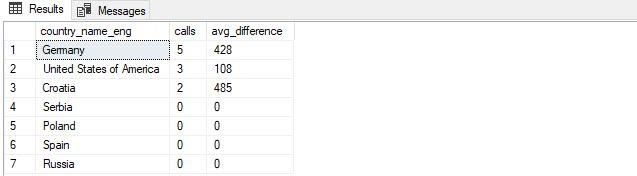
“How to write a complex SELECT query?” -> Now we’re really close to complete our query and get really close to this answer.
“如何编写复杂的SELECT查询?” ->现在,我们真的很接近完成查询并非常接近这个答案。
So, the result contains all countries with their number of calls and the average call duration. From this result, we’re interested only in these having average call duration greater than average call duration of all calls. That’s our original query, but with comments added.
因此,结果包含所有国家/地区及其通话次数和平均通话时间。 从这个结果来看,我们只对平均通话时间长于所有通话的平均通话时间的那些感兴趣。 这是我们的原始查询,但添加了注释。
-- the query returns a call summary for countries having average call duration > average call duration of all calls
SELECT
    country.country_name_eng,
    SUM(CASE WHEN call.id IS NOT NULL THEN 1 ELSE 0 END) AS calls,
    AVG(ISNULL(DATEDIFF(SECOND, call.start_time, call.end_time),0)) AS avg_difference
FROM country
-- we've used left join to include also countries without any call
LEFT JOIN city ON city.country_id = country.id
LEFT JOIN customer ON city.id = customer.city_id
LEFT JOIN call ON call.customer_id = customer.id
GROUP BY
    country.id,
    country.country_name_eng
-- filter out only countries having an average call duration > average call duration of all calls
HAVING AVG(ISNULL(DATEDIFF(SECOND, call.start_time, call.end_time),0)) > (SELECT AVG(DATEDIFF(SECOND, call.start_time, call.end_time)) FROM call)
ORDER BY calls DESC, country.id ASC;
You can see the query result in the picture below.
您可以在下图中看到查询结果。

Compared to the previous query, we’ve just added the HAVING part. While in the WHERE part of the query we test “regular” values, HAVING part of the query is used to test aggregated values. We’re using it to compare AVG values.
与上一个查询相比,我们仅添加了HAVING部分。 在查询的WHERE部分中,我们测试“常规”值,而查询的HAVING部分中,则用于测试汇总值。 我们正在使用它来比较AVG值。
Comments are a crucial thing, not only in databases but in programming in general. By adding these 3 comment lines, the query should become much more readable. Even somebody who looks at this query for the first time will see what you did and why. That somebody could even be you if you’re looking at the code you wrote some time ago. While it takes some time to write these comments, don’t be lazy and do it. You’ll probably save yourself much more time when revisiting old queries/code.
注释不仅在数据库中,而且在一般编程中都是至关重要的。 通过添加这3条注释行,查询应变得更具可读性。 即使是第一次浏览此查询的人,也会看到您的操作以及原因。 如果您正在查看您前一段时间编写的代码,那么甚至有人可能是您。 尽管写这些评论要花一些时间,但不要偷懒去做。 重访旧查询/代码时,您可能会节省更多时间。
Let’s Wrap up Everything
让我们总结一切
So, the question was – “How to write a complex SELECT query?”. While there is no easy answer, I would suggest the following steps:
因此,问题是–“如何编写复杂的SELECT查询?”。 虽然没有简单的答案,但我建议采取以下步骤:
- Think of it as of LEGO bricks and build the query that way. Treat complex parts as black boxes – they will return what they need to and you’ll write (and incorporate into the main query) them later 将其视为LEGO积木,并以此方式构建查询。 将复杂的部分视为黑盒–它们将返回所需的内容,稍后您将编写它们(并将其合并到主查询中)
- Identify all the tables you’ll need in the query 识别查询中需要的所有表
- Join tables containing the data you need to display or the data used in the WHERE part of the query 连接包含您需要显示的数据或查询的WHERE部分中使用的数据的表
- Display all data to check if you’ve joined everything correctly and to see the result of such a query 显示所有数据以检查您是否正确连接了所有内容,并查看查询结果
- Create all subqueries separately. Test them to see do they return what they should. Add them to the main query 分别创建所有子查询。 测试他们,看他们是否返回了应有的状态。 将它们添加到主查询
- Test everything 测试一切
- Add comments 添加评论
Could you give us your answer on “How to write a complex SELECT query?”. Which approach have you used?
您能否回答“如何编写复杂的SELECT查询?”。 您使用了哪种方法?
目录 (Table of contents)
翻译自: https://www.sqlshack.com/learn-sql-how-to-write-a-complex-select-query/
复杂sql 查询编写方法
 2003
2003


 扫一扫
扫一扫


 被折叠的 条评论
为什么被折叠?
被折叠的 条评论
为什么被折叠?
 到【灌水乐园】发言


