


In this series of the SQL Server FILESTREAM (see TOC at bottom), We have gone through various aspects of this feature to store large size objects into the file systems.
在本系列SQL Server FILESTREAM(请参见底部的TOC)中,我们介绍了此功能的各个方面,以将大型对象存储到文件系统中。
In the previous SQL Server FILESTREAM articles, we have covered the following benefits from this feature:
在以前SQL Server FILESTREAM文章中,我们介绍了此功能的以下优点:
- The benefit of NTFS data streaming NTFS数据流的好处
- Less overhead on SQL Server for the large BLOB objects 大型BLOB对象在SQL Server上的开销更少
- Backup includes the metadata along with the FILESTREAM container data 备份包括元数据以及FILESTREAM容器数据
- FILESTREAM also allows Point-in-time restore for the database FILESTREAM还允许对数据库进行时间点还原
- FILESTREAM provides the transactional consistency also which is the primary requirement of any database FILESTREAM还提供事务一致性,这也是任何数据库的主要要求
Now let’s review a few more features of SQL Server FILESTREAM.
现在,让我们回顾一下SQL Server FILESTREAM的其他功能。
FILESTREAM数据库容器 (FILESTREAM database Container)
We cannot use the FILESTREAM container for another database. This restriction also applies to the subfolder of the FILESTREAM container. In the previous article, we used the file system ‘ C:\sqlshack\Demo’ for the sample database.
我们不能将FILESTREAM容器用于另一个数据库。 此限制也适用于FILESTREAM容器的子文件夹。 在上一篇文章中,我们将文件系统'C:\ sqlshack \ Demo'用于示例数据库。
Database Name | FILESTREAM Container (file system location) | Remarks |
FileStreamDemodatabase_test | C:\sqlshack\Demo | It works fine. |
FileStreamDemodatabase_test _New | C:\sqlshack\Demo | Error: Since other database is using this location. |
FileStreamDemodatabase_test _New | C:\sqlshack\Demo\New | Error: we cannot use the child folder as well. In this case, the parent folder is being used by the FILESTREAM database ‘DemoSQL.’ |
数据库名称 | FILESTREAM容器 (文件系统位置) | 备注 |
FileStreamDemodatabase_test | C:\ sqlshack \ Demo | 它工作正常。 |
FileStreamDemodatabase_test _New | C:\ sqlshack \ Demo | 错误:由于其他数据库正在使用此位置。 |
FileStreamDemodatabase_test _New | C:\ sqlshack \ Demo \ New | 错误:我们也不能使用子文件夹。 在这种情况下,FILESTREAM数据库'DemoSQL'将使用父文件夹。 |
检查数据库中是否启用了FILESTREAM (Checking whether FILESTREAM is enabled or not in database)
We can check whether the SQL Server FILESTREAM feature at database level using the filegroup.
我们可以使用文件组在数据库级别检查SQL Server FILESTREAM功能。
Use FileStreamDemodatabase_test
Go
SELECT  *  FROM  sys.filegroups

The SQL Server FILESTREAM filegroup type is ‘FD’ therefore we can check the property using the above command, or we can use the print statement to give the output.
SQL Server FILESTREAM文件组的类型为“ FD”,因此我们可以使用上述命令检查属性,也可以使用print语句提供输出。
IF EXISTS ( SELECT  *  FROM    sys.filegroups   WHERE   type = 'FD' )
BEGIN
 PRINT 'FILESTREAM Filegroup Exists for the database; you can check the Physical file location'+@Physicalfilename
 END
ELSE
BEGIN
PRINT 'FILESTREAM Filegroup does not exist for this database'
 END
If I run this query on the FILESTREAM database, we get the below output.
如果我在FILESTREAM数据库上运行此查询,则会得到以下输出。

Otherwise, we get the output below.
否则,我们将获得以下输出。
使用SQL Server FILESTREAM功能检查表是否可以保存FILESTREAM数据 (Checking whether the table can hold FILESTREAM data using SQL Server FILESTREAM feature)
We must have a UNIQUEIDENTIFIER column with ROWGUIDCOL property in the table to hold the FILESTREAM data. You can check this using join system tables and views.
我们必须在表中具有一个带有ROWGUIDCOL属性的UNIQUEIDENTIFIER列,以保存FILESTREAM数据。 您可以使用联接系统表和视图进行检查。
IF EXISTS ( SELECT  *  FROM    sys.key_constraints sc
INNER JOIN sys.indexes si
ON sc.unique_index_id = si.index_id
AND si.object_id = OBJECT_ID('DemoFileStreamTable_1')
INNER JOIN
( SELECT * ,                                   COUNT(*)
OVER ( PARTITION BY index_id,                                                   object_id )
AS ColCount
 FROM   sys.index_columns ) ic
ON ic.index_id = si.index_id
AND ic.object_id = si.object_id
INNER JOIN sys.columns c
ON c.column_id = ic.column_id
AND c.object_id = ic.object_id
AND c.is_rowguidcol = 1

AND c.is_nullable = 0
WHERE   is_unique_constraint = 1

OR ( is_primary_key = 1                          AND ColCount = 1                        )

)
BEGIN
PRINT 'Specified table can have FILESTREAM columns; it is having '     END
ELSE      BEGIN
PRINT 'You should modify the table to have UNIQUEIDENTIFIER column, currently it is not ready to have FILESTREAM columns'     END
We have included the table name in this query in which SQL Server FILESTREAM data needs to be added.
我们在此查询中包括了表名,其中需要添加SQL Server FILESTREAM数据。

If the table does not meet the requirements, we get the following output:
如果表不符合要求,我们将获得以下输出:

修改现有的VARBINARY(MAX)列以保存FILESTREAM数据 (Modifying existing VARBINARY(MAX) column to hold FILESTREAM data)
We might have a requirement to change the existing Varbinary(max) column to a FILESTREAM column. It might be due to the old versions of SQL Server (older than 2008) does not support FILESTREAM. Therefore, if we want to convert the existing column to FILESTREAM, we require to copy the data (objects) into the file system container. We cannot directly modify the table property to reflect these changes.
我们可能需要将现有的Varbinary(max)列更改为FILESTREAM列。 可能是由于SQL Server的旧版本(早于2008)不支持FILESTREAM。 因此,如果要将现有列转换为FILESTREAM,则需要将数据(对象)复制到文件系统容器中。 我们无法直接修改table属性以反映这些更改。
Suppose we have a table ‘customers’, which also holds customer images into the varbinary(Max) column.
假设我们有一个“客户”表,该表还将客户图像保存在varbinary(Max)列中。
We need to perform the below steps to change this.
我们需要执行以下步骤来更改此设置。
ALTER TABLE [dbo].[customers] ADD Image_temp VARBINARY(MAX) FILESTREAM NULL
UPDATE [dbo].[customers] SET ItemImage_New = Imagedata
ALTER TABLE [dbo].[Items] DROP COLUMN ItemImage
EXECUTE sp_rename
	@objname = '[dbo].[customers].ItemImage_New ',
	@newname = 'Imagedata',
	@objtype = 'COLUMN'
使用表名称标识SQL Server FILESTREAM文件组名称 (Identifying the SQL Server FILESTREAM filegroup name using the table name)
We might want to know the FILESTREAM filegroup name in which the particular table belongs. We can do it using the join condition between catalog view sys.data_spaces and sys.tables. The catalog view (sys.data_spaces) shows the row for each data space such as filegroup, partition.
我们可能想知道特定表所属的FILESTREAM文件组名称。 我们可以使用目录视图sys.data_spaces和sys.tables之间的连接条件来做到这一点。 目录视图(sys.data_spaces)显示每个数据空间(例如文件组,分区)的行。
Now join this catalog view with sys.tables to get the detail of filegroup belonging to a table.
现在,将此目录视图与sys.tables结合在一起,以获取属于表的文件组的详细信息。
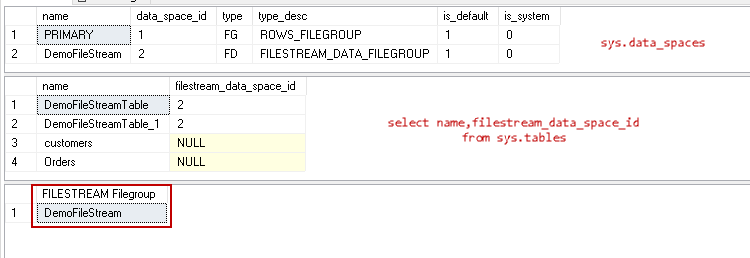
In the above image, we can see that the table belongs to ‘DemoFileStreamFILESTREAM filegroup.
在上图中,我们可以看到该表属于'DemoFileStreamFILESTREAM文件组。
SQL Server FILESTREAM表的触发器 (Triggers for SQL Server FILESTREAM tables )
We can create the DML triggers for the FILESTREAM columns as well in the table. Suppose we want to create a trigger for the update or insert activity notification any insert occurs in the FILESTREAM table using the AFTER INSERT trigger.
我们也可以在表中为FILESTREAM列创建DML触发器。 假设我们想为更新或插入活动通知创建一个触发器,使用AFTER INSERT触发器在FILESTREAM表中发生任何插入。
Execute the below code to create an AFTER INSERT trigger.
执行以下代码以创建AFTER INSERT触发器。
DECLARE @File varbinary(MAX);
SELECT
@File = CAST(
bulkcolumn as varbinary(max)
)
FROM
OPENROWSET(BULK 'C:\WideWorldImporters-Full.bak', SINGLE_BLOB) as MyData;

INSERT INTO DemoFileStreamTable_1
VALUES
(
NEWID(),
'Installation file SQL',
@File
)
Now insert any FILESTREAM object in the table.
现在,在表中插入任何FILESTREAM对象。
DECLARE @File varbinary(MAX);
SELECT
@File = CAST(
bulkcolumn as varbinary(max)
)
FROM
OPENROWSET(BULK 'C:\WideWorldImporters-Full.bak', SINGLE_BLOB) as MyData;

INSERT INTO DemoFileStreamTable_1
VALUES
(
NEWID(),
'Installation file SQL',
@File
)
In the output, we get the message about the size of the inserted object.
在输出中,我们得到有关插入对象大小的消息。
Similarly, we can create AFTER UPDATE trigger and display the required message. For example, in the trigger below, we defined a message to print for every update in the FILESTREAM object.
同样,我们可以创建AFTER UPDATE触发器并显示所需的消息。 例如,在下面的触发器中,我们定义了一条消息,以针对FILESTREAM对象中的每次更新进行打印。
CREATE TRIGGER TGR_FS_Update ON DemoFileStreamTable_1
AFTER UPDATE
AS
BEGIN
DECLARE @Filesize INT

SELECT  @Filesize = DATALENGTH([FILE])
FROM    INSERTED
PRINT   'The updated size of the object in FILESTREAM is :' + STR(@Filesize)
END
Now, we are going to replace the existing file with a new file so the trigger will give the updated size of the FILESTREAM object.
现在,我们将用新文件替换现有文件,以便触发器将提供FILESTREAM对象的更新大小。
UPDATE DemoFileStreamTable_1
SET [File] = (SELECT *
FROM OPENROWSET(
BULK 'C:\AdventureWorks2017.bak',
SINGLE_BLOB) AS Document)
WHERE fileid = '8662F1FA-8918-48D7-B752-AFBC0392902C'
GO
Once the update completes for the FILESTREAM table, we get the below message printed.
FILESTREAM表的更新完成后,我们将打印以下消息。
多个FILESTREAM文件组 (Multiple FILESTREAM filegroups)
We might be using the FILESTREAM for a large number of objects and might be big files such as videos. In the database, we usually create multiple secondary data files on different disks to split the load from a single disk or data store. The question may arise here whether SQL Server allows creating multiple FILESTREAM filegroups. We can create multiple FILESTREAM filegroups due to the disk space limitation. We can also create multiple filegroups to get the benefits of the multiple disks IO read and write latency and performance.
我们可能将FILESTREAM用于大量对象,并且可能是大文件,例如视频。 在数据库中,我们通常在不同的磁盘上创建多个辅助数据文件,以将负载从单个磁盘或数据存储区中分离出来。 这里可能会出现问题,即SQL Server是否允许创建多个FILESTREAM文件组。 由于磁盘空间的限制,我们可以创建多个FILESTREAM文件组。 我们还可以创建多个文件组,以获得多个磁盘IO读写延迟和性能的好处。
You can notice in the below that we created the multiple FILESTREAM filegroups.
您可以在下面注意到我们创建了多个FILESTREAM文件组。
CREATE DATABASE [FS_MultipleFG]
  ON  PRIMARY
( NAME = N'FS_MultipleFG', FILENAME = N'C:\MS\FS_MultipleFG.mdf' , SIZE = 8192KB , FILEGROWTH = 65536KB ),
 FILEGROUP [FILESTREAM_1] CONTAINS FILESTREAM DEFAULT
( NAME = N'FS_FG_1', FILENAME = N'C:\MS\FS_FG_1' ),
 FILEGROUP [FILESTREAM_2] CONTAINS FILESTREAM
( NAME = N'FS_FG_2', FILENAME = N'C:\NPE\FS_FG_2' )
 LOG ON
( NAME = N'FS_MultipleFG_log', FILENAME = N'C:\MS\FS_MultipleFG_log.ldf' , SIZE = 8192KB , FILEGROWTH = 65536KB )
GO
Execute the above code and open the database properties from SSMS. In the ‘Filegroups’ page, you can see two FILESTREAM filegroups and defined ‘FILESTREAM_1’ as default FILESTREAM filegroup.
执行上面的代码,然后从SSMS中打开数据库属性。 在“文件组”页面中,您可以看到两个FILESTREAM文件组,并将“ FILESTREAM_1”定义为默认的FILESTREAM文件组。
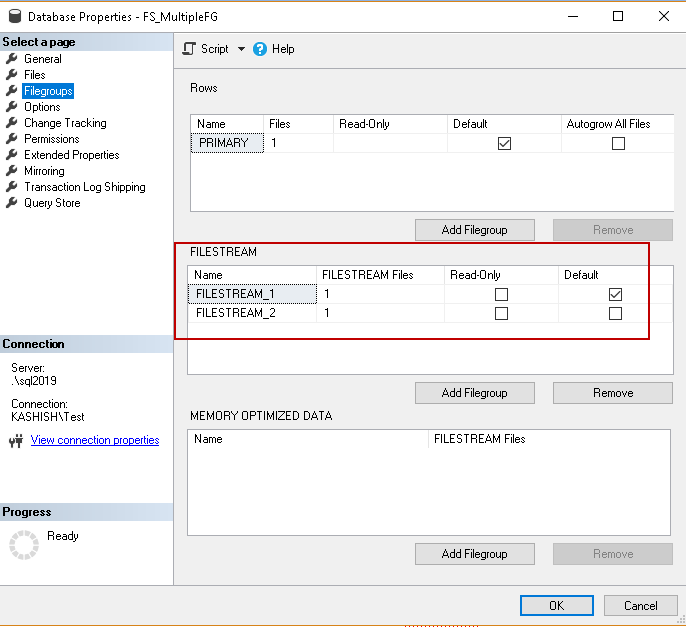
In the database files, we created multiple FILESTREAM files in the different filegroups.
在数据库文件中,我们在不同的文件组中创建了多个FILESTREAM文件。

We have multiple FILESTREAM filegroups in this database. Therefore, we need to define the FILESTREAM filegroup while creating the table. If we do not specify any filegroup, it uses the default FILESTREAM filegroup (in this example FILESTREAM_1) to create the object.
在此数据库中,我们有多个FILESTREAM文件组。 因此,我们在创建表时需要定义FILESTREAM文件组。 如果我们未指定任何文件组,它将使用默认的FILESTREAM文件组(在本示例中为FILESTREAM_1)创建对象。
Let us create the tables to use the default FILESTREAM filegroup and specific FILESTREAM filegroup.
让我们创建表以使用默认的FILESTREAM文件组和特定的FILESTREAM文件组。
- Default filegroup: in the below command, we did not specify any FILESTREAM filegroup.默认文件组:在以下命令中,我们未指定任何FILESTREAM文件组。
CREATE TABLE [DemoFileStreamTable_1] (
[FileId] UNIQUEIDENTIFIER ROWGUIDCOL NOT NULL UNIQUE,
[FileName] VARCHAR (25),
[File] VARBINARY (MAX) FILESTREAM);
GO
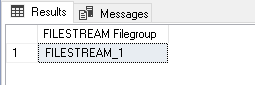
In the below image, we can see SQL Server created the table in the default FILESTREAM filegroup.
在下图中,我们可以看到SQL Server在默认的FILESTREAM文件组中创建了表。
- Object creation in specific FILESTREAM filegroup: In the below code, we instructed SQL Server to create the table in the’ FILESTREAM_2′ filegroup. 在特定的FILESTREAM文件组中创建对象 :在下面的代码中,我们指示SQL Server在“ FILESTREAM_2”文件组中创建表。
CREATE TABLE [DemoFileStreamTable_2] (
	[FileId] UNIQUEIDENTIFIER ROWGUIDCOL NOT NULL UNIQUE,
	[FileName] VARCHAR (25),
	[File] VARBINARY (MAX) FILESTREAM)
	 FILESTREAM_ON FILESTREAM_2
	GO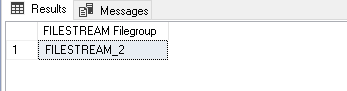
结论 (Conclusion)
In this article, we explored various aspects the SQL Server FILESTREAM feature available from SQL Server 2008 onwards. I will continue writing on this topic to complete this series. Stay tuned for the next article.
在本文中,我们从SQL Server 2008开始探讨了SQL Server FILESTREAM功能的各个方面。 我将继续就该主题进行写作以完成本系列。 请继续关注下一篇文章。
目录 (Table of contents)
翻译自: https://www.sqlshack.com/sql-server-filestream-queries-and-filegroups/
 930
930


 扫一扫
扫一扫


 被折叠的 条评论
为什么被折叠?
被折叠的 条评论
为什么被折叠?
 到【灌水乐园】发言


