


In the series on the SQL Server FILESTREAM feature, we have explored the various aspects of FILESTREAM including its overview, internal architecture, database creation etc. In my last article [put the name of the article and a link], we explored the backup for the FILESTREAM enabled database. We can take Full backup as well as filegroup level backup in the FILESTREAM database.
在有关SQL Server FILESTREAM功能的系列文章中,我们探讨了FILESTREAM的各个方面,包括其概述,内部体系结构,数据库创建等。在我的上一篇文章中(输入文章名称和链接),我们探讨了以下方面的备份:启用FILESTREAM的数据库。 我们可以在FILESTREAM数据库中进行完全备份以及文件组级别的备份。
In this article, we are going to look at full database restores and filegroup level restores as well.
在本文中,我们将研究完整的数据库还原以及文件组级别的还原。
Before we start with this article, you should follow the previous articles and perform the following steps.
在开始本文之前,您应该遵循前面的文章并执行以下步骤。
- Enable the FILESTREAM feature in SQL Server and configure access 在SQL Server中启用FILESTREAM功能并配置访问
- Create a FILESTREAM database and insert sample records into it 创建一个FILESTREAM数据库并将示例记录插入其中
- Backup the FILESTREAM backup (Full backup and the FILESTREAM filegroup level backup) 备份FILESTREAM备份(完整备份和FILESTREAM文件组级备份)
Suppose we want to restore the FULL backup of the SQL Server FILESTREAM database in the same instance. There, we will use the different name for this database in the same instance.
假设我们要在同一实例中还原SQL Server FILESTREAM数据库的完整备份。 在那里,我们将在同一实例中为此数据库使用不同的名称。
Connect to the SQL Server instance and Right-click on the instance and ‘Restore Database’
连接到SQL Server实例,然后右键单击该实例并“还原数据库”
Specify the backup file location and the new database name in the restore database wizard.
在还原数据库向导中指定备份文件位置和新数据库名称。
Now click on the files tab from the left side menu. We need to change the data file and log file location because our source database exists on the same server path. You cannot put the database into a similar location with the same file names.
现在,从左侧菜单中单击文件选项卡。 我们需要更改数据文件和日志文件的位置,因为我们的源数据库位于同一服务器路径上。 您不能将数据库放置在具有相同文件名的类似位置。

Let us again generate the script to ‘New Query Editor Window.’ Alternatively, you can save the script in a file as well. Later, we can open the file to view the script.
让我们再次将脚本生成到“新查询编辑器窗口”。 或者,您也可以将脚本保存在文件中。 稍后,我们可以打开文件以查看脚本。

You can see the restore database command for SQL Server FILESTREAM enabled database. It is also similar to a standard database restore command. The only difference is that you can see a FILESTREAM file move command also in the script.
您可以看到针对启用SQL Server FILESTREAM的数据库的restore database命令。 它也类似于标准数据库还原命令。 唯一的区别是,您还可以在脚本中看到FILESTREAM文件移动命令。
USE [master]
RESTORE DATABASE [FileStreamDemoDB_Restore] FROM
DISK = N'C:\Program Files\Microsoft SQL Server\MSSQL15.SQL2019\MSSQL\Backup\FileStreamDemoDB.bak'
WITH  FILE = 9,
MOVE N'FileStreamDemoDB' TO N'C:\sqlshack\Demo\FileStreamDemoDB_Restore.mdf',
MOVE N'FileStreamDemoDB_log' TO N'C:\sqlshack\Demo\FileStreamDemoDB_Restore_log.ldf',
MOVE N'DemoFiles' TO N'C:\sqlshack\Demo\DemoFiles',  NOUNLOAD,  STATS = 5
GO
Execute this restore database command. We can see the output of the restore command also processed FILESTREAM file ‘DemoFiles’ similar to the backup command output.
执行此还原数据库命令。 我们可以看到,restore命令的输出也处理了FILESTREAM文件'DemoFiles',类似于backup命令的输出。
9 percent processed.
14 percent processed.
18 percent processed.
23 percent processed.
28 percent processed.
33 percent processed.
…
100 percent processed.
9%已处理。
14%已处理。
18%已处理。
23%已处理。
28%已处理。
33%已处理。
…
100%已处理。
Processed 432 pages for database ‘FileStreamDemoDB_Restore’, file ‘FileStreamDemoDB’ on file 9.
Processed 2 pages for database ‘FileStreamDemoDB_Restore’, file ‘FileStreamDemoDB_log’ on file 9.
Processed 2041 pages for database ‘FileStreamDemoDB_Restore’, file ‘DemoFiles’ on file 9.
RESTORE DATABASE successfully processed 2475 pages in 1.859 seconds (10.399 MB/sec).
已处理432页的数据库'FileStreamDemoDB_Restore',文件'FileStreamDemoDB'的页面9。
已处理2页的数据库'FileStreamDemoDB_Restore',文件'FileStreamDemoDB_log'的页面9。
已处理数据库'FileStreamDemoDB_Restore'的2041页,文件9的文件'DemoFiles'。
RESTORE DATABASE在1.859秒(10.399 MB /秒)中成功处理了2475页。

Now, let us go to the FILESTREAM container for the newly restored database. Below we can see both the databases contain the exact similar files and file size is similar to each other.
现在,让我们转到新恢复的数据库的FILESTREAM容器。 在下面我们可以看到两个数据库都包含完全相似的文件,并且文件大小彼此相似。

We cannot restore the SQL Server FILESTREAM container in the same location as of source database. If we try to do so, we get the below error message.
我们无法在与源数据库相同的位置还原SQL Server FILESTREAM容器。 如果尝试这样做,则会收到以下错误消息。
Msg 3156, Level 16, State 6, Line 2
File ‘DemoFiles’ cannot be restored to ‘C:\sqlshack\FileStream’. Use WITH MOVE to identify a valid location for the file.
Msg 3119, Level 16, State 1, Line 2
Problems were identified while planning for the RESTORE statement. Previous messages provide details.
Msg 3013, Level 16, State 1, Line 2
RESTORE DATABASE is terminating abnormally.
消息3156,第16层,状态6,第2行
无法将文件“ DemoFiles”还原到“ C:\ sqlshack \ FileStream”。 使用WITH MOVE标识文件的有效位置。
消息3119,第16层,状态1,第2行
在计划RESTORE语句时发现了问题。 以前的消息提供了详细信息。
Msg 3013,第16级,状态1,第2行
RESTORE DATABASE异常终止。
In the last article, we took the database backup while the file in the FILESTREAM container opened in another program. Below was the error in the backup of the database.
在上一篇文章中,我们在另一个程序中打开FILESTREAM容器中的文件时进行了数据库备份。 以下是数据库备份中的错误。
Msg 3056, Level 16, State 1, Line 1
The backup operation has detected an unexpected file in a FILESTREAM container.
The backup operation will continue and include file ‘C:\sqlshack\FileStream\DemoFiles\97f720ed-afbf-413d-8f5c-5b56d4736984\8f62d1b7-7f8b-4f98-abe9-a06b4faa1d2e\00000024-00000588-000c\
C:\sqlshack\FileStream\DemoFiles\97f720ed-afbf-413d-8f5c-5b56d4736984\8f62d1b7-7f8b-4f98-abe9-a06b4faa1d2e\~$000024-00000588-000c’.
消息3056,第16级,状态1,第1行
备份操作已在FILESTREAM容器中检测到意外文件。
备份操作将继续并包括文件'C:\ sqlshack \ FileStream \ DemoFiles \ 97f720ed-afbf-413d-8f5c-5b56d4736984 \ 8f62d1b7-7f8b-4f98-abe9-a06b4faa1d2e \ 00000024-00000588-000c \
C:\ sqlshack \ FileStream \ DemoFiles \ 97f720ed-afbf-413d-8f5c-5b56d4736984 \ 8f62d1b7-7f8b-4f98-abe9-a06b4faa1d2e \〜$ 000024-00000588-000c'。
Now let us restore the database backup that completed with the above warning message. If we restore the database, it works fine. Now, let us go to the container of the newly restored database, and we can see the temporary file there as well. However, there is no issue with the database availability and work due to this hidden file.
现在,让我们还原完成上述警告消息的数据库备份。 如果我们还原数据库,它可以正常工作。 现在,让我们转到新还原的数据库的容器,在那里我们也可以看到临时文件。 但是,由于此隐藏文件,数据库可用性和工作没有问题。

Now let us look at the internal of the FILESTREAM database restore using the extended event session. This event session we configured in my last article. You can follow the steps there and monitor it during the database restore.
现在,让我们看一下使用扩展事件会话的FILESTREAM数据库还原的内部。 我们在上一篇文章中配置了此事件会话。 您可以按照此处的步骤进行操作,并在数据库还原期间对其进行监视。
First, it takes the locks on the database (if we are doing database overwrite) and opens the backup set. Once it reads the backup set, it plans for the database restore.
首先,它获取数据库上的锁(如果我们正在进行数据库覆盖)并打开备份集。 读取备份集后,便计划进行数据库还原。
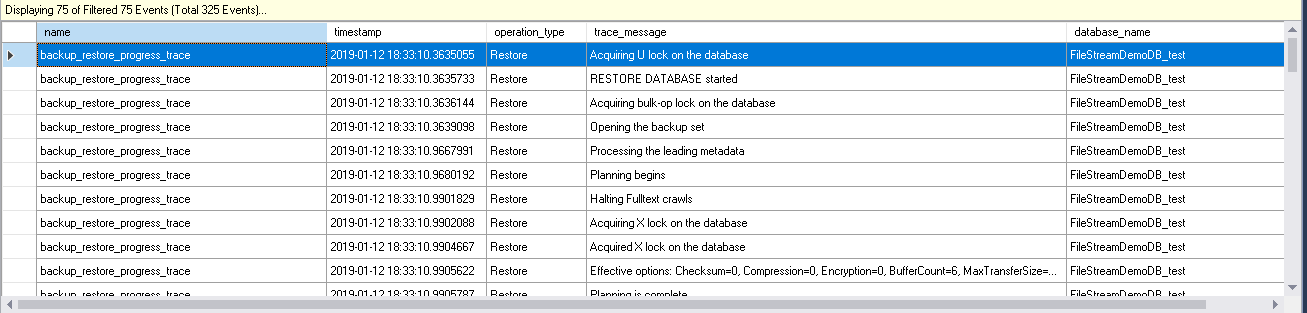
In below screenshot, you can notice that it begins the OFFLINE database restore. We are restoring the SQL Server FILESTREAM enabled database backup. Therefore it prepares the FILESTREAM containers into the path we specified in database restore command.
在下面的屏幕截图中,您会注意到它开始了OFFLINE数据库的还原。 我们正在还原启用SQL Server FILESTREAM的数据库备份。 因此,它将FILESTREAM容器准备到我们在数据库还原命令中指定的路径中。

Now, it starts transferring the data. In the backup stream, you can see that it starts processing the FILESTREAM data.
现在,它开始传输数据。 在备份流中,您可以看到它开始处理FILESTREAM数据。

Once it completes the data copy for the FILESTREAM, it starts log zeroing. Log zeroing is the process of file Initialization during the database restore.
一旦完成了FILESTREAM的数据复制,它就会开始日志清零。 日志清零是数据库还原期间文件初始化的过程。

Once the data transfer is complete, it starts the database recovery process. In below image, you can notice it starts the SQL Server FILESTREAM recovery as well along with the data recovery. Once the file recovery is completed, it starts the offline roll forward for the transactions.
数据传输完成后,它将启动数据库恢复过程。 在下图中,您会注意到它同时启动了SQL Server FILESTREAM恢复以及数据恢复。 文件恢复完成后,它将启动事务的脱机前滚。

In the last step, it starts the process to bring this database to ONLINE state. It runs the post-restore container fix and starts the database in ONLINE status.
在最后一步中,它开始使该数据库进入ONLINE状态的过程。 它运行还原后容器修复程序,并以联机状态启动数据库。

FILESTREAM数据库的FILEGROUP级别还原 (FILEGROUP level restore for the FILESTREAM database)
In the previous article, we performed the FILESTREAM filegroup backup as well. We can check the FILESTREAM database files and its status.
在上一篇文章中,我们还执行了FILESTREAM文件组备份。 我们可以检查FILESTREAM数据库文件及其状态。
select File_id, type_desc,name, physical_name,state_desc,size from sys.database_files

We can mark SQL Server FILESTREAM file status to OFFLINE. When the FILESTREAM file status is OFFLINE, its filegroup status is also OFFLINE.
我们可以将SQL Server FILESTREAM文件状态标记为OFFLINE。 当FILESTREAM文件状态为OFFLINE时,其文件组状态也为OFFLINE。
Run the below command in the FILESTREAM database to make it offline.
在FILESTREAM数据库中运行以下命令以使其脱机。
The output of the command is as below. It rolls back the transactions in the particular database.
命令的输出如下。 它回滚特定数据库中的事务。
Nonqualified transactions are being rolled back. Estimated rollback completion: 0%.
Nonqualified transactions are being rolled back. Estimated rollback completion: 100%.
不合格的交易正在回滚。 估计回滚完成:0%。
不合格的交易正在回滚。 估计回滚完成:100%。
Now, we can see the status for this FILESTREAM file as offline.
现在,我们可以看到此FILESTREAM文件的状态为脱机。
Note: You should have taken the filegroup level back up before it is in OFFLINE status. If we run the backup while the filegroup is OFFLINE, we get the below error message. The error message says that we can take the backup filegroup backup only it is in ONLINE status.
注意:在脱机状态之前,您应该已备份文件组级别。 如果在文件组为OFFLINE时运行备份,则会收到以下错误消息。 该错误消息表明,只有处于联机状态时,我们才能对备份文件组进行备份。
Msg 3007, Level 16, State 2, Line 3
The backup of the file or filegroup “DemoFileStream” is not permitted because it is not online. Container state: “Offline” (2). Restore status: 0. BACKUP can be performed by using the FILEGROUP or FILE clauses to restrict the selection to include only online data.
Msg 3013, Level 16, State 1, Line 3
BACKUP DATABASE is terminating abnormally.
Msg 3007,第16级,州2,第3行
不允许备份文件或文件组“ DemoFileStream”,因为它不在线。 容器状态:“离线”(2)。 恢复状态:0。可以通过使用FILEGROUP或FILE子句将选择限制为仅包含联机数据来执行BACKUP。
Msg 3013,第16级,状态1,第3行
BACKUP DATABASE异常终止。
Let us consider that we want to restore this FILEGROUP backup only for this database. We can do the filegroup level backup from the Tasks -> Restore -> Files and Filegroups.
让我们认为我们只想为此数据库还原此FILEGROUP备份。 我们可以从任务->恢复->文件和文件组中进行文件组级别的备份。
In the database restore wizard, specify the filegroup backup file path. Let us generate the script for the filegroup restore.
在数据库还原向导中,指定文件组备份文件路径。 让我们为文件组还原生成脚本。
Below is the script for filegroup restore.
以下是用于文件组还原的脚本。
RESTORE DATABASE [FileStreamDemoDB] FILE = N'FileStreamDemoDB',  FILE = N'DemoFiles' FROM  DISK = N'C:\Program Files\Microsoft SQL Server\MSSQL15.SQL2019\MSSQL\Backup\FileGroupDB.bak' WITH  FILE = 2,  NOUNLOAD,
STATS = 10

GO
In the output, we can see that it set the roll forward start point LSN. It requires additional roll forward LSN to complete the restore sequence. The status of the SQL Server FILESTREAM data file is ‘Restoring’ at this point.
在输出中,我们可以看到它设置了前滚起始点LSN。 它需要附加的前滚LSN才能完成还原序列。 此时,SQL Server FILESTREAM数据文件的状态为“正在还原”。
We need to take transaction log backup as well for the FILESTREAM DB. Run the below script to take the t-log backup.
我们还需要对FILESTREAM DB进行事务日志备份。 运行以下脚本以进行t-log备份。
BACKUP LOG [FileStreamDemoDB_test] TO  DISK = N'C:\Program Files\Microsoft SQL Server\MSSQL15.SQL2019\MSSQL\Backup\log.trn'
WITH NOFORMAT, NOINIT,  NAME = N'FileStreamDemoDB_test-Full Database Backup', SKIP, NOREWIND, NOUNLOAD,  STATS = 10
GO
Now we need to restore the t-log backup on SQL Server FILESTREAM database. In the below image, we can see that transaction log restore option is disabled in the SSMS.
现在,我们需要在SQL Server FILESTREAM数据库上还原t-log备份。 在下图中,我们可以看到SSMS中禁用了事务日志还原选项。

Therefore, we need to restore the t-log backup using the t-sql only.
因此,我们只需要使用t-sql还原t-log备份。
use master
go
RESTORE LOG [FileStreamDemoDB] FROM  DISK = N'C:\Program Files\Microsoft SQL Server\MSSQL15.SQL2019\MSSQL\Backup\log.trn'
We can see below that, t-log backup is now restored successfully. Status of the FILESTREAM filegroup is also online after the t-log restore.
我们可以在下面看到,t-log备份现在已成功还原。 还原t-log后,FILESTREAM文件组的状态也处于联机状态。
结论 (Conclusion)
In this series on the SQL Server FILESTREAM, we learned to restore the backup for the SQL Server FILESTREAM database. We can restore the full backup as well as filegroup level backup. In the next article, we will explore a few recovery scenarios of the FILESTREAM database.
在有关SQL Server FILESTREAM的本系列文章中,我们学习了如何还原SQL Server FILESTREAM数据库的备份。 我们可以还原完整备份以及文件组级别的备份。 在下一篇文章中,我们将探讨FILESTREAM数据库的一些恢复方案。
目录 (Table of contents)
翻译自: https://www.sqlshack.com/restoring-a-sql-server-filestream-enabled-database/
 3543
3543


 扫一扫
扫一扫


 被折叠的 条评论
为什么被折叠?
被折叠的 条评论
为什么被折叠?
 到【灌水乐园】发言


