



 本文介绍了如何监控和获取Tomcat应用服务器的繁忙线程数,通过分析Tomcat源码,发现可以从线程池中获取活跃线程数。虽然Tomcat内部有相应的方法,但未直接对外提供,可以通过自定义接口实现。文章提到了具体涉及的Tomcat类及函数,并建议读者根据实际情况(如使用JSP或后台代码)调整实现方式。
在某些情况下,我们需要对tomcat的繁忙线程数进行监控以满足我们队应用服务器状态信息的把控。那么我们该如何通过我们自定义的接口来获得tomcat的繁忙线程数?
首先,我们应该想到tomcat本身是否为我们提供了类似的方法,博主在实际开发中拜读了一遍tomcat的源码,的确也找到了获取当前服务繁忙线程数的方法。但是它本身并未对外提供,并且使用的时候需要进行一些初始化操作。大家如果有兴趣的话可以下载tomcat源文件,找到org.apache.coyote.http11.AbstractHttp11Processor这个类,在process中有disableKeepAlive这个函数。进入函数查看具体实现
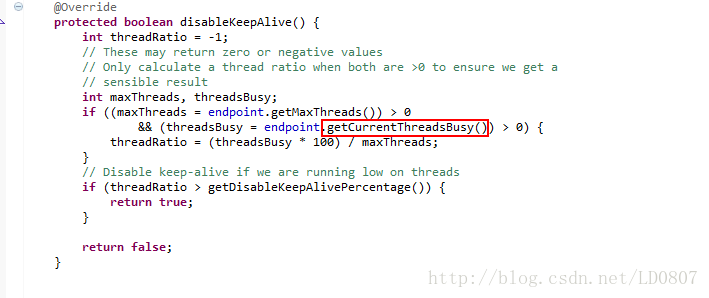
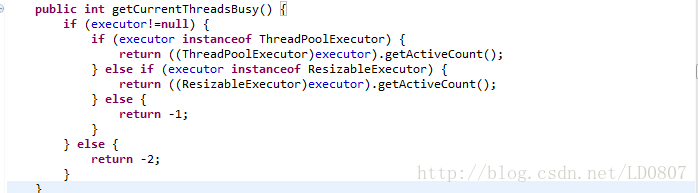
我们可以看到tomcat本事是从线程池中取得活跃数,那么我们也可以通过类似的办法取得tomcat线程池中的活跃数。博主使用的jsp,大家可以对应改为后台代码。
bean来解析线程池
public static class MBeans {

	private final MBeanServer mbeanServer;

	MBeans() {
		this(getPlatformMBeanServer());
	}

	private MBeans(MBeanServer mbeanServer) {
		super();
		this.mbeanServer = mbeanServer;
	}
	static MBeanServer getPlatformMBeanServer() {
		return ManagementFactory.getPlatformMBeanServer();
	}
	Set<ObjectName> getTomcatThreadPools() throws MalformedObjectNameException {
		return mbeanServer.queryNames(new ObjectName("*:type=ThreadPool,*"), null);
	}

	Set<ObjectName> getTomcatGlobalRequestProcessors() throws MalformedObjectNameException {
		return mbeanServer.queryNames(new ObjectName("*:type=GlobalRequestProcessor,*"), null);
	}

	Object getAttribute(ObjectName name, String attribute) throws JMException {
		return mbeanServer.getAttribute(name, attribute);
	}
}
然后用一个方法获取信息,这里可以添加函数获取到其他信息,例如最大连接数等。
public static class TomcatInformations implements Serializable {

	private static final boolean TOMCAT_USED = System.getProperty("catalina.home") != null;

	private static final long serialVersionUID = -6145865427461051370L;

	@SuppressWarnings("all")
	private static final List<ObjectName> THREAD_POOLS = new ArrayList<ObjectName>();
	@SuppressWarnings("all")
	private static final List<ObjectName> GLOBAL_REQUEST_PROCESSORS = new ArrayList<ObjectName>();

	private final String name;
	private final int maxThreads;
	private final int currentThreadCount;
	private static int currentThreadsBusy=0;
	private final long bytesReceived;
	private final long bytesSent;
	private final int requestCount;
	private final int errorCount;
	private final long processingTime;
	private final long maxTime;

	private TomcatInformations(MBeans mBeans, ObjectName threadPool) throws JMException {
		super();
		name = threadPool.getKeyProperty("name");
		maxThreads = (Integer) mBeans.getAttribute(threadPool, "maxThreads");
		currentThreadCount = (Integer) mBeans.getAttribute(threadPool, "currentThreadCount");
		currentThreadsBusy = (Integer) mBeans.getAttribute(threadPool, "currentThreadsBusy");
		ObjectName grp = null;
		for (final ObjectName globalRequestProcessor : GLOBAL_REQUEST_PROCESSORS) {
			if (name.equals(globalRequestProcessor.getKeyProperty("name"))) {
				grp = globalRequestProcessor;
				break;
			}
		}
		if (grp != null) {
			bytesReceived = (Long) mBeans.getAttribute(grp, "bytesReceived");
			bytesSent = (Long) mBeans.getAttribute(grp, "bytesSent");
			requestCount = (Integer) mBeans.getAttribute(grp, "requestCount");
			errorCount = (Integer) mBeans.getAttribute(grp, "errorCount");
			processingTime = (Long) mBeans.getAttribute(grp, "processingTime");
			maxTime = (Long) mBeans.getAttribute(grp, "maxTime");
		} else {
			bytesReceived = 0;
			bytesSent = 0;
			requestCount = 0;
			errorCount = 0;
			processingTime = 0;
			maxTime = 0;
		}
	}

	public static List<TomcatInformations> buildTomcatInformationsList() {
		if (!TOMCAT_USED) {
			return Collections.emptyList();
		}
		try {
			synchronized (THREAD_POOLS) {
				if (THREAD_POOLS.isEmpty() || GLOBAL_REQUEST_PROCESSORS.isEmpty()) {
					initMBeans();
				}
			}
			final MBeans mBeans = new MBeans();
			final List<TomcatInformations> tomcatInformationsList = new ArrayList<TomcatInformations>(
					THREAD_POOLS.size());
			for (final ObjectName threadPool : THREAD_POOLS) {
				tomcatInformationsList.add(new TomcatInformations(mBeans, threadPool));
			}
			return tomcatInformationsList;
		} catch (final InstanceNotFoundException e) {
			return Collections.emptyList();
		} catch (final AttributeNotFoundException e) {
			return Collections.emptyList();
		} catch (final JMException e) {
			throw new IllegalStateException(e);
		}
	}

	private static void initMBeans() throws MalformedObjectNameException {
		final MBeans mBeans = new MBeans();
		THREAD_POOLS.clear();
		GLOBAL_REQUEST_PROCESSORS.clear();
		THREAD_POOLS.addAll(mBeans.getTomcatThreadPools());
		GLOBAL_REQUEST_PROCESSORS.addAll(mBeans.getTomcatGlobalRequestProcessors());
	}

	public static long getCurrentThreadsBusy(){
		buildTomcatInformationsList();
		return currentThreadsBusy;
	}
}
博主经过测试可以得到当前tomcat的活跃(繁忙)线程数,希望可以帮到大家。当然,tomcat也提供了管理功能,在管理功能里面可以根据关键字获得对应的数值。这也是一种获取tomcat繁忙线程数的方式。


 扫一扫
扫一扫


 2127
2127

 被折叠的 条评论
为什么被折叠?
被折叠的 条评论
为什么被折叠?
 到【灌水乐园】发言


