

.avif)

How to access your API key in Google Drive



Thomas Pauly
Google Drive, which allows users to store files in the cloud, synchronize files across devices, and share files with others, includes productivity tools like Google Docs, Sheets, Slides, and more.
While you can benefit from Google Drive’s standalone features and capabilities in a variety of ways, you can get even more value by integrating Google Drive with your product or your internal applications.
To do so, you’ll first need to procure your unique API key. We’ll break down the steps for doing exactly that below!
Prerequisites
To access your API key, you’ll need to have a Google Cloud Platform (GCP) account.
If you don't have one, you can create it here; but If you’re already logged into Gmail/any Google app, you’ll be automatically logged into your GCP.
{{this-blog-only-cta}}
Step 1: Visit the Google Cloud Console
Go to the Google Cloud Console.
Step 2: Select a project (or create a new project)
In the top bar, find and click on “Select a project.”

A window will open up, allowing you to select an existing project or create a new one.

If you’re creating a new project, go through the steps of setting it up.

Related: How to use Python to integrate with Google Drive's API
Step 3: Navigate to API & Services
Once you create your new project, you’ll see its name at the top of the page.
You’ll then need to hover your cursor over API & Services and click “Enabled APIs & services.”

Related: How to get your API key in Box
Step 4: Enable your API
If you haven't already, you need to enable the API you want to use. In the top search bar, search for the API you want to enable. In this case” Google Drive API”

After searching, you’ll see a handful of results. Select the Google Drive API you want to enable.

Then click “Enable”

Step 5: Create your credentials
After enabling the API, you’ll be able to create credentials.
To do so, click “Create Credentials”

Then choose the type of credentials you need (API key, OAuth client ID, etc.), and fill in the required information.

6. Configure your API Key
If you're creating an API key, you might need to configure its settings, such as restricting its usage to certain websites, IP addresses, or APIs.

7. Get your API key
Once you've configured your API key, it’ll be generated. You can go ahead and use it!
Other key considerations for building to the Google Drive API
Before integrating with Google Drive’s API, it’s worth considering other items:
Pricing
The pricing for a Google Workspace comes in 4 tiers. Business Starter, Business Standard, Business Plus, and Enterprise.
- Business starter: $6/per user/month with a custom and secure business email, 30 GB pooled storage per user, security and management controls, and more.
- Business Standard: $12/per user/month with a custom and secure business email, 2 TB pooled storage per user, security and management controls, and more.
- Business Plus: $18/per user/month with a custom and secure business email, 5 TB pooled storage per user, enhanced security and management controls, advanced endpoint management, and more.
- Enterprise: You’ll need to contact Google for pricing. That said, it comes with a custom and secure business email, 5 TB pooled storage per user, enhanced security and management controls, advanced endpoint management, and more.

Rate Limits
All use of the Google Drive API is available at no additional cost. But since the Google Drive API is a shared service, they apply quotas and limitations to make sure it's used fairly by all users and to protect the overall performance of the Google Workspace system.
For queries, the limits are 12,000 per 60 seconds and 12,000 per 60 seconds per user.

Note: Exceeding the quota request limit doesn’t incur extra charges and your account isn’t billed. You can learn more about Google Drive’s API rate limits here.
Related: How to stop getting rate limited by APIs
Errors to look out for
The Google Drive API returns two levels of error information:
- HTTP error codes and header messages
- A JSON object in the response body with additional details that can help you determine how to handle the error
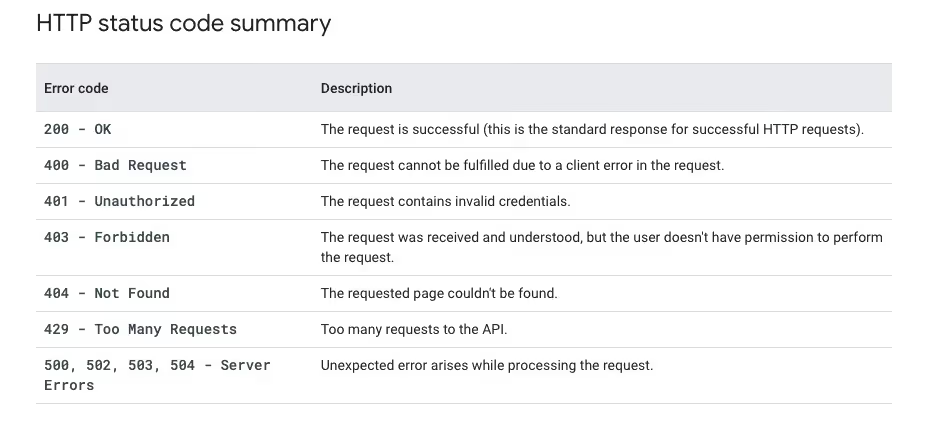
To get a deeper look into error handling, visit Google’s documentation here
Final thoughts
Many of your customers use other File Storage tools, like Box, Dropbox, or OneDrive.
You can offer integrations with any of the file storage applications your clients use by building to Merge’s File Storage Unified API.
To learn more about the API, and Merge’s platform more broadly, you can schedule a demo with one of our integration experts!

Thomas Pauly




Integrate with several file storage solutions via Merge
Learn how Merge can help you integrate your product with Google Drive—and many other file storage applications—through a single unified API.

But Merge isn’t just a Unified
API product. Merge is an integration platform to also manage customer integrations. gradient text
But Merge isn’t just a Unified
API product. Merge is an integration platform to also manage customer integrations. gradient text
But Merge isn’t just a Unified
API product. Merge is an integration platform to also manage customer integrations. gradient text
But Merge isn’t just a Unified
API product. Merge is an integration platform to also manage customer integrations. gradient text
