

Table of contents

.avif)
How to GET folders from the Dropbox API in Python



Max Gong
While Dropbox, the widely-used file storage solution, offers many benefits on its own—such as letting you store documents, photos, and/or videos securely and from any device and location—it offers even more value when its folders can be accessed by your other internal applications or your product.
Regardless of your specific integration use case, we'll walk through every step you should take to get folders from the Dropbox API using Python.
Prerequisites
To follow along, you’ll need:
- A valid GitHub account
- Python version 3.10 or later
- The python requests library installed in your environment (like your laptop)
Related: A guide to integrating with the Dropbox API using Python
Authenticating to the Dropbox folders API
To access Dropbox’s API, you’ll need a sandbox Dropbox account and an OAuth application to get your access token.
To do both, you can follow these steps:
1. Sign up for a developer account here. Click Create apps to sign up.
2. Once you’re done signing up, navigate here and click Create app.
3. Choose “Scoped access” and “Full Dropbox”, so that your app has access to all files & folders.

4. For this article, we’ll just be showing you how to access the API. So instead of implementing the full OAuth flow, we’ll generate a temporary access token. Click Generate access token to generate an access token. Save the token, as we’ll be using it to make API calls.

To get a sandbox Dropbox account, simply sign up for a free account here.
Related: How to get your Dropbox API key
Fetching folders from the Dropbox API in Python
Dropbox uses bearer tokens to make authenticated calls. For any request you make, you’ll need to add <code class="blog_inline-code">“Authorization: Bearer {ACCESS_TOKEN}”</code>, where {ACCESS_TOKEN} is the token you retrieved when creating your Dropbox OAuth application in the previous step.
1. Retrieve your root namespace ID
At the highest level, Dropbox is organized by namespaces. To access folders, you need your root namespace id.
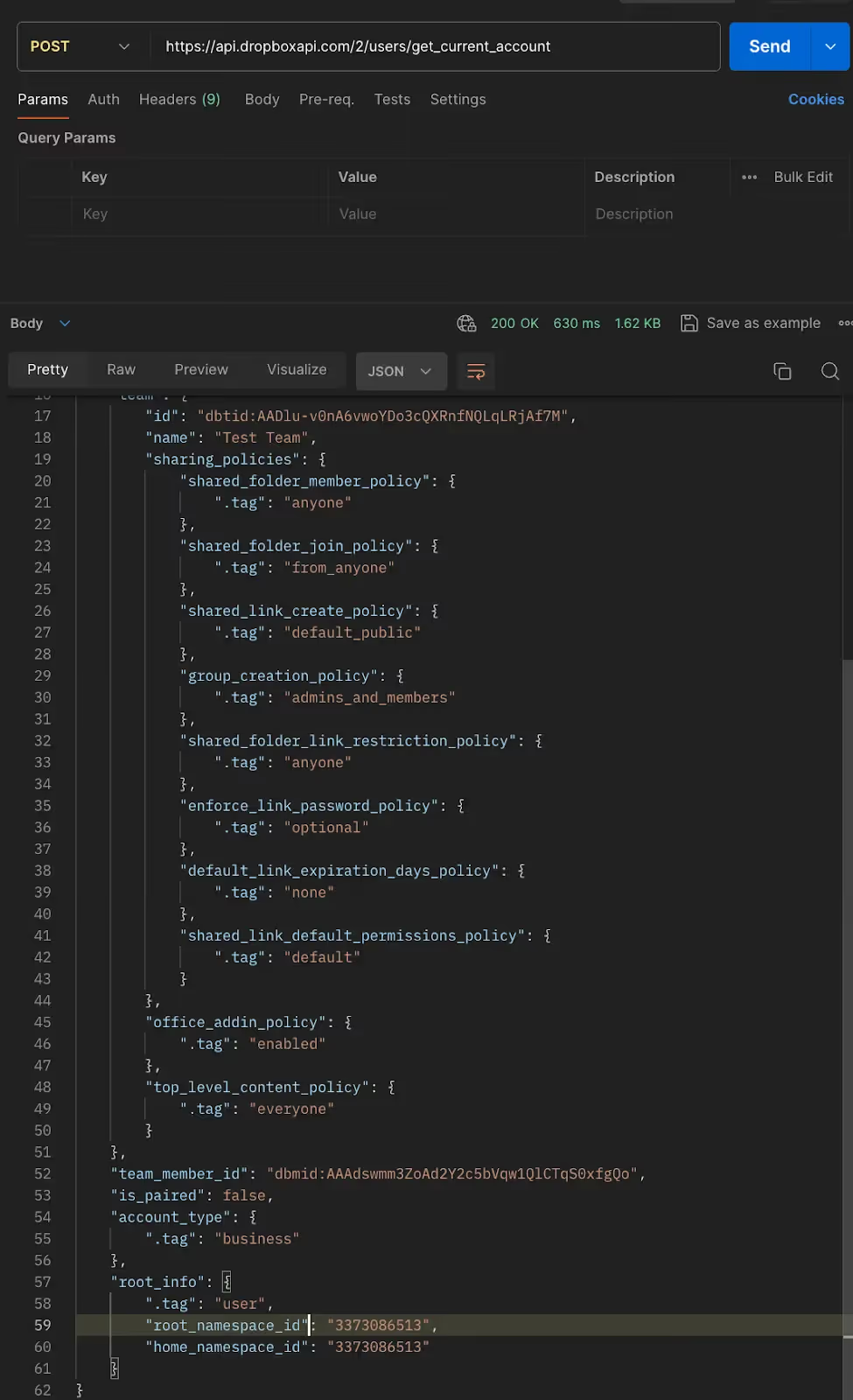
To access that, make the following API call: <code class="blog_inline-code">POST https://api.dropboxapi.com/2/users/get_current_account</code>
In the response body, you’ll see root_namespace_id under root_info field. This defines your root namespace id.
Related: A guide to connecting Dropbox MCP with Claude Code
2. Get your root-level folders
Your root-level folders exist at the top-level of your namespace.
To retrieve them, make the following API call:
<code class="blog_inline-code">method = POST</code>
<code class="blog_inline-code">url = https://api.dropboxapi.com/2/files/list_folder</code>
<code class="blog_inline-code">data = {"path": "ns:YOURROOTNAMESPACEID", "limit": 2000”, "recursive": false}</code>
<code class="blog_inline-code">headers= 'Dropbox-API-path_Root: {".tag": "root", "root": "YOURROOTNAMESPACEID"}'</code>
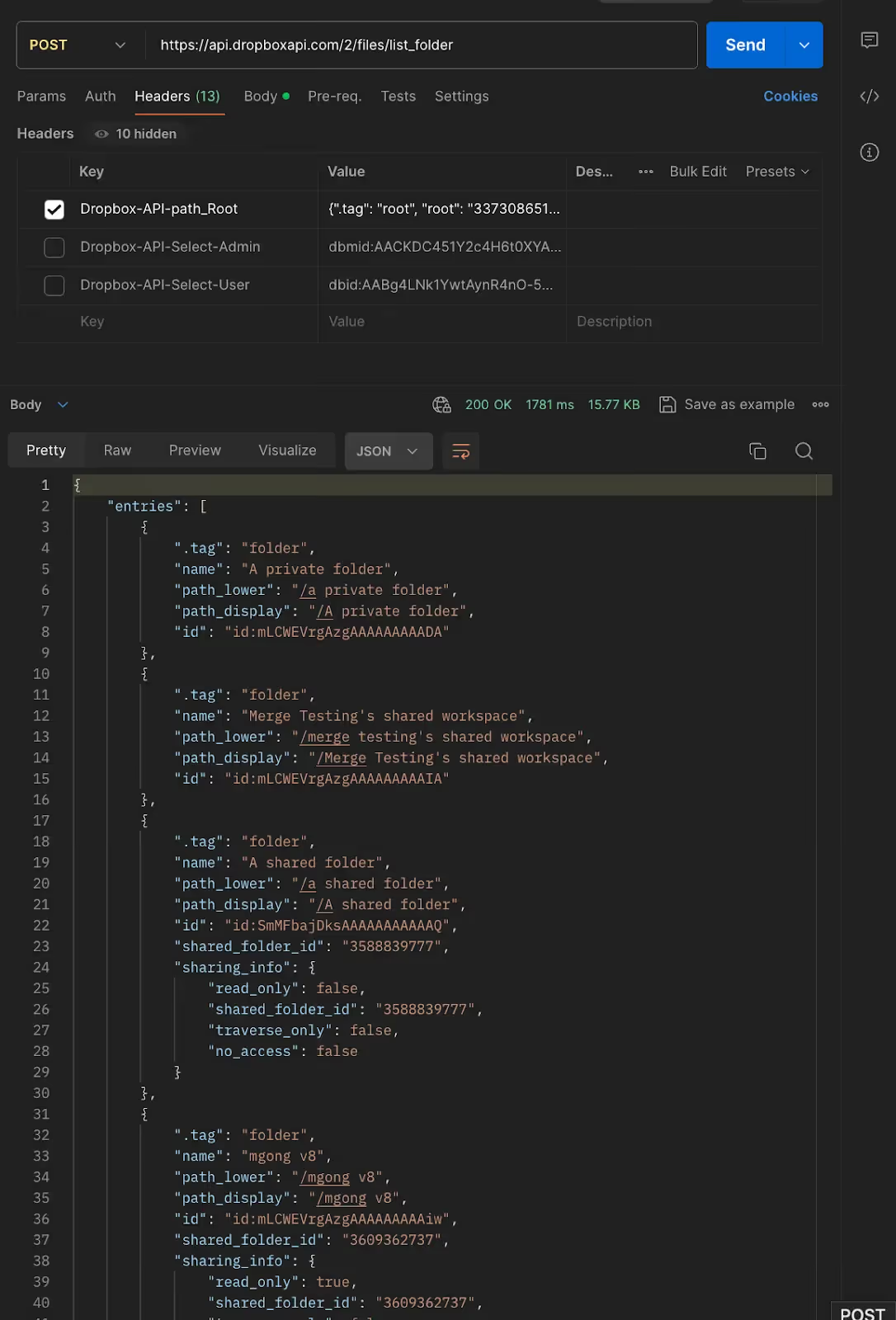
- Enter your root namespace id in the text where YOURROOTNAMESPACEID is mentioned.
- “limit” indicates the page size returned.
- “recursive=false” indicates that we don’t want to fetch all children of the root namespace, just the immediate children. Dropbox’s API “recursive=true” doesn’t provide a reliable way to understand a folder’s hierarchy, so we'll traverse it ourselves.
- “Path” indicates the path to the namespace where you want to access folders, in this case the root namespace.
- “Dropbox-API-path_Root” indicates the namespace you’re trying to access.
- When parsing the response, you’ll notice objects with ”.tag”: “folder” and ”.tag”.: “file”. In your code, you’ll want to write an if-else loop that only looks for ”.tag”: “folder”.
3. Process folders at the root level
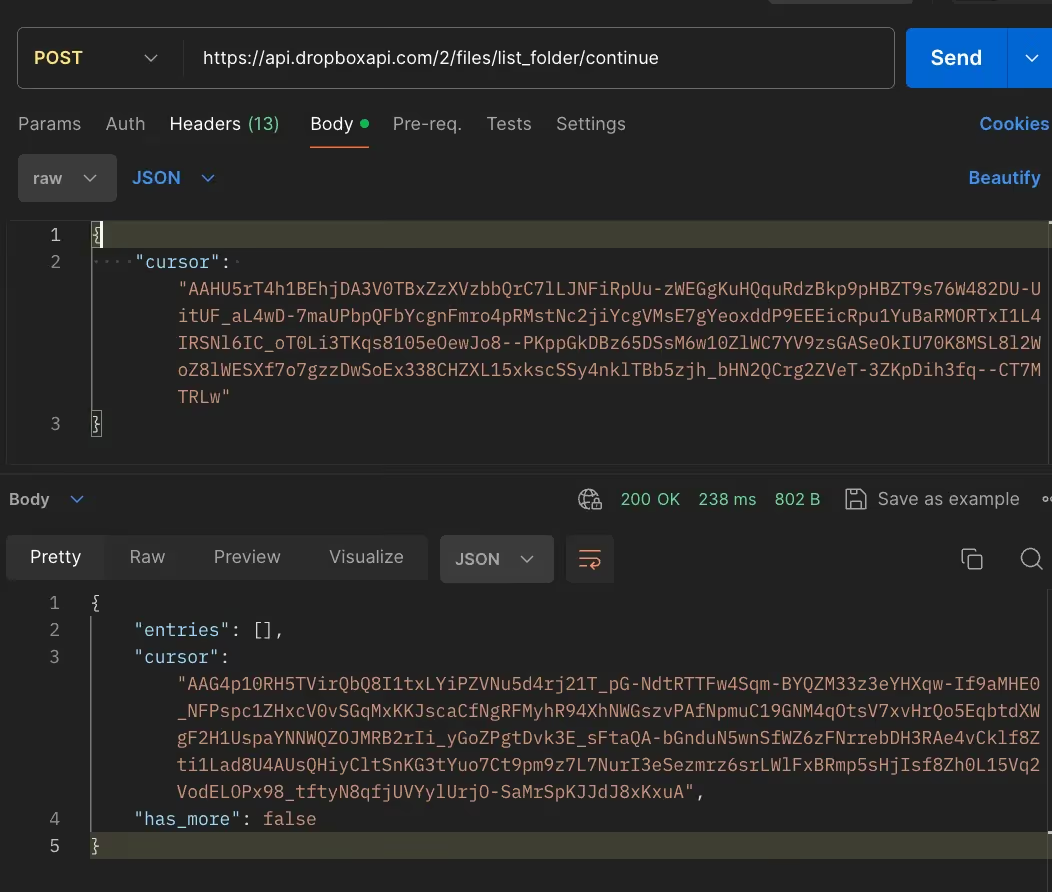
Let’s say you get more than 2000 folders at the root-level. In the previous response, you’ll see a cursor value. To paginate, make the following API call:
<code class="blog_inline-code">method = POST</code>
<code class="blog_inline-code">url = https://api.dropboxapi.com/2/files/list_folder/continue</code>
<code class="blog_inline-code">data = {“cursor”: YOURCURSORFROMPREVIOUSRESPONSE}</code>
<code class="blog_inline-code">headers = 'Dropbox-API-path_Root: {".tag": "root", "root": "YOURROOTNAMESPACEID"}'</code>
- You’ll notice that this is a different endpoint and request body. Dropbox API essentially offers 2 endpoints to process folders & files—one to process the initial page and another to process any subsequent pages.
- Continue calling this endpoint with the provided cursor until has_more=False
Related: A guide to file storage APIs
4. Process the folders within a folder
Now let’s get folders within folders.
To do so, make the following API call:
<code class="blog_inline-code">method = POST</code>
<code class="blog_inline-code">url = https://api.dropboxapi.com/2/files/list_folder</code>
<code class="blog_inline-code">data = {"path": "THEFOLDERID", "limit": 2000”, "recursive": false}</code>
<code class="blog_inline-code">headers = 'Dropbox-API-path_Root: {".tag": "root", "root": "YOURROOTNAMESPACEID"}'</code>
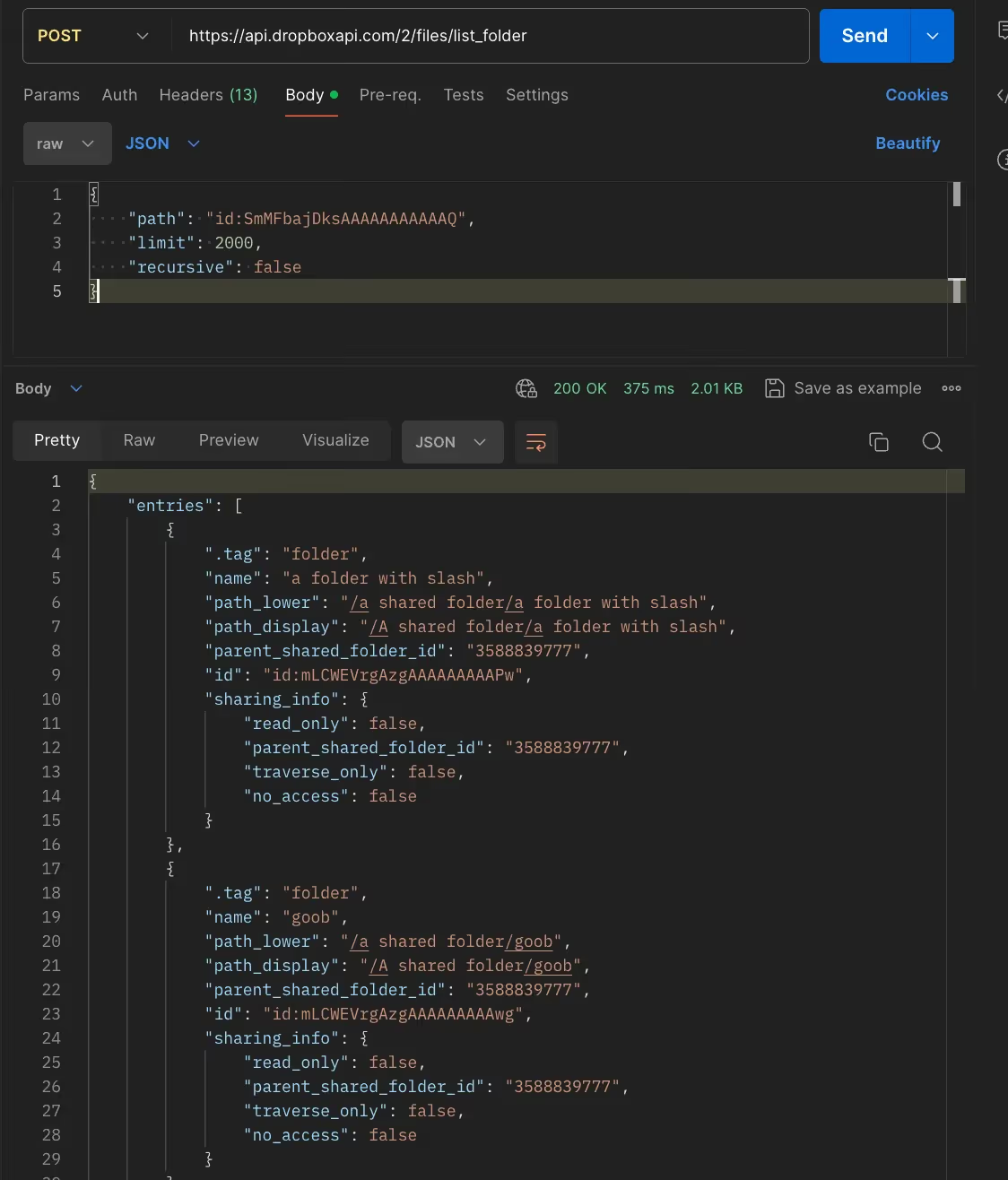
- Replace THEFOLDERID with the id of the folder whose children you want to process.
- Use the same pagination method we talked about previously.
The final python code may look something like what's shown below. We can use depth-first search—which can be more reliable than breadth-first search—so that you know which root-level folder is done being processed or not (i.e. more accurately track progress).
Final thoughts
As you can tell, retrieving folders from Dropbox via API requests can be technically complex and time consuming to set up (and maintain!). These issues only get exacerbated when you consider the other file storage tools your clients want to integrate with your product, such as Box or Google Drive.
To help you integrate with any of your clients' file storage solutions so that your product can access their folders (among other resources), you can simply build to Merge's File Storage Unified API.
You can learn more about Merge and its Unified API by scheduling a demo with one of our integration experts.

Max Gong





But Merge isn’t just a Unified
API product. Merge is an integration platform to also manage customer integrations. gradient text
But Merge isn’t just a Unified
API product. Merge is an integration platform to also manage customer integrations. gradient text
But Merge isn’t just a Unified
API product. Merge is an integration platform to also manage customer integrations. gradient text
But Merge isn’t just a Unified
API product. Merge is an integration platform to also manage customer integrations. gradient text
