

Table of contents


API response codes: examples and error-handling strategies



Jon Gitlin
As you make API calls to different API providers, you’ll likely receive a wide range of response codes.
These can vary based on how providers implement HTTP status codes and the nature of the issues associated with the requests. So, theoretically, you can end up receiving countless response codes.
However, you’ll likely only run into a certain set of codes consistently.
We’ll help you understand and respond to each of the most common ones so that you can manage your API calls effectively over time.
But first, let’s align on the definition of an API response code.
What is an API response code?
It’s an HTTP status code that a server returns to a client for a given API request. The code reveals whether the request was successful or not, and, if not, provides additional context on the issue—enabling the client to debug the issue if it’s on their end.
.avif)
{{this-blog-only-cta}}
Common API response codes
Here are the top response codes to be aware of.
200 OK
You’ll hopefully see this response code in the majority of your API calls. It simply means that the request was successful.

If you used a GET request, you should see the requested resource below the code, allowing you to easily pull the data. While if you used a method like PATCH, you might get a message that the data was updated on the server successfully and see the specific data that was updated.
201 Created
This means that request was successful and a resource was created on the server.
Here’s a simplified look at how the HTTP header can look for a successful response:

The body can include details on the resource that was created.

This is associated with either POST requests, where a new resource is created on the server, or PUT requests, where a resource is either created or replaced on the server.
301 Moved Permanently
API providers may end up changing their resources’ locations over time, leading you to receive this error.
Fortunately, the API provider typically shares the resource's new URL within the response’s location header, which allows you to automatically redirect current and future requests for that resource.

You likely won’t need to debug this error, as most HTTP libraries handle redirects automatically.
302 Found
This status code means that the requested resource is located in a different URL temporarily.
Similar to the 301 status code, the response includes the temporary URL within the location header.

Also like the 301 status code, there’s likely little you need to do. Your request will automatically redirect to the temporary URL, and all future requests will—and should—continue to use the original URL, as the redirect is temporary.
404 Not Found
This means that the requested resource either doesn’t exist or isn’t available.

You can debug this in a few ways:
- Double check the request URL and your parameters. Any minor mistake (like one misplaced letter or character) can be the root cause of the issue
- See if there are similar resources you can request instead. It may be worth identifying and calling another endpoint that helps you access similar data
- Determine if the endpoint has been moved or deprecated. You can typically confirm this by reviewing the API provider’s documentation and/or their community forum. If it's been deprecated, it may be worth following the previously mentioned tip
Related: Top integration issues to look out for
429 Too Many Requests
This indicates that you’ve reached your rate limit for calling a certain endpoint in the current rate limit window.
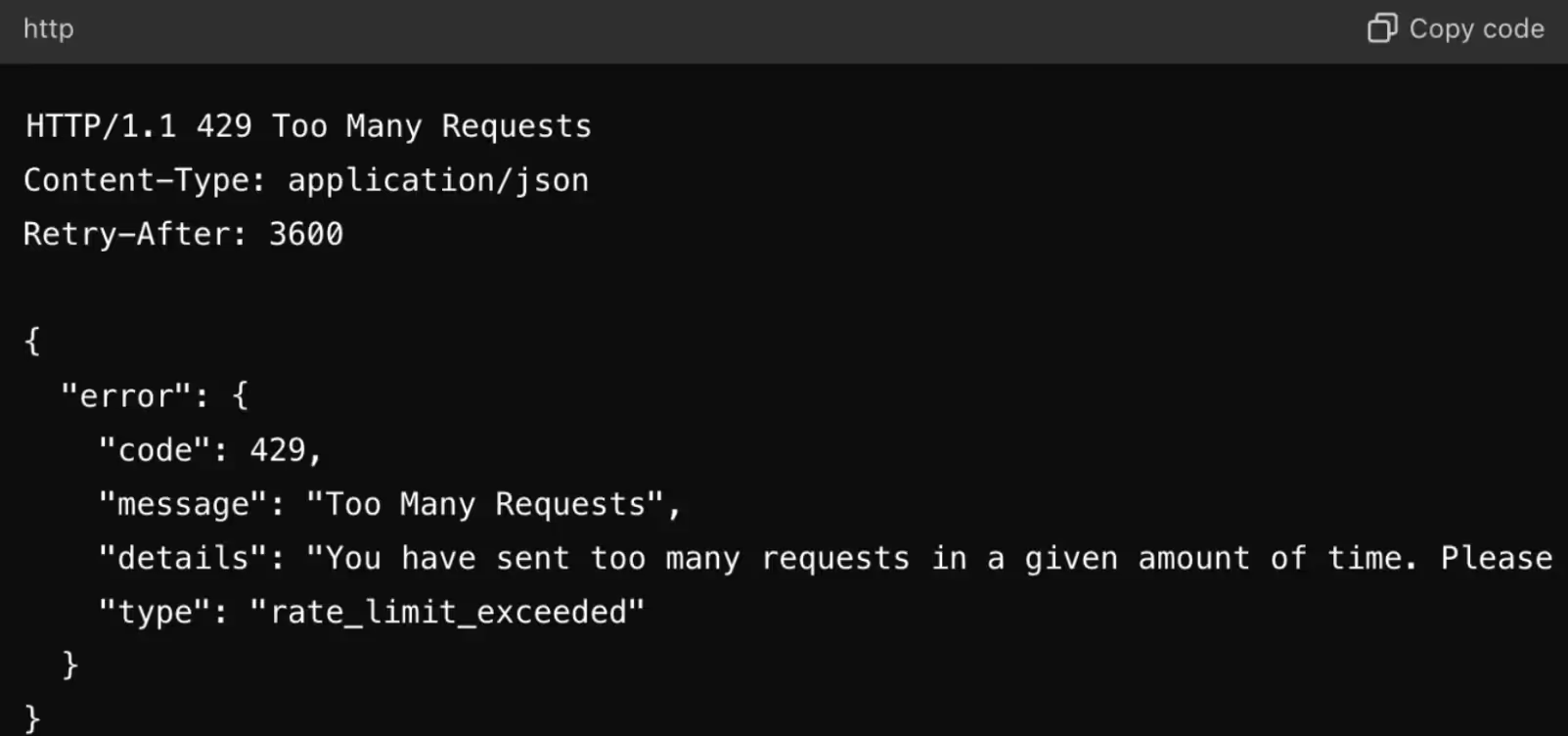
To troubleshoot this response code, you can:
- Look for opportunities to optimize requests. You can, for example, batch requests. You can also cache responses so that identical requests are served from the cache instead of the server
- Upgrade your plan with the API provider. In some cases, your rate limits for certain resources are determined by the plan you’re on with the 3rd-party service. If that’s the case and it’s critical that you can make more requests than the current plan allows, it may be worth the investment
- Use a backoff strategy that retries the request in the following window. This may not be the solution you’re after, but it may prove inevitable if the options above aren’t helpful
401 Unauthorized
This means that the request either doesn’t have authentication credentials or the credentials don’t have sufficient privileges to perform the desired action on the resource.

To manage this type of error, you can try any of the following:
- Double check your authentication credentials. You may have inadvertently used the wrong ones, put them in incorrectly, or let them expire
- Verify the status of the 3rd-party authentication provider (if you use one). A service like AuthO may be experiencing an issue themselves (e.g., a status outage). In this case, you’ll just need to wait until the provider’s issue gets resolved
- Review the API provider’s authentication requirements. They may have updated them without your knowledge (although backwards incompatible changes are rare) or you might have misread them. For instance, you may have thought that the provider accepts basic authentication but they actually require access tokens instead
Related: How to decide between building and buying integrations
500 Internal Server Error
The request couldn’t be completed successfully because of an issue on the server’s end.

To address this status code effectively, you can:
- Get more context on the nature of the issue. Given how vague the 500 status code is, it can be hard to even know where to start in troubleshooting it. You can try to get more insight on the server issue by enabling debugging mode either in the application or server configuration
- Assess changes to the code base. Check if there were any changes in the API request’s code before the last error occurred. You might find this in your organization’s change management system and/or any other places that document changes to your code base
- Contact the API provider’s support team. Through the provider’s API documentation, you may be able to chat with their support team or submit a ticket that explains the issue
503 Service Unavailable
This generally means that a server is unavailable—whether that’s because it’s overloaded with traffic, undergoing maintenance, etc.
The API provider might include details on when you should retry the request in the header field “Retry-After”, where the timeframe for retrying can be presented in seconds or through a specific timestamp.

To address this status code effectively, you can:
- Incorporate retry logic within your request body
- Leverage exponential backoff when there isn’t a retry-after header field to limit unnecessary requests
- Limit the number of retries when there isn’t a retry-after header field, as the server may experience significant, long-term issues
Final thoughts
Analyzing and responding to individual status code errors can be overwhelming if left to your engineers. This is especially true for customer-facing integrations, as you might be supporting dozens of integrations that are used by countless end-users (your customer’s customers).
To offload this work to your customer-facing employees and to help these employees identify, diagnose, and resolve integration issues effectively and easily, your team can use Merge’s Integration Observability tooling.
Learn more about this tooling and how our unified API lets you add hundreds of integrations to your product through a single build by scheduling a demo with one of our integration experts.
API response codes FAQ
In case you have any more questions on API response codes, we’ve addressed several more below.
When should you use 400 Bad Request vs 422 Unprocessable Entity for validation errors?
Use 400 when the request’s structure is invalid, missing required fields, or can’t be parsed; and use 422 when the request is well-formed but fails domain or business-rule validation (e.g. date range conflict).
As a general best practice, you should not only implement 400 and 422 error codes but also any other potential 4xx response codes. This enables the client to understand the source of an error, decide whether to retry the request, and—if the request should be retried—resend the request quickly and successfully.
How should clients handle asynchronous operations that return 202 Accepted?
A 202 response code means the server accepted the request but hasn’t finished processing it.
To see when the server finishes handling a request, you’ll have two options to choose from:
1. You’ll often see a status endpoint in the response that you can poll at a reasonable interval (and a max number of attempts) until the operation reaches a terminal state (success, failure, or timeout).
2. You might see a <code class="blog_inline-code">Retry-After</code> field in the response header that tells you when it’s safe to poll the endpoint. You can follow this value to time your follow-up status check.
The first option is most common. But if the endpoint also displays the <code class="blog_inline-code">Retry-After</code> value, you should prioritize the second option, as it provides more helpful instructions on when you should poll the endpoint.
What’s the difference between 401 Unauthorized and 403 Forbidden, and what headers matter?
A 401 Unauthorized response indicates that the client is unauthenticated or has provided invalid credentials, while a 403 Forbidden response means the client is authenticated but not authorized for the resource or action.
For a 401 response, the server provides a <code class="blog_inline-code">WWW-Authenticate</code> header. This header tells the client the type of authentication that’s needed and any required parameters so the client can retry the request with appropriate credentials.
For example:
This tells the client that Basic authentication is required and that the credentials should correspond to the “admin” realm.
A 403 Forbidden response typically doesn’t include a <code class="blog_inline-code">WWW-Authenticate</code> header because the issue isn’t authentication. The client is recognized but still not allowed to perform the action, either due to insufficient permissions or because the server forbids the operation entirely.
How should Retry-After and other rate limit headers influence your request logic?
Many APIs include rate-limit–related response headers to help clients pace their requests and avoid hitting rate limits.
Here are a few examples:
- <code class="blog_inline-code">Retry-After</code>: indicates how long you need to wait before sending additional requests. Depending on the API, this may apply to retrying the same request or to issuing further requests
- <code class="blog_inline-code">X-RateLimit-Remaining</code>: shows how many requests you still have available in the current rate-limit window. When this value approaches zero, you should throttle or pause requests to avoid exceeding the limit
- <code class="blog_inline-code">For X-RateLimit-Reset</code>: tells you when the current rate-limit window will reset. You can use this to determine when you can safely resume normal request volume after throttling
Jon Gitlin




Avoid managing integrations at scale
Merge lets you add hundreds of integrations to your product by simply building to its Unified API.


But Merge isn’t just a Unified
API product. Merge is an integration platform to also manage customer integrations. gradient text
But Merge isn’t just a Unified
API product. Merge is an integration platform to also manage customer integrations. gradient text
But Merge isn’t just a Unified
API product. Merge is an integration platform to also manage customer integrations. gradient text
But Merge isn’t just a Unified
API product. Merge is an integration platform to also manage customer integrations. gradient text
