I’ve recently read Josh Long‘s Bootiful GCP series on Sprint Central’s engineering blog and especially liked the 4th part about using Google Cloud’s Pub/Sub. I felt inspired by the series and as I’m also evaluating Spring Cloud Stream for a new project of mine. I thought, I would expand on that article where Josh left off. This article describes how to use Spring Cloud Stream with Google Cloud Pub/Sub for implementing a simple producer and a consumer application.
Introduction
You can safely skip this part if you’ve read Josh’s article before. If you haven’t done so, no worries, I’ll quickly summarize some key points here.
What is Google Cloud Pub/Sub?
Google defines Pub/Sub in the following way.
Cloud Pub/Sub brings the scalability, flexibility, and reliability of enterprise message-oriented middleware to the cloud. By providing many-to-many, asynchronous messaging that decouples senders and receivers, it allows for secure and highly available communication between independently written applications.
Simply put, Pub/Sub is Google’s solution for supporting developers connecting application components with a message broker at Google’s scale. As the name suggests this solution implements publish/subscribe mechanism with the same concepts you would expect. Messages can be submitted to topics and all the subscribers of a certain topic receive a published message.
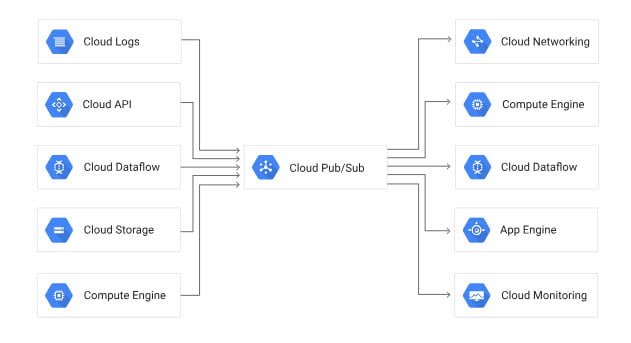
It’s important to emphasize here that Pub/Sub offers at least once delivery for each submitted message. If you want to ensure that a message gets delivered only once, then you would have to take care of that yourself.
What is Spring Integration?
Spring Integration is a Spring project in their portfolio. An entire article or even an entire book could be written on it, as it’s a vast framework in itself. In summary, Spring Integration is a framework which help you design and integrate applications by using EIP patterns. The two most basic primitives Spring Integration is built upon are Message<T> and MessageChannel. In this regard, developers can decouple and isolate components from each other. You can think of this mechanism as though Spring Integration would take the idea of dependency injection even further in a way where components don’t even have to know about each other, but they’re exchanging messages instead.
Channels can connect components with each other either if they live in the same JVM or even if they’re distributed and separated by the network. At this point the relevant concept to understand is what channel adapters are. They’re basically meant to transform a Spring Framework message as it goes through a message channel, into a piece of data that can be used by external systems.
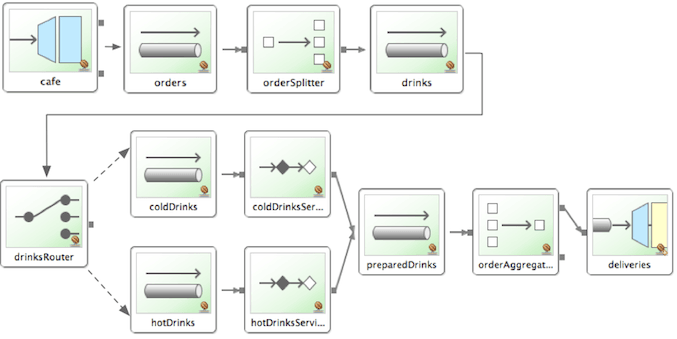
A myriad of adapters are provided by Spring Integration which help developers connect to databases, message brokers, and to many other external systems. In this case, adapters are being used for submitting and receiving messages to/from Google Cloud Pub/Sub. The Spring Cloud GCP project provides in- and outbound adapters for Pub/Sub and that makes message exchanges transparent from the point of view of a Spring Integration message flow.
If you read Josh’s article what he does is that he’s introducing Spring Integration for using Pub/Sub in a clean and consistent way. That means that direct references of PubSubTemplate are removed, as a consequence if you wanted to adapt examples in that article for example to RabbitMQ, all you would have to do is just replace the channel adapters accordingly.
What is Spring Cloud Stream?
Messaging is a really great fit for the microservices world where a set of distributed components communicate with each other. As messages and channels are first class citizens in Spring Integration, it’s a great fit for that. On the other hand, Spring Integration was specifically designed to implement those EIP patterns.
However, with modern application development, we don’t necessarily want to integrate with legacy systems, we’d rather integrate with modern message brokers like RabbitMQ, Apache Kafka or with GCP Pub/Sub in this case. That said, we don’t need the full repertoire of Spring Integration in terms of being able to integrate with a wide variety of external systems. That extra flexibility would require us to configure adapters, which we don’t need. If we’re just using GCP Pub/Sub or any other modern message broker previously mentioned, it becomes tedious having to define and configure the adapters for every single component.
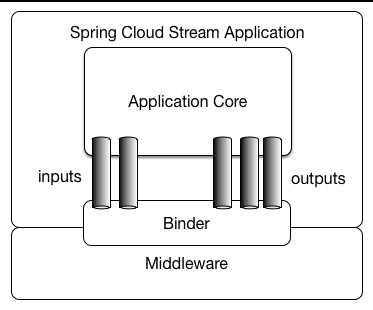
We do want the flexibility of being able to work with messages and we want to take advantage of using a message broker, but we don’t want to write that much code bare Spring Integration would require. Spring Cloud Stream builds on Spring Integration and it leverages the same primitives like messages and channels, but it off-loads the developer from having to wire these components together; as channels are connected to external brokers through middleware-specific Binder implementations.
Using Spring Cloud Stream with Google Cloud Pub/Sub
I think I’ve talked enough about the background of Spring Cloud Stream, Spring Integration and Google Cloud Pub/Sub. It’s time to see some code. There are two very simple Spring Boot applications, which exchange a simple string as the payload of messages. Let’s start with the publisher.
Publisher
This is basically a simple controller which send a simple String as the message’s payload. If you’ve worked with Spring Integration before, there’s nothing special about the sending part.
@RestController
public class PublisherController {

  private final MessageChannel outgoing;

  public PublisherController(Channels channels) {
    outgoing = channels.outgoing();
  }

  @PostMapping("/publish/{name}")
  public void publish(@PathVariable String name) {
    outgoing.send(MessageBuilder.withPayload("Hello " + name + "!").build());
  }

}
What’s interesting is how message channels are bound to the resources of an actual message broker. In line 6-8 a bean (Channels) is injected and that seems to hold a reference to the outgoing message channel.
import org.springframework.cloud.stream.annotation.Output;
import org.springframework.messaging.MessageChannel;

public interface Channels {

  @Output
  MessageChannel outgoing();

}
Channels in turn is just an interface where arbitrary number of message channels can be defined and marked with either @Input or @Output. Spring Cloud Stream takes care of instantiating a proxy object which is responsible for returning references to MessageChannel objects.
@EnableBinding(Channels.class)
@SpringBootApplication
public class PubsubPublisherApplication {

  public static void main(String[] args) {
    SpringApplication.run(PubsubPublisherApplication.class, args);
  }

}
Spring Cloud Stream relies on both Spring Boot and Spring Integration. The @EnableBinding annotation marks Channels as a bindable interface and pairs a logical binding name (outgoing) with a destination. What destination means that varies across binders, for Pub/Sub it means a topic for a message producer and a subscription for a message consumer. These bindings can be defined in application.yml.
spring:
  cloud:
    stream:
      bindings:
        outgoing:
          destination: reservations
Subscriber
The subscriber is even simpler than the publisher, it’s just a single class.
import org.springframework.boot.autoconfigure.SpringBootApplication;
import org.springframework.cloud.stream.annotation.EnableBinding;
import org.springframework.cloud.stream.annotation.StreamListener;
import org.springframework.cloud.stream.messaging.Sink;
import org.springframework.messaging.Message;

@Slf4j
@EnableBinding(Sink.class)
@SpringBootApplication
public class PubsubSubscriberApplication {

  public static void main(String[] args) {
    SpringApplication.run(PubsubSubscriberApplication.class, args);
  }

  @StreamListener(Sink.INPUT)
  public void handleMessage(Message<String> message) {
    log.info("Received: {}.", message.getPayload());
  }

}
What’s worth mentioning here is what Sink is? As we’ve just seen @EnableBinding can take interfaces and then the framework hides the complexity of wiring in- and outbound message adapters to message channels and it also configures the related infrastructure. Most applications just send or receive messages to/from a single channel. That’s why Spring Cloud Stream provides the Source, Sink, and Processor interfaces in order to help you cut down on code. That said, we could’ve also used a Source for the publisher instead of defining Channels, but I wanted to show what the framework is capable of.
Running the demo
In order to be able to run the examples, you’ll need the complete the following steps.
Create a GCP project
If you have one already, you can skip this step.
Start Google Cloud Shell
I think easier if you don’t have to install anything. Google Cloud Shell comes with Google Cloud SDK, Git, Maven and Java pre-installed by default.
Enable Pub/Sub API
As Spring Cloud Stream is an opinionated framework, applications built upon it will create topics and subscriptions on their own. That said, creating a topic and subscription manually is optional here. You’ll have to enable the Pub/Sub API though.
% gcloud services enable pubsub.googleapis.com
% gcloud pubsub topics create reservations
% gcloud pubsub subscriptions create reservations --topic=reservations
Clone the springuni-examples repo
% git clone https://github.com/springuni/springuni-examples.git
Start the publisher
% cd ~/springuni-examples/spring-cloud/spring-cloud-stream-pubsub-publisher
% mvn spring-boot:run
Start the subscriber
Google Cloud Shell comes with tmux support and that also means that it starts a tmux session by default. That can be disabled of course. Important point is that you don’t have to open a new shell, you just have to open a new window by hitting Ctrl-B and C. Refer to Tmux Key Bindings for further details.
% cd ~/springuni-examples/spring-cloud/spring-cloud-stream-pubsub-subscriber
% mvn spring-boot:run
Send a message
Open a new window again as before and send a message.
% curl -XPOST http://localhost:8080/publish/test
You should see the subscriber receiving it.
Questions
- What do you think what would happen if you started more subscribers?
- Would all of them receive the same message or only one of them?
- And of course why?
Leave a comment below and let me know what do you think!
Conclusion
We’ve seen what Google Cloud Pub/Sub is, what Spring Integration is and how an why Spring Cloud Stream builds upon Spring Integration to help developers create message driven microservices faster. With the code examples above I’ve taken Josh’s example further and used Spring Cloud Stream replacing Spring Integration and ultimately cut down on code even more.
Published on Java Code Geeks with permission by Laszlo Csontos, partner at our JCG program. See the original article here: Bootiful GCP: Spring Cloud Stream with Google Cloud Pub/Sub Opinions expressed by Java Code Geeks contributors are their own. |