Greetings! :)
After a few months away I decided to come back in style :). I noticed that one of my previous posts about the new Date/Time API got really popular, so this time I’m going to dedicate this post to another new feature of Java 8: Lambda Expressions.
Functional Programming
Lambda Expressions are the way by which the Java programming language finally implement nuances of functional programming.
The definition of functional programming is full of controversy. Here’s what wikipedia tells us about it:
“In computer science, functional programming is a programming paradigm, a style of building the structure and elements of computer programs, that treats computation as the evaluation of mathematical functions and avoids state and mutable data”
To summarize it, lambda expressions are going to allow passing of behavior, functions, as arguments in a method call. It’s a paradigm a little different from which java programmers are used to, since all this time we have only written methods that take objects as parameters, not another methods!
The Java platform actually got a little late at this party. Other languages such as Scala, C#, Python and even Javascript have been doing this for quite some time. Some people think that even though lambdas make it possible “do more with less”, it compromises code legibility. This allegation was often used by those who disagreed the addition of lambdas to the Java programming language. Martin Fowler himself once said:
“Any fool can write code that a computer can understand. Good programmers write code that humans can understand.”
Controversies aside, there’s at least one good reason in favor of lambda expressions: Parallelism. As multicore CPUs proliferate, writing code that can easily take advantage of parallel processing is an obligation. Until Java 8 there was no easy way of writing code that could easily iterate big collections of objects in parallel. As we’re going to see further ahead, using Streams will enable us to do just that.
Lambdas vs Anonymous Inner Classes
For those who can’t contain your excitement, here’s a first taste. The so called “classical” use of lambdas will occur in places where you would usually opt for anonymous classes. If you come to think of it, those are the exact places where we would want to pass “behaviors” instead of state (objets).
As an example I’m gonna be using the Swing API which most of you probably already know. In fact, situations like this are almost identical in any GUI API where we have to handle user events: JavaFX, Apache Wicket, GWT, and so on.
Using Swing, if you want some action to take place when a user clicks a button, you would do something like this:

What the above image shows is one of the most commonly used manner by which we handle events in Java. Notice however that our true intention was just passing a behavior to the addActionListener() method, the button action. What we ended up doing was passing an object (state) as argument, an anonymous ActionListener.
And how could the exactly same thing be done using lambdas? Like this:

Like I said before, we can “do more with less”. We passed as an argument to the addActionListener method just the action we really wanted to get done in the first place, only behavior. All that fuss needed to create an anonymous class just went away. Syntax details will be explored later, but the lambda expression in the code above boils down to:
(event) -> System.out.println("Button 2 clicked!")I know I know. Some of you might be thinking:
“Hang on just a second! I have been a swing programmer since the first episode of Dungeon & Dragons came out, and I have never seen an event processing with just one line of code!”
Chill, young jedi. It’s also possible to write lambdas with ‘n’ lines of code. But then again, the bigger the code, the less we gain in legibility:

Personally, I’m still part of those who think that even with multiple statements the code looks cleaner with lambdas than it does with anonymous classes. If we disregard indentation, all the syntax requires is adding up braces as block delimiters, and each statement get its own “;”:
(event) -> {System.out.println("First"); System.out.println("Second");}But don’t lose all hope just yet. There’s still a much cleaner way of handling events using lambdas when you have multiple statements. Just take a look at the code excerpt below:
public class MyFrame extends Frame {

    public MyFrame() {
        //create the button
        JButton button5 = new JButton("Button 5");

        //"buttonClick()" is a private method of this very class
        button5.addActionListener(e -> buttonClick(e));

        //etc etc etc
    }

    private void buttonClick(ActionEvent event) {
        //multiple statements here
    }
}
See? Simple as that.
@FunctionalInterface
To write a lambda expression you first need a so called “functional interface”. A “functional interface” is a java interface that has exactly one abstract method. Don’t forget this part, “one abstract method”. That’s because it’s now possible in Java 8 to have concrete method implementations inside interfaces: default methods as well as static methods.
As far as the specification is concerned, all those default methods and static methods you might have in your interface do not count under your functional interface quota. If you have 9 default or static methods and only one abstract method, it is still conceptually a functional interface. To make things a little clearer, there’s an informative annotation @FunctionalInterface whose sole purpose in life is to mark an interface as being “functional”. Be advised that as it happens with @Override, its use is merely to demonstrate intent at compile time. Although it is optional, I strongly recommend you use it.
ps: The ActionListener interface used previously has only one abstract method, which makes it a full fledged functional interface.
Let’s create a simple example in order to reinforce the syntax of lambda expressions. Imagine we want to create an API, a class, that work as a calculator of two operands of type Double. That is, a java class with methods to sum, subtract, divide and etc, two objects of type Double:
public class Calculator {
    public static Double sum(Double a, Double b) {
        return a + b;
    }

    public static Double subtract(Double a, Double b) {
        return a - b;
    }

    public static Double multiply(Double a, Double b) {
        return a * b;
    }

    //etc etc etc...
}
In order to use this calculator “straight out of NASA”, the clients of the API would simply invoke any of the static methods:
Double result = Calculator.sum(200, 100); //300
This approach however has some problems. Programming all the possible operations between two objects of type Double would be virtually impossible. Soon enough our clients would need less common operations, such as square root or whatever. And you, owner of this API, would be enslaved forever.
Wouldn’t it be great if our calculator was flexible enough to enable clients themselves inform which type of math operation they would like to use? To reach this goal, let’s first create an functional interface called DoubleOperator:
@FunctionalInterface
public interface DoubleOperator {

    public Double apply(Double a, Double b);

}
Our interface defines a contract by which operations on two objects of type Double are made, that also returns a Double. The exact operation will be left to the clients to decide.
Now the Calculator class needs only a single method, taking two Double operands as parameters and a lambda expression who will allow our clients inform what operation they want:
public class Calculator {

    public static Double calculate(Double op1, Double op2, DoubleOperator operator) {
        return operator.apply(op1, op2); //delegate to the operator
    }

}
Finally this is how our clients would invoke methods on our new API:
//sum
Double result1 = Calculator.calculate(30d, 70d, (a, b) -> a + b);
System.out.println(result1); //100.0

//subtract
Double result2 = Calculator.calculate(200d, 50d, (a, b) -> a - b);
System.out.println(result2); // 150.0

//multiply
Double result3 = Calculator.calculate(5d, 5d, (a, b) -> a * b);
System.out.println(result3); // 25.0

//find the smallest operand using a ternary operator
Double result4 = Calculator.calculate(666d, 777d, (a, b) -> a > b ? b : a);
System.out.println(result4); //666.0
The sky now is the limit. Clients can invoke the calculate() method with any idea that comes to mind. All they need to do is come up with a valid lambda expression.
A lambda has to sections separated by the character ‘->’. The left section is only for parameters declaration. The right section stands for the method implementation itself:

Notice how the left section has only parameters declaration, which correspond to the DoubleOperator.apply(Double a, Double b) signature. The parameter’s type can be inferred by the compiler and most of the time need not be informed. Likewise, the name of the parameters variables can be anything we want, not necessarily “a” and “b” like the signature of our functional interface:
//sum with explicit types
Double result1 = Calculator.calculate(30d, 70d, (Double x, Double y) -> x + y);

//another way
OperadorDouble operator = (Double op1, Double op2) ->  op1 + op2;
Double result2 = Calculator.calculate(30d, 70d, operador);
When your functional interface‘s method signature doesn’t have any parameters, all you need to do is place an empty “()”. This can be seen with the help of the Runnable interface:
/* The r variable can be passed to any method that takes a Runnable */
Runnable r = () -> System.out.println("Lambda without parameter");
Just out of curiosity I’m gonna show an alternate syntax that can also be used to declare lambdas, known as Method Reference. I’m not diving into details or I would need a whole book for this post. It provides an even cleaner way when all your expression wants is to make a method call:
JButton button4 = new JButton("Button 4");

//this
button4.addActionListener(ActionEvent::getSource);

//is equivalent to this
button4.addActionListener((event) -> event.getSource());
Do Not Reinvent The Wheel
Before moving on let’s just make a quick pause to remember this old jargon we all know. What it means is that in Java’s 8 API there are already tons of functional interfaces we may come to need on our daily work. Including one that can perfectly well eliminate our DoubleOperator interface.
All these interfaces are located inside the java.util.function package, and the main ones are:
| Name | Parameters | Return | Example |
|---|---|---|---|
| BinaryOperator<T> | (T, T) | T | Make any kind of operation between two objects of the same type. |
| Consumer<T> | T | void | Print a value. |
| Function<T, R> | T | R | Take an object of type Double and return it as a String. |
| Predicate<T> | T | boolean | Making any kind of test on the object passed as a parameter: oneString.endsWith(“suffix”) |
| Supplier<T> | – | T | Making an operation that doesn’t take any parameters but has a return value. |
This is not it. All the others are just variations of the ones mentioned above. Soon enough when we get to see the use of Streams we’re gonna have the opportunity to see most the them in action, and it’s gonna be a lot easier to fit the whole picture. We can however refactor our Calculator class and replace our old DoubleOperator interface by one already provided in the JDK, BinaryOperator:
public class Calculator {

    public static <T> T calculate(T op1, T op2, BinaryOperator<T> operator) {
        return operator.apply(op1, op2);
    }

}
For our clients little would change, except the fact that the BinaryOperator interface has parameterized types, generics, and now our calculator is even more flexible for we can make math operations between two objects of any type, not just Doubles:
//sum integers
Integer result1 = Calculator.calculate(5, 5, (x, y) -> x + y);
Collections & Streams
As developers we probably waste most of our time using third parties APIs, not making our own. And this is what we’ve accomplished so far in this article, seeing how we can employ lambdas in our own APIs.
It’s time however to analyze some of the changes made to the core Java APIs that allows us to use lambdas when manipulating collections. To illustrate our examples we are going to use a simple class, Person, which has a name, age and sex (“M” for Male and “F” for Female):
public class Person {

    private String name;
    private Integer age;
    private String sex; //M or F

    //gets and sets
}
All examples up ahead require collections of objects, so imagine we have a collection of objects of type Person:
List<Person> persons = thisMethodReturnsPersons();
We start by the new method stream() that was added to the Collection interface. Since all collections “extends” Collection, all Java collections have inherited this method:
List<Person> persons = thisMethodReturnsPersons();
Stream<Person> stream = persons.stream(); //a stream of person objects
Despite of that it seems, the Stream interface is not just one more regular type of collection. A Stream is more of a “data flow” abstraction that enables us to transform or manipulate its data. Unlike the collections we already know, a Stream doesn’t allow direct access to its elements (we would need to transform the Stream back to Collection).
For comparison let’s see how our code would look like if we had to count how many female objects we have in our collection of persons. First, without streams:
long count = 0;
List<Person> persons = thisMethodReturnsPersons();
for (Person p : persons) {
    if (p.getSex().equals("F")) {
        count++;
    }
}
Using a for loop we create a counter that gets incremented each time a female is encountered. Codes like this we have all done hundreds of times.
Now the same thing using a stream:
List<Person> persons = thisMethodReturnsPersons();
long count = persons.stream().filter(person -> person.getSex().equals("F")).count();
Much cleaner, isn’t it? It all begins by calling the stream() method, all the other calls are chained together since most methods in the Stream interface were designed with the Builder Pattern in mind. For those not used to method chaining like these, it might be easier to visualize like this:
List<Person> persons = thisMethodReturnsPersons();
Stream<Person> stream = persons.stream();
stream = stream.filter(person -> person.getSex().equals("F"));
long count = stream.count();
Let’s focus our attention in the two methods of the Stream we used, filter() and count().
The filter() takes the condition by which we want to filter our collection. And this condition is represented by a lambda expression who takes one parameter and returns a boolean:
person -> person.getSex().equals("F")Not by chance, the functional interface used to represent this expression, the parameter of the filter() method, is the Predicate interface. She has only one abstract method, boolean test(T t):
@FunctionalInterface
public interface Predicate<T> {

    boolean test(T t);

    //non abstract methods here
}
The parameterized type T is representing the type of the element of our stream, that is, Person objects. So it makes as though our lambda expression implement the test() method like this:
boolean test(Person person) {
    if (person.getSex().equals("F")) {
        return true;
    } else {
        return false;
    }
}
After the filtering all that is left is to call the count() method. There’s not much to it, it simply counts how many objects we have left in our stream after the filtering took place (we could have many more things besides just filtering). The count() method is considered a “terminal operation” and after it’s invoked that stream is said to be “consumed” and can no longer be used.
Let’s take a look at some other methods of the Stream interface.
collect()
The collect() method is often used to perform a mutable reduction on a stream (follow the link for details). That usually means transforming a stream back to a normal collection. Notice that like the count() method, the collect() method is also a “terminal operation”!
Suppose a small variation of our last example, where we wanted to filter out only female objects from our collection of persons. This time however we’re not going to just filter the female (filter()) and then count them (count()). We’re going to physically separate all female objects in an entirely different collection, which will contain only females:
List<Person> persons = thisMethodReturnsPersons();

//creating a List with females only
List<Person> listFemales = persons.stream()
        .filter(p -> p.getSex().equals("F"))
        .collect(Collectors.toList());

//creating a Set with females only
Set<Person> setFemales = persons.stream()
        .filter(p -> p.getSex().equals("F"))
        .collect(Collectors.toSet());
The filtering part remains the same, the only difference is the call to collect() at the end. As we can see this call takes a argument, and object of type Collector.
To build an object of type Collector takes a little work, so fortunately there’s a class who allows us to build them in a more convenient manner, meet the Collectors (plural) class. As showed in Collectors.toList() and Collectors.toSet(). A few interesting examples:
//We can choose the specific type of collection we want
//by using Collectors.toCollection().

//another way for building a Stream
Stream<String> myStream = Stream.of("a", "b", "c", "d");

//transforming into a LinkedList (using method reference)
LinkedList<String> linkedList = myStream.collect(Collectors.toCollection(LinkedList::new));

//transforming into a TreeSet
Stream<String> s1 = Stream.of("a", "b", "c", "d");
TreeSet<String> t1 = s1.collect(Collectors.toCollection( () -> new TreeSet<String>() ));

//using method reference, the same would be accomplished like this
Stream<String> s2 = Stream.of("a", "b", "c", "d");
TreeSet<String> t2 = s2.collect(Collectors.toCollection( TreeSet::new ));
Notice how the Collectors.toCollection() method takes a lambda expression of type Supplier.
The functional interface Supplier provides a single abstract method T get(), which doesn’t take any parameters and returns a single object. That’s why our expression was simply a call to the collection constructor we wanted to use:
() -> new TreeSet<String>()
map()
The map() method is pretty straightforward. It can be used when you want to transform each element of one collection in some other type of object, that means, map each element of a collection to another type of element.
Taking our example one step further, let’s try the following scenario: Given a collection of Person objects, let’s obtain a entirely different collection who only contains our female objects names as Strings, all in uppercase letters. Summarizing it, besides using filter() and collect() to separate all our female objects in their own collection, we’re also going to use the map() method to transform each female Person object into its String representation (the name in uppercase):

And here’s the code:
List<Person> persons = thisMethodReturnsPersons();

List<String> names = persons.stream()
        .filter(p -> p.getSex().equals("F"))
        .map(p -> p.getName().toUpperCase())
        .collect(Collectors.toList());
The functional interface used as a parameter for the map() method was Function, whose only abstract method R apply(T t) takes an object as parameter and returns an object of a different type. That’s exactly what map() is about: taking a Person and turning into a String.
forEach() & forEachOrdered()
Perhaps the most simple of all, forEach() and forEachOrdered() provide means to visit each element in a stream, for instance to print each element in the console when encountered. The main distinction between the two is that the first does not guarantee “encounter order”, and the second does.
If a stream possesses or not “encounter order” depends on the collection that originated it, as well as intermediary operations performed in it. Streams originated from a List have a defined order as expected.
This time the functional interface is Consumer, whose abstract method void accept(T t) takes a single parameter and doesn’t return anything:
List<Person> persons = thisMethodReturnsPersons();

//print without any "encounter order" guarantee
persons.stream().forEach(p -> System.out.println(p.getName()));

//print in the correct order if possible
persons.stream().forEachOrdered(p -> System.out.println(p.getName()));
Remember that forEach() and forEachOrdered() are also terminal operations! (you don’t need to know this by heart, just look it up in the javadocs when needed)
min() & max()
Finding the minimum and maximum element of a collection also got a lot easier using lambda expressions. Using regular algorithms, this is the kind of routine that is simple and really annoying at the same time.
Let’s get our collection of Person objects and find the youngest and oldest person inside it:
List<Person> persons = thisMethodReturnsPersons();

//youngest using min()
Optional<Person> youngest = persons.stream()
        .min((p1, p2) -> p1.getAge().compareTo(p2.getAge()));

//oldest using max()
Optional<Person> oldest = persons.stream()
        .max((p1, p2) -> p1.getAge().compareTo(p2.getAge()));

//printing their ages in the console
System.out.println(youngest.get().getAge());
System.out.println(oldest.get().getAge());
The methods min() and max() also take a functional interface as parameter, only this one is not new: Comparator. (ps: If you’re reading this article and have no idea what a “Comparator” is, I suggest taking a step back and trying to learn java basics before having fun with lambdas)
The code above has also something else we haven’t seen before, the class Optional. This is also a new feature in Java 8 and I’m not going through details about it. In case you’re curious, just follow this link.
The same result could be achieved by using the new static method Comparator.comparing(), which takes a Function and acts as an utility for creating comparators:
//min()
Optional<Person> youngest = persons.stream().min(Comparator.comparing(p -> p.getAge()));

//max()
Optional<Person> oldest = persons.stream().max(Comparator.comparing(p -> p.getAge()));
A little more on collect() and Collectors
Using the method collect() enables us to make some really interesting manipulations, along with the help of some of the built-in Collectors.
It’s possible for instance to calculate the average age of all our Person objects:
List<Person> persons = thisMethodReturnsPersons();

Double average = persons.stream().collect(Collectors.averagingDouble(p -> p.getAge()));

System.out.println("A average is: " + average);
There are 3 methods in the class Collectors who can help us in that direction, each of them specific to a type of data:
- Collectors.averagingInt() (integers)
- Collectors.averagingLong() (longs)
- Collectors.averagingDouble() (doubles)
All of these methods return a valid Collector that can be passed as an argument to collect().
Another interesting possibility is being able to partition a collection, a stream, into two collection of values. We already have done something similar when we created a new collection exclusively for our female Person objects, however our original collection still kept both female and male objects mixed in it. What if we wanted to partition the original collection into two new ones, one only with males and another one with females?
To make this happen, we’ll use Collectors.partitioningBy():
List<Person> persons = thisMethodReturnsPersons();

//a Map Boolean -> List<Person>
Map<Boolean, List<Person>> result = persons.stream()
        .collect(Collectors.partitioningBy(p -> p.getSex().equals("M")));

//males stored with the 'true' key
List<Person> males = result.get(Boolean.TRUE);

//females stored with the 'false' key
List<Person> females = result.get(Boolean.FALSE);
The Collectors.partitioningBy() method shown above works by creating a Map with two elements, one stored with the key ‘true’ and the other with the ‘false’ key. Since it takes the functional interface of type Predicate, whose return is a boolean, the elements whose expression evaluates to ‘true’ go in the ‘true’ collection, and those who evaluates to ‘false’ go in the ‘false’ collection.
To get this over with, let’s suppose one more scenario where we might want to group all our Person objects by age. It looks like what we’ve done with Collectors.partitioningBy() except that this time it’s not a simple true/false condition, it will be a condition determined by us, the age.
Piece of cake, we just use Collectors.groupingBy():
//Map "Age" -> "List<Person>"
Map<Integer, List<Person>> result = persons.stream()
        .collect(Collectors.groupingBy(p -> p.getAge()));
How would you do that without lambdas? Gives me a headache just to think about it.
Performance and Parallelism
At the beginning of this article I mentioned that one of the advantages of using lambda expressions was the ability of manipulating collections in parallel, and that’s what I’m going to show next. Surprisingly, there’s not much to show. All we need to do in order to make all our previous code into “parallel processing” is changing one single method call:
List<Person> persons = thisMethodReturnsPersons();

//sequential
Stream<Person> s1 = persons.stream();

//parallel
Stream<Person> s2 = persons.parallelStream();
That’s it. Just change the call to stream() for parallelStream() and parallel processing takes place. All the other chained method calls remain the same.
To demonstrate the difference of using parallel processing, I made a test using our last code example where we grouped all Person objects by age. Taking into account a test data of 20 million objects, this is what we got:
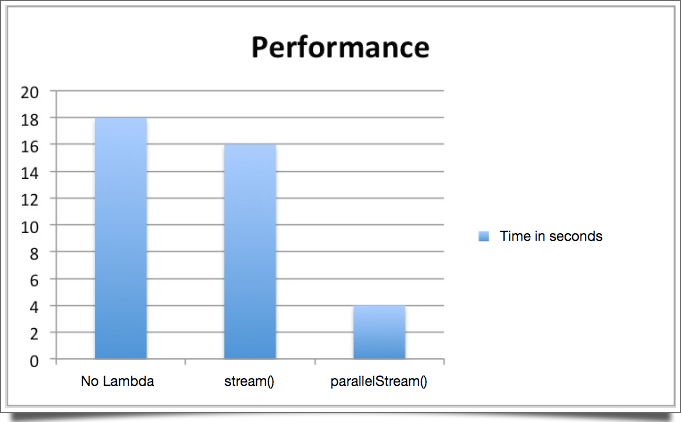
If we compare the “old school” way without lambdas with sequential lambda processing, stream(), we can say it’s a draw. On the other hand parallelStream() seemed to be three times as fast. Only 4 seconds. That’s a 300% difference.
ATTENTION: This DOES NOT mean in any way that you should do all your processing in parallel!
Besides the obvious fact that my tests are too simplistic to be considered blindly, it’s important to take into account before opting for parallel processing that there’s an inherent overhead to parallelism: The collection is decomposed into multiple collections and then merged again to form the final result.
That being said, if there isn’t a relatively large number of elements the cost of parallel processing probably is not going to pay off. Analyse carefully before using parallelStream() indiscriminately.
Well I guess this is all. Of course covering everything is impossible, would take a whole book, but I think a lot of relevant aspects were shown here. Leave a comment if you have anything to say.
Happy coding!
| Reference: | Java 8 Lambda Expressions Tutorial from our JCG partner Rodrigo Uchoa at the Code to live. Live to code. blog. |