Privacy Mode on, client code in, done?
Not quite. That toggle decides whether Cursor trains on your code. It doesn’t decide whether your plan even comes with a Data Processing Agreement (DPA). Nor whether the agent’s terminal can read your .env file, or how long a Cloud Agent keeps your repository.
I started coding with AI in mid-2023, back then with Cursor. Since mid-2025 I’ve been building with Claude Code and have put more than 800 hours into it. Both tools raise the same privacy questions. The switches just have different names.
So here’s the short answer first, in one table. After that, you’ll set up Cursor in 7 steps so you can use it with client code under GDPR, at least as far as plans and settings go.
- Cursor’s DPA applies to Teams and Enterprise, not individual plans. Privacy Mode does not replace that agreement for processing personal data on your behalf.
- Privacy Mode prevents training on your code. It is on by default for teams; enforce it if members must not disable it. Content still reaches Cursor and model providers.
- Cloud Agents need separate assessment. Chats stay until deletion by default. Admins of selected Enterprise teams with early access can cap conversation retention at 90 days. The cloud docs state 90 days after last activity for snapshots; clarify the conflicting vendor guidance.
Cursor GDPR at a glance
There are three ways to use Cursor. You’re on an individual plan, on a Teams or Enterprise account, or you bring your own API key. Each route answers the questions that matter for client code a little differently:
| Feature | Free, Plus, Premium, Super, Ultra | Teams, Enterprise | Own API key |
|---|---|---|---|
| DPAPlan-dependent | No | Yes | Cursor plan and separate provider DPA |
| No training on your code | with Privacy Mode | with Privacy Mode | Cursor and provider terms |
| Privacy Mode on by default | n/a | Yes | n/a |
| Editor retention | no single period | feature and agreement dependent | Cursor and provider terms |
| Cloud AgentsChat / snapshot | chat until deletion / 90 days | chat until deletion or enabled Enterprise policy / 90 days | assess Cursor rules separately |
| Zero data retentionPrivacy Mode, per model | Partial | Partial | No |
| Full EU residencyEnterprise: US only | No | No | No |
| Key switch | Privacy Mode | Enforce Privacy Mode | Settings > Models |
Check retention by feature and data type. “n/a” does not mean no storage. For processing personal data on your behalf, you need a suitable DPA; Privacy Mode does not replace it.
1. Pick a plan that includes a DPA
Since October 12, 2026, Cursor comes as a free plan, Individual plans at Plus ($8), Premium ($30), Super ($100), and Ultra ($200) per month, Teams from $30 per user, and Enterprise. The earlier Hobby, Pro, and Pro+ tiers have been replaced. Here’s the pricing page:
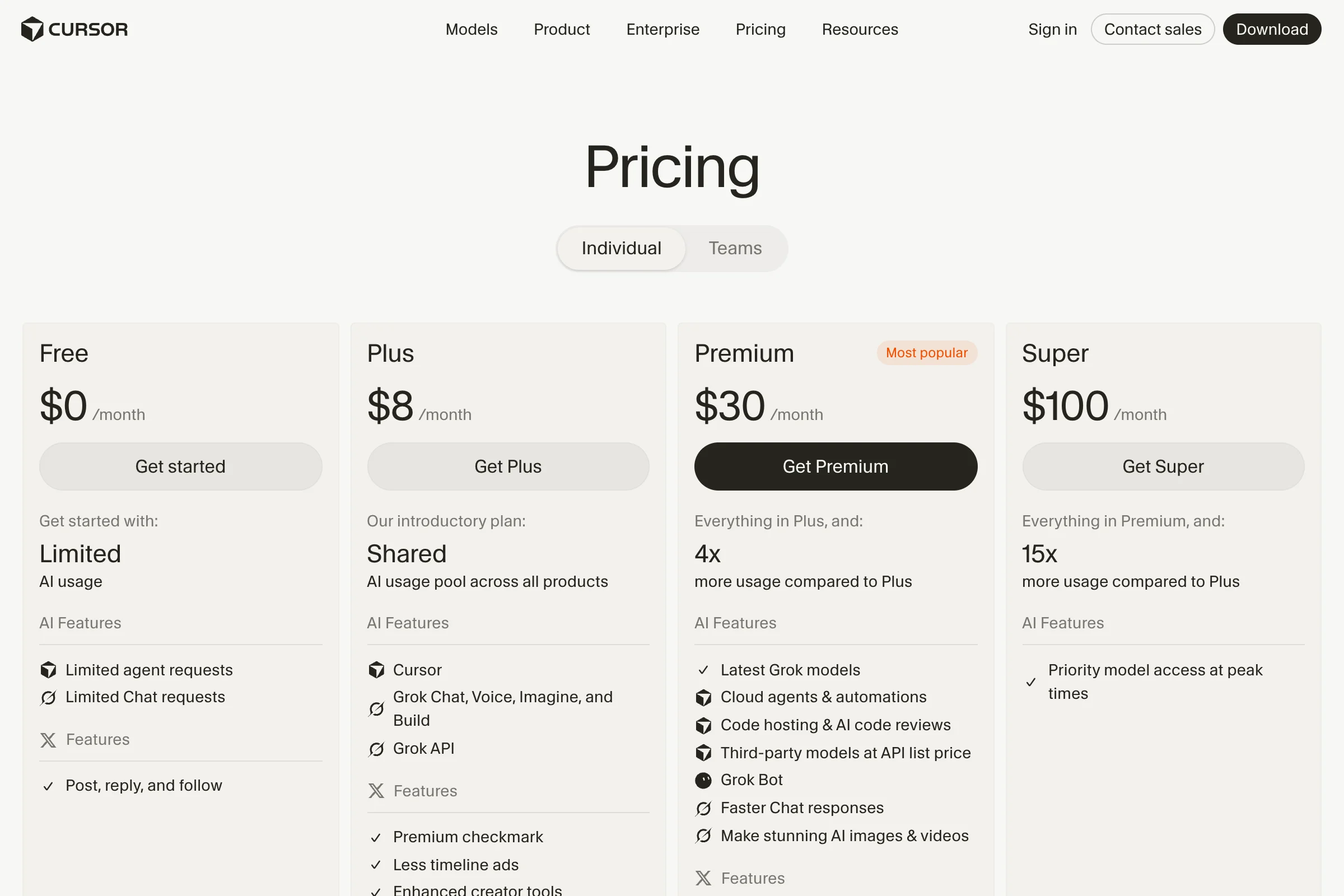
The difference that matters for privacy isn’t on that page. It’s in Cursor’s privacy help, and it’s clear. The DPA covers Teams and Enterprise customers. On an individual plan it explicitly doesn’t apply, and your data is handled under the privacy policy alone.
For client projects where Cursor processes personal data on instructions, I’d assess Teams or Enterprise. An individual plan such as Premium with Privacy Mode does not provide the Cursor DPA. Code without personal data needs a separate assessment; confidentiality and client agreements still apply.
The Cursor DPA includes SCCs (Module 2). New subprocessors normally have 30 business days’ advance notice; urgent changes permit notice within ten business days afterward. Check the Trust Center list and the objection procedure.
The DPA is one part of your assessment. Whether Cursor trains on your code also depends on Privacy Mode.
2. Turn on Privacy Mode before your first prompt
Open Cursor Settings and choose “General”. In the Agents view, use the gear icon to open settings. Under General > Privacy > Privacy Mode, click “Configure” and choose “Privacy Mode”. Check that the tick appears next to that option.
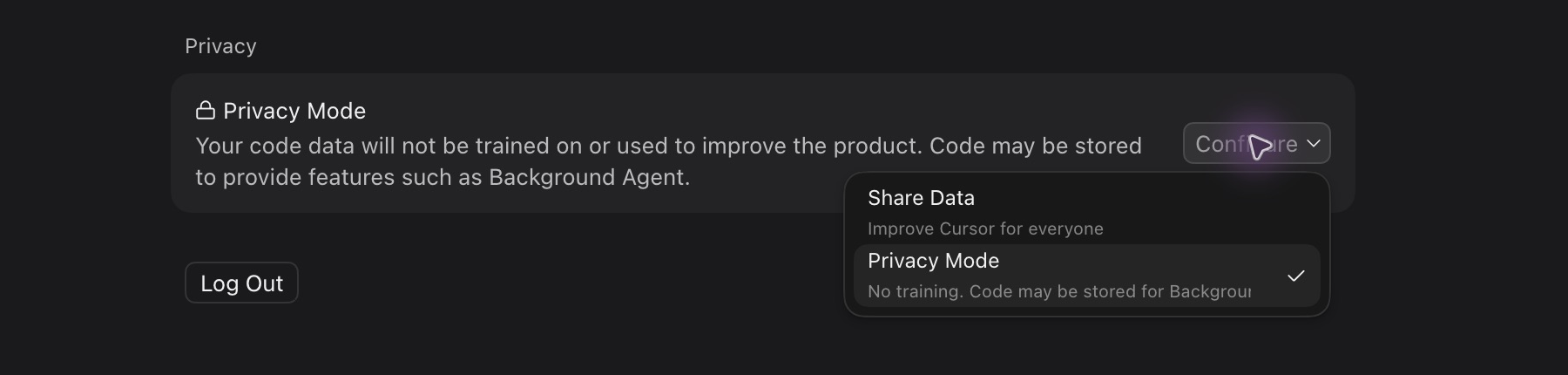
On teams, Privacy Mode is on by default for every member. Admins can enforce it for the whole organization at cursor.com/dashboard, so nobody can switch it off. Cursor doesn’t name a default for the individual plans.
So look before you open your first client project.
Cursor’s data use page is pretty upfront about why this matters. With Privacy Mode off, Cursor may store codebase data, prompts, editor actions, and code snippets and use them to train its models.
With Privacy Mode on, Cursor does not train on your code. Its provider ZDR agreements cover supported models and requests, not every form of storage. Assess the model and abuse-monitoring exceptions below, and BYOK separately.
However:
Nothing becomes local. Prompts and the code context they need still go to Cursor and to model providers like OpenAI, Anthropic, and Google. There are also two exceptions worth knowing.
Cursor and other model providers may use risk classifiers to detect violations of their terms and usage policies. If a prompt or conversation triggers an abuse detector, the data may be stored for investigation and deleted according to the providers’ retention policies. Some models also require retention on the provider side, which takes them outside the ZDR agreements. Those models are off by default and need an admin’s approval.
So Privacy Mode controls what happens to your data once it reaches Cursor. What gets there in the first place depends on your project folder.
The current Search docs describe a local Instant Grep index. Cursor says building it uploads neither file paths nor code. When Agent opens a match, its file content can still enter a model request.
A Cursor research article separately describes server-side semantic indexes. A technical indexing article names file uploads, filenames, SHA-256 hashes, code chunks, and cached embeddings (vector representations) in that flow.
The current product docs do not establish that this semantic data flow applies to every current plan and version. These sources give no general deletion period for the index or embedding cache.
3. Keep secrets out of context with .cursorignore
A project .cursorignore is intended to exclude files from Agent, Tab, Inline Edit, and @ context. Cursor does not guarantee full protection; it is not a file-access boundary. The ignore docs describe .gitignore-style patterns. This is a starting point for common secret files.
.env
.env.*
**/credentials.json
**/secrets.json
**/*.pem
**/id_rsa
private-data/
Then add the folders in your project that hold test data, exports, or database dumps. A zipped backup sitting in the repo can contain exactly the client data you removed from the visible code months ago.
.env file in the terminal, its contents reach the model through the tool output anyway.Keep production credentials in a secret store that the agent process cannot read. Being outside the project folder alone does not stop terminal access. Restrict inherited credentials and process permissions too.
4. Put the brakes on the terminal and MCP servers
The terminal can read files, run programs, and send data. Find approvals under Cursor Settings > Agents > Execution and Approvals > Run Mode. Current run modes are ‘Auto-review’, ‘Allowlist’, and ‘Run Everything’. ‘Ask Every Time’ is deprecated for new users; an empty Allowlist reproduces approval for every call.
The hardening guide recommends Auto-review with sandboxing. Eligible shell commands may be sandboxed; allowlisted calls and Fetch or MCP tools may run outside it. The classifier runs on Cursor’s backend, can use local read-only file and search tools, and is explicitly not a security boundary.
For client projects, I’d avoid ‘Run Everything’. Check which commands are covered and their file and network permissions. Classifier approval does not demonstrate that no personal data is transmitted.

For every MCP server and extension, ask where it runs and what data it gets. Your contract with Cursor doesn’t cover third-party tool vendors. To help your team understand what those approvals mean, the EU AI literacy guide is useful for training.
No contract stops a nosy terminal. And no API key of your own gets you around Cursor’s servers either.
5. Don’t count on your own API key
Plenty of people hope that bringing their own key (BYOK) lets them skip Cursor and talk to OpenAI or Anthropic directly. Under Cursor Settings > Models, expand “API Keys”. Find the input field and the switch to use the key for your provider:
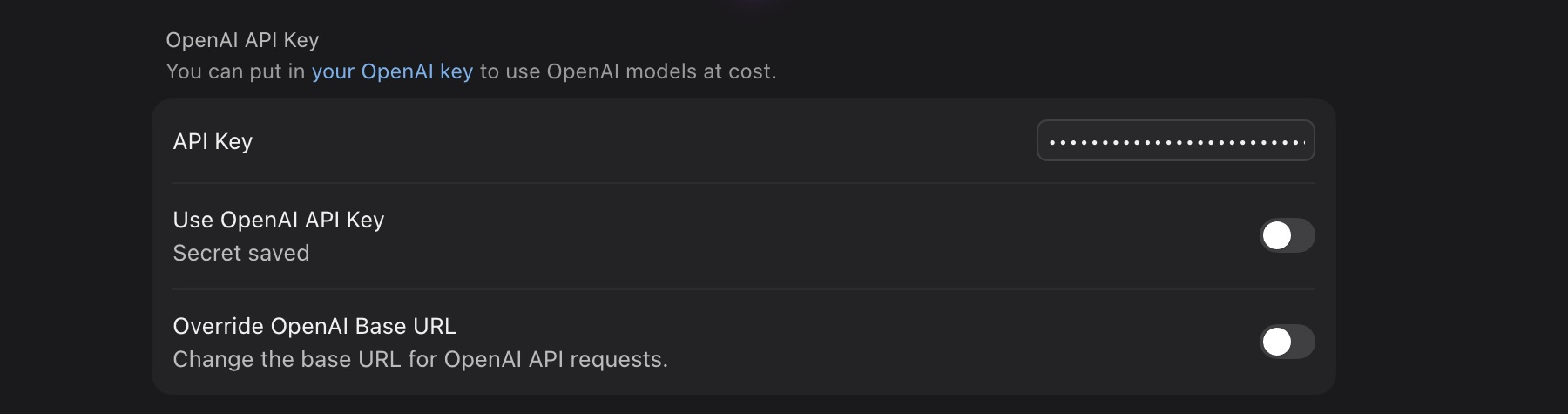
BYOK changes billing but does not bypass Cursor’s backend. The API key docs say it still builds the final prompt there and does not keep the key on Cursor’s servers after the request. Cursor’s ZDR agreements do not cover BYOK. Assess Cursor’s processing and your provider’s agreement, model, and retention separately.
Data location works much the same way. Cursor’s governance docs let Enterprise customers enroll in US-only residency, which keeps inference, processing, and storage for supported features in the US. For the EU and Iceland, there’s inference-only coverage on request. Cursor says broader EU support is in development.
US residency excludes BYOK, custom model gateways, sign-in through WorkOS, MCP servers, and integrations, among other things. An EU project key from your provider doesn’t move Cursor to Europe.
If you’re using OpenAI models anyway, Codex puts you on a different contract. The Codex privacy guide walks through its switches. Even more data leaves your machine once a Cloud Agent clones your whole repository.
6. Sign off on Cloud Agents separately
A Cloud Agent doesn’t run on your laptop. It runs in a virtual machine in Cursor’s cloud, with your cloned repository, installed dependencies, your secrets, and network access. Cursor’s Cloud Agent security overview shows how long each kind of data stays:
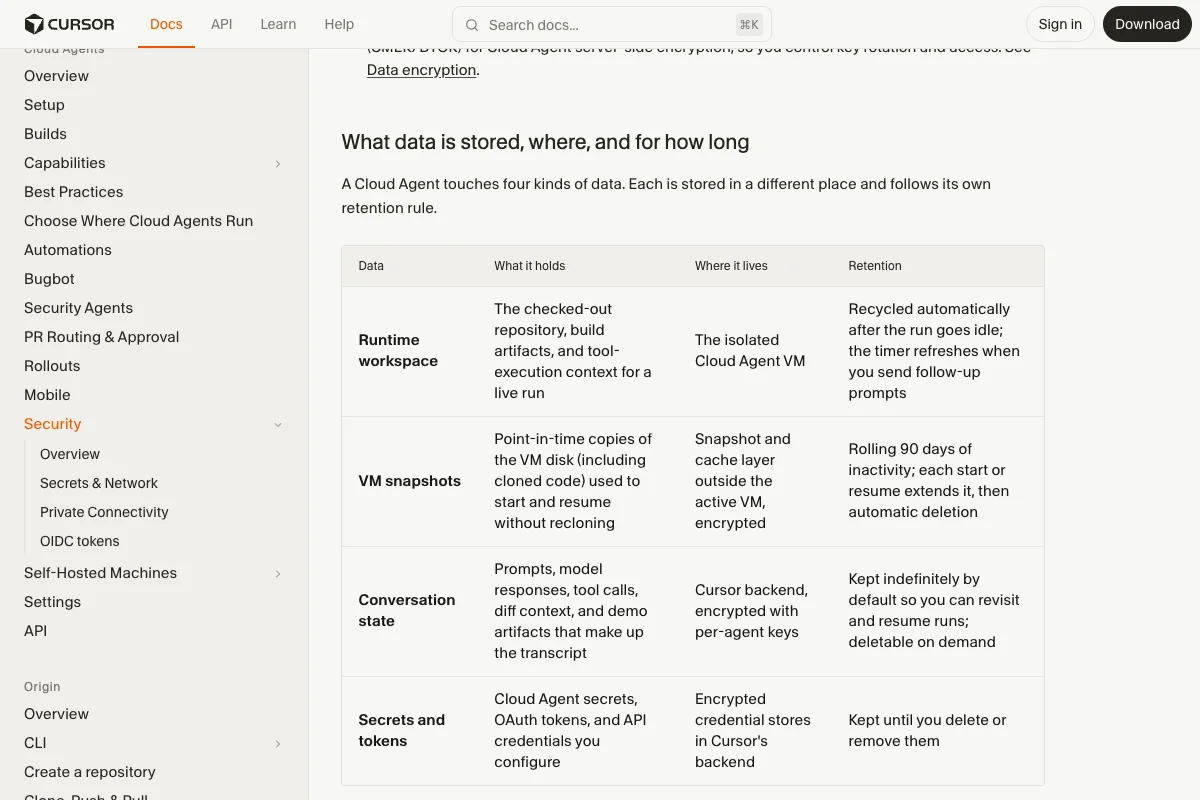
How long Cursor keeps what
Cursor recycles the workspace automatically once a run goes idle. The specific cloud documentation states 90 days from last activity for VM snapshots; each start or resume resets the clock. Conversations are kept indefinitely by default until you delete them. Secrets and tokens stay until you remove them.
The Delete Agent API removes transcripts and artifacts, not snapshots. The Cloud Agent docs say admins of selected Enterprise teams with early access can cap conversation retention at 90 days. For snapshots, the hardening page instead states 30 days of inactivity. Do not rely on the shorter period when approving use; have the rule for your offering confirmed.
What Privacy Mode changes for Cloud Agents
The security overview describes Cloud Agents in Privacy Mode without Cursor training. However, the configuration page also mentions starting runs with Privacy Mode disabled. Check and enforce it before each run; enabling it during a run does not change that run’s mode, according to Cursor. They do not support Legacy Privacy Mode because they must store code and environment data in the cloud during operation.
So Privacy Mode and a stored conversation can exist side by side.
Then there’s the network. Cloud Agents have internet access by default and run terminal commands on their own. In the network settings you can limit outbound traffic to an allowlist, and lock that down for the whole organization if you need to.
With Self-Hosted Machines, file edits, the terminal, and local MCP servers run on a machine you manage. Cursor still runs the agent loop, inference, and planning, though, and file contents, tool output, and artifacts can reach it.
Five questions before you switch them on
Before you enable Cloud Agents for a client project, you should be able to answer these:
- Which repositories can the Git integration clone?
- Which test credentials does the environment get, and what data do they unlock?
- Which external hosts can the agent reach?
- Who on your team can see conversations and artifacts?
- When do you delete conversations, and who removes secrets you no longer need?
If you can’t answer them yet, I’d block Cloud Agents for that project and stick with the local agent for now. Only a small test tells you whether your settings actually hold.
7. Test everything with a dummy repository
Create a test project with no real client data. Add one normal sample file and one file with made-up content that’s listed in .cursorignore. That way you see what slips through without risking a real secret. Then work through this order:
- Check the account, the organization, Privacy Mode, and the selected model.
- Ask the agent what’s in the ignored file, without the terminal.
- Ask again with the terminal and every MCP server you plan to allow.
- Watch which commands Auto-review runs without asking.
- Test Cloud Agents separately, including Git permissions, the allowlist, and deletion.
Write down the setting, the Cursor version, and the result for each point. If the ignored file leaks anywhere, block exactly that feature until you’ve changed it and tested again. Asking the agent nicely in the chat is not a technical boundary.
What GDPR asks of you on top
The steps reduce particular technical risks. Also assess roles, legal basis, the required DPA, individual rights, transfers outside the EEA, and any DPIA requirement. General requirements are in the GDPR section. Assess Cursor’s own terms and approvals separately.
Cursor vs. Claude Code vs. Codex on privacy
If you’re weighing the three big coding agents against each other, this comparison of the key privacy facts helps:
| Feature | Claude Code | Codex | Cursor |
|---|---|---|---|
| DPA from plan | Team, Enterprise, API | Business, Enterprise, API | Teams, Enterprise |
| No training on business plansExceptions apply | by default | by default | with Privacy Mode |
| No training on individual plans | after opt-out | after opt-out | with Privacy Mode |
| RetentionBy data and feature | sessions usually 30 days | API logs up to 30 days | editor and cloud separate |
| European optionsLimited scope | e.g. AWS or Google | eligible Enterprise, Edu, API configuration | inference on request |
| Key switch | Help improve our AI models | Improve the model for everyone | Privacy Mode |
For ChatGPT Edu, OpenAI points to a separate Student Data Privacy Agreement. Assess your institution’s agreement separately.
See my guides to Claude Code and Codex for details. These retention figures describe differently scoped commitments; compare the actual data types and features.
Where I’d start tomorrow
For personal client data processed on instructions, you need a suitable agreement and an assessment of the whole operation. Privacy Mode and limited context are building blocks. Cloud Agents additionally move repository work and stored data to Cursor infrastructure. Assess their permissions, network routes, and deletion separately and after relevant changes.
Open Cursor Settings > General now and check that “Privacy Mode” has the matching option selected. It takes less than a minute, and no other setting changes as much.