

The req.body property contains key-value pairs of data submitted in the request body. By default, it is undefined and is populated when you use a middleware called body-parsing such as express.urlencoded() or express.json().
Syntax:
req.bodyParameter: No parameters.
Return Value: Returns the parsed request body. It is typically an object when using express.json() or express.urlencoded().
Steps to Install the express module:
Step 1: You can install this package by using this command.
npm install expressStep 2: After installing the express module, you can check your express version in the command prompt using the command.
npm version expressStep 3: After that, you can just create a folder and add a file, for example, index.js. To run this file you need to run the following command.
node index.jsProject Structure:
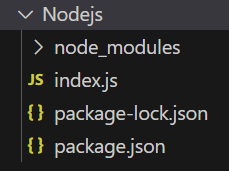
Example 1: Below is the code of req.body Property implementation.
const express = require('express');
const app = express();
const PORT = 3000;
// For parsing application/json
app.use(express.json());
// For parsing application/x-www-form-urlencoded
app.use(express.urlencoded({ extended: true }));
app.post('/profile', function (req, res) {
    console.log(req.body);
    res.send();
});
app.listen(PORT, function (err) {
    if (err) console.log(err);
    console.log("Server listening on PORT", PORT);
});
Steps to run the program:
Run the index.js file using the below command:
node index.jsNow make a POST request to http://localhost:3000/profile with the following body:
{
    "title":"Greetings from GeeksforGeeks"
}
Console Output:

Example 2: Below is the code of req.body Property implementation.
const express = require('express');
const app = express();
const PORT = 3000;
app.use(express.json());
app.use(express.urlencoded({ extended: true }));
app.post('/signup', function (req, res) {
    const data = req.body;
    console.log("Name: ", data.name);
    console.log("Age: ", data.age);
    console.log("Gender: ", data.gender);
    res.send();
});
app.listen(PORT, function (err) {
    if (err) console.log(err);
    console.log("Server listening on PORT", PORT);
});
Steps to run the program:
Run the index.js file using the below command:
node index.jsNow make a POST request to http://localhost:3000/signup with the following request body:
 {
     "name": "Gourav",
     "age": 13,
     "gender":"Male"
 }
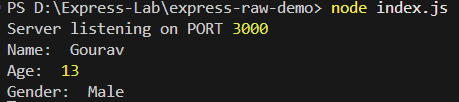
Output:
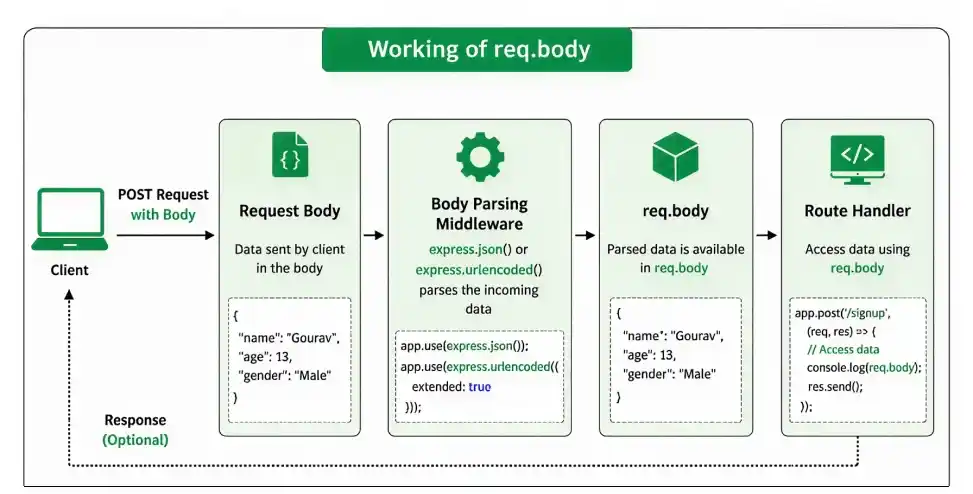
Working of req.body
- The client sends data in the request body.
- Middleware such as express.json() or express.urlencoded() parses the incoming data.
- The parsed data is stored in req.body.
- The route handler can access the values using req.body.
Middleware for Parsing Request Body
Express provides middleware to parse request bodies. The two most commonly used middleware are:
- express.json(): Parses incoming JSON-formatted data in the body of the request.
app.use(express.json()); // Parses JSON request bodies- express.urlencoded(): Parses URL-encoded form data (typically used in HTML forms). The extended: true option allows parsing of complex objects like arrays.
app.use(express.urlencoded({ extended: true }))Handling Large Request Bodies
Express's default body parser has limits on the size of the incoming data. If your application receives large JSON or URL-encoded request bodies, you can increase the parsing limit using the limit option.
app.use(express.json({ limit: '10mb' }));  // Set the maximum body size to 10 MB
app.use(express.urlencoded({ extended: true, limit: '10mb' }));
Common Use Cases of req.body
- Form Submissions: Capturing data from forms (login, signup, etc.).
- API Requests: Handling JSON payloads sent by the client to interact with the server.
- File Uploads: Parsing file data from multi-part form submissions (although for this, you'd typically use additional middleware like multer).
