

The express.text() function is a built-in middleware in Express.js that parses incoming HTTP request bodies with a text/plain content type. It allows you to easily handle raw text data sent in the body of a request, making it suitable for handling non-JSON, non-URL-encoded, or non-multipart data.
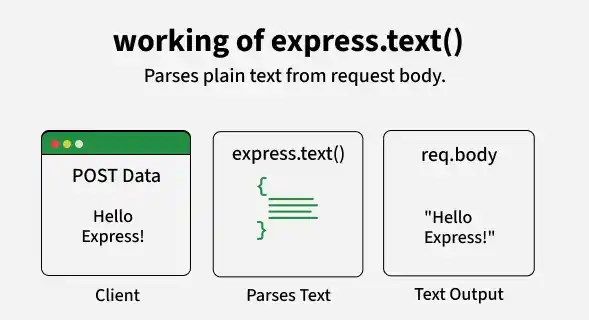
The middleware parses the request body and makes it available in req.body, allowing you to access and work with the text data easily.
Syntax
express.text([options])Parameter: The options parameter contains various properties like defaultCharset, inflate, limit, verify, etc.
- defaultCharset: Specifies the default character encoding (default: utf-8)
- inflate: Allows handling of compressed request bodies
- limit: Defines the maximum size of the text payload
- verify: Custom function to validate request body before parsing
Return Value: Parses the request body as a string and makes it available in req.body.
Steps to Use express.text() Middleware
Step 1: Set Up a Node.js Project
mkdir express-text-demo
cd express-text-demo
npm init -y
Step 2: Install Express
npm install expressStep 3: Create index.js and Add the Middleware
This example demonstrates how to use express.text() to parse incoming plain text requests
// Filename - index.js
const express = require("express");
const app = express();
const PORT = 3000;

// Middleware to parse text/plain content
app.use(express.text());

app.post("/", (req, res) => {
    console.log("Received Text Data:", req.body);
    res.send(`Server received: ${req.body}`);
});

app.listen(PORT, () => {
    console.log(`Server listening on PORT ${PORT}`);
});
- app.use(express.text()); enables Express to automatically parse incoming text/plain data and convert it into a string
- When a POST request is made to /, the server logs the received text (req.body) and sends a response confirming the received data
- app.listen(PORT, ...) starts the server and logs a message indicating that it is running on port 3000
To start the application run the following command.
node index.jsTesting the API
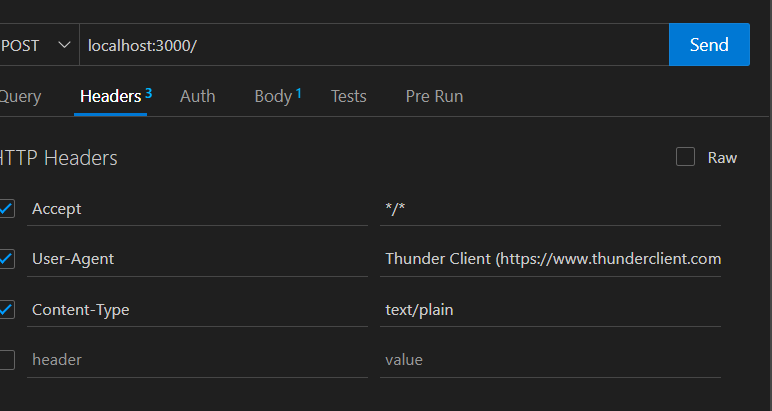
1. Send a POST request with the header Content-Type: text/plain and the body
You can use POSTMAN or ThunderClient and click on the headers in it set the header as Content-Type: text/plain and then click on the body option in it then on text and add some text to it.
2. Fill up the body and make the POST request
Write the text you want to send over the network in the body section. Now click on the dropdown at the left and select POST request from it and the click on the send button.
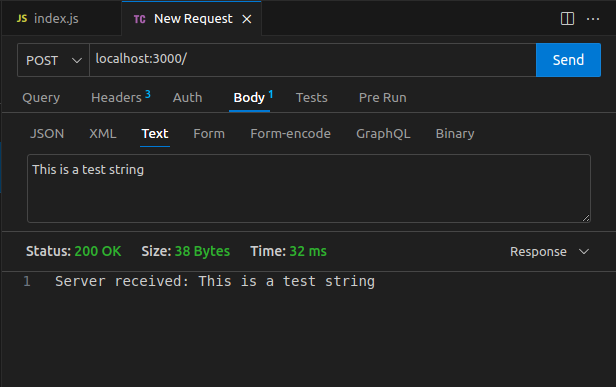
As soon as you send the text on to the server server will respond with the same text message to you after parsing it.
Working of express.text()
When you set up express.text() as middleware in your Express app, it processes requests where the Content-Type header is set to text/plain. The middleware reads the body of the request and transforms it into a plain text string, which can then be accessed via req.body.
- The client sends an HTTP request with a Content-Type of text/plain.
- The request body is passed to the express.text() middleware.
- The middleware processes the body and adds the text content to req.body.
- You can access the plain text data directly from req.body in your route handler.
Using the limit Option
app.use(express.text({ limit: "100b" }));
app.post("/", (req, res) => {
    res.send(req.body);
});
The limit option restricts the maximum size of the incoming text payload. In this example, the request body cannot exceed 100 bytes. If a request exceeds this limit, Express returns a 413 Payload Too Large error.
Working Without express.text() Middleware
If the express.text() middleware is not used, req.body will be undefined, making it impossible to read text-based payloads
const express = require("express");
const app = express();
const PORT = 3000;

app.post("/", (req, res) => {
    console.log("Received Text Data:", req.body); // req.body will be undefined
    res.end();
});

app.listen(PORT, () => {
    console.log(`Server running on PORT ${PORT}`);
});
Output

- When a POST request is made to /, the server tries to log the received text data (req.body)
- Since no middleware (like express.text() or express.json()) is used to parse the request body, req.body will be undefined
- app.listen(PORT, ...) starts the server and logs a message indicating it is running on port 3000, but the POST request won’t work properly without a body-parsing middleware
Common Use cases of express.text() middleware
- Handling Chat Messages: Used in chat applications where messages are sent as plain text instead of JSON
- Processing Webhooks: Some external services send webhook data as plain text, which express.text() helps parse
- Logging and Monitoring: Collects log messages or status updates from clients and stores them for analysis
- Text-Based APIs: Useful in APIs where requests contain plain text input, such as search queries or commands
- Handling File Metadata: Some file upload services send metadata as plain text, which can be parsed using express.text()
