

Type annotations explicitly specify the type of variables, function parameters, return values, and object properties, improving type safety and code readability.
- Define the expected data type explicitly.
- Detect type-related errors during development.
- Improve code readability and maintainability.
- Provide better IDE support with autocompletion and type checking.
Example:
const str: string = "GeeksforGeeks";
const num: number = 6;
const arr: (string | number)[] = ["GFG", "TypeScript", 500, 20];

console.log(typeof str);
console.log(typeof num);
console.log(arr);
Output:
string
number
["GFG", "TypeScript", 500, 20]
- str is explicitly annotated as a string.
- num is explicitly annotated as a number.
- arr uses a union type (string | number) to store both strings and numbers.
Using Type Annotations
Type annotations can be applied to different TypeScript constructs such as variables, functions, objects, arrays, and classes.
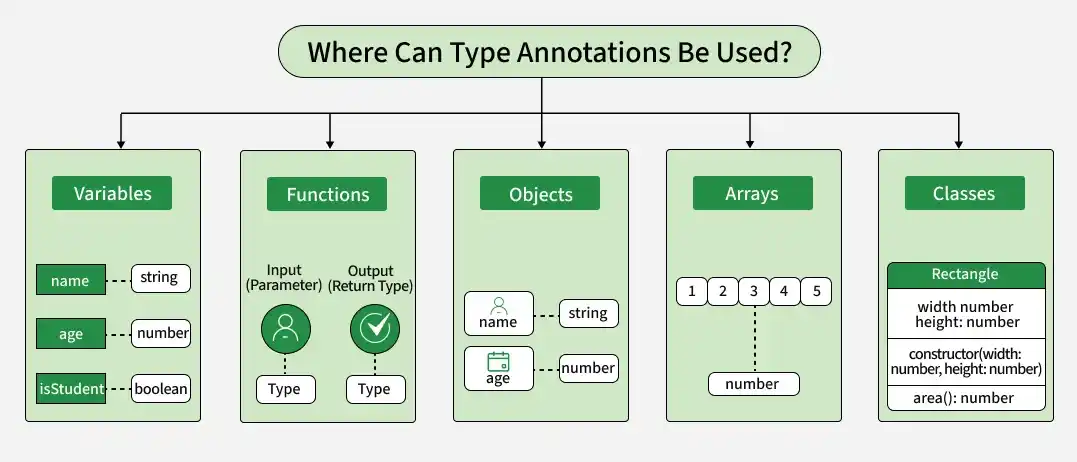
1. Variables
Variables can be annotated to specify the type of value they can store.
const name: string = "Alen";
const age: number = 30;
const isStudent: boolean = true;

console.log(name);
console.log(age);
console.log(isStudent);
Output:
Alen
30
true
- name stores only string values.
- age stores only numeric values.
- isStudent stores only boolean values.
2. Functions
Function type annotations define the types of parameters and the return value.
function greet(name: string): string {
    return `Hello, ${name}!`;
}

console.log(greet("Alen"));
Output:
Hello, Alen!- name is of type string.
- The function returns a string.
- TypeScript validates both the parameter and return type.
3. Objects
Object type annotations define the required properties and their types.
const person: { name: string; age: number } = {
    name: "Alen",
    age: 30
};

console.log(person);
Output
{ name: 'Alen', age: 30 }- person must contain both name and age.
- name must be a string.
- age must be a number.
4. Arrays
Array type annotations specify the type of elements an array can contain.
const numbers: number[] = [1, 2, 3, 4, 5];

console.log(numbers);
Output:
[1, 2, 3, 4, 5]- numbers can contain only number values.
- Adding any other data type results in a type error.
5. Classes
Type annotations can be applied to class properties, constructor parameters, and method return types.
class Rectangle {
    width: number;
    height: number;

    constructor(width: number, height: number) {
        this.width = width;
        this.height = height;
    }

    area(): number {
        return this.width * this.height;
    }
}

const rect = new Rectangle(5, 10);

console.log(rect);
console.log(rect.area());
Output:
Rectangle { width: 5, height: 10 }
50
- width and height are class properties of type number.
- The constructor accepts two number parameters.
- The area() method returns a value of type number.
