

SQLite is a lightweight, serverless and self-contained relational database management system (RDBMS) that stores the entire database in a single file. It is widely used in mobile applications, embedded systems, desktop software and web browsers due to its simplicity, portability and minimal configuration. SQLite enables users to:
- Create and manage database structures (tables, indexes, views and triggers)
- Insert, update, delete and retrieve data using SQL
- Perform transactions while maintaining ACID properties
- Build lightweight, embedded database applications without requiring a separate database server
1. What is SQLite and how does it differ from other database management systems?
- SQLite is serverless, whereas most other database management systems require a separate database server.
- It stores the entire database in a single file, whereas other DBMSs store data across multiple database files managed by a server.
- It runs directly within an application, whereas other DBMSs run as separate server processes.
- It is best suited for mobile, desktop and embedded applications, whereas other DBMSs are designed for large-scale, multi-user applications.
2. What is ROWID in SQLite?
SQLite automatically assigns a unique ROWID to each row in a table unless the table is created using the WITHOUT ROWID option. The ROWID is a 64-bit signed integer that uniquely identifies each record and can be used to retrieve rows efficiently.
3. How do you create a New SQLite Database?
A new SQLite database is created by opening or connecting to a database file. If the specified file does not exist, SQLite automatically creates it.
Syntax:
sqlite3 database_name.db4. What is the .schema Command in SQLite?
The .schema command displays the SQL statements used to create database objects such as tables, indexes, views and triggers. It is mainly used to view the structure of the database and understand how objects are defined.
5. How do you Create a Table in SQLite?
A table is created using the CREATE TABLE statement. It defines the table name, columns, data types and constraints.
Syntax:
CREATE TABLE table_name (
    column1 datatype,
    column2 datatype,
    ...
);
6. How do you Insert Data into a Table in SQLite?
Data is inserted into a table using the INSERT INTO statement. It allows you to add one or more rows by specifying the column names and corresponding values.
Syntax:
INSERT INTO table_name (column1, column2, ...)
VALUES (value1, value2, ...);
7. How do you Update Data in a Table in SQLite?
The UPDATE statement is used to modify existing records in a table. It is commonly used with the WHERE clause to update specific rows.
Syntax:
UPDATE table_name
SET column_name = value
WHERE condition;
8. What is the Difference Between SQLite and MySQL?
SQLite and MySQL are both relational database management systems, but they differ in their architecture and use cases.
| SQLite | MySQL |
|---|---|
| Serverless database that runs within an application. | Client-server database that requires a separate server. |
| Stores the entire database in a single file. | Stores data in multiple files managed by the MySQL server. |
| Best suited for mobile, desktop and embedded applications. | Best suited for web applications and large multi-user systems. |
| Supports limited concurrent writes. | Supports high concurrency with multiple users. |
9. What are Transactions in SQLite?
A transaction is a group of SQL statements executed as a single unit of work. If all statements execute successfully, the changes are committed. If an error occurs, the transaction can be rolled back.
Commands:
- BEGIN TRANSACTION
- COMMIT
- ROLLBACK
10. What is Full-Text Search (FTS) in SQLite?
Full-Text Search (FTS) is an SQLite feature that enables fast searching of large text data. It creates a special index that allows efficient keyword searches using the MATCH operator.
11. What is the .tables Command in SQLite?
The .tables command is used in the SQLite command-line interface (CLI) to display all tables available in the current database. It helps users quickly check the existing tables before performing database operations.
Syntax:
.tables12. What is the .dump Command in SQLite?
The .dump command is used in the SQLite command-line interface (CLI) to generate the complete SQL script of a database. It includes CREATE TABLE, INSERT, CREATE INDEX and other SQL statements required to recreate the database. It is commonly used for database backup and migration.
13. What is the Difference Between INTEGER PRIMARY KEY and AUTOINCREMENT in SQLite?
| INTEGER PRIMARY KEY | AUTOINCREMENT |
|---|---|
| Automatically generates a unique integer value for each row. | Automatically generates a unique integer value that is never reused. |
| May reuse deleted ROWID values. | Does not reuse previously deleted ROWID values. |
| Faster and uses less overhead. | Slightly slower because it maintains additional information. |
| Recommended for most applications. | Used when unique values must never be reused. |
14. What are Constraints in SQLite?
Constraints are rules applied to table columns to maintain data accuracy and integrity. They restrict the type of data that can be stored in a table.
Common Constraints:
- PRIMARY KEY
- FOREIGN KEY
- NOT NULL
- UNIQUE
- CHECK
- DEFAULT
Example:
CREATE TABLE Employee (
    EmployeeID INTEGER PRIMARY KEY,
    Name TEXT NOT NULL,
    Email TEXT UNIQUE
);
15. What is the Difference Between WHERE and HAVING in SQLite?
Both WHERE and HAVING are used to filter data, but they work at different stages.
| WHERE | HAVING |
|---|---|
| Filters rows before grouping. | Filters groups after GROUP BY. |
| Cannot use aggregate functions. | Can use aggregate functions like COUNT() and SUM(). |
Example:
SELECT Department, COUNT(*)
FROM Employee
GROUP BY Department
HAVING COUNT(*) > 5;
16. What are Subqueries in SQLite?
A subquery is a query written inside another SQL query. It is used to retrieve data that is required by the main query.
Example:
SELECT Name
FROM Employee
WHERE Salary > (
    SELECT AVG(Salary)
    FROM Employee
);
17. What are Triggers in SQLite?
A Trigger is a database object that automatically executes a set of SQL statements when an INSERT, UPDATE, or DELETE operation occurs on a table.
Syntax:
CREATE TRIGGER trigger_name
AFTER INSERT ON Employee
BEGIN
    -- SQL statements
END;
18. What is a Common Table Expression (CTE)?
A Common Table Expression (CTE) is a temporary result set defined using the WITH clause. It makes complex queries easier to read and maintain.
Syntax:
WITH cte_name AS (
    SELECT column_name
    FROM table_name
)
SELECT *
FROM cte_name;
Example:
WITH HighSalary AS (
    SELECT Name, Salary
    FROM Employee
    WHERE Salary > 50000
)
SELECT *
FROM HighSalary;
19. What are Window Functions in SQLite?
Window functions perform calculations across a set of rows while returning each individual row. They are commonly used for ranking, running totals and comparisons.
Common Window Functions:
- ROW_NUMBER()
- RANK()
- DENSE_RANK()
- LAG()
- LEAD()
Example:
SELECT Name,
       Salary,
       RANK() OVER (ORDER BY Salary DESC) AS Rank
FROM Employee;
20. What are Temporary Databases in SQLite?
A Temporary Database stores temporary tables, indexes and other objects that exist only for the current database session. These objects are automatically removed when the connection is closed.
Example:
CREATE TEMP TABLE TempEmployee (
    EmployeeID INTEGER,
    Name TEXT
);
Temporary databases are commonly used to store intermediate results without affecting the main database.
21. What is Write-Ahead Logging (WAL) in SQLite?
Write-Ahead Logging (WAL) is a journaling mode in SQLite that improves database performance and concurrency. Instead of writing changes directly to the database file, SQLite first records them in a separate WAL file. This allows multiple users to read the database while another user is writing to it.
Syntax:
PRAGMA journal_mode = WAL;Example:
PRAGMA journal_mode = WAL;

CREATE TABLE Employee (
    EmployeeID INTEGER PRIMARY KEY,
    EmployeeName TEXT
);
22. What are Virtual Tables in SQLite?
A Virtual Table is a special type of table whose data is managed by an SQLite extension instead of being stored directly in the database. Virtual tables are commonly used for Full-Text Search (FTS), R-Tree indexing and other advanced features.
Syntax:
CREATE VIRTUAL TABLE table_name
USING module_name(column1, column2);
23. How does SQLite Handle Concurrency?
SQLite allows multiple database connections to read the database simultaneously, but only one connection can write to it at a time. It uses file-locking mechanisms and journaling modes such as WAL to maintain data consistency during concurrent operations.
24. What is the EXPLAIN QUERY PLAN Statement in SQLite?
The EXPLAIN QUERY PLAN statement displays how SQLite executes a query. It helps developers analyze query execution, determine whether indexes are being used and optimize query performance.
Syntax:
EXPLAIN QUERY PLAN
SELECT * FROM Employee
WHERE EmployeeID = 101;
25. What is the VACUUM Command in SQLite?
The VACUUM command is used to rebuild the SQLite database file by reclaiming unused disk space and optimizing database performance. It is commonly executed after deleting a large amount of data to reduce the database file size and improve storage efficiency.
Syntax:
VACUUM;26. What is the ATTACH DATABASE Statement in SQLite?
The ATTACH DATABASE statement is used to attach another SQLite database file to the current database connection. It allows users to access and query multiple databases within a single SQL statement.
Syntax:
ATTACH DATABASE 'database_name.db' AS database_alias;Example:
ATTACH DATABASE 'company.db' AS company;27. What is the ANALYZE Command in SQLite?
The ANALYZE command collects statistics about tables and indexes in an SQLite database. SQLite uses these statistics to generate more efficient query execution plans, which can improve query performance.
Syntax:
ANALYZE;Example:
ANALYZE Employee;28. What is UPSERT in SQLite?
UPSERT is an SQLite feature that allows you to insert a new row or update an existing row if a conflict occurs on a PRIMARY KEY or UNIQUE constraint.
Syntax:
INSERT INTO table_name (column1, column2)
VALUES (value1, value2)
ON CONFLICT(column_name)
DO UPDATE SET column2 = excluded.column2;
Example:
INSERT INTO Employee (EmployeeID, EmployeeName)
VALUES (101, 'John')
ON CONFLICT(EmployeeID)
DO UPDATE SET EmployeeName = 'John';
29. What is the ON CONFLICT Clause in SQLite?
The ON CONFLICT clause specifies how SQLite handles violations of PRIMARY KEY, UNIQUE, NOT NULL and CHECK constraints. It helps control the behavior when a constraint violation occurs.
Common Conflict Resolution Options:
- ROLLBACK
- ABORT (Default)
- FAIL
- IGNORE
- REPLACE
Example:
CREATE TABLE Employee (
    EmployeeID INTEGER PRIMARY KEY,
    EmployeeName TEXT UNIQUE ON CONFLICT IGNORE
);
30. What are SQLite Storage Classes?
SQLite uses Storage Classes instead of strict data types. Every value stored in SQLite belongs to one of the following storage classes.
Storage Classes:
- NULL: Represents a null value.
- INTEGER: Stores whole numbers.
- REAL: Stores floating-point numbers.
- TEXT: Stores character strings.
- BLOB: Stores binary data such as images or files.
Example:
CREATE TABLE Employee (
    EmployeeID INTEGER,
    EmployeeName TEXT,
    Salary REAL,
    Resume BLOB
);
31. What is the Difference Between Rollback Journal and Write-Ahead Logging (WAL) in SQLite?
| Rollback Journal | Write-Ahead Logging (WAL) |
|---|---|
| Writes changes directly to the database. | Writes changes to a separate WAL file. |
| Supports lower concurrency. | Supports better concurrency. |
| Readers may be blocked during writes. | Readers can access the database while writing. |
| Suitable for simple applications. | Suitable for applications with frequent read and write operations. |
32. How does SQLite Handle Database Locking?
SQLite uses file-locking mechanisms to ensure data consistency when multiple users access the database. It allows multiple users to read the database simultaneously, but only one user can write to it at a time.
Types of Locks:
- SHARED: Allows multiple users to read the database.
- RESERVED: Indicates that a write operation is planned.
- PENDING: Prevents new readers while waiting for an exclusive lock.
- EXCLUSIVE: Allows only one writer to modify the database.
33. What is the sqlite_master Table in SQLite?
The sqlite_master table is a system table that stores metadata about all database objects, such as tables, indexes, views and triggers. It is commonly used to inspect the database schema.
Syntax:
SELECT name, type
FROM sqlite_master;
34. What are SQLite Extensions?
SQLite Extensions are optional modules that add additional functionality to SQLite. They provide advanced features that are not included in the core SQLite engine.
Common SQLite Extensions:
- FTS5 (Full-Text Search)
- JSON1
- R-Tree
- Spellfix
35. What is the Purpose of the WITHOUT ROWID Option?
The WITHOUT ROWID option creates a table without the hidden ROWID column. Instead, SQLite stores rows using the declared primary key, which can improve storage efficiency for certain tables.
Syntax:
CREATE TABLE Employee (
    EmployeeID INTEGER PRIMARY KEY,
    EmployeeName TEXT
) WITHOUT ROWID;
36. How do you Optimize Query Performance in SQLite?
SQLite query performance can be improved by following these practices:
- Create indexes on frequently searched columns.
- Avoid using SELECT * whenever possible.
- Use EXPLAIN QUERY PLAN to analyze queries.
- Execute the VACUUM and ANALYZE commands periodically.
37. What are Savepoints in SQLite?
A Savepoint is a marker within a transaction that allows you to roll back part of a transaction without undoing all the changes. Savepoints are useful when you want more control over transaction management.
Syntax:
SAVEPOINT savepoint_name;

-- SQL statements

ROLLBACK TO savepoint_name;
RELEASE SAVEPOINT savepoint_name;
Example:
BEGIN TRANSACTION;
INSERT INTO Employee VALUES (101, 'John');
SAVEPOINT sp1;

INSERT INTO Employee VALUES (102, 'Alice');

ROLLBACK TO sp1;
COMMIT;
38. What are the Different Journaling Modes in SQLite?
SQLite supports multiple journaling modes to maintain database consistency and recover data after failures.
Common Journaling Modes:
- DELETE
- TRUNCATE
- PERSIST
- MEMORY
- WAL
- OFF
39. How do you Recover a Corrupted SQLite Database?
A corrupted SQLite database can be recovered by restoring a backup or by using the .recover command to extract recoverable data into a new database.
Syntax:
.recover40. What are the Best Practices for Securing an SQLite Database?
Some common practices for securing an SQLite database include:
- Restrict database file permissions.
- Encrypt the database using SQLite Encryption Extension (SEE).
- Validate user input to prevent SQL injection.
- Create regular database backups.
- Keep the SQLite library updated.
Query Based Interview Questions
The following SQLite queries are based on the table below.
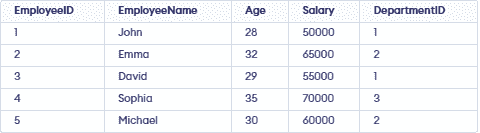
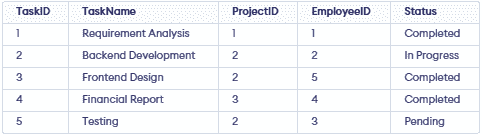

41. Retrieve the Names of Employees Working in the IT Department.
Query:
SELECT e.Name
FROM Employee e
JOIN Tasks t ON e.EmployeeID = t.AssignedTo
JOIN Projects p ON t.ProjectID = p.ProjectID
WHERE e.DepartmentID = p.DepartmentID;
Output:

42. Find the total budget of projects managed by each department and order by the total budget in descending order.
Query:
SELECT d.DepartmentName, SUM(p.Budget) AS TotalBudget
FROM Department d
JOIN Project p
ON d.DepartmentID = p.DepartmentID
GROUP BY d.DepartmentName
ORDER BY TotalBudget DESC;
Output:

43. Retrieve Employees Assigned to Completed Tasks.
Query:
SELECT DISTINCT e.EmployeeName
FROM Employee e
JOIN Task t
ON e.EmployeeID = t.EmployeeID
WHERE t.Status = 'Completed';
Output:

44. Display the Project with the Highest Budget.
Query:
SELECT ProjectName, Budget
FROM Project
ORDER BY Budget DESC
LIMIT 1;
Output:

45. Find Employees Who Are Not Assigned to Any Task.
Query:
SELECT EmployeeName
FROM Employee
WHERE EmployeeID NOT IN (
SELECT EmployeeID
FROM Task
);
Output:

46. Retrieve the Names of Employees Who Work in the Same Department as 'Emma'.
Query:
SELECT EmployeeName
FROM Employee
WHERE DepartmentID = (
SELECT DepartmentID
FROM Employee
WHERE EmployeeName = 'Emma'
);
Output:

47. Find the Employee(s) with the Second Highest Salary.
Query:
SELECT EmployeeName, Salary
FROM Employee
WHERE Salary = (
             SELECT MAX(Salary)
             FROM Employee
             WHERE Salary < (
                       SELECT MAX(Salary)
                        FROM Employee
                    )
);
Output:

48. Find the Projects That Do Not Have Any Pending Tasks.
Query:
SELECT p.ProjectName
FROM Project p
WHERE NOT EXISTS (
    SELECT 1
     FROM Task t
     WHERE t.ProjectID = p.ProjectID
       AND t.Status = 'Pending'
 );
Output:

49. Retrieve the Project Names Along with the Number of Employees Assigned to Each Project.
Query:
SELECT p.ProjectName,
        COUNT(DISTINCT t.EmployeeID) AS TotalEmployees
FROM Project p
LEFT JOIN Task t
ON p.ProjectID = t.ProjectID
GROUP BY p.ProjectID, p.ProjectName;
Output:

50. Display the Total Number of Completed and Pending Tasks for Each Project.
Query:
SELECT p.ProjectName,
              SUM(CASE WHEN t.Status = 'Completed' THEN 1 ELSE 0 END) AS CompletedTasks,
              SUM(CASE WHEN t.Status = 'Pending' THEN 1 ELSE 0 END) AS PendingTasks
FROM Project p
LEFT JOIN Task t
ON p.ProjectID = t.ProjectID
GROUP BY p.ProjectID, p.ProjectName;
Output:

