

The SQL UNION ALL operator combines the result sets of two or more SELECT statements into a single output. Unlike UNION, it does not remove duplicate rows, making it faster when duplicates are acceptable.
- Includes all records, even duplicate rows, from the combined queries
- Requires the same number of columns with compatible data types in each SELECT
- More performant than UNION since no duplicate elimination is performed
Example: First, we create a demo SQL database and tables, on which we will use the UNION ALL command.


Query:
SELECT id, city FROM table1
UNION ALL
SELECT id, city FROM table2;
Output:

Syntax
SELECT columns FROM table1
UNION ALL
SELECT columns FROM table2;
Examples
First, let's create a demo SQL database and tables on which UNION ALL will be performed.
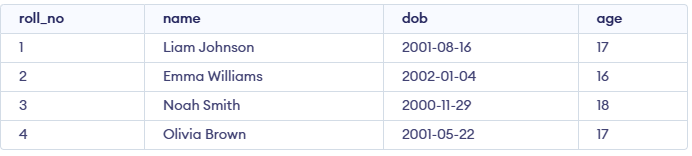

Example 1: Single Field With Same name
We want to combine the names from both the students and trip_details tables, including all names, even if there are duplicates.
SELECT name FROM students
UNION ALL
SELECT name FROM trip_details;
Output:

Example 2: Different Field names
We can use the UNION ALL operator to merge the results. Although column names do not need to match, aliases can be used to make the output column name consistent.
Query:
SELECT roll_no AS Identifier FROM students
UNION ALL
SELECT roll_no AS Identifier FROM trip_details;
Output:

SQL UNION ALL With WHERE
You can use the WHERE clause with UNION ALL in SQL. The WHERE clause is used to filter records and is added after each SELECT statement
Example
The following SQL statement returns the countries (duplicate values also) from both the "students" and the "trip_details" tables:
Query:
SELECT name, age
FROM students
WHERE age > 16

UNION ALL

SELECT name, age
FROM trip_details
WHERE age >= 18;
Output:

To learn the difference between UNION ALL and UNION, refer to this article: SQL UNION All vs UNION.
