

The SQL TOP, LIMIT, and FETCH FIRST clauses are used to limit the number of rows returned by a query, helping retrieve only the required records from a table.
- TOP: Limits rows in SQL Server and Sybase.
- LIMIT: Limits rows in MySQL, PostgreSQL, and SQLite.
- FETCH FIRST: Limits rows in Oracle, DB2, and PostgreSQL.
SQL SELECT TOP Clause
The SELECT TOP clause returns only a specified number of rows from a table, helping improve query performance on large datasets. The SQL TOP keyword is utilized with these database systems:
- SQL Server
- MS Access
Syntax
SELECT TOP count column1, column2, ...
FROM table_name
[WHERE conditions]
[ORDER BY expression [ ASC | DESC ]];
- column1, column2: names of columns.
- count: number of records to be fetched.
- WHERE conditions: (Optional) Filters the data based on conditions.
- ORDER BY expression: (Optional) Sorts the result set in ascending or descending order.
Let’s understand this using an example of SQL SELECT TOP statement. We will use the following table for this example:
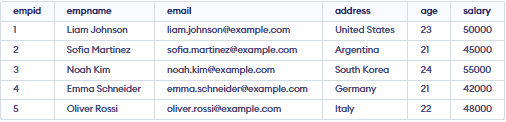
Example 1: Using SELECT TOP Clause in SQL
In this example, we will fetch the top 4 rows from the table.
Query:
SELECT TOP 4 *
FROM employee;
Output:

Example 2: SQL SELECT TOP with ORDER BY Clause
In this example, we will use the SQL SELECT TOP clause with ORDER BY clause to sort the data in the results set.
Query
SELECT TOP 4 *
FROM employee
ORDER BY salary DESC;
Output:

Example 3: SQL SELECT TOP Clause with WHERE Clause Example
In this example, we will use the SELECT TOP clause with WHERE clause to filter data on specific conditions.
Query:
SELECT TOP 2 *
FROM employee
WHERE salary>2000
ORDER BY salary;
Output:

Example 4: SQL SELECT TOP PERCENT Clause Example
The PERCENT keyword is utilized to select the primary and percent of all-out rows. For example,
Query:
SELECT TOP 50 PERCENT *
FROM employee;
Output:

- The query selects the first 50% of the total employee records.
- It calculates half of all available rows in the table.
SQL LIMIT Clause
SQL LIMIT Clause limits the number of results returned in the results set. The LIMIT Clause is utilized with the accompanying database systems:
- MySQL
- PostgreSQL
- SQLite
Example 1: SELECT LIMIT Clause in SQL
In this example, we will use the SELECT LIMIT clause to display only 2 results.
Query:
SELECT * FROM employee
LIMIT 2;
Output:

Example 2: SQL LIMIT with WHERE Clause
The accompanying query selects the initial 4 records from the employee table with a given condition.
Query:
SELECT * FROM employee
WHERE salary = 45000
LIMIT 2;
Output:
- The LIMIT 2 clause restricts the result to two records.
Example 3: SQL LIMIT With OFFSET Clause
The OFFSET keyword is utilized to indicate beginning rows from where to select rows. For instance,
Query:
SELECT * FROM employee
LIMIT 2 OFFSET 2;
Output:

- The OFFSET 2 clause skips the first two rows of the result.
SQL FETCH FIRST Clause
SQL FETCH FIRST clause fetches the first given number of rows from the table.
It is supported in database systems like:
- IBM DB2
- Oracle
- PostgreSQL
Syntax
The syntax to use the FETCH FIRST clause in SQL is:
SELECT columns FROM table
WHERE condition FETCH FIRST n ROWS ONLY;
Example 1: SQL FETCH FIRST Clause
In this example, we will fetch the first 3 rows from the table.
Query:
SELECT *
FROM employee
FETCH FIRST 3 ROWS ONLY;
Output:
- The query retrieves only the first 3 rows from the employee table.
Example 2: SQL FETCH FIRST PERCENT
In this example, we will fetch first 50% of the data from the table.
Query:
SELECT *FROM employeeFETCH FIRST (SELECT CEIL(COUNT(*) / 2) FROM employee) ROWS ONLY;
Output:
- It returns the top 50% of rows from the employee table.
Example 3: SQL FETCH FIRST with WHERE Clause
The "FETCH FIRST" syntax is not supported in MySQL. The correct syntax for limiting the number of rows in MySQL is by using the LIMIT clause.
Query:
SELECT *
FROM employee
WHERE salary = 45000
FETCH FIRST 1 ROW ONLY;
Output:

- The FETCH FIRST 1 ROW ONLY clause returns only the first matching row from the result set.
