

SQL provides the INSERT INTO statement to add new records into a table. It is a key part of Data Manipulation Language (DML) used for efficient data insertion.
- Used to insert single or multiple rows into a table.
- Allows specifying values for selected columns.
- Supports inserting multiple records in a single query.
Syntax
INSERT INTO table_name (column1, column2, column3)
VALUES
(value1, value2, value3),
(value4, value5, value6);
Working
First, we will create a demo SQL database and table, on which we will use the Insert Multiple Rows command:
Query:
CREATE TABLE employees (
    employee_id INT PRIMARY KEY,
    employee_name VARCHAR(100),
    age INT,
    department VARCHAR(50)
);
INSERT INTO employees (employee_id, employee_name, age, department)
VALUES
(1, 'John Doe', 30, 'Engineering'),
(2, 'Jane Smith', 28, 'Marketing'),
(3, 'Sam Brown', 35, 'Sales'),
(4, 'Lucy Green', 25, 'Human Resources');
Output:

Using INSERT INTO ... SELECT for Inserting Multiple Rows
INSERT INTO ... SELECT is used to insert multiple rows into a table by selecting data from another table or query result. It is commonly used when copying, filtering, or transforming data before insertion.
- Transfers data from one table to another without manually writing values.
- Allows inserting only selected or condition-based records into the target table.
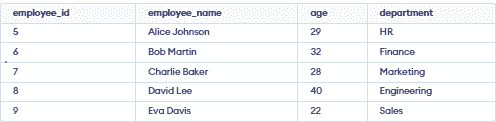
Consider the new_employees table shown below, for the following example:
Query:
INSERT INTO employees (employee_id, employee_name, age, department)
SELECT employee_id, employee_name, age, department
FROM new_employees
WHERE age > 30;
Output:
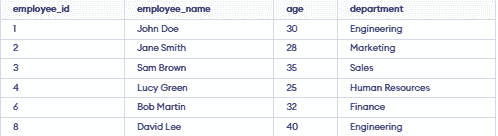
- The INSERT INTO ... SELECT statement copies data from the new_employees table to the employees table.
- Only records where the employee’s age is greater than 30 are inserted.
Note: The number of values in each row must match the number of specified columns, otherwise the query will result in an error.
