

The SQL LIKE operator is used to search for a specific pattern within a column’s text data. It works with wildcard characters to match partial strings, making it useful for flexible filtering.
- % represents any sequence of characters
- _ represents a single character
Example: First, we create a demo SQL database and table, on which we will use the LIKE Operator command.

Query:
SELECT * FROM employees
WHERE emp_name LIKE 'A%';
Output:

Syntax
SELECT column1, column2, ...
FROM table_name
WHERE column_name LIKE pattern;
- column_name: The column to be searched.
- pattern: The pattern to search for, which can include wildcard characters.
Wildcard Characters with the SQL LIKE Operator
Wildcards are used with the LIKE operator to search for specific patterns in strings. Wildcard characters substitute one or more characters in the string. There are four wildcard characters in SQL:
- % (Percent): Represents zero or more characters.
- _ (Underscore): Represents a single character.
- [] (Square Brackets): Represents any single character within brackets.
- - (Hyphen): Specify a range of characters inside brackets.
| Pattern | Meaning |
|---|---|
| 'a%' | Match strings that start with 'a' |
| '%a' | Match strings that end with 'a' |
| 'a%t' | Match strings that contain the start with 'a' and end with 't'. |
| '%wow%' | Match strings that contain the substring 'wow' in them at any position. |
| '_wow%' | Match strings that contain the substring 'wow' in them at the second position. |
| '_a%' | Match strings that contain 'a' at the second position. |
| 'a_ _%' | Match strings that start with 'a and contain at least 2 more characters. |
Examples
Let's understand LIKE operator in SQL with examples. First, we will create a demo SQL database and table, on which we will use the SQL LIKE Operator command.
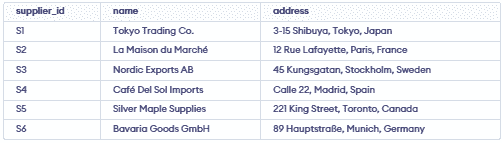
Example 1 : Match names Starting with 'Ca'
Retrieve suppliesupplier_id, name and address from suppliers table, where supplier name starts form Ca.
SELECT supplier_id, name, address
FROM supplier
WHERE name LIKE 'Ca%';
Output:

Example 2: Match addresses Containing 'Kungsgatan'
Retrieve entire table, where address contains Kungsgatan.
SELECT *
FROM supplier
WHERE address LIKE '%Kungsgatan%';
Output:

Example 3: Match names Where 'afé' Appears in the Second Position
Retrieve the supplier_id, name and address of suppliers whose name has "afé" starting from the second position.
SELECT supplier_id, name, address
FROM supplier
WHERE name LIKE '_afé%';
Output:
Example 4: Using LIKE with AND for Complex Conditions
Retrieve suppliers from Madrid with names starting with "C":
SELECT supplier_id, name, address
FROM supplier
WHERE address LIKE '%Madrid%' AND name LIKE 'C%';
Output:
Example 5: Using NOT LIKE for Exclusion
To retrieve all suppliers whose name does not contain "Co"
SELECT supplier_id, name, address
FROM supplier
WHERE name NOT LIKE '%Co%';
Output:

Note: Case sensitivity with LIKE depends on the database, use BINARY in MySQL, COLLATE in others and LIKE in PostgreSQL for case-insensitive matching.
