

The IN operator in SQL is used to filter query results by checking whether a column’s value matches any value in a specified list. It acts like a shorthand for writing multiple OR conditions, making queries cleaner and easier to read.
Syntax
SELECT column_name
FROM table_name
WHERE column_name IN (value1, value2, .....);
Example
First, we create a demo SQL database and table, on which we will use the IN Operator command.
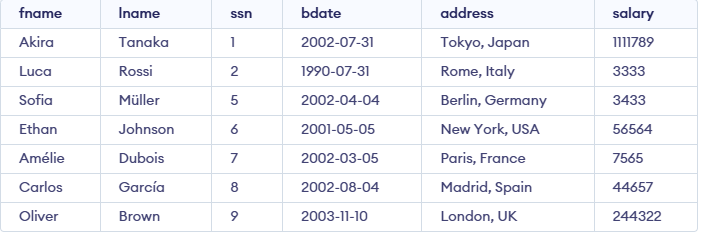
Example 1: Basic Use of the IN Operator
SQL Query to get Fname and Lname of employees who have address in Tokyo, Japan, France and Paris.
Query:
SELECT fname, lname
FROM employee
WHERE address IN ('Tokyo, Japan', 'Paris, France');
Output:

Example 2: SQL IN and NOT IN Operators
We can use the SQL IN with the NOT operator to exclude specified data from our result.
Query:
SELECT fname
FROM employee
WHERE address NOT IN ('Tokyo, Japan', 'London, UK');
Output:

Note: The IN operator returns TRUE if a value matches any item in the given list or subquery result.
