

WireMock is an open-source tool used to mock and stub HTTP-based APIs during development and testing. It allows developers and testers to simulate external services with predefined request-response mappings, making it possible to test applications without depending on the actual APIs.
- Simulates HTTP APIs using configurable stub mappings.
- Helps test applications when external services are unavailable, unstable, or still under development.
- Supports response customization, delays, faults, and request verification.
WireMock Architecture
WireMock follows a client-server architecture where the client sends HTTP requests to the WireMock server, which matches them against stub mappings and returns mock responses.
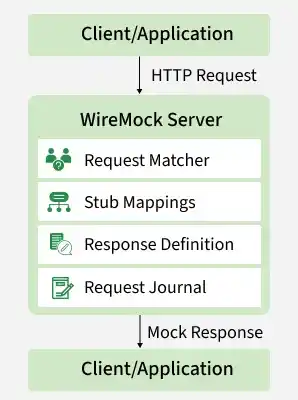
- Client/Application: The application sends an HTTP request to the WireMock server instead of the actual backend API.
- HTTP Request: The request contains details such as the URL, HTTP method, headers, query parameters, and request body.
- WireMock Server: WireMock receives the request and processes it based on the configured mock API definitions.
- Request Matcher: Compares the incoming request with the configured request patterns to find a matching stub.
- Stub Mappings: Stores predefined request-response mappings that determine how WireMock should respond.
- Response Definition: Generates the configured mock response, including the HTTP status code, headers, body, delays, or faults.
- Request Journal: Records every incoming request, enabling request verification and debugging during testing.
- Mock Response: WireMock returns the predefined response to the client, simulating the behavior of the real API.
- Client/Application: The application receives the mock response and continues execution as if it had communicated with the actual service.
Working of WireMock
WireMock processes an HTTP request by matching it against predefined stub mappings and returning the response associated with the matching stub.
- Configure Stub Mappings: Define the request conditions and corresponding mock responses.
- Start the WireMock Server: Start WireMock on the required port to accept HTTP requests.
- Send the Request: The application or test sends an HTTP request to the WireMock server.
- Match the Request: WireMock compares the incoming request with the configured stub mappings.
- Return the Response: WireMock returns the response defined by the matching stub.
- Verify the Request: The request journal allows testers to verify that the expected request was received.
WireMock in API Testing
WireMock provides a controlled environment for testing applications that communicate with HTTP APIs. Testers can simulate different API behaviors without modifying the application code.
- Mock API Endpoints: Simulates external API endpoints using stub mappings.
- Test HTTP Status Codes: Simulates responses such as
200 OK,400 Bad Request,401 Unauthorized,404 Not Found, and500 Internal Server Error. - Test Error Scenarios: Simulates failures that may be difficult to reproduce with a real service.
- Simulate Delays: Adds response delays to test application behavior under slow API conditions.
- Verify Requests: Checks whether the application sends the expected HTTP method, URL, headers, query parameters, or request body.
- Test Unavailable Services: Allows testing when a dependent API is unavailable or under development.
Example
Suppose an application calls:
GET /api/users/101
WireMock can be configured to return:
{
"id": 101,
"name": "John"
}
The application receives this response from WireMock and processes it as if it came from the actual user API.
Integration Testing Using WireMock
ntegration testing verifies whether different application components work correctly together. When an application depends on an external HTTP service, WireMock can simulate that service during testing.
Testing with a Real External API
The application can communicate directly with the actual external service during integration testing.
Challenges
- Tests depend on the availability of the external API.
- Network latency can increase test execution time.
- External service failures can cause unrelated test failures.
- API usage may introduce additional costs or rate limits.
- Test data may be difficult to control.
- Some external APIs may not provide a dedicated test environment.

Testing Using WireMock
WireMock replaces the external HTTP service with a controlled mock server. This allows tests to use predictable responses without making requests to the actual service.
Test Flow
- The application sends a request to WireMock.
- WireMock matches the request against a configured stub.
- WireMock returns the predefined response.
- The application processes the response.
- The test verifies the application's behavior and, when required, the request sent to WireMock.

WireMock with Java and JUnit
WireMock can be used with Java and JUnit to create automated tests for applications that communicate with HTTP services. A WireMock server can be started during the test lifecycle, configured with stubs, and stopped after testing.
Maven Dependencies
Add the following dependencies to the pom.xml file:
<dependency>
    <groupId>org.wiremock</groupId>
    <artifactId>wiremock</artifactId>
    <version>3.13.1</version>
    <scope>test</scope>
</dependency>

<dependency>
    <groupId>org.junit.jupiter</groupId>
    <artifactId>junit-jupiter</artifactId>
    <version>5.12.2</version>
    <scope>test</scope>
</dependency>
Verify the dependency versions against the versions supported by your project before using them.
Example: WireMock with Java and JUnit
The following example starts a WireMock server, creates a stub, sends an HTTP request, and verifies that the request was received.
import static com.github.tomakehurst.wiremock.client.WireMock.*;
import static com.github.tomakehurst.wiremock.core.WireMockConfiguration.wireMockConfig;

import com.github.tomakehurst.wiremock.WireMockServer;
import org.junit.jupiter.api.*;

import java.net.URI;
import java.net.http.HttpClient;
import java.net.http.HttpRequest;
import java.net.http.HttpResponse;

class UserApiTest {

    private static WireMockServer wireMockServer;

    @BeforeAll
    static void setup() {
        wireMockServer = new WireMockServer(wireMockConfig().port(8080));
        wireMockServer.start();
    }

    @Test
    void testUserApi() throws Exception {

        wireMockServer.stubFor(
            get(urlEqualTo("/users/101"))
                .willReturn(
                    aResponse()
                        .withStatus(200)
                        .withHeader("Content-Type", "application/json")
                        .withBody("{\"id\":101,\"name\":\"John\"}")
                )
        );

        HttpClient client = HttpClient.newHttpClient();

        HttpRequest request = HttpRequest.newBuilder()
            .uri(URI.create("http://localhost:8080/users/101"))
            .GET()
            .build();

        HttpResponse<String> response =
            client.send(request, HttpResponse.BodyHandlers.ofString());

        Assertions.assertEquals(200, response.statusCode());
        Assertions.assertEquals(
            "{\"id\":101,\"name\":\"John\"}",
            response.body()
        );

        wireMockServer.verify(
            getRequestedFor(urlEqualTo("/users/101"))
        );
    }

    @AfterAll
    static void tearDown() {
        wireMockServer.stop();
    }
}
How the Example Works
- Start the Server: @BeforeAll starts WireMock before the test execution.
- Create the Stub: stubFor() defines the expected request and mock response.
- Send the Request: HttpClient sends a GET request to the WireMock server.
- Validate the Response: JUnit assertions verify the returned status code and response body.
- Verify the Request: verify() confirms that WireMock received the expected request.
- Stop the Server: @AfterAll stops the WireMock server after the tests complete.
Using WireMock with Gradle
WireMock can also be added to a Gradle-based Java project.
Add the dependencies to build.gradle:
dependencies {
testImplementation 'org.wiremock:wiremock:3.13.1'
testImplementation 'org.junit.jupiter:junit-jupiter:5.12.2'
}
Explanation
wiremockprovides the APIs required to create and configure WireMock servers and stubs.testImplementationmakes WireMock available to the test source set without adding it to the production runtime.- JUnit 5 provides the framework for writing and executing automated tests.
Running WireMock Programmatically
WireMock can be started and controlled directly from Java code when a test requires programmatic server management.
import com.github.tomakehurst.wiremock.WireMockServer;

import static com.github.tomakehurst.wiremock.client.WireMock.*;
import static com.github.tomakehurst.wiremock.core.WireMockConfiguration.wireMockConfig;

public class WireMockExample {

    public static void main(String[] args) {

        WireMockServer wireMockServer =
            new WireMockServer(wireMockConfig().port(8080));

        wireMockServer.start();

        wireMockServer.stubFor(
            get(urlEqualTo("/api/songs/12345"))
                .willReturn(
                    aResponse()
                        .withStatus(200)
                        .withHeader("Content-Type", "application/json")
                        .withBody(
                            "{\"title\":\"Mock Song\",\"artist\":\"Mock Artist\"}"
                        )
                )
        );

        // Application or test logic can run here.

        wireMockServer.stop();
    }
}
In this example, the WireMock server is created, started on port 8080, configured with a stub, and stopped programmatically.
Advantages of WireMock
WireMock provides several benefits for API and integration testing:
- Removes dependency on external HTTP services during tests.
- Produces predictable and repeatable API responses.
- Speeds up tests by avoiding real network calls.
- Makes error and edge-case scenarios easier to reproduce.
- Allows simulation of delays and service failures.
- Helps verify requests sent by the application.
Limitations of WireMock
WireMock is useful for simulating HTTP services, but it does not replace testing against real services in every situation.
- It does not reproduce the complete business logic of the real backend.
- Stub mappings require maintenance when the real API contract changes.
- Mocked responses may differ from actual service behavior if they are not kept up to date.
- It cannot validate the actual availability or performance of an external service.
- Complex stateful service behavior may require additional configuration.
- Large collections of stubs can become difficult to organize and maintain.
