

Internationalization Testing is a software testing technique used to verify that an application can support multiple languages, regions, and cultural settings without requiring changes to the source code. It ensures that the software is prepared for localization and can adapt to different international markets.
- Verifies support for different languages, character sets, and regional formats.
- Ensures proper handling of date, time, currency, and number formats.
- Checks that the application works correctly across various locales and cultural settings.
Example
E-Commerce Website: Internationalization testing ensures that an online shopping platform works correctly for users from different countries and languages. It verifies proper display of localized content, currencies, and regional date/time formats.
An Indian user sees prices in INR and dates in DD/MM/YYYY format, while a U.S. user sees prices in USD and dates in MM/DD/YYYY format.
Types of Internationalization Testing
Internationalization testing can be categorized into different types based on the aspects of the application being verified for global usability.
- Language Testing: Ensures that the application supports multiple languages and displays translated text correctly without affecting functionality.
- Character Encoding Testing: Verifies that the application correctly handles different character sets, special symbols, and international characters.
- Locale Testing: Ensures that the application adapts correctly to regional settings such as language, date formats, and measurement units.
- Date and Time Format Testing: Validates that dates and times are displayed according to the conventions of different countries and regions.
- Currency and Number Format Testing: Verifies that currencies, decimal separators, and number formats are displayed correctly according to regional conventions.
- User Interface (UI) Testing: Ensures that the interface layout remains consistent and accommodates translated text of different lengths.
- Input Method Testing: Verifies that the application supports different keyboards, input methods, and language-specific character inputs.
- Time Zone Testing: Ensures that the application correctly handles and displays data across different time zones.
Areas of Internationalization (i18n) Testing
Internationalization testing is done on several important aspects that are classified into the following two parts.
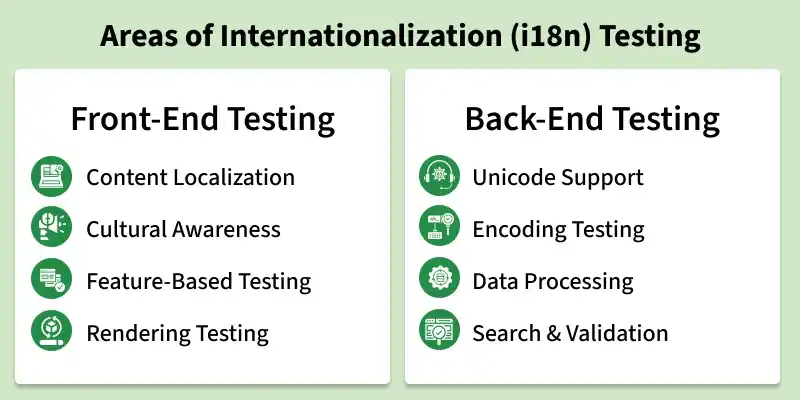
Front-End Internationalization Testing
Front-end internationalization testing is performed on the user interface of the application.
- Content Localization: Verifies that labels, buttons, menus, dialog boxes, toolbars, and other UI elements are displayed correctly in different languages.
- Locale and Cultural Awareness Testing: Ensures proper formatting of dates, times, currencies, phone numbers, postal codes, and regional events according to local conventions.
- Feature-Based Testing: Verifies that region-specific features are available only to the intended users and hidden from users in unsupported regions.
- File Transfer and Rendering Testing: Ensures that language files are loaded correctly and that translated content is displayed properly without text truncation, misalignment, or display issues.
Back-End Internationalization Testing
Back-end internationalization testing focuses on the server and database components of the application.
- Unicode Support Testing: Ensures that the database can store, process, and retrieve multilingual data correctly.
- Encoding Testing: Verifies that data is transmitted and processed without character corruption.
- Data Processing Testing: Ensures proper handling of different languages, currencies, and locale-specific formats.
- Search and Form Validation Testing: Verifies that search functionality and form submissions work correctly with international characters and multilingual content.
Internationalization Testing Process
- Requirement Analysis: Identify the languages, regions, locales, and cultural settings that the application must support.
- Test Planning: Define the testing scope, test cases, tools, and environments required for internationalization testing.
- Environment Setup: Configure different locale settings, languages, character encodings, and regional preferences for testing.
- Test Case Design: Create test cases to verify language support, date and time formats, currencies, number formats, and character handling.
- Test Execution: Execute the test cases across multiple locales and verify that the application functions correctly in each environment.
- Defect Reporting: Record and report issues related to language display, formatting, encoding, or regional compatibility.
- Retesting and Validation: Re-test the application after fixes are implemented to ensure that all internationalization issues have been resolved.
- Final Verification: Confirm that the application is ready for localization and can support users from different countries and regions.
Benefits of Internationalization Testing
- Expands the application's reach to users worldwide.
- Provides a consistent user experience across different languages and regions.
- Supports global product releases with reduced cost and development effort.
- Improves software quality, maintainability, and scalability.
- Enables the use of a single codebase for multiple localized versions.
- Reduces long-term maintenance and ownership costs.
- Ensures compliance with international standards and regional requirements.
Tools Used for Internationalization Testing
- Selenium: Automates testing of multilingual web applications across different browsers and locales.
- Appium: Supports internationalization testing for mobile applications on Android and iOS platforms.
- BrowserStack: Provides real devices and browsers to test applications under various language and regional settings.
- LambdaTest: Enables cross-browser and cross-locale testing to verify internationalized applications.
- Globalyzer: Identifies internationalization issues in source code and helps prepare applications for global markets.
- Pseudo Localization Tool: Simulates translated content to detect UI and layout issues before actual localization.
Challenges in Internationalization Testing
- Multiple Language Support: Testing the application across numerous languages can be time-consuming and complex.
- Character Encoding Issues: Different character sets and special symbols may not display or store correctly.
- Varying Text Lengths: Translated text can be longer or shorter than the original, causing UI layout problems.
- Locale-Specific Formatting: Ensuring correct formats for dates, times, currencies, and numbers across regions can be challenging.
- Time Zone Differences: Applications must correctly handle and display time-related data for users in different time zones.
- Cultural Differences: Certain symbols, colors, images, or content may have different meanings in different cultures.
- Input Method Compatibility: Supporting various keyboards, scripts, and input methods requires extensive testing.
- Testing Environment Complexity: Configuring and maintaining multiple locale and language environments can be difficult.
- Increased Testing Effort: Internationalization testing requires additional test cases, resources, and validation across multiple regions.
- Defect Identification and Resolution: Finding and fixing internationalization-related issues can be more challenging than standard functional defects.
Internationalization vs Localization Testing
| Aspect | Internationalization Testing (i18n) | Localization Testing (L10n) |
|---|---|---|
| Definition | Verifies that the application can support multiple languages, regions, and cultural settings without code changes. | Verifies that the application is correctly adapted for a specific language, region, or culture. |
| Purpose | Ensures the application is ready for global use. | Ensures the localized version meets regional and linguistic requirements. |
| Focus | Application architecture, language support, character encoding, and regional settings. | Translation accuracy, cultural appropriateness, and localized content. |
| Testing Scope | Tests the application's ability to handle different locales and formats. | Tests a specific localized version of the application. |
| Language Dependency | Does not focus on a particular language. | Focuses on one target language or region at a time. |
| Examples | Verifying support for multiple currencies, date formats, and Unicode characters. | Verifying that French translations are correct and culturally appropriate for France. |
| Performed By | Developers and testers during application development. | Localization testers, translators, and regional experts. |
| Goal | Prepare the software for localization. | Ensure the localized product works correctly for a specific market. |
