

React suite is a library of React components, sensible UI design, and a friendly development experience. It is supported in all major browsers. It provides pre-built components of React which can be used easily in any web application. In this article, we’ll learn about React Suite Cascader Container and Prevent Overflow.
A cascader is used for a single selection of data with a hierarchical relationship structure. The preventOverflow prop helps in positioning the cascader components in the scrolling container.
Syntax:
<PreventOverflowContainer>
      {getContainer => (
        <Cascader
              preventOverflow
              container={getContainer}
              data={...}
              ...
        />
      )}
</PreventOverflowContainer>
Creating React Application and Installing Module:
Step 1: Create a react application using the given command:
npm create-react-app projectname
Step 2: After creating your project, move to it using the given command:
cd projectname
Step 3: Now Install the rsuite node package using the given command:
npm install rsuite
Project Structure: Now your project structure should look like the following:
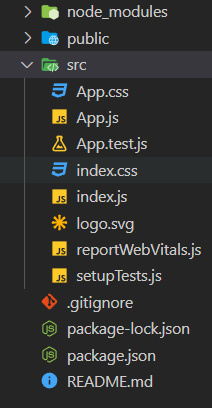
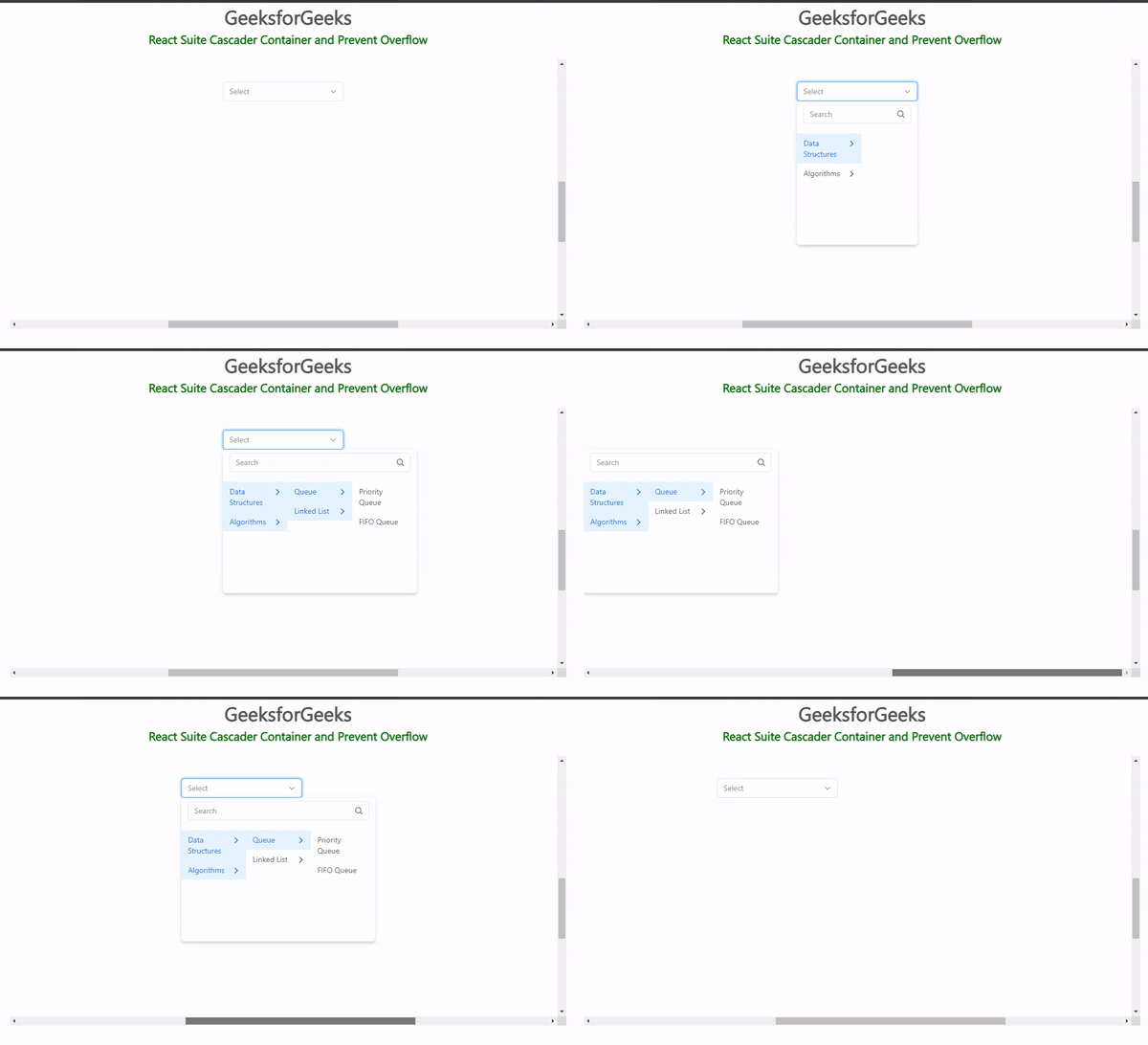
Example 1: Below example demonstrates the preventOverflow of Cascader Component in a container.
import "rsuite/dist/rsuite.min.css";
import { Cascader } from "rsuite";
import { useEffect, useRef } from "react";

const customData = [
    {
        label: "Data Structures",
        value: 1,
        children: [
            {
                label: "Queue",
                value: 2,
                children: [
                    {
                        label: "Priority Queue",
                        value: 3,
                    },
                    {
                        label: "FIFO Queue",
                        value: 4,
                    },
                ],
            },
            {
                label: "Linked List",
                value: 5,
                children: [
                    {
                        label: "Circular",
                        value: 6,
                    },
                    {
                        label: "Double",
                        value: 7,
                    },
                    {
                        label: "Single",
                        value: 8,
                    },
                ],
            },
        ],
    },
    {
        label: "Algorithms",
        value: 1,
        children: [
            {
                label: "Search",
                value: 2,
                children: [
                    {
                        label: "Binary Search",
                        value: 3,
                    },
                    {
                        label: "Linear Search",
                        value: 4,
                    },
                ],
            },
            {
                label: "Sorting",
                value: 5,
                children: [
                    {
                        label: "Bubble Sort",
                        value: 6,
                    },
                    {
                        label: "Selection Sort",
                        value: 7,
                    },
                    {
                        label: "Insertion Sort",
                        value: 8,
                    },
                ],
            },
        ],
    },
];

function PreventOverflowContainer(
    {
        children,
        height = 500
    }) {
    const container = useRef();
    const content = useRef();

    const containerStyle = {
        overflow: 'auto',
        position: 'relative'
    };

    const contentStyle = {
        height: '400%',
        width: '230%',
        justifyContent: 'center',
        alignItems: 'center',
        display: 'flex',
        flexWrap: 'wrap'
    };

    useEffect(() => {
        container.current.scrollTop =
            content.current.clientHeight / 2 - 60;

        container.current.scrollLeft =
            content.current.clientWidth / 2 -
            container.current.clientWidth / 2;
    }, [container, content]);

    return (
        <div style={
            {
                ...containerStyle,
                height
            }} ref={container}>
            <div style={contentStyle} ref={content}>
                {children(() => container.current)}
            </div>
        </div>
    );
}

export default function App() {

    return (
        <div>
            <div style={
                {
                    textAlign: "center"
                }}>
                <h2>GeeksforGeeks</h2>
                <h4 style={
                    {
                        color: "green"
                    }}>
                    React Suite Cascader Container
                    and Prevent Overflow
                </h4>
            </div>
            <div style={
                {
                    padding: 20,
                    textAlign: "center"
                }}>
                <div>
                    <PreventOverflowContainer>
                        {getContainer => (
                            <Cascader
                                preventOverflow
                                placement={'bottomStart'}
                                style={{ width: 224 }}
                                container={getContainer}
                                data={customData}
                            />
                        )}
                    </PreventOverflowContainer>
                </div>
            </div>
        </div>
    );
}
Output:
Example 2: Below is another example that demonstrates the preventOverflow of cascader component with a subtle appearance in a container.
import "rsuite/dist/rsuite.min.css";
import { Cascader } from "rsuite";
import { useEffect, useRef } from "react";

const customData = [
    {
        label: "Data Structures",
        value: 1,
        children: [
            {
                label: "Queue",
                value: 2,
                children: [
                    {
                        label: "Priority Queue",
                        value: 3,
                    },
                    {
                        label: "FIFO Queue",
                        value: 4,
                    },
                ],
            },
            {
                label: "Linked List",
                value: 5,
                children: [
                    {
                        label: "Circular",
                        value: 6,
                    },
                    {
                        label: "Double",
                        value: 7,
                    },
                    {
                        label: "Single",
                        value: 8,
                    },
                ],
            },
        ],
    },
    {
        label: "Algorithms",
        value: 1,
        children: [
            {
                label: "Search",
                value: 2,
                children: [
                    {
                        label: "Binary Search",
                        value: 3,
                    },
                    {
                        label: "Linear Search",
                        value: 4,
                    },
                ],
            },
            {
                label: "Sorting",
                value: 5,
                children: [
                    {
                        label: "Bubble Sort",
                        value: 6,
                    },
                    {
                        label: "Selection Sort",
                        value: 7,
                    },
                    {
                        label: "Insertion Sort",
                        value: 8,
                    },
                ],
            },
        ],
    },
];

function PreventOverflowContainer(
    {
        children,
        height = 500
    }) {
    const container = useRef();
    const content = useRef();

    const containerStyle = {
        overflow: 'auto',
        position: 'relative'
    };

    const contentStyle = {
        height: '400%',
        width: '230%',
        justifyContent: 'center',
        alignItems: 'center',
        display: 'flex',
        flexWrap: 'wrap'
    };

    useEffect(() => {
        container.current.scrollTop =
            content.current.clientHeight / 2 - 60;

        container.current.scrollLeft =
            content.current.clientWidth / 2 -
            container.current.clientWidth / 2;
    }, [container, content]);

    return (
        <div style={
            {
                ...containerStyle,
                height
            }} ref={container}>
            <div style={contentStyle}
                ref={content}>
                {children(() => container.current)}
            </div>
        </div>
    );
}

export default function App() {

    return (
        <div>
            <div style={{ textAlign: "center" }}>
                <h2>GeeksforGeeks</h2>
                <h4 style={{ color: "green" }}>
                    React Suite Cascader Container
                    and Prevent Overflow
                </h4>
            </div>

            <div style={
                {
                    padding: 20,
                    textAlign: "center"
                }}>
                <div>
                    <PreventOverflowContainer>
                        {getContainer => (
                            <Cascader
                                preventOverflow
                                appearance="subtle"
                                style={{ width: 224 }}
                                container={getContainer}
                                data={customData}
                            />
                        )}
                    </PreventOverflowContainer>
                </div>
            </div>
        </div>
    );
}
Output:

Reference: https://rsuitejs.com/components/cascader/#container-and-prevent-overflow
