

In this article we will see how we can create a average speed calculator using PyQt5. The average speed of an object is the total distance traveled by the object divided by the elapsed time to cover that distance, below is how the average speed calculator will look like 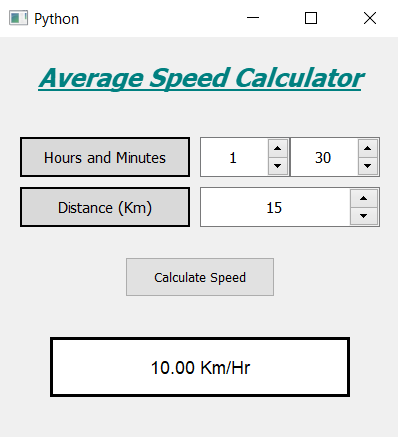
Concept : We will get the time in the form of hours and minutes, and distance in the form of kilometers, when user will press calculate button we will first check if invalid entry is given or not, if entries are correct then we will convert the hours and minutes into hours and calculate the speed and show the speed on the screen.
GUI Implementation Steps :
1. Create a heading label that display the calculator name
2. Create label to show user to set the hours and minutes
3. Create two QSpinBox object to get the hours and minutes
4. Create another label to show user to set distance, and corresponding to the label create a QSpinBox to get the distance
5. Create a push button to calculate the average speed
6. Create a label to show the calculated speedBack-End Implementation :
1. Set the maximum value of minutes spin box as 60 and increase the maximum value of distance spin box
2. Add action to the push button
3. Inside the push button action get the hours, minutes and the distance from the spin boxes
4. Check if distance or time value is zero then return the function so that action stop executing further
5. Convert the hours and minutes into hours and calculate the speed using this time
6. Show the speed on the screen with the help of label
Below is the implementation
# importing libraries
from PyQt5.QtWidgets import *
from PyQt5 import QtCore, QtGui
from PyQt5.QtGui import *
from PyQt5.QtCore import *
import sys


class Window(QMainWindow):

    def __init__(self):
        super().__init__()

        # setting title
        self.setWindowTitle("Python ")

        # width of window
        self.w_width = 400

        # height of window
        self.w_height = 400

        # setting geometry
        self.setGeometry(100, 100, self.w_width, self.w_height)

        # calling method
        self.UiComponents()

        # showing all the widgets
        self.show()

    # method for components
    def UiComponents(self):

        # creating head label
        head = QLabel("Average Speed Calculator", self)

        # setting geometry to the head
        head.setGeometry(0, 10, 400, 60)

        # font
        font = QFont('Times', 15)
        font.setBold(True)
        font.setItalic(True)
        font.setUnderline(True)

        # setting font to the head
        head.setFont(font)

        # setting alignment of the head
        head.setAlignment(Qt.AlignCenter)

        # setting color effect to the head
        color = QGraphicsColorizeEffect(self)
        color.setColor(Qt.darkCyan)
        head.setGraphicsEffect(color)

        # creating a label
        t_label = QLabel("Hours and Minutes", self)

        # setting properties to the  label
        t_label.setAlignment(Qt.AlignCenter)
        t_label.setGeometry(20, 100, 170, 40)
        t_label.setStyleSheet("QLabel"
                              "{"
                              "border : 2px solid black;"
                              "background : rgba(70, 70, 70, 35);"
                              "}")
        t_label.setFont(QFont('Times', 9))

        # creating a spin box to get the hours
        self.hours = QSpinBox(self)

        # setting geometry to the spin box
        self.hours.setGeometry(200, 100, 90, 40)

        # setting font and alignment
        self.hours.setFont(QFont('Times', 9))
        self.hours.setAlignment(Qt.AlignCenter)

        # creating a spin box to get the minutes
        self.minutes = QSpinBox(self)

        # setting geometry to the spin box
        self.minutes.setGeometry(290, 100, 90, 40)

        # setting maximum value of minutes spin box
        self.minutes.setMaximum(60)

        # setting font and alignment
        self.minutes.setFont(QFont('Times', 9))
        self.minutes.setAlignment(Qt.AlignCenter)

        # creating a label
        d_label = QLabel("Distance (Km)", self)

        # setting properties to the label
        d_label.setAlignment(Qt.AlignCenter)
        d_label.setGeometry(20, 150, 170, 40)
        d_label.setStyleSheet("QLabel"
                              "{"
                              "border : 2px solid black;"
                              "background : rgba(70, 70, 70, 35);"
                              "}")
        d_label.setFont(QFont('Times', 9))

        # creating a spin box to get the distance
        self.distance = QSpinBox(self)

        # setting geometry to the spin box
        self.distance.setGeometry(200, 150, 180, 40)

        # setting maximum value of minutes spin box
        self.distance.setMaximum(99999999)

        # setting font and alignment
        self.distance.setFont(QFont('Times', 9))
        self.distance.setAlignment(Qt.AlignCenter)

        # creating a push button
        calculate = QPushButton("Calculate Speed", self)

        # setting geometry to the push button
        calculate.setGeometry(125, 220, 150, 40)

        # adding action to the calculate button
        calculate.clicked.connect(self.calculate_action)

        # creating a label to show percentile
        self.result = QLabel(self)

        # setting properties to result label
        self.result.setAlignment(Qt.AlignCenter)
        self.result.setGeometry(50, 300, 300, 60)
        self.result.setStyleSheet("QLabel"
                                  "{"
                                  "border : 3px solid black;"
                                  "background : white;"
                                  "}")
        self.result.setFont(QFont('Arial', 11))

    def calculate_action(self):

        # getting hours
        hours = self.hours.value()

        # getting minutes
        minutes = self.minutes.value()

        # getting distance
        distance = self.distance.value()

        # checking if time value is zero or distance is zero
        # return the function i.e do nothing
        if distance == 0:
            return
        elif hours == 0 and minutes == 0:
            return

        # converting minutes into hours
        # and adding it to hours i.e total time
        time = hours + minutes / 60

        # calculate the speed
        speed = distance / time

        # setting formatting of the speed
        speed = '%.2f' % speed

        # setting text to the label
        self.result.setText(str(speed) + " Km / Hr")


# create pyqt5 app
App = QApplication(sys.argv)

# create the instance of our Window
window = Window()

# start the app
sys.exit(App.exec())
Output :
