A Bank Management System is a Python-based application used to manage basic banking operations efficiently.
- Uses Python for application development.
- Uses MySQL to store and manage banking data.
- Uses mysql.connector to connect Python with MySQL.
- Supports account creation, deposits, withdrawals and customer record management.
Creating the Bank Database & Tables
In this part, connect Python to MySQL, create the BankDB database, define the required tables, insert sample data and verify the database setup.
Step 1: Import the Required Library
Import the mysql.connector module to establish a connection between Python and MySQL.
import mysql.connectorStep 2: Connect Python to MySQL
Use the connect() method to connect Python with the MySQL server.
import mysql.connector

try:
    mycon = mysql.connector.connect(
        host="localhost",
        user="root",
        password="your_password"
    )

    if mycon.is_connected():
        print("Connected Successfully to MySQL")

except mysql.connector.Error as err:
    print("Error:", err)
Step 3: Create the Database
After establishing the connection, create a cursor object and create the database.
mycur = mycon.cursor()

mycur.execute("CREATE DATABASE IF NOT EXISTS BankDB")

print("Database Created Successfully")
Step 4: Select the Database and Create Tables
Select the BankDB database and create the required tables.
mycur.execute("USE BankDB")

mycur.execute("""
CREATE TABLE IF NOT EXISTS Customers(
    customer_id INT AUTO_INCREMENT PRIMARY KEY ,
    first_name VARCHAR(50),
    last_name VARCHAR(50),
    phone VARCHAR(15),
    address VARCHAR(100)
)
""")

mycur.execute("""
CREATE TABLE IF NOT EXISTS Accounts(
    account_no BIGINT PRIMARY KEY,
    customer_id INT ,
    account_type VARCHAR(20),
    balance DECIMAL(10,2),
    FOREIGN KEY(customer_id)
    REFERENCES Customers(customer_id)
)
""")

mycur.execute("""
CREATE TABLE IF NOT EXISTS BankTransactions(
    transaction_id INT AUTO_INCREMENT PRIMARY KEY,
    account_no BIGINT,
    transaction_type VARCHAR(20),
    amount DECIMAL(10,2),
    transaction_date DATETIME,
    FOREIGN KEY(account_no)
    REFERENCES Accounts(account_no)
)
""")

print("Tables Created Successfully")
Step 5: Verify the Tables and Close the Connection
Verify the created tables and close the database connection.
mycur.execute("SHOW TABLES")

print("Tables in BankDB:")

for table in mycur.fetchall():
    print(table[0])
Output:

Step 6: Insert Sample Data
Insert sample records into the Customers, Accounts and BankTransactions tables.
mycur.execute("""
INSERT INTO Customers (first_name, last_name, phone, address)
VALUES
('John', 'Smith', '1234567890', 'New York'),
('Emma', 'Johnson', '2345678901', 'Chicago'),
('Michael', 'Brown', '3456789012', 'Los Angeles')
""")

mycur.execute("""
INSERT INTO Accounts (account_no, customer_id, account_type, balance)
VALUES
(10001, 1, 'Savings', 5000.00),
(10002, 2, 'Current', 12000.00),
(10003, 3, 'Savings', 8000.00)
""")

mycur.execute("""
INSERT INTO BankTransactions
(account_no, transaction_type, amount, transaction_date)
VALUES
(10001, 'Deposit', 5000.00, NOW()),
(10002, 'Deposit', 12000.00, NOW()),
(10003, 'Deposit', 8000.00, NOW())
""")

mycon.commit()

print("Sample Data Inserted Successfully")
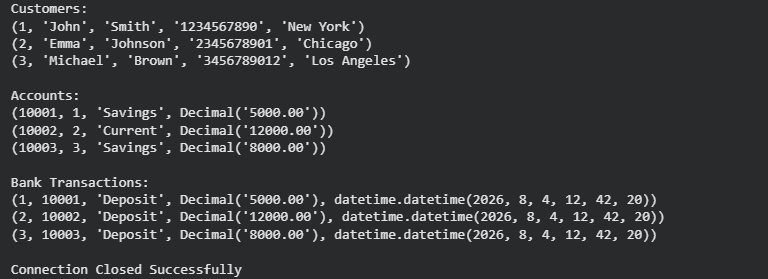
Step 7: Verify the Inserted Data
Verify the inserted data and close the database connection.
mycur.execute("SELECT * FROM Customers")

print("Customers:")

for row in mycur.fetchall():
    print(row)

mycur.execute("SELECT * FROM Accounts")

print("\nAccounts:")

for row in mycur.fetchall():
    print(row)

mycur.execute("SELECT * FROM BankTransactions")

print("\nBank Transactions:")

for row in mycur.fetchall():
    print(row)
Output:
Create a Bank Account
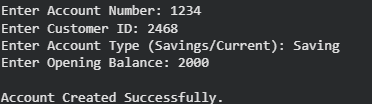
The program accepts customer and account details, checks whether the account already exists, creates a new bank account and stores the information in the MySQL database.
Step 1: Create the Function
Create a function named create_account().
def create_account():
Step 2: Accept Customer Details
Take the account number, customer ID, account type and opening balance from the user.
def create_account():

    account_no = int(input("Enter Account Number : "))
    customer_name = input("Enter Customer Name : ")
    phone = input("Enter Phone Number : ")
    account_type = input("Enter Account Type (Saving/Current) : ")
    balance = float(input("Enter Opening Balance : "))
Step 3: Check Whether the Account Already Exists
Search the database using the account number.
qry = "SELECT * FROM Accounts WHERE account_no=%s"

mycur.execute(qry, (account_no,))

result = mycur.fetchone()
Step 4: Insert the Account Details
If the account number does not exist, insert the record into the Accounts table.
if result is None:

    sql = """
    INSERT INTO Accounts
    VALUES(%s,%s,%s,%s,%s)
    """

    values = (
        account_no,
        customer_name,
        phone,
        account_type,
        balance
    )

    mycur.execute(sql, values)
    mycon.commit()
Step 5: Display the Result
Display a success or error message.
    print("\nAccount Created Successfully.")

else:
    print("\nAccount Number Already Exists.")
Step 6:Call the Function
create_account()
Output:
Deposit Money
The program checks whether the account exists, accepts the deposit amount, updates the account balance, records the transaction in the BankTransactions table and saves the changes in the database.
Step 1: Create the Function
Create a function named deposit_money().
def deposit_money():
Step 2: Enter the Account Number
Take the account number from the user and search for it in the database.
acc_no = int(input("Enter Account Number : "))

qry = "SELECT balance FROM Accounts WHERE account_no=%s"

mycur.execute(qry, (acc_no,))

result = mycur.fetchone()
Step 3: Enter the Deposit Amount
If the account exists, accept the amount to be deposited.
if result:

    amount = float(input("Enter Deposit Amount : "))
Step 4: Update the Account Balance
Update the balance using an UPDATE query and save the changes.
sql = """
UPDATE Accounts
SET balance = balance + %s
WHERE account_no = %s
"""

mycur.execute(sql, (amount, acc_no))
mycon.commit()

mycur.execute("""
INSERT INTO BankTransactions
(account_no, transaction_type, amount, transaction_date)
VALUES (%s, %s, %s, NOW())
""", (acc_no, 'Deposit', amount))

mycon.commit()
Step 5: Display the Result
Display a success message if the amount is deposited successfully; otherwise, display an error message.
if result:

    print("\nAmount Deposited Successfully.")
else:
    print("\nAccount Not Found.")
Output:

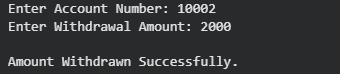
Withdraw Money
The program verifies the account number, checks whether the account has sufficient balance, withdraws the specified amount, updates the account balance and stores the changes in the MySQL database.
Step 1: Create the Function
Create a function named withdraw_money().
def withdraw_money():
Step 2: Search the Account
Take the account number from the user and retrieve the current balance from the database.
acc_no = int(input("Enter Account Number : "))

qry = "SELECT balance FROM Accounts WHERE account_no=%s"

mycur.execute(qry, (acc_no,))

result = mycur.fetchone()
Step 3: Enter the Withdrawal Amount
If the account exists, enter the amount to be withdrawn and compare it with the available balance.
if result:

    balance = result[0]

    amount = float(input("Enter Withdrawal Amount : "))

    if amount <= balance:
         print("Insufficient Balance.")
            return
Step 4: Update the Balance
Subtract the withdrawal amount from the existing balance and save the changes.
mycur.execute(sql, (amount, acc_no))
mycon.commit()


mycur.execute("""
INSERT INTO BankTransactions
(account_no, transaction_type, amount, transaction_date)
VALUES (%s, %s, %s, NOW())
""", (acc_no, 'Withdrawal', amount))

mycon.commit()
Step 5: Display the Result
Display an appropriate message based on the transaction status.
if result:

    if amount <= balance:
        print("\nAmount Withdrawn Successfully.")

    else:
        print("\nInsufficient Balance.")

else:
    print("\nAccount Not Found.")