2048 is a single-player puzzle game in which tiles with the same value are combined to create a tile with the value 2048. The game can be implemented in Python using a 4×4 matrix, with all game operations performed through the console without requiring a graphical user interface (GUI).
The project consists of two Python files:
- logic.py – Implements the game logic, including tile movement, merging, random tile generation, and game state checks.
- 2048.py – Initializes the game, accepts user input, and displays the updated game board.
Game Rules
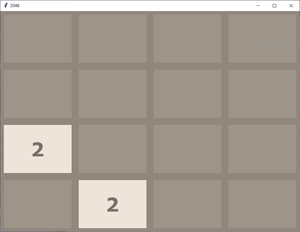
1. There is a 4*4 grid which can be filled with any number. Initially two random cells are filled with '2' in it. Rest cells are empty.
2. Players can press one of the four keys to move tiles:
- W / w – Move Up
- S / s – Move Down
- A / a – Move Left
- D / d – Move Right
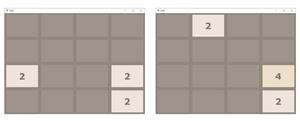
3. After this grid compression any random empty cell gets itself filled with 2.
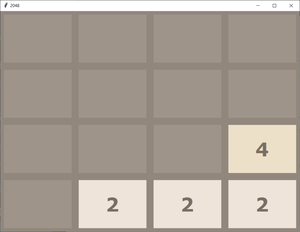
4. Following the above process, we have to double the elements by adding up and make 2048 in any of the cell. If we are able to do that we win.
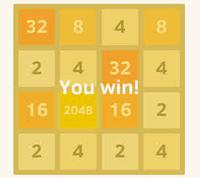
5. But if during the game there is no empty cell left to be filled with a new 2, then the game goes over.
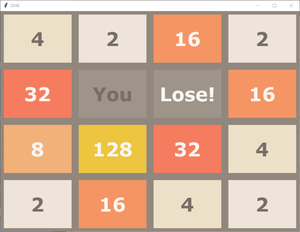
In the above process, snapshots show the graphical interface of the 2048 game. However, all the logic is in the code. To understand it clearly, we can represent the grid as a 4×4 matrix (a list with four rows and four columns) and take input/output directly in the console, without using a GUI.
Example:
Commands are as follows:
'W' or 'w': Move Up
'S' or 's': Move Down
'A' or 'a': Move Left
'D' or 'd': Move Right
[0, 0, 0, 0]
[0, 0, 0, 0]
[0, 0, 0, 0]
[0, 0, 2, 0]
Press the command: a
GAME NOT OVER
[0, 0, 0, 2]
[0, 0, 0, 0]
[0, 0, 0, 0]
[2, 0, 0, 0]
Press the command: s
GAME NOT OVER
[0, 0, 0, 0]
[0, 0, 0, 0]
[0, 0, 2, 0]
[2, 0, 0, 2]
Press the command: d
GAME NOT OVER
[0, 0, 0, 0]
[0, 0, 0, 0]
[2, 0, 0, 2]
[0, 0, 0, 4]
Press the command: a
GAME NOT OVER
[0, 2, 0, 0]
[0, 0, 0, 0]
[4, 0, 0, 0]
[4, 0, 0, 0]
Press the command: s
GAME NOT OVER
[0, 0, 0, 0]
[0, 0, 0, 0]
[0, 0, 0, 0]
[8, 2, 0, 2]
.
.
.
And the series of input output will go on till we lose or win!
Programming Approach
The game can be logically represented as a 4×4 matrix. Each movement can be broken down into a series of steps:
- Left swipe: Compress tiles to the left -> Merge identical tiles -> Compress again.
- Right swipe: Reverse the matrix -> Perform left swipe -> Reverse again.
- Up swipe: Transpose the matrix -> Perform left swipe -> Transpose back.
- Down swipe: Transpose the matrix -> Perform right swipe -> Transpose back.
Helper functions like compress(), merge(), reverse(), and transpose() are used to implement these moves.
logic.py
This file contains all the helper functions required for the game logic.
import random

def start_game():
    mat =[]
    for i in range(4):
        mat.append([0] * 4)

    print("Commands are as follows : ")
    print("'W' or 'w' : Move Up")
    print("'S' or 's' : Move Down")
    print("'A' or 'a' : Move Left")
    print("'D' or 'd' : Move Right")

    add_new_2(mat)
    return mat

def findEmpty(mat):
    """Finds the first empty (0) cell in the grid."""
    for i in range(4):
        for j in range(4):
            if mat[i][j] == 0:
                return i, j
    return None, None

def add_new_2(mat):
    """Adds a new '2' in a random empty cell in the grid."""
    if all(all(cell != 0 for cell in row) for row in mat):
        return

    tries = 0
    while tries < 30:
        r = random.randint(0, 3)
        c = random.randint(0, 3)
        if mat[r][c] == 0:
            mat[r][c] = 2
            return
        tries += 1

    r, c = findEmpty(mat)
    if r is not None and c is not None:
        mat[r][c] = 2

def get_current_state(mat):
    for i in range(4):
        for j in range(4):
            if(mat[i][j]== 2048):
                return 'WON'

    for i in range(4):
        for j in range(4):
            if(mat[i][j]== 0):
                return 'GAME NOT OVER'

    for i in range(3):
        for j in range(3):
            if(mat[i][j]== mat[i + 1][j] or mat[i][j]== mat[i][j + 1]):
                return 'GAME NOT OVER'

    for j in range(3):
        if(mat[3][j]== mat[3][j + 1]):
            return 'GAME NOT OVER'

    for i in range(3):
        if(mat[i][3]== mat[i + 1][3]):
            return 'GAME NOT OVER'

    return 'LOST'

def compress(mat):
    changed = False
    new_mat = []
    for i in range(4):
        new_mat.append([0] * 4)

    for i in range(4):
        pos = 0
        for j in range(4):
            if(mat[i][j] != 0):
                new_mat[i][pos] = mat[i][j]

                if(j != pos):
                    changed = True
                pos += 1

    return new_mat, changed

def merge(mat):
    changed = False

    for i in range(4):
        for j in range(3):
            if(mat[i][j] == mat[i][j + 1] and mat[i][j] != 0):
                mat[i][j] = mat[i][j] * 2
                mat[i][j + 1] = 0
                changed = True

    return mat, changed

def reverse(mat):
    new_mat =[]
    for i in range(4):
        new_mat.append([])
        for j in range(4):
            new_mat[i].append(mat[i][3 - j])
    return new_mat

def transpose(mat):
    new_mat = []
    for i in range(4):
        new_mat.append([])
        for j in range(4):
            new_mat[i].append(mat[j][i])
    return new_mat

def move_left(grid):
    new_grid, changed1 = compress(grid)
    new_grid, changed2 = merge(new_grid)

    changed = changed1 or changed2

    new_grid, temp = compress(new_grid)
    return new_grid, changed

def move_right(grid):
    new_grid = reverse(grid)
    new_grid, changed = move_left(new_grid)

    new_grid = reverse(new_grid)
    return new_grid, changed

def move_up(grid):
    new_grid = transpose(grid)
    new_grid, changed = move_left(new_grid)
    new_grid = transpose(new_grid)
    return new_grid, changed

def move_down(grid):
    new_grid = transpose(grid)
    new_grid, changed = move_right(new_grid)

    new_grid = transpose(new_grid)
    return new_grid, changed
Explanation:
- start_game() creates a 4×4 game board initialized with zeros, places the first 2 in a random empty cell, and displays the movement controls.
- add_new_2(mat) adds a 2 to a random empty cell. If the selected cell is occupied, the function retries until an empty cell is found.
- get_current_state(mat) returns "WON" if a tile with the value 2048 exists, "GAME NOT OVER" if empty cells or valid merges are available, and "LOST" if no valid moves remain.
- move_left(grid) compresses the tiles to the left, merges adjacent tiles with the same value, and compresses the grid again.
- move_right(grid) reverses the grid, performs the left move, and reverses the grid again.
- move_up(grid) transposes the grid, performs the left move, and transposes the grid back.
- move_down(grid) transposes the grid, performs the right move, and transposes the grid back.
- compress(mat) shifts all non-zero tiles to the left.
- merge(mat) merges adjacent tiles with the same value.
- reverse(mat) reverses each row of the grid.
- transpose(mat) swaps the rows and columns of the grid.
- findEmpty(mat) returns the first empty cell in the grid.
2048.py code
This is the main driver file to run the game.
import logic

if __name__ == '__main__':
        mat = logic.start_game()

while(True):
    x = input("Press the command : ")
    if(x == 'W' or x == 'w'):
        mat, flag = logic.move_up(mat)
        status = logic.get_current_state(mat)
        print(status)

        if(status == 'GAME NOT OVER'):
            logic.add_new_2(mat)
        else:
            break

    elif(x == 'S' or x == 's'):
        mat, flag = logic.move_down(mat)
        status = logic.get_current_state(mat)
        print(status)

        if(status == 'GAME NOT OVER'):
            logic.add_new_2(mat)
        else:
            break

    elif(x == 'A' or x == 'a'):
        mat, flag = logic.move_left(mat)
        status = logic.get_current_state(mat)
        print(status)

        if(status == 'GAME NOT OVER'):
            logic.add_new_2(mat)
        else:
            break

    elif(x == 'D' or x == 'd'):
        mat, flag = logic.move_right(mat)
        status = logic.get_current_state(mat)
        print(status)

        if(status == 'GAME NOT OVER'):
            logic.add_new_2(mat)
        else:
            break

    else:
        print("Invalid Key Pressed")

    print(mat)
Explanation:
- logic.start_game() initializes the game board, places the first 2 in a random empty cell, and displays the movement controls.
- logic.move_up(mat) moves all tiles upward by compressing and merging them according to the game rules.
- logic.move_down(mat) moves all tiles downward by compressing and merging them according to the game rules.
- logic.move_left(mat) moves all tiles to the left by compressing and merging them according to the game rules.
- logic.move_right(mat) moves all tiles to the right by compressing and merging them according to the game rules.
- logic.get_current_state(mat) checks whether the player has won, the game should continue, or no valid moves remain.
- logic.add_new_2(mat) places a new 2 in a random empty cell after every valid move.
- If the user enters a key other than W, A, S, or D (uppercase or lowercase), the program prints "Invalid Key Pressed".
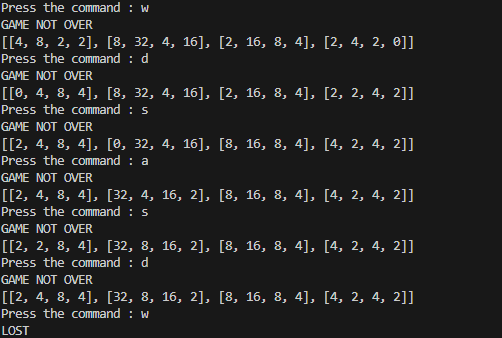
Output