

When working with MongoDB and Mongoose in Node.js, handling multiple database operations one by one can be slow and inefficient. That’s where the Model.bulkWrite() method comes in handy. This powerful API lets you execute multiple write operations (insert, update, delete, replace) in a single command, which improves performance and reduces network overhead.
In this article, we’ll explore the Mongoose bulkWrite() API with practical examples, setup steps, and best practices to help us boost your application’s database interaction speed.
What is Model.bulkWrite() in Mongoose?
The Model.bulkWrite() method of the Mongoose API is used to perform multiple operations in one command. It can insert multiple documents, update one or multiple documents, replace documents, delete documents in one single command. This is faster in performance than multiple independent create commands.
- Executes multiple operations in a single database call
- Supports insert, update, replace, and delete operations
- Faster performance compared to individual commands
- Returns a detailed result object for operation outcomes
Syntax:
Model.bulkWrite(operations, options, callback)
Parameters
- operations: It is an array of objects with various operations. Like: insertOne, updateOne, updateMany, deleteOne, deleteMany, replaceOne etc.
- options (Optional): It is an object with various properties.
- callback (Optional): It is a callback function that will run once execution is completed.
Return Value
- The Model.bulkWrite() function returns a promise. Named as BulkWriteOpResult if command succeeds.
Setting up Node.js Project with Mongoose
Step 1: Create a Node.js application using the following command:
npm initStep 2: After creating the NodeJS application, Install the required module using the following command:
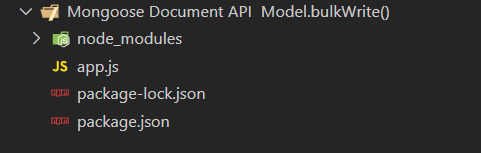
npm install mongooseProject Structure: The project structure will look like this:
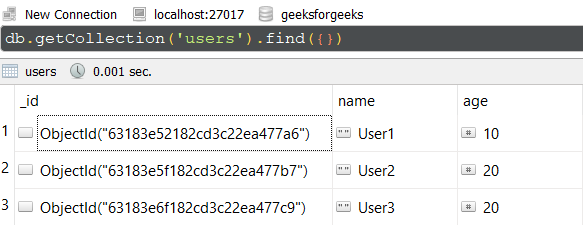
Database Structure: The database structure will look like this, the following documents are present in the collection.
Example 1: Using bulkWrite() for Insert and Update Operations
In this example, We have established a database connection using mongoose and defined model over userSchema, having two columns or fields "name" and "age". At the end, we are using bulkWrite() method on the User model which is having various operations like insertOne, UpdateOne.
We are providing these as an array of objects as the first parameter to bulkWrite() method. In this example, we have inserted one new document and updated the existing document. Write down the below code in the app.js file:
// Require mongoose module
const mongoose = require("mongoose");

// Set Up the Database connection
mongoose.connect("mongodb://localhost:27017/geeksforgeeks", {
    useNewUrlParser: true,
    useUnifiedTopology: true,
});

const userSchema = new mongoose.Schema({
    name: String,
    age: Number,
});

// Defining userSchema model
const User = mongoose.model("User", userSchema);
User.bulkWrite([
    {
        insertOne: {
            document: {
                name: "User4",
                age: 30,
            },
        },
    },
    {
        updateOne: {
            filter: { name: "User1" },
            update: { name: "User1 Updated" },
        },
    },
]).then((result) => {
    console.log(result);
});
Steps to run the program: To run the application execute the below command from the root directory of the project:
node app.jsOutput:
BulkWriteResult {
  result: {
    ok: 1,
    writeErrors: [],
    writeConcernErrors: [],
    insertedIds: [ [Object] ],
    nInserted: 1,
    nUpserted: 0,
    nMatched: 1,
    nModified: 1,
    nRemoved: 0,
    upserted: []
  }
}
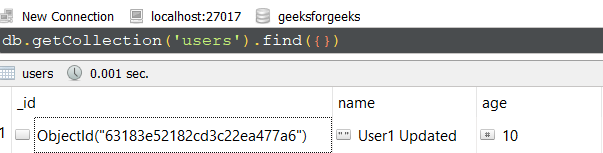
GUI Representation of the Database using Robo3T GUI tool:

Explanation:
insertOneadds a new user with name "User4".updateOnesearches for a user named "User1" and updates the name to "User1 Updated".- Both operations are sent to MongoDB in one batch, improving speed and reducing latency.
Example 2: Using bulkWrite() for Delete Operations
In this example, we are performing deleteOne and deleteMany operation using bulkWrite() method. Below is the documents present in collection before executing the command.
Write down the below code in the app.js file:
// Require mongoose module
const mongoose = require("mongoose");

// Set Up the Database connection
mongoose.connect("mongodb://localhost:27017/geeksforgeeks", {
    useNewUrlParser: true,
    useUnifiedTopology: true,
});
const userSchema = new mongoose.Schema({
    name: String,
    age: Number,
});

// Defining userSchema model
const User = mongoose.model("User", userSchema);

User.bulkWrite([
    {
        deleteOne: {
            filter: { name: "User4" }
        }
    },
    {
        deleteMany: {
            filter: { age: 20 },
        }
    },
]).then((result) => {
    console.log(result);
});
Steps to run the program: To run the application execute the below command from the root directory of the project:
node app.jsOutput:
BulkWriteResult {
  result: {
    ok: 1,
    writeErrors: [],
    writeConcernErrors: [],
    insertedIds: [],
    nInserted: 0,
    nUpserted: 0,
    nMatched: 0,
    nModified: 0,
    nRemoved: 3,
    upserted: []
  }
}
GUI Representation of the Database using Robo3T GUI tool:
Explanation:
deleteOneremoves the user document with name "User4".deleteManyremoves all users with age 20.- Both deletes happen in one command, saving resources and time.
Best Practices and Tips for Using bulkWrite()
- Use atomic operations when possible to maintain data consistency.
- Always handle errors with
.catch()or try-catch in async functions. - Prefer
bulkWrite()when you have multiple operations to perform on the same collection to improve performance. - For large batches, consider splitting operations into chunks to avoid exceeding MongoDB limits.
- Use the detailed
BulkWriteResultto audit operations and handle partial failures.
Conclusion
The Mongoose Model.bulkWrite() API is a valuable tool for optimizing MongoDB write-heavy applications. By batching multiple operations inserts, updates, deletes into a single command, you reduce the overhead of multiple network calls and improve throughput. Whether you are building a scalable backend or handling large datasets, mastering bulkWrite() will help make your application faster and more efficient.
