

Image segmentation is a computer vision technique that divides an image into meaningful regions to identify objects, boundaries, or patterns. Since images are made up of pixels, K-Means Clustering groups pixels with similar characteristics such as intensity or colour to simplify visual analysis and help in accurately identifying and separating objects in an image.
Implementation
Step 1: Install Required Libraries
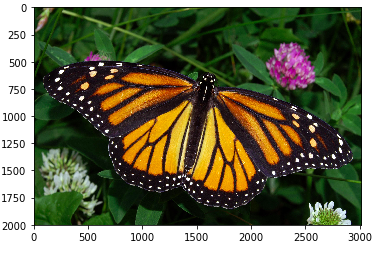
In the first step we load required libraries like Numpy, Matplotlib and OpenCV. We'll start by reading the image and displaying it.
You can download the image from here.
import numpy as np
import matplotlib.pyplot as plt
import cv2

image = cv2.imread('images/monarch.jpg')

image = cv2.cvtColor(image, cv2.COLOR_BGR2RGB)

plt.imshow(image)
Output:
Step 2: Reshape the Image for K-Means Clustering
K-Means works on 2D data but images are in 3D i.e height, width, color channels. So we need to reshape the image into a 2D array.
pixel_vals = image.reshape((-1,3))

pixel_vals = np.float32(pixel_vals)
Step 3: Apply K-Means Clustering and Segment the Image
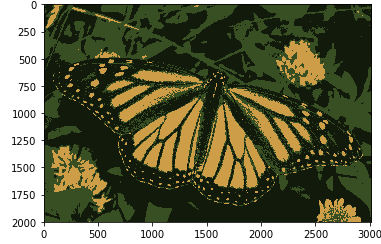
Now let's apply the K-Means clustering algorithm to segment the image into distinct regions based on color.
- First set the criteria for when the algorithm should stop.
- We’ll use a maximum of 100 iterations or an accuracy threshold of 85%.
- We will choose k = 3 which means the algorithm will identify 3 clusters in the image.
- K-Means will group pixels with similar colors into the specified number of clusters.
- Finally we reshape the segmented data to match the original dimensions of the image so it can be visualized properly.
criteria = (cv2.TERM_CRITERIA_EPS + cv2.TERM_CRITERIA_MAX_ITER, 100, 0.85)

k = 3
retval, labels, centers = cv2.kmeans(pixel_vals, k, None, criteria, 10, cv2.KMEANS_RANDOM_CENTERS)

centers = np.uint8(centers)
segmented_data = centers[labels.flatten()]

segmented_image = segmented_data.reshape((image.shape))

plt.imshow(segmented_image)
Output:
Now if we change the value of k to 6 we get the below image
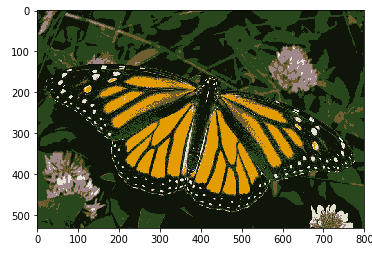
As you can see with an increase in the value of k the image becomes clearer and distinct because K-means algorithm can classify more classes or cluster of colors. It can segment objects in images and give better results in smaller dataset. But when it is applied on large datasets it becomes time consuming.
You can download source code from here.
