

Front-end development, also known as client-side development, focuses on building the user interface (UI) and user experience (UX) of a website or web application.
- It involves designing and implementing interactive elements that users interact with directly.
- The core technologies used in front-end development are HTML for structure, CSS for styling, and JavaScript for interactivity.
- Apart from that, we use different CSS frameworks (like Bootstrap, Tailwind CSS) and JavaScript frameworks (like React, Angular, Vue.js) to enhance development efficiency and improve user experience.
Beginner
1. What is HTML?
HTML stands for Hyper Text Markup Language. It is used to define the structure of the web pages. It is a markup language that consists of different tags. HTML is the basic building block of the web page, which is used to display text, images, and other content.
2. What are Semantic elements in HTML?
The semantic elements in HTML are the elements that contain the meaning of the content and the structure of the HTML document. These elements contain content that is related to their names or reflects their names. These are some of the semantic HTML elements listed below:
- Header
- Main
- Section
- Article
- Aside
- Footer etc.
3. Differentiate between the Inline and the Block elements in HTML.
| Inline Element | Block Element |
|---|---|
| Does not start on a new line | Always starts on a new line |
| Takes up only as much width as necessary | Takes up the full width available |
| Cannot contain block elements | Can contain both inline and block elements |
| Height and width are usually not adjustable | Height and width can be set freely |
Example: <span>, <a>, <strong>, <em> etc | Example: <div>, <p>, <h1> etc |
4. What is a list in HTML? Explain the different types of lists available in HTML
Lists in HTML are used to group and display a collection of related items. HTML provides three types of lists:
1. Unordered List: Displays items with bullets. Each item is defined using the <li> tag.
<ul>
    <li>List Item 1</li>
    <li>List Item 3</li>
    <li>List Item 3</li>
</ul>
2. Ordered List: Displays items in a numbered or ordered sequence. Each item is defined using the <li> tag.
<ol>
    <li>List Item 1</li>
    <li>List Item 3</li>
    <li>List Item 3</li>
 </ol>
3. Description List: Displays terms and their descriptions using the <dt> (term) and <dd> (description) tags.
<dl>
    <dt>First  term</dt>
    <dd>Definition 1</dd>

    <dt>Second term</dt>
    <dd>Definition 2</dd>

    <dt>Third term</dt>
    <dd>Definition 3</dd>
</dl>
5. What is the difference between <div> and <span>?
The table below will show the differences between the div and span tags in HTML:
<div> tag | <span> tag |
|---|---|
It is a block-level element. | It is an inline element. |
It can be used to group and structure the content of the web page. | Used to group and style small portions of inline content. |
It represents a bigger section of the web page. | It is used to target small parts of the web page. |
It starts from a new line and takes up the full width available. | It does not start from a new line and takes up only the required width as taken by the content. |
6. What is the DOCTYPE declaration?
The DOCTYPE declaration (<!DOCTYPE html>) tells the browser to render the document in standards mode, ensuring consistent behavior across browsers. In HTML5, it is a simple declaration placed at the beginning of the document.
7. What is the purpose of the <iframe> tag?
The <iframe> tag is used to embed another HTML document or web page within the current web page. It is commonly used to display videos, maps, documents, or other web content from the same or another website.
8. What is the difference between <b> and <strong> tags in HTML?
<b> | <strong> |
|---|---|
Displays text in bold without adding semantic importance. | Displays text in bold and indicates that the content is important. |
Used to draw attention to text for styling or presentation. | Used to convey semantic importance, helping browsers, screen readers, and search engines understand the content. |
Primarily a presentational element. | A semantic element. |
9. What are meta tags in HTML?
Meta tags provide metadata (information about the web page) that is not displayed on the page. They are placed inside the <head> element and are used to specify information such as the character encoding, page description, keywords, author, and viewport settings.
10. What is CSS?
CSS (Cascading Style Sheets) is a stylesheet language used to control the presentation and layout of HTML documents. It defines how elements are displayed, including their colors, fonts, spacing, positioning, and responsiveness, separating the content (HTML) from its presentation.
11. Explain selectors in CSS
CSS selectors are patterns used to select HTML elements and apply CSS styles to them.
- Element Selector: Selects elements by their tag name.
- ID Selector (#): Selects an element by its unique id.
- Class Selector (.): Selects one or more elements by their class.
- Universal Selector (*): Selects all elements.
- Attribute Selector: Selects elements based on their attributes.
- Child Selector (>): Selects direct child elements.
- Pseudo-classes: Select elements in a specific state, such as :hover and :nth-child().
- Pseudo-elements: Select specific parts of an element, such as ::before and ::after.
12. How can we include the CSS in the webpage?
We can include the CSS in the webpage in the following ways:
- Inline CSS: Added directly to an HTML element using the style attribute.
<p style="color: blue; font-size: 20px;">This is a paragraph with inline CSS.</p>- Internal CSS: Written inside a <style> tag within the <head> section of the HTML document.
<head>
  <style>
    p {
      color: green;
      font-size: 18px;
    }
  </style>
</head>
- External CSS: Written in a separate .css file and linked to the HTML document using the <link> tag.
<head>
  <link rel="stylesheet" href="styles.css">
</head>
p {
  color: red;
  font-size: 16px;
}
- @import Rule: Used to import one CSS file into another CSS file or a <style> block.
@import url("styles.css");13. What is the difference between visibility: hidden and display: none properties in CSS?
The visibility: hidden property only hides the content of the element on which it is used. It does not remove the element from the document and keeps the space as it is, so that no other element can replace it on the UI.
The display: none property not only hides the element but removes it from the document, and the space acquired by the element is now free to be acquired by the other elements.
14. What is the difference between CSS Grid and Flexbox?
CSS Grid and Flexbox are CSS layout systems used to create responsive web layouts. Grid is designed for two-dimensional layouts, while Flexbox is designed for one-dimensional layouts.
| CSS Grid | Flexbox |
|---|---|
| Two-dimensional layout | One-dimensional layout |
| Controls both rows and columns | Controls either row or column, not both |
| Suitable for complex, structured layouts | Ideal for simple, linear layouts |
| Allows item placement anywhere in the grid | Items follow the document/source order |
| Can define both rows and columns together | Defines layout in a single direction (row or column) |
15. What is the use of the float property?
The float property is used to position an element to the left or right of its container, allowing surrounding content (such as text) to wrap around it. It is commonly used for image wrapping and older page layouts.
16. What is JavaScript?
JavaScript is a high-level, dynamically typed scripting language used to create interactive and dynamic web applications. It enables features such as DOM manipulation, event handling, form validation, animations, and asynchronous communication. JavaScript is used for both frontend and backend development (using environments like Node.js).
17. What is the difference between let, var, and const?
var | let | const |
|---|---|---|
Function-scoped | Block-scoped | Block-scoped |
Hoisted but initialized as undefined | Hoisted but not initialized | Hoisted but not initialized |
No TDZ (accessible before declaration) | Has TDZ (not accessible before declaration) | Has TDZ (not accessible before declaration) |
Reassigning and redeclaring within the same scope is allowed. | Reassigning is allowed, but redeclaration in the same scope is not allowed. | Cannot be reassigned or redeclared in the same scope. |
18. What is difference between == and === in JavaScript?
The == operator is known as the double-equal operator in JavaScript. The == operator checks only for the values of the operands and returns true if the values are the same.
The === operator is known as the triple-equal the operator. It not only checks for the values of the operands but also the types of the operands. It returns true only if the values and the type of the operands are the same.
let num = 5;
let str = '5';

console.log(num == str);
console.log(num === str);
19. What is the DOM?
The DOM (Document Object Model) is a tree-like representation of an HTML or XML document. It represents each element as an object, allowing JavaScript to access, modify, add, or remove elements, attributes, styles, and content dynamically.
20. Difference between null and undefined in JS.
Undefined Value:
- The undefined is the default value that is assigned to a variable that is declared but not initialized.
- It is also the default return value of a function.
- When you try to access some value or property that is not the part of an object, it returns undefined.
Null Value:
- null is an intentional value assigned to represent the absence of a value or an empty value.
- It must be assigned explicitly by the programmer.
- It is commonly used to indicate that a variable currently has no value.
let a;      // variable is declared but not assigned a value
let b = null; // variable is explicitly assigned a null value

console.log(a);
console.log(b);

console.log(a === b);  // false (undefined is not equal to null)
21. What is React?
React is an open-source JavaScript library developed by Meta (formerly Facebook) for building component-based user interfaces (UIs). It enables developers to create fast, reusable, and interactive web applications.
Key Features of React
- Component-Based Architecture
- Virtual DOM (DOM)
- JSX (JavaScript XML)
- One-Way Data Binding
- Single Page Application (SPA)
- State Management
22. Explain the building blocks of React.
There are five main building blocks of React:
- Components: Reusable pieces of UI that return JSX.
- JSX (JavaScript XML): A syntax extension that allows you to write HTML-like code inside JavaScript.
- Props and State: Props are used to pass data from parent to child components, while State stores and manages data within a component.
- Context: Allows data to be shared across components without passing props through every level (avoids prop drilling).
- Virtual DOM: A lightweight copy of the real DOM that improves performance by updating only the changed parts of the UI.
23. What is virtual DOM in React?
The Virtual DOM is a lightweight, in-memory representation of the real DOM. When the state or props change, React creates a new Virtual DOM, compares it with the previous one (diffing), and updates only the changed parts of the real DOM (reconciliation). This improves rendering performance and reduces unnecessary DOM updates.
24. What is JSX React?
JSX (JavaScript XML) is a syntax extension for JavaScript that allows you to write HTML-like code inside JavaScript. JSX is transpiled into JavaScript by tools like Babel, enabling React to create and render UI elements.
import React from 'react';
function App() {
    return <h1>Hello, React!</h1>;
}
export default App;
In this example, the JSX code inside the App function returns an <h1> element with the text "Hello, React!" which will be displayed in the browser when the component is rendered.
25. What are the components In React?
A component is a reusable, independent piece of UI that represents a part of a React application. React applications are built by combining multiple components.
There are two types of components in React:
- Functional Components: Functional Component are simple JavaScript functions that accept props as input and return JSX. They can manage state and lifecycle features using React Hooks.
- Class Components: Class Components are ES6 classes that extend React.Component and return JSX using a render() method. They can manage state and lifecycle methods, but are less commonly used in modern React since Hooks were introduced.
26. What is Angular?
Angular is an open-source framework that is used for building web applications using TypeScript. Angular is used for building single-page applications (SPAs). It was developed by Google.
Key Features of Angular
- Two-way data binding: Synchronizes data between the model and the view automatically.
- Dependency injection: Manages and injects dependencies efficiently to enhance modularity.
- Modularization: Break down the application into smaller, reusable modules.
- Templating: Uses templates to define the view, providing dynamic and efficient UI updates.
- Component-Based Architecture: Builds applications using reusable components.
27. How is AngularJS different from Angular?
AngularJS and Angular are both web application frameworks developed by Google, but they differ in architecture, language, and performance.
| Features | AngularJS | Angular |
|---|---|---|
| Release Year | 2010 | 2016 |
| Language | JavaScript | TypeScript |
| Architecture | MVC (Model-View-Controller) | Component-based |
| Mobile Optimization | Limited | Built-in support |
| Performance | Slower | Faster with Ahead-of-Time (AOT) compiler |
| Routing | Using third-party libraries | Provided by Angular Router |
28. What are the Components in Angular?
Components are the fundamental building blocks of an Angular application. A component controls a part of the user interface and consists of a TypeScript class, an HTML template, and optional CSS styles.
Example: A reusable header component.
import { Component, Input } from '@angular/core';

@Component({
  selector: 'app-header',
  templateUrl: './header.component.html',
  styleUrls: ['./header.component.css']
})
export class HeaderComponent {
  @Input() title: string;
  @Input() links: { name: string; url: string }[];

  constructor() {}
}
29. What is Two-Way Data Binding in Angular?
Angular supports two-way data binding, which allows the automatic synchronization of data between the view and the component. If any changes are made in the component will be reflected in the view, and if any changes are made in the view, they will be reflected in the component. This is known as the two-way data binding.
30. What are Angular Services and when to use them?
Angular Services are reusable classes used to store shared logic such as API calls, authentication, or data processing. They are injected into components through Angular’s dependency injection system.
Use them when you want to separate business logic from UI components or share data/functions across multiple components.
31. What are Angular Pipes?
Angular Pipes are used to transform the displayed data in the template. They apply the transformation on the input values and return the transformed value. Due to this, we can directly manipulate the data in the HTML templates.
Syntax
{{ value | pipeName }}32. What is Vue.js?
Vue.js is an open-source, progressive JavaScript framework used for building user interfaces (UIs) and single-page applications (SPAs). It is known for its simplicity, reactive data binding, component-based architecture, and easy integration with existing projects and libraries.
33. What are VueJS components?
A component in VueJS is a reusable piece of code that signifies a part of the user interface. Components make it simpler to handle complex applications by breaking them down into minor, controllable pieces.
34. What are Props in VueJS?
Props in VueJS are custom attributes that permit parent components to pass data to child components. They empower component reusability by making it possible to handle child components from their parent component. They are specified in the child component and received as arguments from the parent.
Syntax
Vue.component('child-component', {
    props: ['propName'],
        // define component
});
35. What is a VueJS Router?
Vue Router is the official routing library for Vue.js. It enables navigation between different views by mapping URLs to Vue components, allowing developers to build single-page applications (SPAs) without reloading the page.
36. What is Git?
Git is an open-source distributed version control system (VCS) used to track changes, manage source code, and collaborate on software development. It was created by Linus Torvalds in 2005 for the development of the Linux kernel.
37. What are the advantages of using Git?
Git offers the following advantages:
- Version Control: Tracks and manages changes to source code over time.
- Distributed: Every developer has a complete copy of the repository, enabling offline work and improving reliability.
- Secure: Uses cryptographic hashing to maintain the integrity of commits and repository history.
- Collaboration: Allows multiple developers to work on the same project simultaneously using branches and merges.
- Fast and Efficient: Performs most operations locally, making common tasks quick and efficient.
38. Explain the difference between Git and GitHub.
Git | GitHub |
|---|---|
Distributed version control system (DVCS). | Cloud-based platform for hosting Git repositories. |
Used to track and manage source code changes locally. | Provides remote repository hosting and collaboration tools. |
Does not provide cloud hosting. | Offers cloud hosting for public and private repositories. |
Supports version control operations such as commit, branch, merge, and checkout. | Provides features such as pull requests, issue tracking, code reviews, and GitHub Actions. |
Can be used independently without GitHub. | Built on Git and requires Git for version control operations. |
39. What is a repository in Git?
In Git, the repository is the location in which all the files and the versions of projects are stored, which allows the developers to track the changes made in the code. There are two types of repository.
- Local Repository: Local Repositories exist on a developer's local machine.
- Remote Repository: Remote Repositories are stored on the server (GitHub, GitLab).
Intermediate
40. What is localStorage?
localStorage is a client-side web storage mechanism that allows web applications to store key-value pairs persistently in a user’s web browser. It provides a simple interface for storing data locally.
41. What is sessionStorage?
sessionStorage is a web storage API provided by web browsers to store data in a similar way as stored in the localStorage in the form of key-value pairs. The data stored in the sessionStorage will only be accessible for one session, such that if the user closes the window or tab, the stored data will be lost.
42. How to create a table In HTML?
In HTML, tables are created using the <table> element. Each table consists of rows <tr> and cells <td> for data, and <th> for headers.
<table border="1">
    <tr>
        <th>Name</th>
        <th>Age</th>
        <th>Country</th>
    </tr>
    <tr>
        <td>GFG</td>
        <td>12</td>
        <td>India</td>
    </tr>
    <tr>
        <td>Ryan</td>
        <td>24</td>
        <td>India</td>
    </tr>
</table>
43. Difference between the GET and the POST methods in HTML forms.
GET Method | POST Method |
|---|---|
Sends form data as part of the URL. | Sends form data in the request body. |
Form data is visible in the URL. | Form data is not visible in the URL. |
Limited by the maximum URL length supported by the browser/server. | Not limited by the URL length (request body size depends on server configuration). |
Requests can be cached by browsers. | Requests are not cached by default. |
URLs containing form data can be bookmarked. | Form submissions cannot be bookmarked in the same way. |
Suitable for retrieving data and non-sensitive information. | Suitable for submitting data, especially sensitive or large amounts of data. |
44. What are common client-side form validation techniques?
Client-side form validation can be done using built-in HTML attributes (required, pattern, type="email"), custom JavaScript checks (running on input or form submission), or framework-based solutions like Angular Reactive Forms or React Hook Form.
These methods help catch user errors early and improve user experience, but server-side validation should still be used for security.
45. What are void elements in HTML?
Void elements (also called empty elements) are HTML elements that cannot contain any content and do not have a closing tag.
Examples: <img>, <br>, <hr>, <input>, <meta>, and <link>.
46. What is z-index in CSS?
The z-index property controls the stacking order of overlapping elements in CSS.
- Default value: auto.
- Works only on positioned elements (position: relative, absolute, fixed, or sticky) and on some layout items such as flex and grid items.
- Higher z-index values appear in front of elements with lower values.
- Negative z-index values place elements behind others within the same stacking context.
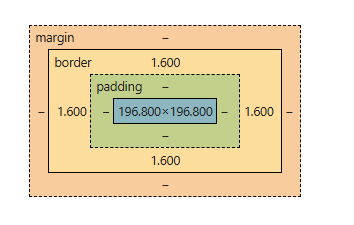
47. What is the Box Model in CSS?
The CSS Box Model describes how every HTML element is represented as a rectangular box. It defines the element's size and spacing using four areas:
- Content: The actual content of the element (text, images, etc.).
- Padding: Space between the content and the border.
- Border: Surrounds the padding and content.
- Margin: Transparent space outside the border that separates the element from other elements.
48. What are CSS Sprites?
CSS Sprites are a technique used in web development to combine multiple images (such as icons, buttons, or other UI elements) into a single image file. This single image is then displayed in different parts on the web page using CSS, reducing the number of HTTP requests required to load multiple images.
.icon {
  background-image: url('sprites.png');
  background-repeat: no-repeat;
}

.icon-home {
  background-position: 0 0;
  width: 50px;
  height: 50px;
}

.icon-search {
  background-position: -50px 0;
  width: 50px;
  height: 50px;
}
- Both the home and search icons are part of the same sprites.png image file.
- The background-position shifts the visible area of the sprite image to show the appropriate icon.
49. What is CSS specificity and how do you resolve selector conflicts?
CSS specificity determines which style rule is applied when multiple rules target the same element. The priority order is: inline styles > IDs > classes/attributes/pseudo-classes > tag selectors.
Conflicts are resolved by using more specific selectors, adjusting rule order, or simplifying styles. Avoid using !important unless absolutely necessary.
50. What is the CSS preprocessor?
A CSS preprocessor is a scripting language that extends CSS with additional features and compiles it into standard CSS.
Popular CSS preprocessors:
- Sass (Syntactically Awesome Style Sheets)
- Less (Leaner Style Sheets)
Features of CSS preprocessors:
- Variables: Store reusable values.
- Mixins: Reuse groups of CSS declarations.
- Nesting: Write nested CSS rules for better readability.
- Functions and Operations: Perform calculations and manipulate values.
- Partials and Imports: Organize styles into reusable files.
51. What is hoisting in JavaScript?
In JavaScript, Hoisting is the behavior in which during the compilation phase, the variables and the functions declarations are moved to the top of their respective scopes.
- Hoisting is applied on the var.
- But with let and const it is technically hoisted which goes under the TDZ (Temporal Dead Zone) and shows the Reference Error, where we cannot access them before their declaration point.
Example with the var
a = 10
var a
console.log(a)
Example with let
a = 10
let a
console.log(a);
It will show the Reference Error.
52. Difference between Implicit and Explicit Conversion in JavaScript.
Implicit Conversion (Coercion) | Explicit Conversion |
|---|---|
Automatically converts data types during operations. | Manually converts data types using built-in functions. |
Performed by JavaScript. | Performed by the developer. |
Conversion depends on the operation and context. | Uses functions like Number(), String(), Boolean(), parseInt(), and parseFloat(). |
May lead to unexpected results if not handled carefully. | Provides predictable and controlled type conversion. |
53. What is Implicit Type Coercion in JavaScript?
Implicit type conversion is the automatic conversion of a value from one data type to another by JavaScript during an operation or comparison, based on the context.
Common examples of implicit type coercion:
- String + Number (Concatenation): "5" + 3 → "53"
- Boolean to Number: true + 1 → 2
- Loose Equality (==): "5" == 5 → true
54. What are the closures?
A closure is a function that has access to its scope, the outer function’s variables, and global variables, even after the outer function has finished executing. This enables functions to “remember” their environment.
function outer() {
    let outerVar = "I'm in the outer scope!";
    function inner() {
        console.log(outerVar);
    }
    return inner;
}
const closure = outer();
closure();
- outer() defines a local variable outerVar.
- Inside outer(), we define innerFunction, which logs the value of outerVar.
- outer() returns inner(), and closure() stores the returned value (which is inner()).
- Even though outer() has finished execution, inner() can still access outerVar because it “remembers” the environment where it was created. This is the closure at work!
55. What is the use of 'this' keyword in JS?
The this Keyword refers to the object that is executing the current function. Its value is determined by how the function is invoked, and it can change depending on the execution context.
const person = {
    name: "GFG",
    greet: function() {
        console.log("Hello, " + this.name);
    }
};

person.greet();
- This keyword refers to the object that calls the function.
- Here, this.name refers to a person.name, which is "GFG".
56. How do browsers read JSX in React?
Browsers are not capable of reading JSX they can only read pure JavaScript. The web browsers read JSX with the help of a transpiler. Transpilers are used to convert JSX into JavaScript. The transpiler used is called Babel.
57. What is a react router?
React Router is a routing library for React that enables client-side routing in single-page applications (SPAs). It allows users to navigate between different components or pages without reloading the browser, while keeping the UI synchronized with the URL.
To install react router type the following command.
npm install react-router-dom58. What are Hooks in React?
React hooks was introduced in React 16.8, with the help of the React hooks we can use the state and lifecycle features in the functional components without using the class components.
Some of the commonly used React Hooks are
- useState: Enables functional components to manage their own state.
- useEffect: Allows performing side effects in functional components, similar to lifecycle methods in class components.
- useContext: Provides a way to access context values within functional components.
- useRef: Creates a mutable reference that persists across renders.
- useMemo: Memoizes the result of a function, preventing unnecessary recalculations.
- useCallback: Memoizes a function itself, useful for optimizing performance when passing callbacks to child components.
59. What are Custom Hooks in React?
Custom Hooks are user-defined functions that encapsulate reusable logic. They enhance code reusability and readability by sharing behavior between components.
60. What are the lifecycle methods in the React?
Lifecycle methods are special methods available in React class components that allow code to run at different stages of a component's lifecycle.
There are the three main phases of the Component Lifecycle
- Mounting: When the component is created and inserted into the DOM.
- Updating: When the component’s state or props change.
- Unmounting: When the component is removed from the DOM.
61. What are the main features of Angular?
- TTwo-way Data Binding: Automatically synchronizes data between the model and the view.
- Dependency Injection (DI): Manages and injects dependencies, improving modularity and testability.
- Component-Based Architecture: Builds applications using reusable, self-contained components.
- Modules (NgModules / Standalone Components): Organizes applications into reusable and maintainable units.
- Templating: Uses HTML templates with directives and data binding to create dynamic user interfaces.
- Routing: Enables navigation between different views in a single-page application (SPA).
- HTTP Client: Simplifies communication with RESTful APIs using the built-in HttpClient module.
62. What is Angular CLI?
Angular CLI is a command-line interface tool that helps automate the development workflow, including creating, building, testing, and deploying Angular applications.
63. What is a module in Angular?
An Angular module (NgModule) is a class that organizes related components, directives, pipes, and services into a cohesive unit. It helps structure an application by grouping related functionality and managing dependencies. Modules are defined using the @NgModule decorator.
Common Angular modules:
- AppModule: The root module of an Angular application.
- Feature Modules: Organize features into separate modules.
- Shared Modules: Contain reusable components, directives, and pipes.
Note: Starting with Angular 15, applications can also be built using standalone components, making NgModule optional for many use cases.
64. What is a directive in Angular?
A directive in Angular is a special instruction that extends HTML functionality by attaching custom behaviors to elements in the DOM. Directives help manipulate the structure, appearance, and behavior of elements dynamically.
Angular provides three types of directives
- Component Directives: These are directives with a template, and they form the building blocks of Angular applications (e.g., @Component).
- Structural Directives: These alter the layout by adding or removing elements from the DOM (e.g., *ngIf, *ngFor, *ngSwitch).
- Attribute Directives: These change the appearance or behavior of an element (e.g., ngClass, ngStyle, custom directives).
Apart from that, Angular allows us to create custom directives to add reusable functionalities and enhance HTML elements based on specific project needs.
65. What is scope and Data Binding in AngularJS?
- Scope ($scope): Scope is an object that connects the controller and the view in AngularJS. It stores application data and exposes it to the HTML, allowing the view to access and display controller data.
- Data Binding: Data binding is a feature that creates a connection between the model and the view, ensuring that changes in one are automatically reflected in the other. AngularJS primarily supports two-way data binding, which keeps the UI and data synchronized in real time.
66. What is a Vue instance? How can we create a Vue instance?
A Vue instance is the root object of a Vue application. It manages the application's data, methods, lifecycle, and rendering, serving as the entry point of the application.
Creating a Vue Instance (Vue 3)
import { createApp } from 'vue';

const app = createApp({
  data() {
    return {
      message: 'Hello GeeksForGeeks!'
    };
  }
});

app.mount('#app');
67. What is the watcher in VueJS?
A watcher in Vue.js is a mechanism designed to monitor changes in data properties within a component. It allows developers to execute specific functions in response to those changes, making it useful for handling complex logic when reactive properties are updated.
68. Explain Virtual Dom in VueJs?
In VueJS, the Virtual DOM (VDOM) is an approach used to upgrade execution when updating web pages. It works like a blueprint of the real web page's structure, kept in memory.
- When a Vue component changes, Vue first update VDOM instead of directly editing the real DOM.
- Then, it matches the improved VDOM with the earlier one to figure out the smallest number of changes vital in the real DOM.
69. Explain Hooks in VueJS?
In Vue 3, lifecycle hooks are functions provided by the Composition API that allow developers to execute code at different stages of a component's lifecycle. They are typically used inside the setup() function or <script setup>.
Common Vue lifecycle hooks:
- onMounted(): Runs after the component is mounted to the DOM. Commonly used for data fetching, DOM manipulation, or initializing third-party libraries.
- onUnmounted(): Runs just before the component is removed from the DOM. Commonly used to clean up event listeners, timers, or subscriptions.
- onUpdated(): Runs after the component has re-rendered due to reactive data changes.
- onBeforeMount(): Runs before the component is mounted to the DOM.
70. What is Vue CLI and how is it used?
Vue CLI (Command Line Interface) is a tool used to create, develop, build, and manage Vue.js applications. It provides a project structure, development server, build tools, and configuration for Vue projects.
Common Vue CLI commands:
npm install -g @vue/cli
vue create my-project
cd my-project
npm run serve
Note: Vue CLI is now in Maintenance Mode. For new Vue 3 projects, the recommended approach is to use create-vue, which creates projects powered by Vite.
Advanced
71. What is an anchor tag in HTML?
The <a> tag (anchor tag) in HTML is used to create a hyperlink on the webpage. This hyperlink is used to link the webpage to other web pages. It’s either used to provide an absolute reference or a relative reference as its “href” value. Click Here to know more in detail.
Syntax
<a href = "link"> Link Name </a>72. How to create scrolling text or images on a webpage?
In modern web development, scrolling text or images are created using CSS animations or JavaScript. These approaches provide better performance, flexibility, and browser compatibility than the deprecated <marquee> tag.
<div class="marquee">
  <p>Welcome to GeeksforGeeks!</p>
</div>
.marquee {
  overflow: hidden;
  white-space: nowrap;
}

.marquee p {
  display: inline-block;
  animation: scroll 10s linear infinite;
}

@keyframes scroll {
  from {
    transform: translateX(100%);
  }
  to {
    transform: translateX(-100%);
  }
}
73. How can you apply JS in your HTML?
Scripts can be placed inside the body, the head section of an HTML page, inside both head and body, or can be added externally.
- JavaScript in head: A JavaScript function is placed inside the head section of an HTML page and the function is invoked when a button is clicked.
- JavaScript in the body: A JavaScript function is placed inside the body section of an HTML page and the function is invoked when a button is clicked.
- External JavaScript: JavaScript can also be used as external files. JavaScript files have file extension .js . To use an external script put the name of the script file in the src attribute of a script tag.
74. How you can merge the rows and columns of a HTML table?
We can use the colspan and the rowspan attributes with the <td> element and specify the number of rows and columns to be merged by passing a numerical value to the defined attributes. The colspan attribute can be used to merge columns while the rowspan to merge the rows.
75. What is the purpose of using <figure> and <figcaption> elements in HTML5?
- <figure>: Represents self-contained content such as images, diagrams, code snippets, charts, tables, audio, or video that can be referenced independently of the main content.
- <figcaption>: Provides a caption or description for the content inside the <figure> element, improving readability and accessibility.
76. What are pseudo classes and pseudo elements in CSS?
Pseudo-classes and pseudo-elements are CSS selectors that allow you to style elements based on their state or specific parts.
- Pseudo-classes (:): Select elements based on their state, position, or user interaction.
- Pseudo-elements (::): Select and style a specific part of an element or insert generated content.
77. What is Media Queries in CSS?
Media queries are a CSS feature that allows you to apply styles based on the characteristics of the user's device or viewport, such as screen width, height, orientation, or resolution. They are commonly used to create responsive web designs that adapt to different screen sizes.
Media queries are defined using the @media rule.
@media screen and (max-width: 768px) {
  body {
    font-size: 14px;
  }
}
78. How to create responsive designs?
There are some key concepts available in CSS that can help you in creating responsive designs as listed below:
- Using Media queries
- Using the flexbox layout
- Using the grid layout
- Using responsive CSS properties like percentage and vh, vw.ow to create responsive designs
79. How you can optimize the loading of CSS files in browser?
CSS loading can be optimized using the following techniques:
- Minimize the number of CSS files: Reduce HTTP requests by combining CSS files where appropriate.
- Minify CSS: Remove unnecessary whitespace, comments, and unused code to reduce file size.
- Leverage Browser Caching: Cache CSS files so they don't need to be downloaded on every visit.
- Load Non-Critical CSS Asynchronously: Defer loading of styles that are not required for the initial page render.
- Remove Unused CSS: Eliminate unused styles to reduce the CSS bundle size.
- Compress CSS Files: Enable Gzip or Brotli compression on the server to reduce transfer size.
80. What is the difference between the em and rem units?
Feature | em | rem |
|---|---|---|
Reference Point | Relative to the parent element’s font size. | Relative to the root (<html>) element’s font size. |
Dependency | Affected by the font size of its parent. | Independent of the parent element's font size. |
Common Use Case | Often used for adjusting font sizes and spacing relative to the parent container. | Used for consistent and predictable font sizes across the entire page. |
Inheritance | Cascades and can be compounded by the parent’s font size. | Does not cascade, always references the root element’s font size. |
Example | font-size: 2em; (if parent font-size is 16px, it will be 32px) | font-size: 2rem; (if root font-size is 16px, it will be 32px) |
81. What is Redux in React?
Redux is the state management library for React applications. Redux simply helps to manage the state of your application or in other words, it is used to manage the data of the application. It is used with a library like React.
To install the redux follow the below command
npm install redux react-redux82. What is the Context API?
Context API in React is used to share data between the components without passing the props(prop drilling) manually through every level. It allows to create global state of data providing global access to all the components.
The Context API consists of the three main parts
- createContext(): Creates a Context object.
- Provider: Provides the state to components.
- useContext(): Accesses the state inside any component.
83. Difference between the Redux and the Context API.
Context API | Redux |
|---|---|
Built-in React feature for prop drilling prevention and state sharing across components. | A state management library for complex global state handling. |
Works best for lightweight state sharing (e.g., theme, language, auth state). | Best for large-scale applications with complex data flow. |
No extra installation needed (built into React). | Requires installing Redux (npm install @reduxjs/toolkit react-redux). |
Context updates can cause all consuming components to re-render when the context value changes. | Efficient updates using Redux's selective rendering (connect, useSelector). |
Small to medium apps user authentication, language settings. | Large-scale apps, Complex state like API caching, notifications, user sessions. |
84. What is prop drilling?
Prop drilling in React is the process of passing data (props) from a parent component to deeply nested child components through multiple intermediate components, even when those intermediate components do not use the data. This can make the code harder to read, maintain, and scale.
Ways to avoid prop drilling:
- Context API: Share data across multiple components without passing props through every level.
- State Management Libraries: Use libraries such as Redux, Zustand, or MobX to manage shared application state.
85. What is Debouncing in JavaScript?
Debouncing is a technique used to delay the execution of a function until a specified period has passed since the last event occurred. If the event is triggered again before the delay ends, the timer resets. This ensures the function executes only once after the user stops triggering the event.
Common use cases:
- Search input with API calls.
- Window resize events.
- Auto-save functionality.
- Form validation while typing.
86. What is the differences between Java and JavaScript?
Java | JavaScript |
|---|---|
Object-Oriented Programming (OOP) Language | Scripting Language for web development |
Compiled into bytecode (.class files) that runs on JVM | Runs in the browser (Frontend) and also on servers (Node.js) |
Class-based OOP (Objects are created from classes) | Prototype-based OOP (Objects inherit from other objects) |
Faster for heavy computations (since it runs on JVM) | Slower for CPU-intensive tasks (single-threaded) |
Automatic Garbage Collection (JVM handles it) | Automatic Garbage Collection (handled by the browser/Node.js) |
87. What is a template literal in JavaScript?
Template Literal in ES6 provides new features to create a string that gives more control over dynamic strings. Traditionally, String is created using single quotes (‘) or double quotes (“) quotes. Template literal is created using the backtick (`) character.
let s=`some string`;88. What is a higher-order function in React.js?
Higher-order components (HOC) is an advanced React pattern used to reuse component logic. It is a function that takes a component as an argument and returns a new enhanced component with additional functionality.
Syntax:
const EnhancedComponent = higherOrderComponent(OriginalComponent);89. What is the Temporal Dead Zone (TDZ) in JavaScript?
The Temporal Dead Zone (TDZ) is the period between entering a block scope and the declaration of a variable using let or const. During this period, the variable exists but is uninitialized, and attempting to access it results in a ReferenceError.
{
  console.log(a); // ReferenceError

  let a = 10;

  console.log(a); // 10
}
90. What is the difference between call() and apply() methods ?
call() Method | apply() Method |
|---|---|
Invokes a function immediately with a specified this value. | Invokes a function immediately with a specified this value. |
Arguments are passed individually. | Arguments are passed as an array (or array-like object). |
Syntax: function.call(thisArg, arg1, arg2, ...) | Syntax: function.apply(thisArg, [arg1, arg2, ...]) |
Best when the number of arguments is known. | Best when arguments are already available as an array. |
91. How many types of Directives are available in AngularJS?
There are four kinds of directives in AngularJS those are described below
- Element directives
- Attribute directives
- CSS class directives
- Comment directives
92. What is factory method in AngularJS?
A Factory in AngularJS is a way to create and share reusable objects or functions across an application. It allows you to add custom logic before returning an object or function. The returned value can be injected into controllers, services, directives, filters, and other AngularJS components.
93. What is the digest cycle in AngularJS?
The digest cycle is the process AngularJS uses to detect changes in the application model and update the view automatically. During the digest cycle, AngularJS checks all watchers ($watch) to compare the current and previous values of scope variables. If a change is detected, the view is updated.
- Compares the old and new values of watched scope variables.
- Updates the view whenever the model changes.
- Triggered automatically by AngularJS for events such as user interactions, HTTP responses, and timers.
- Can be triggered manually using $scope.$apply(), which starts a digest cycle.
94. What is an Angular router?
The Angular router is a library that helps to manage navigation and routing in Angular applications, enabling single-page application (SPA) behavior.
95. What are Angular lifecycle hooks?
Angular lifecycle hooks are methods that allow you to tap into key moments in a component’s lifecycle. Here are the main lifecycle hooks:
- ngOnInit(): Called once after the component’s data-bound properties have been initialized.
- ngOnChanges(changes: SimpleChanges): Called whenever one or more data-bound input properties change.
- ngDoCheck(): Called during every change detection run, allowing you to implement your own change detection.
- ngAfterContentInit(): Called once after Angular projects external content into the component’s view.
- ngAfterContentChecked(): Called after every check of projected content.
- ngAfterViewInit(): Called once after the component’s view (and child views) has been initialized.
- ngAfterViewChecked(): Called after every check of the component’s view (and child views).
- ngOnDestroy(): Called just before Angular destroys the component, allowing you to clean up resources.
96. What is Vue-loader?
Vue Loader is a Webpack loader that enables Vue applications to use Single File Components (SFCs) with the .vue file extension. It processes the template, script, and style sections of a .vue file and compiles them into JavaScript modules that can be used in a Vue application.
- Supports Single File Components (SFCs).
- Encapsulates HTML, CSS, and JavaScript in a single .vue file.
- Processes scoped CSS, preprocessors (e.g., Sass, Less), and hot module replacement (HMR).
- Compiles Vue components into JavaScript modules for the browser.
97. Discuss the v-cloak directive in Vue.js.
The v-cloak directive is used to hide uncompiled Vue templates until the Vue application is fully initialized. It prevents users from briefly seeing raw template expressions (such as {{ message }}) before Vue finishes compiling the template.
- Add the v-cloak directive to an element.
- Use CSS to hide elements with the v-cloak attribute.
- Vue automatically removes the v-cloak attribute after compilation, making the content visible.
98. What is vue plugin?
A Vue plugin is a reusable piece of code that extends the functionality of a Vue application. Plugins can add global features, such as components, directives, methods, or provide services that are available throughout the application.
- Add global components or directives.
- Add global properties or methods.
- Provide application-wide functionality.
- Installed using app.use() in Vue 3.
99. Name some websites which are using VueJS?
Some well-known companies and platforms that have used Vue.js in parts of their applications include:
- GitLab
- Alibaba
- Xiaomi
- Adobe
- Behance
- Laravel (official website uses Vue in many frontend components)
100. How can you install VueJS in your project?
You can install Vue.js using the following methods:
1. Using a CDN
Include Vue.js directly in your HTML file.
<script src="https://unpkg.com/vue@3/dist/vue.global.js"></script>2. Using npm
Install Vue.js in an existing project.
npm install vue3. Create a New Vue Project (Recommended)
Use create-vue, the official scaffolding tool for Vue 3.
npm create vue@latest
cd my-vue-app
npm install
npm run dev
Topic-Wise Frontend Developer Interview Questions
Here, we've compiled a wide range of front-end technology interview questions with detailed answers. These questions cover essential topics in front-end development, providing thorough preparation for interviews.
