

Application Developer interview questions assess a candidate’s knowledge of software development, coding, problem-solving, and application design. They also evaluate the ability to build reliable, scalable, and user-focused applications.
- Covers programming, software development, debugging, and problem-solving skills.
- Evaluates knowledge of application design, scalability, testing, and collaboration.
- Assesses the ability to work with modern technologies and deliver reliable applications.
Q1. What is an Activity?
An Activity is a component in Android that represents a single screen or user interaction point in an application. It is responsible for displaying the user interface and handling user actions.
- An Activity manages the UI and user interactions for a specific screen.
- It follows a lifecycle, such as onCreate(), onStart(), onResume(), onPause(), and onDestroy().
- Activities can communicate with other Activities using Intents, enabling navigation between different screens.
Q2. What are the features of Android Architecture?
Android architecture is a layered software stack that provides the foundation for developing and running Android applications. It includes components that manage applications, system services, hardware interaction, and the Android operating system.
- Layered Architecture: Organizes the system into layers such as Applications, Application Framework, Android Runtime, Native Libraries, and Linux Kernel.
- Hardware Abstraction: Provides a standardized interface between Android framework components and device hardware through the Hardware Abstraction Layer (HAL).
- Application Support: Provides APIs and system services for UI, data storage, notifications, location, media, connectivity, and other application features.
Q3. What is the Life Cycle of an Android Activity?
The Android Activity lifecycle describes the different states an Activity goes through from creation to destruction. Android provides lifecycle callback methods to manage the Activity's UI, resources, and state.
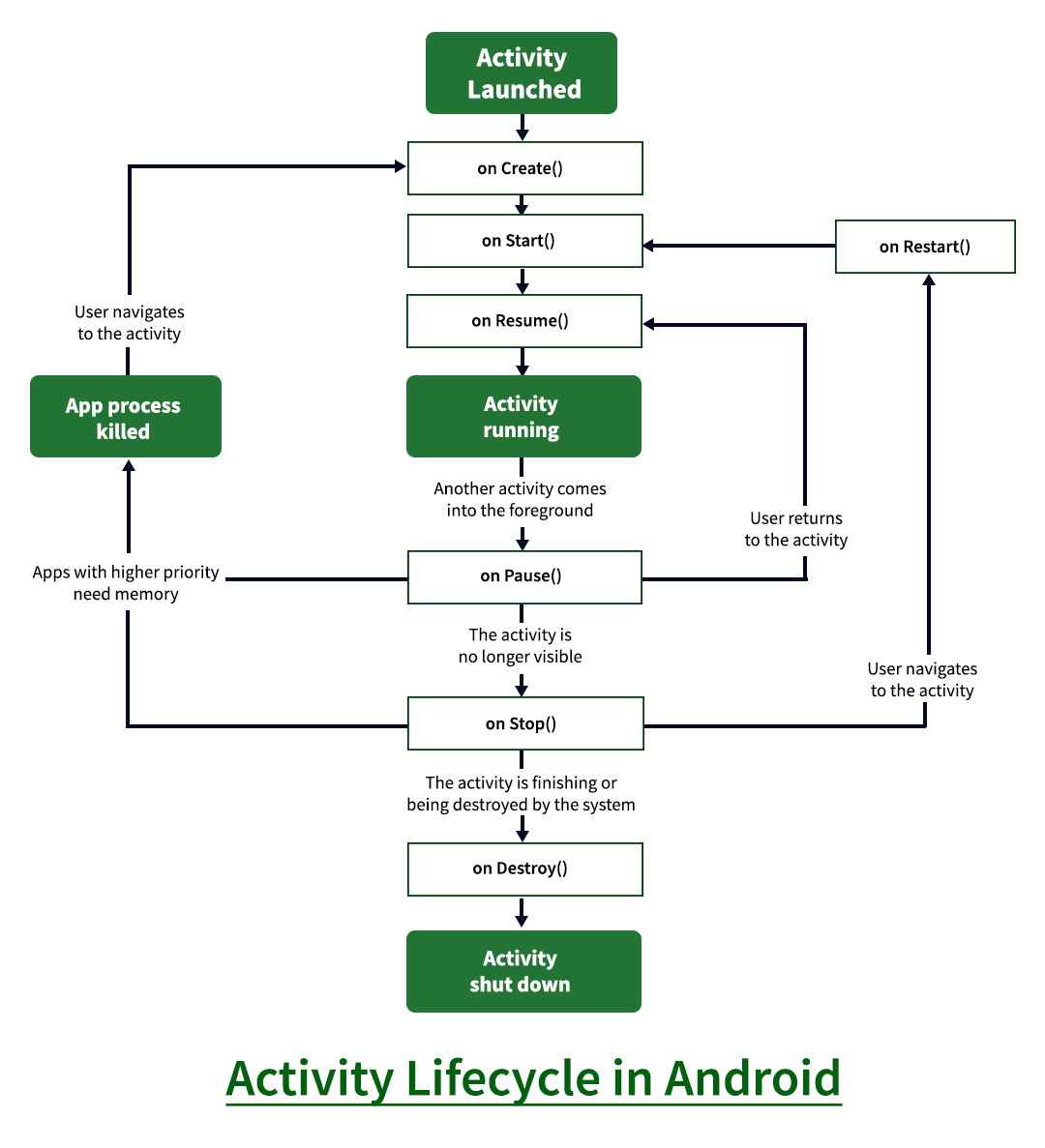
- onCreate() -> onStart() -> onResume(): The Activity is created, becomes visible, and enters the foreground for user interaction.
- onPause() -> onStop(): The Activity loses focus and then becomes no longer visible.
- onRestart() -> onStart() -> onResume() or onDestroy(): A stopped Activity can return to the foreground or be destroyed.
Q4. What’s Android Interface Definition Language (AIDL) in Android?
Android Interface Definition Language (AIDL) is an Android mechanism used to define interfaces for inter-process communication (IPC). It allows a client in one process to invoke methods on a service running in another process.
- AIDL defines the methods and data types that can be shared between processes.
- It enables remote method calls between a client and a service using Android’s Binder IPC mechanism.
- It is mainly used when an Android application needs to communicate with a service running in a separate process.
Q5. What is Dalvik Debug Monitor Service(DDMS)?
Dalvik Debug Monitor Service (DDMS) was a debugging tool in the Android SDK used to monitor and debug Android applications running on devices or emulators.
- It provided features such as log monitoring, thread and heap inspection, process management, and screen capture.
- It helped developers analyze application performance and diagnose runtime issues.
- DDMS has been deprecated and replaced by modern Android Studio debugging and profiling tools.
Q6. What is a Framework?
A framework is a pre-built software structure that provides reusable components, libraries, tools, and guidelines for developing applications. It provides a foundation that helps developers build software faster and more consistently.
- Provides reusable code, libraries, and predefined structures for application development.
- Reduces development effort by handling common tasks and providing standard solutions.
- Helps improve code organization, maintainability, scalability, and development efficiency.
Q7. What is Intent in Android?
An Intent is a messaging mechanism in Android used to request an action from another component, such as starting an Activity, starting a Service, or delivering a Broadcast.
- Explicit Intent targets a specific component, usually within the same application.
- Implicit Intent specifies an action to perform, allowing Android to select a suitable component.
- Intents can also carry data and extras to pass information between Android components.
Q8. What is Context?
Context in Android provides access to application-specific resources, system services, and information about the current application or component environment. It acts as a bridge between an Android component and the Android system.
- It is used to access resources, start Activities or Services, send broadcasts, and obtain system services.
- Common types include Activity Context and Application Context, each having a different lifecycle and scope.
- Choosing the appropriate Context helps prevent memory leaks and ensures resources and components are managed correctly.
Q9. Explain Sensors in Android.
Sensors in Android are components that allow applications to detect physical changes in the device or its surroundings, such as motion, orientation, light, and proximity. Android provides a Sensor Framework to access sensor data efficiently.
- Common sensors include accelerometer, gyroscope, proximity, light, and magnetic field sensors.
- The SensorManager is used to access sensors, while SensorEventListener receives sensor data changes.
- Sensors are widely used in gaming, navigation, activity tracking, screen rotation, and other motion-based applications.
Q10. What is a Toast?
A Toast is a small, temporary notification in Android that displays a brief message to the user without interrupting the current activity or requiring any user action.
- It is commonly used to provide short feedback, such as confirming an action or notifying the user about a status.
- A Toast appears for a short duration and automatically disappears.
- It is created using the Toast class, for example Toast.makeText().
Q11. What's the difference between Implicit Intent and Explicit Intent?
| Feature | Explicit Intent | Implicit Intent |
|---|---|---|
| Target | Specifies the exact component to be launched. | Specifies an action without specifying a particular component. |
| How it works | Android directly launches the specified component. | Android finds a suitable component that can handle the requested action. |
| Common Use | Navigating between Activities or starting a specific Service. | Opening a web page, sharing content, sending email, or making a call. |
| Example | Starting SecondActivity directly. | Opening a URL using a suitable web browser. |
Q12. What is the use of Bundle in Android?
A Bundle is a key-value data structure in Android used to store and transfer small amounts of data between Android components. It is commonly used with Intents and for saving and restoring Activity or Fragment state.
- Stores data using key-value pairs such as String, int, boolean, and other supported types.
- Transfers data between Activities, Fragments, and other Android components through Intents.
- Helps preserve UI and application state when an Activity is recreated, such as during screen rotation.
Q13. What's the Difference Between Foreground Service and Activity in Android?
A Foreground Service performs ongoing background tasks, while an Activity provides the user interface for user interaction.
| Feature | Foreground Service | Activity |
|---|---|---|
| Purpose | Performs ongoing tasks in the background that are noticeable to the user. | Provides a user interface for a specific screen or interaction. |
| User Interface | Does not provide a direct user interface. | Provides a user interface and handles user interactions. |
| Visibility | Can continue running even when the user leaves the app. | Usually operates while the screen is visible or active. |
| Notification | Must display a persistent notification while running. | Does not require a persistent notification. |
| Example | Music playback, navigation, or active fitness tracking. | Login screen, home screen, or settings screen. |
Q14. What is SimpleAdapter in Android?
SimpleAdapter is an Android adapter class used to bind data from a list of key-value pairs, typically a List<Map<String, ?>>, to views in a layout.
- It is commonly used with ListView or similar adapter-based UI components to display structured data.
- It maps values from specified keys to corresponding views using from and to parameters.
- It is suitable for simple data display but offers less flexibility than custom adapters for complex layouts.
Q15. What is Batch Scheduling?
Batch scheduling is a method of executing multiple jobs or tasks together as a batch, usually without continuous user interaction. Tasks are scheduled based on specific conditions such as time, priority, or available system resources.
- It is used to automate repetitive or resource-intensive tasks.
- Jobs are processed in groups according to predefined schedules or conditions.
- It improves resource utilization and reduces the need for manual execution.
Q16. What's the difference between Serializable and Parcelable?
Serializable and Parcelable are mechanisms for passing objects between Android components. Serializable is a standard Java mechanism, while Parcelable is specifically optimized for Android's IPC and Bundle/Intent data transfer.
| Feature | Serializable | Parcelable |
|---|---|---|
| Definition | Standard Java interface for converting an object into a serializable form. | Android-specific interface for efficiently writing and reading objects using Parcel. |
| Performance | Relatively slower because it relies on reflection and creates additional temporary objects. | Generally faster and more memory-efficient for Android component communication. |
| Implementation | Simple to implement by adding Serializable. | Requires implementing Parcelable and defining how fields are written and restored. |
| Use Case | Suitable for simple object serialization when performance is not critical. | Preferred when passing objects through Intent, Bundle, or Android IPC. |
| Best Practice | Use when simplicity is more important than serialization performance. | Use for performance-sensitive Android data transfer, especially across component or process boundaries. |
Q17. What are broadcast receivers?
Broadcast Receivers are Android components that allow an application to receive and respond to broadcast messages from the Android system or other applications. They are mainly used to react to system-wide or application-specific events.
- They can respond to events such as device boot completion, connectivity changes, or custom application broadcasts.
- A Broadcast Receiver does not normally provide a user interface and is designed for short, event-driven operations.
- Receivers can be registered statically in the manifest where permitted or dynamically at runtime using
registerReceiver().
Q18. What is ANR in Android?
ANR stands for Application Not Responding. It occurs when an Android application fails to respond to user input or system events within the expected time because the main thread is blocked or overloaded.
- ANRs commonly occur when long-running tasks such as network operations, database queries, or heavy computations are performed on the main thread.
- Android may display an ANR dialog asking the user to wait or close the application.
- ANRs can be prevented by moving intensive work to background threads or using appropriate asynchronous APIs.
Q19. What is Android Activity launchMode?
launchMode defines how Android creates and manages instances of an Activity when it is launched. It controls whether a new Activity instance is created or an existing instance is reused in the Activity back stack.
- standard creates a new Activity instance for every launch.
- singleTop reuses the existing instance if it is already at the top of the back stack; otherwise, a new instance is created.
- singleTask maintains a single instance within a task and delivers new intents to that instance.
- singleInstance places the Activity in a separate task and prevents other Activities from being launched into that task.
Q20. What is Builder Pattern?
The Builder Pattern is a creational design pattern used to construct complex objects step by step. It separates the object construction process from the final object representation, making code more readable and flexible.
- It allows objects to be created using a sequence of well-defined configuration methods.
- It is useful when an object has many optional parameters or complex construction logic.
- In Android, AlertDialog.Builder is a common example of the Builder Pattern.
Q21. What is refactoring?
Refactoring is the process of restructuring existing code to improve its readability, maintainability, and design without changing its external behavior or functionality.
- It removes code smells, duplication, and unnecessary complexity while preserving the existing functionality.
- Common techniques include extracting methods, renaming variables, simplifying conditions, and removing duplicate code.
- Refactoring improves code quality, reduces technical debt, and makes future changes and testing easier.
Q22. What is Virtual DOM?
The Virtual DOM is a lightweight, in-memory representation of the actual DOM used by UI libraries and frameworks such as React. It helps efficiently update the user interface by determining which parts of the real DOM need to change.
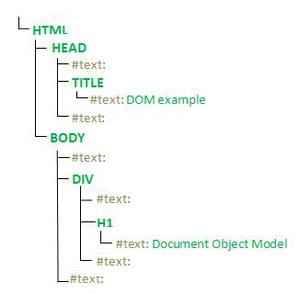
- It compares the previous and updated Virtual DOM representations through a process called reconciliation.
- Only the necessary changes are applied to the actual DOM, reducing unnecessary updates.
- It can improve UI performance and simplify state-driven interface development, especially in applications with frequent UI updates.
Q23. What is Booting Process?
The booting process is the sequence of steps through which an Android device starts from power-on and loads the operating system until the system becomes ready for user interaction.
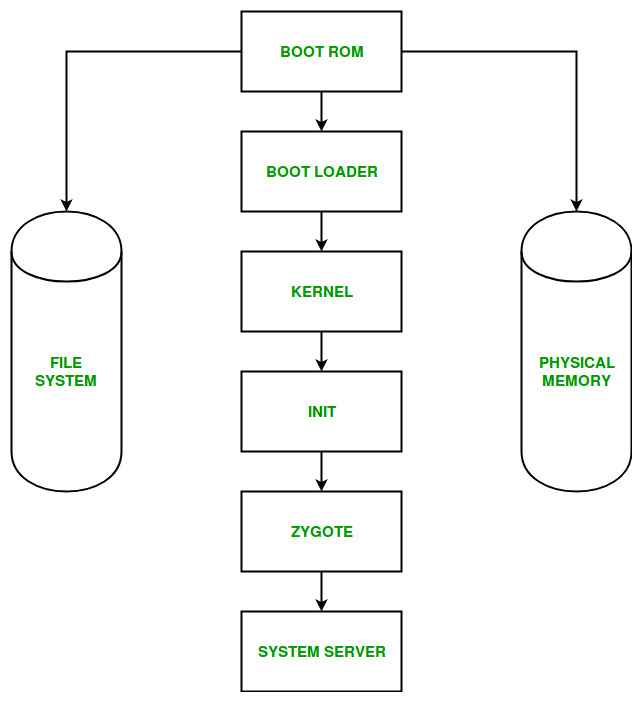
- Boot ROM and Bootloader: Initialize the hardware and load the Android kernel and required system components.
- Linux Kernel and Init: The kernel initializes hardware and system resources, while the init process starts essential system services.
- System Startup: Android Runtime and system services are initialized, followed by the launch of system UI and other components required for normal operation.
Q24. What is Volley Library in Android ?
Volley is an Android networking library developed by Google for making HTTP and network requests efficiently. It simplifies tasks such as fetching data from APIs, loading images, and handling network responses.
- Provides request queuing, prioritization, caching, and automatic retry mechanisms.
- Supports common request types such as JSON, String, and image requests.
- Helps manage network operations asynchronously, reducing the need to handle low-level networking code manually.
Q25. What is Typecasting?
Typecasting is the process of converting a value or object from one data type to another compatible data type. It is commonly used when a program needs to work with a value in a different type.
- Implicit Typecasting occurs automatically when a compatible type conversion is performed, usually from a smaller to a larger data type.
- Explicit Typecasting requires the programmer to specify the target type when performing the conversion.
- In object-oriented programming, typecasting is also used to convert references between related parent and child classes.
Q26. What's the Difference between Upcasting and Downcasting in Java?
Upcasting and downcasting are typecasting techniques used with inheritance to convert object references between parent and child classes.
| Feature | Upcasting | Downcasting |
|---|---|---|
| Meaning | Converting a child-class reference to a parent-class reference. | Converting a parent-class reference to a child-class reference. |
| Direction | Child → Parent | Parent → Child |
| Safety | Generally safe because every child object is also a parent object. | Can be unsafe if the object is not actually an instance of the target child class. |
| Explicit Cast | Usually not required. | Required explicitly. |
| Purpose | Enables polymorphism and allows common parent-level operations. | Provides access to child-specific methods and properties. |
| Example | Animal a = new Dog(); | Dog d = (Dog) a; |
Q27. What is hybrid app development?
Hybrid app development is an approach to building mobile applications using a combination of web technologies and native device capabilities. A single codebase can be deployed across multiple platforms such as Android and iOS.
- Uses technologies such as HTML, CSS, and JavaScript within a native or WebView-based application environment.
- Reduces development time and cost by allowing code reuse across multiple platforms.
- Frameworks such as Ionic, Apache Cordova, and Capacitor are commonly used for hybrid app development.
Q28. What is Singleton Method Design Pattern?
The Singleton Design Pattern is a creational design pattern that ensures a class has only one instance throughout the application's lifecycle and provides a global access point to that instance.
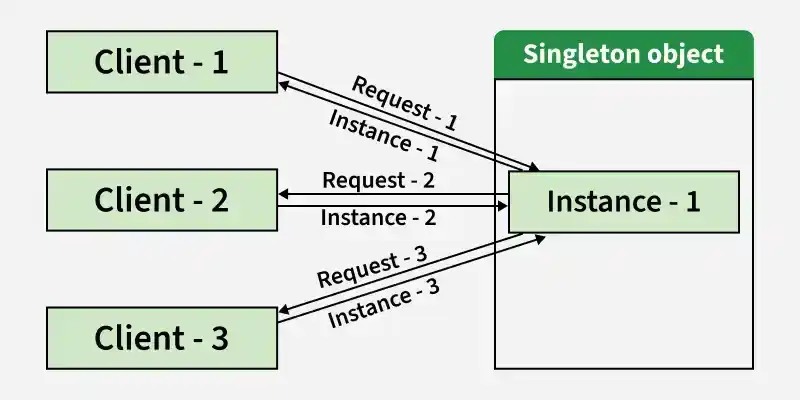
- It restricts direct object creation and controls the creation of the single instance.
- The same instance is returned whenever the object is requested, helping maintain shared state or resources.
- It can be useful for components such as configuration managers, logging services, or resource managers when a single shared instance is required.
Q29. What is Xamarin ?
Xamarin is a Microsoft-owned framework for building cross-platform mobile applications using C# and .NET, allowing developers to share code across Android, iOS, and other platforms. It provided access to native platform APIs while enabling significant code reuse.
- Supports cross-platform application development using C# and .NET.
- Provides access to native Android and iOS APIs and platform-specific features.
- Xamarin has been replaced by .NET MAUI, which is Microsoft's current cross-platform UI framework.
Q30. What is the difference between Ionic and React Native?
Ionic and React Native are cross-platform frameworks used to build mobile applications from a shared codebase, but they use different approaches for rendering and accessing native features.
| Feature | Ionic | React Native |
|---|---|---|
| Technology | Uses web technologies such as HTML, CSS, and JavaScript/TypeScript. | Uses JavaScript/TypeScript with React. |
| UI Rendering | Primarily renders UI using web technologies, typically through WebView or web runtime. | Renders UI using native platform components. |
| Performance | Generally suitable for most business and content-focused applications. | Generally provides more native-like performance and interaction. |
| Code Reusability | High code reuse across Android, iOS, and web platforms. | High code reuse across Android and iOS, with platform-specific code when required. |
| Native Features | Uses Capacitor or plugins to access native device capabilities. | Provides native modules and APIs for accessing platform capabilities. |
| Best Suited For | Applications where web technology reuse and rapid development are priorities. | Applications requiring a more native UI experience and mobile-focused performance. |
Q31. What is meant by progressive web apps?
Progressive Web Apps (PWAs) are web applications that use modern web technologies to provide an app-like experience while running through a web browser. They can offer features such as offline access, installability, and push notifications.
- Use technologies such as Service Workers, Web App Manifests, and HTTPS to provide app-like capabilities.
- Can be installed on supported devices and launched like regular applications.
- Provide features such as offline functionality, caching, responsive design, and background updates.
Q32. What is data binding in Android?
Data Binding is an Android Jetpack feature that allows UI components in XML layouts to bind directly to application data. It reduces the need for repetitive findViewById() calls and helps keep UI code cleaner.
- Allows data and UI elements to be connected declaratively through XML expressions.
- Supports two-way data binding, allowing UI changes to update the underlying data when configured appropriately.
- Improves code maintainability by reducing boilerplate code and keeping UI logic more organized.
Q33. What is Component Driven Development ?
Component-Driven Development (CDD) is a software development approach that builds applications by creating and composing small, reusable, and independently testable UI or software components.
- Promotes reusable components with well-defined responsibilities and interfaces.
- Enables components to be developed and tested independently before integrating them into larger features.
- Improves consistency, maintainability, scalability, and development efficiency across applications.
Q34. What is Cross Origin Resource Sharing (CORS)?
Cross-Origin Resource Sharing (CORS) is a browser security mechanism that controls whether a web page from one origin can access resources from a different origin. It allows servers to explicitly define which cross-origin requests are permitted.
- Uses HTTP response headers such as Access-Control-Allow-Origin to specify allowed origins.
- Applies to browser-based requests and helps prevent unauthorized cross-origin access to resources.
- Supports controls for methods, headers, credentials, and preflight requests using HTTP OPTIONS.
Q35. What is Desugaring?
Desugaring is the process of converting modern or high-level programming language features into simpler constructs that the compiler or runtime can process. In Android, it helps developers use certain newer Java language APIs and language features on older Android versions.
- Converts supported Java language features into compatible bytecode or lower-level constructs during compilation.
- In Android development, D8/R8 performs desugaring as part of the build process.
- Enables the use of supported modern Java features while maintaining compatibility with a wider range of Android versions.
Q36. What is Spinner in Kotlin?
A Spinner is an Android UI component that allows users to select one item from a drop-down list of options. In Kotlin, it is commonly used with an Adapter to populate and manage the available choices.
- Displays a compact list of selectable items and shows the currently selected value.
- Uses adapters such as ArrayAdapter to provide data to the Spinner.
- Provides selection callbacks through setOnItemSelectedListener() to respond when the user selects an item.
Q37. What is Firebase?
Firebase is a Google-backed application development platform that provides cloud-based services and tools for building, testing, monitoring, and scaling mobile and web applications. It helps developers integrate backend capabilities without building all server-side infrastructure from scratch.
- Provides services such as Authentication, Cloud Firestore, Realtime Database, Cloud Messaging, and Crashlytics.
- Supports application development, analytics, testing, monitoring, and user engagement.
- Offers SDKs and APIs that simplify integration of backend and cloud services into Android, iOS, and web applications.
Q38. What is Fragments in Android?
A Fragment is a reusable portion of an Activity's user interface and behavior that has its own lifecycle and can be added, removed, or replaced dynamically. Fragments help build flexible and modular Android user interfaces.
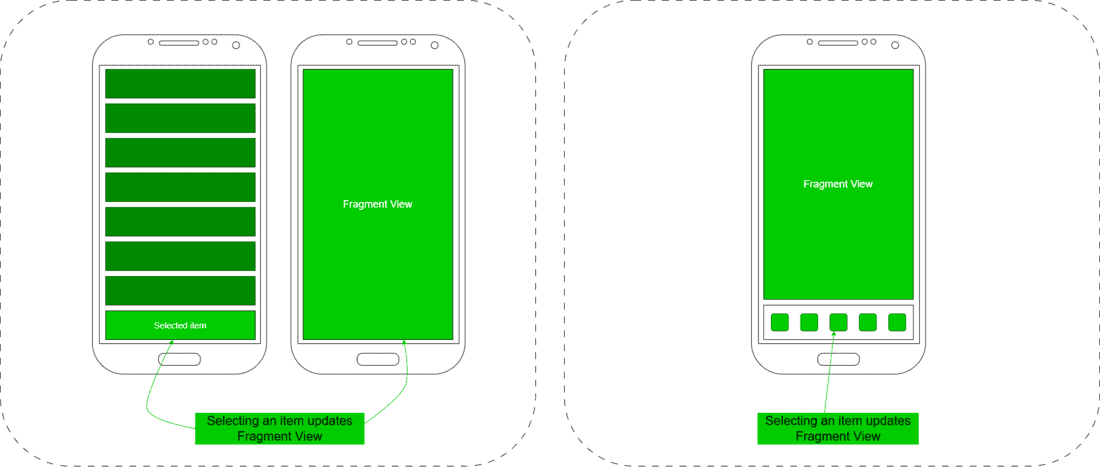
- A Fragment must be hosted by an Activity or another supported Fragment container.
- It has its own lifecycle, which is closely associated with the lifecycle of its host Activity.
- Fragments are useful for creating modular UIs, reusable screens, and layouts that adapt to different device sizes.
Q39. What are the types of Android Fragments?
Android Fragments can be categorized based on how they are used and managed within an application. Common types include:
- Static Fragment: Defined directly in an Activity's layout and remains part of the UI unless the Activity is recreated.
- Dynamic Fragment: Added, removed, or replaced at runtime using FragmentManager and FragmentTransaction.
- Dialog Fragment: Displays a Fragment as a dialog and is useful for temporary user interactions such as confirmations or input forms.
Q40. Explain Webpack.
Webpack is a static module bundler for JavaScript applications that analyzes a project's dependencies and combines modules and assets into optimized bundles for the browser or other environments.
- It builds a dependency graph starting from one or more entry points and processes JavaScript, CSS, images, and other assets using loaders and plugins.
- It supports features such as code splitting, lazy loading, asset optimization, and development tooling.
- Webpack is widely used in modern web applications to organize, transform, and optimize frontend code for deployment.
