

NestJS is a progressive NodeJS framework that uses TypeScript to build efficient and scalable server-side applications. Combining NestJS with GraphQL, a powerful query language for APIs, offers a robust solution for creating modern, maintainable, and highly performant web applications. In this article, we'll explore the basics of setting up a GraphQL API with NestJS.
What is GraphQL?
GraphQL is a query language for APIs and a runtime for executing those queries by using a type system you define for your data. It allows clients to request exactly the data they need, making APIs more efficient and flexible.
Setting Up a NestJS Project with GraphQL
To get started, you'll need to have NodeJS and npm installed on your machine. Then, follow these steps to set up a new NestJS project and integrate GraphQL.
Step 1: Install the nestjs cli
npm i -g @nestjs/cliStep 2: Create a nestjs project
nest new nest-gfg
cd nestgfg
Step 3: Install GraphQL and Apollo Server
npm install @nestjs/graphql @nestjs/apollo graphql apollo-server-expressFolder Structure
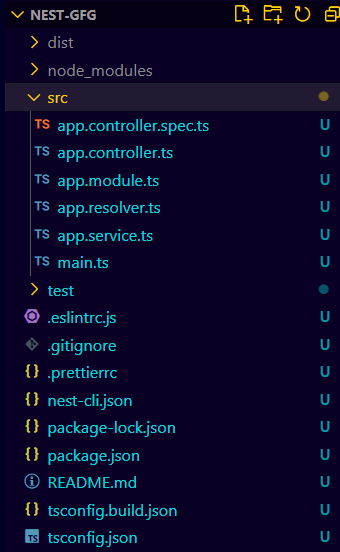
Dependencies
"dependencies": {
    "@nestjs/apollo": "^12.2.0",
    "@nestjs/common": "^10.0.0",
    "@nestjs/core": "^10.0.0",
    "@nestjs/graphql": "^12.2.0",
    "@nestjs/mongoose": "^10.0.10",
    "@nestjs/platform-express": "^10.0.0",
    "apollo-server-express": "^3.13.0",
    "class-transformer": "^0.5.1",
    "class-validator": "^0.14.1",
    "dotenv": "^16.4.5",
    "graphql": "^16.9.0",
    "mongoose": "^8.5.1",
    "reflect-metadata": "^0.2.0",
    "rxjs": "^7.8.1"
  }
Example: Implementing GraphQL with NestJS
// src/app.resolver.ts

import { Resolver, Query, Args } from '@nestjs/graphql';
import { AppService } from './app.service';
import { ObjectType, Field } from '@nestjs/graphql';

@ObjectType()
class Greeting {
    @Field()
    message: string;
}

@Resolver()
export class AppResolver {
    constructor(private readonly appService: AppService) { }

    @Query(() => String)
    sayHello(): string {
        return this.appService.getHello();
    }

    @Query(() => Greeting)
    getGreeting(@Args('name') name: string): Greeting {
        return { message: `Hello, ${name}!` };
    }
}
// src/app.service.ts

import { Injectable } from '@nestjs/common';

@Injectable()
export class AppService {
    getHello(): string {
        return 'Hello World!';
    }
}
// src/app.module.ts

import { Module } from '@nestjs/common';
import { GraphQLModule } from '@nestjs/graphql';
import { ApolloDriver, ApolloDriverConfig } from '@nestjs/apollo';
import { join } from 'path';
import { AppService } from './app.service';
import { AppResolver } from './app.resolver';

@Module({
    imports: [
        GraphQLModule.forRoot<ApolloDriverConfig>({
            driver: ApolloDriver,
            autoSchemaFile: join(process.cwd(), 'src/schema.gql'),
        }),
    ],
    providers: [AppService, AppResolver],
})
export class AppModule { }
To start the appliction run the followingh command
npm run startOutput
Best Practices for GraphQL with NestJS
- Use DTOs and Input Types: Define Data Transfer Objects (DTOs) and input types to validate and type your input data.
- Modular Architecture: Organize your application into modules to keep your codebase maintainable and scalable.
- Error Handling: Implement proper error handling in your resolvers to provide meaningful error messages to the client.
- Authentication and Authorization: Use guards and middleware to protect your GraphQL API endpoints.
