

Bitmasking is a technique of using individual bits of a number to represent and manipulate multiple states efficiently.
In bitmasking, each binary digit (0 or 1) can act as a flag to represent whether a particular feature, element, or state is active or inactive. For example, the binary number 10101 can represent five different states, where 1 means present/active and 0 means absent/inactive.
Some of the most commonly used bitwise operations in bitmasking are:
- OR (|) - used to set bits.
- AND (&) - used to check or clear bits.
- XOR (^) - used to toggle bits.
- NOT (~) - used to flip bits.
- Left Shift (<<) – shifts bits to the left.
- Right Shift (>>) – shifts bits to the right.
This makes bitmasking especially useful in sets, subsets, state representation, and dynamic programming.
Bit Positions:
Every bit in a binary number has a position, starting from 0 at the rightmost bit. Each position represents a power of 2.
For example, consider the binary number 10101:
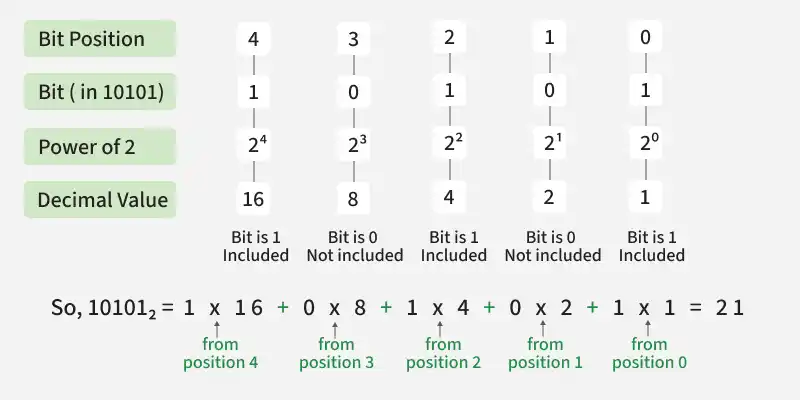
The value of a bit at position i is associated with 2i. Understanding bit positions is important because bitmasking frequently uses expressions such as 1 << i to work with a specific bit.
Creating a Mask:
A mask is a binary number used to target specific bits. The expression 1 << i creates a mask with only the i-th bit set to 1.
Example:
- 1 << 0 = 00001
- 1 << 1 = 00010
- 1 << 2 = 00100
- 1 << 3 = 01000
This mask can then be combined with bitwise operators to check, set, clear, or toggle a specific bit.
Basic Bitmask Operations:
Bitwise operators allow us to check and modify individual bits of a mask.
- Set a Bit: Makes the i-th bit 1.
- Check a Bit: Checks whether the i-th bit is 1.
- Clear a Bit: Makes the i-th bit 0.
- Toggle a Bit: Changes the i-th bit from 0 -> 1 or 1 -> 0.
#include <bits/stdc++.h>
using namespace std;

int main() {
    int mask = 0;
    int i = 2;

    // Set the i-th bit
    mask |= (1 << i);

    // Check whether the i-th bit is set
    if (mask & (1 << i)) {
        cout << "Bit is set\n";
    }

    // Clear the i-th bit
    mask &= ~(1 << i);

    // Toggle the i-th bit
    mask ^= (1 << i);

    return 0;
}
class GFG {
    public static void main(String[] args) {
        int mask = 0;
        int i = 2;

        // Set the i-th bit
        mask |= (1 << i);

        // Check whether the i-th bit is set
        if ((mask & (1 << i)) != 0) {
            System.out.println("Bit is set");
        }

        // Clear the i-th bit
        mask &= ~(1 << i);

        // Toggle the i-th bit
        mask ^= (1 << i);
    }
}
if __name__ == "__main__":
    mask = 0
    i = 2

    # Set the i-th bit
    mask |= (1 << i)

    # Check whether the i-th bit is set
    if mask & (1 << i):
        print("Bit is set")

    # Clear the i-th bit
    mask &= ~(1 << i)

    # Toggle the i-th bit
    mask ^= (1 << i)
using System;

class GFG
{
    static void Main()
    {
        int mask = 0;
        int i = 2;

        // Set the i-th bit
        mask |= (1 << i);

        // Check whether the i-th bit is set
        if ((mask & (1 << i)) != 0)
        {
            Console.WriteLine("Bit is set");
        }

        // Clear the i-th bit
        mask &= ~(1 << i);

        // Toggle the i-th bit
        mask ^= (1 << i);
    }
}
// Driver Code
let mask = 0;
let i = 2;

// Set the i-th bit
mask |= (1 << i);

// Check whether the i-th bit is set
if (mask & (1 << i)) {
    console.log("Bit is set");
}

// Clear the i-th bit
mask &= ~(1 << i);

// Toggle the i-th bit
mask ^= (1 << i);
Representing a Set Using Bitmasking:
Bitmasking can be used to represent a set of elements using a single integer. Each bit corresponds to an element: 1 means the element is present, and 0 means it is absent.
For example, for elements {0, 1, 2, 3, 4}, the set {0, 2, 4} can be represented as:
- Element: 4 3 2 1 0
- Bit: 1 0 1 0 1
- So, the bitmask is 10101. This allows us to efficiently add, remove, and check elements using bitwise operations.
Generate All Subsets Using Bitmasking:
For an array of n elements, there are 2n possible subsets. We can represent each subset using an n-bit mask, where 1 means the element is included and 0 means it is not.
For example, arr = [1, 2, 3]:
- 000 = {}
- 001 = {1}
- 010 = {2}
- 011 = {1, 2}
- 100 = {3}
- 101 = {1, 3}
- 110 = {2, 3}
- 111 = {1, 2, 3}
By iterating from 0 to 2n - 1 and checking each bit, we can generate all subsets efficiently.
#include <bits/stdc++.h>
using namespace std;

int main() {
    vector<int> arr = {1, 2, 3};
    int n = arr.size();

    // Generate all 2^n subsets.
    for (int mask = 0; mask < (1 << n); mask++) {
        cout << "{";
        bool first = true;

        for (int i = 0; i < n; i++) {

            // Include arr[i] if the i-th bit is set.
            if (mask & (1 << i)) {
                if (!first)
                    cout << ", ";

                cout << arr[i];
                first = false;
            }
        }

        cout << "}\n";
    }

    return 0;
}
class GFG {
    public static void main(String[] args) {
        int[] arr = {1, 2, 3};
        int n = arr.length;

        // Generate all 2^n subsets.
        for (int mask = 0; mask < (1 << n); mask++) {
            System.out.print("{");
            boolean first = true;

            for (int i = 0; i < n; i++) {

                // Include arr[i] if the i-th bit is set.
                if ((mask & (1 << i)) != 0) {
                    if (!first)
                        System.out.print(", ");

                    System.out.print(arr[i]);
                    first = false;
                }
            }

            System.out.println("}");
        }
    }
}
if __name__ == "__main__":
    arr = [1, 2, 3]
    n = len(arr)

    # Generate all 2^n subsets.
    for mask in range(1 << n):
        subset = []

        for i in range(n):

            # Include arr[i] if the i-th bit is set.
            if mask & (1 << i):
                subset.append(arr[i])

        print("{" + ", ".join(map(str, subset)) + "}")
using System;

class GFG
{
    static void Main()
    {
        int[] arr = {1, 2, 3};
        int n = arr.Length;

        // Generate all 2^n subsets.
        for (int mask = 0; mask < (1 << n); mask++)
        {
            Console.Write("{");
            bool first = true;

            for (int i = 0; i < n; i++)
            {
                // Include arr[i] if the i-th bit is set.
                if ((mask & (1 << i)) != 0)
                {
                    if (!first)
                        Console.Write(", ");

                    Console.Write(arr[i]);
                    first = false;
                }
            }

            Console.WriteLine("}");
        }
    }
}
// Driver Code
const arr = [1, 2, 3];
const n = arr.length;

// Generate all 2^n subsets.
for (let mask = 0; mask < (1 << n); mask++) {
    const subset = [];

    for (let i = 0; i < n; i++) {

        // Include arr[i] if the i-th bit is set.
        if (mask & (1 << i)) {
            subset.push(arr[i]);
        }
    }

    console.log("{" + subset.join(", ") + "}");
}
Bitmasking in State Representation:
Bitmasking can represent the state of multiple elements using a single integer. Each bit represents one element, where 1 means the element is selected/visited and 0 means it is not selected/visited.
For example, for 5 elements, instead of using boolean[5], we can use a single mask: visited = 10101
Here:
- Element: 4 3 2 1 0
- Bit: 1 0 1 0 1
- So, elements 0, 2, and 4 are visited.
This compact state representation is especially useful in backtracking and dynamic programming, where we frequently need to track which elements have already been selected or visited.
When to Use Bitmasking?
Bitmasking is useful when you need to represent and manipulate a small number of boolean states efficiently.
Common use cases include:
- Representing sets of elements using a single integer.
- Generating all subsets of a small array.
- Tracking selected or visited elements in backtracking.
- Representing states in dynamic programming.
- Performing fast bit-level operations such as checking, setting, clearing, or toggling bits.
