

Google Cloud Platform (GCP) is one of the leading cloud providers, offering different services like compute, storage, databases, AI/ML and data analytics for modern application development and infrastructure management. Preparing for a GCP interview, whether you're a beginner or an experienced professional, means building a strong grasp of these core concepts and this guide will help you assess your knowledge, spot gaps, and practice explaining GCP topics with confidence.
1. What is Google Cloud Platform (GCP)?
- Google offers an assortment of cloud computing services using the Google Cloud Platform (GCP) name.
- It provides an array of services, including like machine learning, storage, and computational power, which assist companies develop, implement, and expand their applications.
- Global network support and compatibility into multiple Google products are included in GCP.
- It is created to be extremely secure and perform well for businesses of all sizes.
2. Name some core services provided by GCP?
Compute Engine for virtual machines, Cloud Storage for scalable object storage, BigQuery for data warehousing and analytics, and Kubernetes Engine for container orchestration are just a few of the primary offerings offered by the Google Cloud Platform (GCP).
3. What is Google Compute Engine?
- Using Google Compute Engine (GCE), consumers may create and manage virtual machines on Google's infrastructure utilizing a cloud-based service.
- It offers scalable computing power for various tasks and workloads.
- GCE supports an array of operating systems and configurations and interfaces with other Google Cloud services.
- It provides reliability, safety, and flexibility for cloud application and service installation.
4. Explain the purpose of Google Cloud Storage?
- A service for storing and accessing data on Google's infrastructure is Google Cloud Storage.
- It provides both structured and unstructured data with scalable, safe, and permanent options for storage.
- Through an easy API, users can save and retrieve objects of any size.
- Large data sets can be distributed, preserved, and backed up with simplicity utilizing it.
5. What is the GCP resource hierarchy, and why does it matter?
- GCP resources are organized in a hierarchy: Organization → Folders → Projects → Resources (VMs, buckets, databases, etc.).
- The Organization node sits at the top and represents your company; Folders let you group projects by team, department, or environment (e.g., dev/staging/prod).
- Projects are the base-level container for billing, APIs, and IAM permissions; and individual resources live inside projects.
- This hierarchy matters because IAM policies are inherited downward — a permission granted at the Organization or Folder level automatically applies to everything beneath it — which is how large companies manage access and billing at scale without configuring every project individually.
6. How are GCP projects typically organized?
- A GCP project is the base unit for enabling APIs, managing billing, and applying IAM permissions — every resource you create belongs to exactly one project.
- In practice, teams often separate projects by purpose or environment: for example, one project for compute and Kubernetes workloads, another for storage and databases, another for data analytics, and another for machine learning (Vertex AI).
- This isn't an official GCP classification — it's just a common organizational pattern — but grouping projects this way, combined with the resource hierarchy above, makes billing, access control, and quota management much easier at scale.
7. How do you create a new project in GCP?
Go to console.cloud.google.com to get logged into the Google Cloud Console.
- Select "New Project" from the option list located at the very top of the page following click on its.
- Select a billing account, enter the project name, and specify the location or organization.
- To finish the configuration of the new project, click "Create."
8. What is Google App Engine?
- A number of Google Cloud's fully managed platform-as-a-service (PaaS) products is Google App Engine.
- It renders feasible for developers to create and execute scalable web services and applications.
- Scaling, load balancing, and monitoring are just some of the infrastructure challenges which the platform takes deal of.
- Several programming languages are available, including Go, Java, Python, and Node.js.
9. What is the difference between a region and a zone in GCP?
In Google Cloud Platform (GCP), a Region is a geographical location containing multiple isolated Zones, whereas a Zone is an individual deployment area within a region where cloud resources such as virtual machines are hosted.
Region
- A geographical location (e.g., us-central1, asia-south1).
- Contains multiple zones.
- Provides high availability and disaster recovery.
- Resources can be distributed across zones within the same region.
- Goal: Provide geographically distributed cloud infrastructure.
Zone
- An isolated deployment area within a region.
- Contains computing resources such as VMs, disks, and Kubernetes nodes.
- Each zone has independent power, networking, and cooling.
- Failure in one zone usually does not affect other zones in the same region.
- Goal: Host and isolate cloud resources.
10. How does Google Cloud IAM help manage access?
- Centralized control over who has access to specific assets is made feasible by Google Cloud IAM (Identity and Access Management).
- It helps you offer users, groups, and service accounts greater control over their access.
- IAM improves security through restricting access to whatever is necessary and helping in ensuring the application of the least privilege principle.
- It additionally offers extensive access control auditing and monitoring capabilities.
11. What are the different types of IAM roles in GCP?
GCP has three categories of IAM roles:
- Basic (Primitive) roles — Owner, Editor, and Viewer. These are broad, legacy roles that apply across an entire project and are generally discouraged in production because they grant far more access than most users need.
- Predefined roles — curated by Google for specific services (e.g.,
roles/storage.objectViewer,roles/compute.instanceAdmin), offering more granular access than basic roles without you having to define permissions yourself. - Custom roles — roles you build yourself by picking an exact set of permissions, used when neither basic nor predefined roles match your access requirements precisely.
12. What is a service account, and how is it different from a user account?
- A service account is a special type of identity that applications, VMs, or workloads use to authenticate and call GCP APIs — it doesn't belong to a person.
- Instead of a password, service accounts authenticate using keys or, preferably, Google's Workload Identity mechanism, which avoids exporting long-lived credentials entirely.
- Like user accounts, service accounts are granted IAM roles, so you control exactly what a piece of software is allowed to do, following the same least-privilege principle used for human users.
13. What is a VPC (Virtual Private Cloud)?
- Within a cloud environment, a virtual network dedicated to a specific company is called a Virtual Private Cloud (VPC).
- It offers separated resources with restricted access and security instructions, including storage and compute instances.
- Using virtualized private clouds (VPCs), businesses may create their own logically isolated part of a cloud provider's infrastructure.
- They offer you control over networking configurations and provide secure conditions for providing and running applications.
14. What is a firewall rule in GCP, and how does it control traffic to and from VM instances?
- A firewall rule in Google Cloud Platform (GCP) is a set of criteria that dictates which incoming and outgoing network traffic is allowed to reach or leave VM instances.
- It controls traffic based on factors like IP addresses, protocols, and ports.
- By defining specific rules, administrators can restrict or permit traffic flow, enhancing security and network management within GCP environment.
15. What is the Function of a Bucket in Google Cloud Storage?
Google Cloud Storage buckets are core containers used to store and manage data such as files, images, and backups with high scalability, durability, and security. They support flexible storage classes and location options to optimize performance, cost, and availability.
- Organize data using object storage with prefix-based structure and fine-grained access control (IAM & ACLs).
- Offer multiple storage classes like Standard, Nearline, Coldline, and Archive for cost optimization.
- Provide regional, dual-region, and multi-region options for redundancy and faster data access.
16. What are the different Cloud Storage classes, and when should you use each?
Cloud Storage offers four storage classes, differing mainly in cost and how frequently you plan to access the data:
- Standard — for frequently accessed ("hot") data, such as content served to users or data actively used in analytics pipelines.
- Nearline — for data accessed less than once a month, such as recent backups.
- Coldline — for data accessed less than once a quarter, such as disaster-recovery data.
- Archive — the cheapest option, for data accessed less than once a year, such as long-term compliance archives.
17. What are the connections between Google Compute Engine and Google App Engine?
Google Compute Engine (GCE) and App Engine (GAE) are core Google Cloud services that work together for scalable, high-performance applications.
- Compute vs. Serverless: GCE offers customizable VMs for full control, while GAE provides a fully managed, auto-scaling platform for hassle free app deployment.
- Scalability & Flexibility: App Engine auto-scales with traffic, ideal for web apps, while Compute Engine requires manual scaling but allows custom CPU, memory, and OS settings.
- Seamless Networking: GAE can connect with GCE for backend processing, AI, and high-performance computing via Google’s global network.
- Hybrid Deployments: Businesses use GAE for APIs and frontend apps, leveraging GCE for databases, machine learning, and heavy processing.
- Deep Cloud Integration: Both services connect with Cloud Storage, BigQuery, Firestore, and AI tools for smooth data handling.
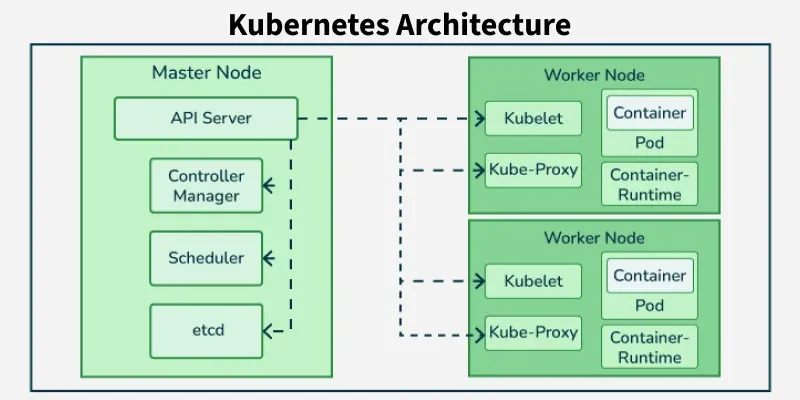
18. Explain the purpose and use of Google Kubernetes Engine (GKE)?
Google Kubernetes Engine (GKE) is a fully managed platform for deploying, managing, and scaling containerized applications using Kubernetes. It simplifies infrastructure management by automating cluster operations, allowing developers to focus on building and running applications efficiently.
- Automates Kubernetes cluster management, reducing operational complexity
- Supports features like auto-scaling, load balancing, and automated updates
- Enables seamless deployment and scaling of containerized workloads in production
- Widely used for building and managing modern cloud-native applications.
19. What is Google Cloud Run, and how does it relate to Cloud Functions?
- Cloud Run is a fully managed serverless platform for running stateless containers — you package your application as a container image, and Cloud Run automatically scales it up and down (including to zero) based on incoming requests.
- Unlike App Engine or Cloud Functions, Cloud Run isn't tied to specific supported languages or runtimes — if it runs in a container, it runs on Cloud Run.
20. How do you choose between Compute Engine, App Engine, GKE, Cloud Run, and Cloud Functions?
This is a common scenario question, and the honest answer is "it depends on how much control you need versus how much you want Google to manage for you":
- Compute Engine — choose this when you need full control over the OS, custom drivers, licensing, or very specific performance tuning.
- App Engine — choose this for traditional web apps/APIs where you want zero infrastructure management and don't need containers.
- GKE — choose this when you're already using Kubernetes, need multi-container pods, service meshes, or complex orchestration across many microservices.
- Cloud Run — choose this for stateless containerized services or APIs where you want serverless scaling (including scale-to-zero) without managing Kubernetes.
- Cloud Functions (Cloud Run functions) — choose this for small, single-purpose pieces of code that react to an event (a file upload, a Pub/Sub message, an HTTP call) and don't need to maintain state between invocations.
21. What are Google Cloud Functions, and when would you use them?
- Cloud Functions let you run small pieces of code in response to events — an HTTP request, a file landing in Cloud Storage, a Pub/Sub message, a Firestore write — without provisioning or managing any servers.
- You're billed only for the time your code actually executes.
- They're a good fit for lightweight, event-driven tasks: image processing on upload, sending notifications, transforming data before it lands in BigQuery, or building small APIs and webhooks.
22. How do you configure autoscaling in GCP?
Autoscaling in Google Cloud Platform (GCP) allows applications to automatically adjust resources based on demand, ensuring optimal performance and cost efficiency. It dynamically increases or decreases the number of instances in response to traffic or workload changes.
- Navigate to Compute Engine and select the required instance group.
- Enable autoscaling and choose scaling metrics (e.g., CPU utilization, load balancing).
- Configure parameters like minimum and maximum number of instances.
- GCP automatically adjusts instances based on real-time workload demand.
23. What is Google Cloud Pub/Sub, and how does it work?
- A messaging service for event-driven systems is Google Cloud Pub/Sub.
- It allows separate applications to interact synchronously with one another.
- Topics are conduits for distributing data; publishers communicate messages to these topics, and subscribers receive messages from these topics.
- It offers a variety of integrations within the Google Cloud ecosystem and scales automatically to manage enormous throughput.
- It uses a push-pull model, so users can choose to receive messages immediately via push notifications or pull them at their own acceleration.
24. Describe how to set up a Cloud SQL instance?
To set up a Cloud SQL instance:
- Open the Google Cloud Console and go to SQL in the left navigation menu.
- Click Create Instance.
- Choose your database engine (MySQL, PostgreSQL, or SQL Server).
- Configure the instance ID, region, machine type, storage, and networking (including whether it needs a public IP or should use private services access).
- Click Create, and the instance will be provisioned automatically with backups and maintenance handled by Google.
25. What is Cloud Spanner, and how is it different from Cloud SQL?
- Cloud Spanner is Google's fully managed, horizontally scalable relational database that combines the consistency and structure of a traditional SQL database.
- Cloud SQL, in contrast, is a managed version of standard MySQL, PostgreSQL, or SQL Server — it scales vertically (bigger machine) and is easier and cheaper for most applications.
- In short: reach for Cloud SQL for typical applications with moderate scale, and reach for Cloud Spanner when you need massive horizontal scale, multi-region strong consistency, and very high availability (its SLA supports 99.999% uptime), and you're willing to pay a premium for it.
26. What is the difference between Persistent Disk and Local SSD in GCP?
Persistent Disk and Local SSD are storage options in Google Cloud Platform (GCP).
- Network-attached block storage.
- Data persists even if the VM is stopped or deleted.
- Can be detached and attached to another VM.
- Suitable for boot disks, databases, and long-term storage.
- Goal: Provide durable and reliable storage.
Local SSD
- Physically attached to the host machine.
- Extremely high IOPS and low latency.
- Data is ephemeral (lost if the VM stops, is terminated, or the host fails).
- Cannot be detached and attached to another VM.
- Best for temporary data, caching, and high-performance workloads.
- Goal: Provide fast temporary storage.
27. What is the difference between a disk snapshot and a custom image in GCP?
Both Disk Snapshots and Custom Images are used to create copies of virtual machine data in Google Cloud Platform (GCP).
- Backup of a Persistent Disk.
- Used for data backup and disaster recovery.
- Incremental (only changed blocks are stored after the first snapshot).
- Can restore an existing disk or create a new disk.
- Suitable for backups and recovery.
- Goal: Protect and restore disk data.
- Template created from a boot disk or VM.
- Used to launch multiple VM instances with the same configuration.
- Includes the operating system, installed software, and settings.
- Does not provide incremental backups.
- Suitable for standardized VM deployments.
- Goal: Reuse a preconfigured VM environment.
28. How do you use Stackdriver for monitoring and logging in GCP?
- Enabling the Stackdriver Monitoring and Logging APIs for your project is the initial step towards employing Stackdriver for monitoring and logging on Google Cloud Platform (GCP).
- Following that, set up Stackdriver Monitoring to offer dashboards and alerts for the metrics of your resources.
- For logging, submit your application logs to Stackdriver Logging, offering effective log data analysis, searching, and export.
- Additionally, for distributed application tracing for performance analysis, use Stackdriver Trace.
- Finally, confirm that appropriate IAM permissions are configured so as to access Stackdriver resources.
29. Explain the role of BigQuery in GCP?
- BigQuery is the entirely managed serverless data storage solution offered by Google Cloud Platform.
- Using SQL-like queries, this enables users to study huge data sets quickly.
- Real-time analytics and insights are rendered feasible by BigQuery's perfect handling of scalability.
- Integration with other GCP services makes data processing, visualization, and input easier.
- All sizes of companies may profit from BigQuery's cost-effective pay-as-you-go membership model.
30. What is the difference between Cloud Dataflow and Cloud Dataproc?
Cloud Dataflow and Cloud Dataproc are data processing services in Google Cloud Platform (GCP).
- Fully managed and serverless data processing service.
- Uses the Apache Beam programming model.
- Supports both batch and stream processing.
- Automatically provisions, scales, and manages resources.
- No cluster management required.
- Goal: Build scalable data pipelines without managing infrastructure.
Cloud Dataproc
- Managed service for open-source big data frameworks.
- Supports Apache Spark, Hadoop, Hive, Pig, Flink, and more.
- Requires creating and managing clusters (although simplified by GCP).
- Suitable for migrating existing Hadoop/Spark workloads.
- Goal: Run big data frameworks with minimal cluster management.
31. What is the principle of least privilege, and how do you apply it in GCP?
- Due to the least privilege principle, users ought to receive only the bare minimum of access necessary to do their tasks.
- This is carried out in Google Cloud Platform (GCP) by giving users roles that have specific permissions, so limiting their access to only what they require.
- Roles can be carefully adjusted to grant specific permissions through IAM (Identity and Access Management) policies, limiting the likelihood of unauthorized behaves and potential security breaches.
32. Describe the process of setting up a VPN between an on-premises network and GCP?
Using the Cloud Console, establish a VPN gateway in Google Cloud Platform (GCP) firstly.
- Connect the on-premises network's VPN device for the GCP VPN gateway through a virtual private network (VPN) connection.
- Put up the necessary firewall rules to ensure that communications is allowed between the VPN networks.
- Check the right routing is configured for the VPN for routing traffic between the on-premises and GCP networks.
- To guarantee that data can be transmitted effectively between the on-premises network and GCP resources, test the connection.
33. What is Cloud NAT, and why would you use it?
- Cloud NAT (Network Address Translation) lets VM instances or GKE pods that don't have external IP addresses initiate outbound connections to the internet without exposing them to unsolicited inbound traffic.
- This is the standard pattern for keeping backend instances private and secure while still letting them reach the internet when needed, and it avoids having to manage a NAT gateway VM yourself since Cloud NAT is fully managed and scales automatically.
34. Explain the concept of uptime checks and how they contribute to monitoring in GCP?
- GCP uptime checks are automated tests that maintain a watch on a resource's or service's availability.
- They test the responsiveness of a particular endpoint through sending requests to it on an ongoing basis.
- Uptime checks aid in maintaining service reliability and timely resolution of possible issues such as outages or problems with performance.
- In the realm of cloud computing, high availability and short downtime are crucial for user experience and business continuity.
- This proactive monitoring approach helps to achieve both of these goals.
35. How do you optimize the cost of running workloads in GCP?
- Use sustained use discounts (automatic) and committed use discounts (1 or 3-year commitments) for predictable, long-running workloads.
- Use Spot VMs (preemptible-style instances at a steep discount) for fault-tolerant, interruptible batch workloads.
- Enable autoscaling so you're not paying for idle capacity, and right-size instances based on actual usage.
- Use lifecycle rules to move Cloud Storage data into cheaper storage classes as it ages.
- Use GCP's built-in cost tools — Billing reports, Budgets and Alerts, and the Pricing Calculator — to monitor spend and catch anomalies early.
36. Explain the concept of Infrastructure as Code (IaC) in GCP and tools you can use?
- Configuration files are employed in Google Cloud Platform (GCP) Infrastructure as Code (IaC) to manage and provision cloud resources.
- This makes it practical to create repeatable and consistent setups utilize the code as opposed to people processes.
- Ansible for cloud resource automation and orchestration, Terraform for declarative resource management, and Google Cloud Deployment Manager for native templated deployments are essential to the instruments for Infrastructure as a Code (IaC) in GCP.
- These tools enable increase scalability, dependability, and automate the infrastructure procedures.
37. How would you design a highly available and scalable architecture in GCP?
Developing a scalable and highly available architecture in GCP includes:
- Use a global load balancer to distribute traffic between multi region.
- Deploy virtual machine instances across multiple location's and regions with auto scale enabled on.
- Utilize the managed services like Cloud SQL database, BigQuery, and Firebase for backend operations.
- Combine cloud storage and cloud content delivery network for scaling, deploy content delivery globally.
- Combine cloud login and monitor for the routine upkeep and improve the performance.
38. Describe a multi-cloud strategy and how you can implement it using GCP?
- A multi-cloud look at involves making use using different cloud services from the different providers to improve repetition, decrease expenses, and prevent vendor lock-in.
- This works with google cloud via BigQuery Omni for data analytics, Apigee to handle APIs across different environments, and Google Cloud's Anthos for consistent management across clouds.
- Kubernetes Engine for orchestration, Virtual private cloud peering, and interconnects can all to be used to controlee integration with different cloud service providers.
- This approach to ensures uninterrupted communication and a combine management interface.
39. What is Cloud Key Management Service (Cloud KMS), and how does it relate to encryption in GCP?
- Cloud KMS is GCP's managed service for creating, storing, rotating, and controlling access to cryptographic keys.
- By default, GCP already encrypts all data at rest using Google-managed keys, but Cloud KMS lets you take more control through customer-managed encryption keys (CMEK) or, for the strictest requirements, customer-supplied encryption keys (CSEK), where you provide the raw key yourself.
- This matters in regulated industries where compliance requires the organization, not just the cloud provider, to control key lifecycle and access.
40. What is Secret Manager, and why would you use it instead of storing secrets in code or config files?
- Secret Manager is a fully managed service for securely storing, versioning, and accessing sensitive values like API keys, database passwords, and certificates.
- Instead of hardcoding secrets into source code or environment variables, applications fetch secrets at runtime through Secret Manager, with access controlled by IAM and every access recorded in audit logs.
- It also supports automatic secret rotation and integrates directly with Compute Engine, GKE, Cloud Run, and Cloud Functions.
41. How do you ensure data security and compliance in GCP?
- Use IAM to enforce least-privilege access, and enable audit logging to track who accessed or changed what.
- Encrypt data in transit (TLS by default across GCP) and at rest (using Cloud KMS-managed keys where extra control is needed).
- Use Security Command Center for centralized threat detection, vulnerability scanning, and compliance posture monitoring across your projects.
- Keep systems patched and use VPC Service Controls to prevent sensitive data from being exfiltrated outside approved network boundaries.
- Run periodic security audits and map your controls against the relevant regulatory frameworks (GDPR, HIPAA, SOC 2, etc.) that apply to your workload.
42. Explain the steps to migrate an existing on-premises application to GCP?
- Assessment and Planning: Analyze the application architecture as exists, the performance specifications, and the dependencies. Plan the migration strategy considering into consideration replatforming, rehosting, and refactoring.
- Provisioning GCP Resources: Building the necessary infrastructure on Google Cloud Platform (GCP) employing Virtual Machines (Compute Engine), Google Kubernetes Engine (GKE), or App Engine. This involves network, storage, and database architecture.
- Data Migration: To transfer data from the on-premises storage to google cloud platform, use the services like database migration or Google Cloud Storage Transfers Services.
- Application Deployment: After ensuring that each part has been set up and optimize the cloud, we can launch the application within the GCP environment.
- Testing and Optimization: Thoroughly test the application in the google cloud environment, maintain a close eye on performance, and implement any required changes to optimize for security, scalability, and cost-effectiveness.
43. How do you implement CI/CD pipelines in GCP?
- Continuous Integration: Automate the code packaging, testing, and deployment using the Google Cloud Build.
- Artifact Storage: Build artifacts may be kept in Google Cloud Storage, Artifact Registry or the Container Registry.
- Continuous Deployment: Use the Google Cloud Deploy or Cloud Run for automatic deployment to GKE, the App Engine, or Cloud Runs.
- Monitoring: Using Google Cloud Monitor and Logging to keep tabs on the performance and health of your cloud deployment.
44. What are Managed Instance Groups (MIGs), and how do you use them?
- Controlled Instance Groups, or MIGs for simple terms, are groups of virtual instances in Google Cloud that are managed as a single entity.
- The next one is an autonomous instance that may grow and cure self.
- Managed instance group (MIGs) may ensure high availability by distribute the instances across multiple zones.
- By develop a group, establish its template, establishing scaling the instructions, and carry out it, they are used.
- It is easier to increase the capacity of MIGs while handling significant workloads effectively.
45. How do you design and manage data pipelines using GCP services?
- Determining your data flow requirements is the first stage in develop and handle data pipelines on Google Cloud Platform.
- Employ the Cloud Storage for data storage, BigQuery for analytics, and Google Cloud Dataflow for batch and stream processing.
- Using the Cloud Composer to set up and track workflows.
- Use best practices for the data governance, security, and scalability throughout the pipeline.
- Sustain performance monitoring and improvement for the most important data processing.
46. Explain how you would handle disaster recovery and backup strategies in GCP?
- Start by replicating critical data across multiple regions using services like multi-region Cloud Storage buckets and Cloud SQL cross-region read replicas.
- Set up automated backups — Persistent Disk snapshots on a schedule, and Cloud SQL's built-in automated backup feature.
- For compute, use multi-region deployments behind a global load balancer with health checks, so traffic automatically fails over if one region becomes unavailable.
- For migrating or recovering workloads from on-premises or another cloud, Google's Migrate to Virtual Machines service can help move VMs into GCP.
- Whatever the design, it only counts as a real DR strategy once you've actually tested failover and restoration, not just configured it.
47. What are some common use cases for SSH tunneling in GCP?
- Secure Remote Access: Secure remote access to resources like virtual machines and databases can be achieved with Google Cloud Platform (GCP) via secure shell (SSH) tunneling.
- Proxying Traffic: It is frequently employed for secure proxy traffic between a local computer and google cloud-deployed resources, such as Kubernetes clusters.
- Database Connection: Secure connections to databases such as Cloud SQL can be created from local development environments via SSH tunneling.
- Bypassing Firewalls: It can be utilized for securely access internal GCP resources from external networks without avoiding firewalls.
- Secure File Transfer: Using SCP or SFTP, SSH tunneling allows safe file transfers between local machines and the Google Cloud Platform instances.
48. Explain the role of Cloud Armor in protecting applications deployed on Google Cloud Platform?
- A safety precaution on the Google Cloud Platform called Cloud Armor protects the web apps from Distributed Denial-of-Service (DDoS) assaults and other online risks.
- By enable the users to set up and enforce security policies at the outer limits of the Google Cloud network, it acts as a means of defense.
- Applications' availability and integrity are ensured by Cloud Armor's features, that also assist reduce the risks.
- These capabilities includes geo-based access controls, IP whitelisting, and blacklisting.
49. What is the difference between Cloud Router and VPN tunnels in GCP?
- The Cloud Router enable the dynamic routing between the networks within your Virtual Private Cloud (VPC) and other networks.
- Routes to your VPC networks are automatically offered by that fully managed a solution.
- Virtual private network tunnels, on the other hand, use encrypted communication over the open internet to offer safe connections between your VPC network and your on-premises network.
- VPN tunnels securely increase your network into on-premises environments, while Cloud Router handles routing within Google Cloud Platform.
50. What are VPC Service Controls, and what problem do they solve?
- VPC Service Controls let you create a security perimeter around GCP resources to prevent data from being copied or exfiltrated outside that boundary.
- This addresses a specific risk that IAM alone doesn't cover: a compromised credential or a misconfigured public setting could otherwise be used to move sensitive data out of your organization entirely.
- It's commonly used in regulated industries where preventing data exfiltration is as important as controlling who can read the data in the first place.
51. What is Identity-Aware Proxy (IAP), and how does it change how you grant remote access?
- Identity-Aware Proxy lets you control access to applications and VMs based on a user's identity and context (device, location) rather than requiring them to be on a VPN or have a public IP exposed.
- Instead of opening firewall rules for SSH/RDP or standing up a VPN, IAP sits in front of your resources and authenticates every request against IAM, only allowing access to verified, authorized users.
- It's increasingly the recommended replacement for traditional bastion hosts and ad hoc SSH tunneling for accessing private GCP resources.
52. What is the difference between GCP, AWS and Azure?
Google Cloud Platform (GCP) and Amazon Web Services (AWS) are leading cloud computing platforms that provide services for computing, storage, networking, databases, AI/ML, and analytics.
- Strong focus on AI/ML, Big Data, and Kubernetes.
- Uses a global private fiber network for high-speed connectivity.
- Offers sustained-use and committed-use discounts.
- Best for analytics, machine learning, and containerized applications.
- Goal: Deliver scalable cloud services with advanced analytics and AI capabilities.
- Largest cloud provider with the broadest range of services.
- Extensive global infrastructure and availability.
- Mature ecosystem with strong enterprise adoption.
- Best for enterprise applications, large-scale deployments, and diverse workloads.
- Goal: Provide comprehensive cloud services for all types of applications.
- Strong integration with Windows Server, Active Directory, and Microsoft 365.
- Excellent support for hybrid and multi-cloud environments.
- Wide range of AI, analytics, IoT, and DevOps services.
- Best for organizations using Microsoft technologies and enterprise workloads.
- Goal: Enable secure, scalable cloud solutions with seamless Microsoft ecosystem integration.
