

Docker is an open-source platform that simplifies the deployment, scaling, and management of applications using lightweight containers. In this guide, we've put together Docker interview questions and answers that cover everything from container basics to advanced topics like orchestration, Docker Compose, and networking.
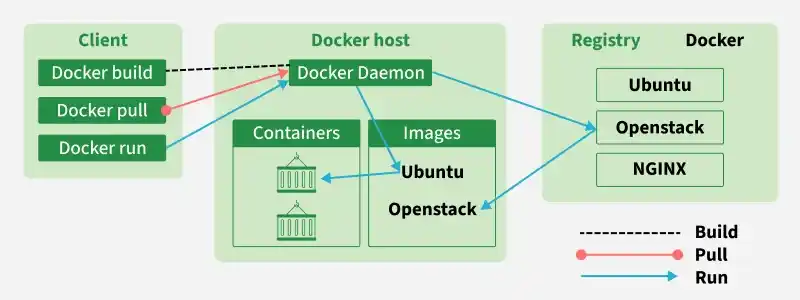
1. What is Docker ?
- Docker is a containerization platform that allows developers to package an application and all its dependencies into a Docker image.
- This image can be distributed and deployed on any machine that supports Docker.
- When the image is executed, it runs as a container — a lightweight, isolated runtime instance that shares the host operating system’s kernel.
2. What is a Docker Container?
- A Docker container is a lightweight, standalone, runnable instance of a Docker image.
- A single server or virtual machine (VM) can run several containers at the same time, because containers share the host operating system's kernel instead of each carrying a full OS of their own.
- Docker gives every container its own isolated view of the system — a separate filesystem, network interface, process tree, and hostname.
3. What Is the Difference Between a Docker Image and a Docker Container?
This is one of the most commonly asked Docker basics questions, so it's worth covering explicitly:
- A Docker image is a read-only, layered template that contains the application code, runtime, libraries, and configuration needed to run an application. Images are built once (usually from a Dockerfile) and can be reused to create any number of containers.
- A Docker container is a running (or stopped) instance of an image. When you run an image, Docker adds a thin writable layer on top of the image's read-only layers — that writable layer is where any runtime changes (new files, logs, temp data) are stored.
4. What are the Features of Docker?
The following are the key features of using docker:
- Containerization: Packaging applications and all their dependencies into isolated containers for consistent deployment across different environments.
- Efficient Resource Utilization: Running multiple containers on a single host by sharing the kernel, leading to lower overhead compared to virtual machines.
- Portability: The ability to easily move and run containers across various operating systems and cloud platforms.
- Security: Isolating processes and filesystems within containers to enhance security.
- Image Layering and Versioning: Building images in layers allows for efficient storage, sharing, and version control.
- Automated Builds: Defining image creation processes in Dockerfiles enables repeatable and automated builds.
- Docker Hub: A vast registry providing access to a wide range of pre-built and community-contributed images for rapid application deployment.
5. What are the Pros and Cons of Docker?
Pros of Docker
- Portability: It enables consistent deployment across various environments.
- Resource Efficiency: Optimizing of resource usage with a shared kernel will be done effectively.
- Isolation: It provides security through isolation of process and file system.
- Automation: it supports automated builds and streamlining development workflow
Cons of Docker
- Learning Curve: Initial learning of the containerization concepts will bit new to understand.
- Additional Resources: Containers use some more resources compared to running applications directly on host.
- Security Concerns: Misconfigurations may lead to the security risks if not properly managed.
- Container Orchestration Complexity: Management of orchestration tools will be complex for larger-scale deployments.
6. Explain the components of docker.
Docker is made up of the following core components:
- Docker Engine: The client-server application (daemon + REST API + CLI) that builds and runs containers.
- Docker Images: Lightweight, read-only templates that bundle an application with its dependencies.
- Docker Containers: Running instances of Docker images.
- Docker Compose: A tool for defining and running multi-container Docker applications using a single YAML file.
- Docker Registry (e.g., Docker Hub): A storage and distribution system for Docker images.
7. Can you tell what is the functionality of a Hypervisor?
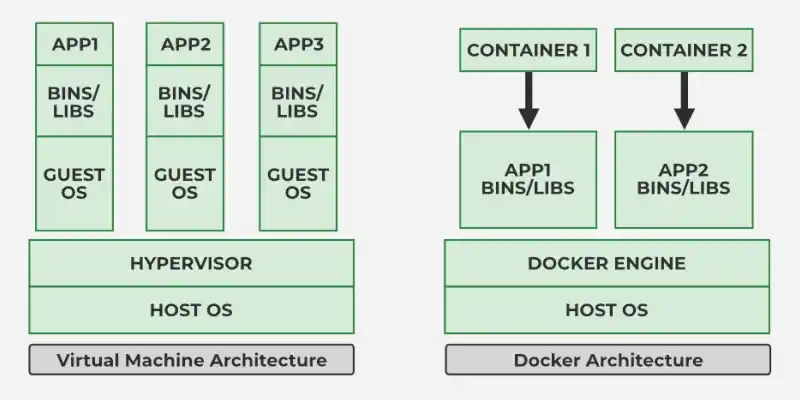
A hypervisor is a virtualization software that helps in running multiple operating systems (Guest OS) on a single physical host system by providing an isolation between the virtual machines (VMs) and manages their resources.
8. Difference between Docker and Virtualization?
Docker uses containerization concept, which shares the host OS kernel for efficiency and speed whereas Virtualization involves running complete OS instances on a hypervisor, which may have more overhead on using resources.
Docker
- Uses containers to package applications and their dependencies.
- Shares the host operating system kernel.
- Lightweight and starts in seconds.
- Uses less CPU, memory, and storage.
- Best for microservices, CI/CD, and cloud-native applications.
- Goal: Fast and efficient application deployment.
Virtualization
- Uses Virtual Machines (VMs) to run applications.
- Each VM has its own guest operating system.
- Requires a hypervisor (e.g., VMware, VirtualBox, Hyper-V).
- Higher resource usage and slower startup.
- Best for running multiple operating systems or legacy applications.
- Goal: Complete OS-level isolation.
9. What Are the States of a Docker Container?
A Docker container is always in one of these states, which directly affects how it interacts with the host operating system:
- Running: The container is actively executing.
- Paused: The container's processes are temporarily suspended (frozen), but not stopped.
- Stopped (Exited): The container's main process has ended and it is inactive.
10. What Is a Dockerfile?
- A Dockerfile is a plain text file that contains a sequence of instructions Docker follows, top to bottom, to build a Docker image.
- Each instruction (
FROM,RUN,COPY,CMD, etc.) creates a new image layer. - Using a Dockerfile makes image builds repeatable, version-controllable, and automatable.
Example of a simple Dockerfile:
FROM python:3.11-slim # Base image
WORKDIR /app # Working directory inside the container
COPY requirements.txt . # Copy dependency file first (for caching)
RUN pip install --no-cache-dir -r requirements.txt
COPY . . # Copy the rest of the application code
EXPOSE 8000 # Document the port the app listens on
CMD ["python", "app.py"] # Default command when the container starts
11. What Is the Difference Between CMD and ENTRYPOINT?
- CMD sets the default command and/or arguments that run when the container starts. It is easily overridden by arguments passed on the
docker runcommand line. - ENTRYPOINT configures the container to run as a fixed executable. It is stricter than CMD and is normally used when the container should always run a specific program, with CMD supplying default arguments to that program.
A common pattern is to combine both: ENTRYPOINT ["python", "app.py"] with CMD ["--port", "8000"], so the executable is fixed but the arguments can still be overridden at runtime.
12. What Is the Difference Between the Shell Form and Exec Form of CMD/ENTRYPOINT?
Docker instructions like RUN, CMD, and ENTRYPOINT can be written in two forms:
Shell form
CMD python app.py— the command runs inside/bin/sh -c, which means it gets shell features like variable substitution, but the process runs as a child of the shell.- This can prevent graceful shutdowns.
CMD ["python", "app.py"]— the command runs directly as PID 1 inside the container, without an intermediate shell.- It receives signals correctly and is the recommended form for production containers.
13. What Is the Difference Between ARG and ENV Instructions in a Dockerfile?
Both ARG and ENV are Dockerfile instructions used to define variables.
- Defines build-time variables.
- Available only during the image build process.
- Values can be passed using the --build-arg option.
- Not available inside the running container unless explicitly copied to ENV.
- Goal: Customize the image build process.
- Defines environment variables.
- Available during image build and at container runtime.
- Values persist in the final Docker image.
- Can be accessed by applications running inside the container.
- Goal: Configure the runtime environment.
14. What Is the Difference Between ADD and COPY in a Dockerfile?
Both instructions copy files into an image, but they behave differently:
- Copies files and directories from the host to the Docker image.
- Performs only file-copy operations.
- Simpler and more predictable.
- Recommended for most use cases.
- Goal: Copy local files into the image.
- Copies files and directories like COPY.
- Can automatically extract local .tar archives.
- Can copy files from a URL (though this is generally discouraged in favor of tools like curl or wget).
- Provides additional functionality beyond simple copying.
- Goal: Copy files with extra capabilities.
15. What Is the Docker Build Context, and What Is the Purpose of a .dockerignore File?
- The build context is the set of files sent to the Docker daemon when you run
docker build .— by default, everything in the specified directory. - A large build context slows down every build and can accidentally get pulled into the image via a broad
COPYinstruction.
.dockerignore
- A .dockerignore file works like
.gitignore: it tells Docker which files and folders to exclude from the build context. - This keeps builds fast and prevents unnecessary or sensitive files from ending up inside the image.
16. How Do You Create a Multi-Stage Build in Docker?
- A multi-stage build uses multiple
FROMinstructions in a single Dockerfile. - Each
FROMstarts a new build stage, and you can selectively copy only the artifacts you need from an earlier stage into the final stage usingCOPY --from=<stage>. - This keeps build tools, compilers, and intermediate files out of the final image.
FROM golang:1.22 AS builder
WORKDIR /src
COPY . .
RUN go build -o app
FROM alpine
COPY --from=builder /src/app /app
CMD ["/app"]
17. What Are the Best Practices to Reduce Docker Image Size?
Interviewers often ask this as a follow-up to multi-stage builds. Key strategies, roughly in order of impact:
- Use multi-stage builds so build tools never ship in the final image.
- Use a minimal base image (
alpine,slim, ordistroless) instead of a full OS image. - Order instructions to maximize layer caching — copy dependency files (like
requirements.txtorpackage.json) and install dependencies before copying application code, since code changes more often than dependencies. - Use a .dockerignore file to keep unnecessary files out of the build context.
- Combine related RUN commands (e.g., chained
apt-get installcommands) to avoid creating unnecessary intermediate layers, and clean up package-manager caches in the same layer they were created in.
18. What is Docker Hub?
- Docker Hub is container registry that serves as a centralized repository for Docker images.
- It built for developers and open source contributors to find , use , share and download container images.
- Docker Hub can be used either host public repos that can be used for free, or docker private repos for teams and enterprises.
19. What Is the Difference Between a Docker Registry and Docker Hub?
A Docker Registry is a service used to store and distribute Docker images, whereas Docker Hub is Docker's official public cloud registry that hosts and shares Docker images.
- A storage service for Docker images.
- Can be public or private.
- Organizations can host their own registry (e.g., on-premises or cloud).
- Used to store, manage, and distribute container images.
- Goal: Store and manage Docker images.
- Docker's official hosted registry.
- Provides public and private repositories.
- Offers official images, community images, and image versioning.
- Does not require users to manage registry infrastructure.
- Goal: Share and distribute Docker images through Docker's cloud platform.
20. What command can you run to export a docker image as an archive?
You can use this following command to export a Docker image as an archive:
docker save -o <output_file_name>.tar <image_name>
21. What command can be run to import a pre-exported docker image into another docker host?
We can use this following command to import a pre-exported Docker image into another host:
docker load -i <input_file_name>.tar
22. What Is the Difference Between docker save/docker load and docker export/docker import?
Both docker save/docker load and docker export/docker import are used to transfer Docker data.
docker save / docker load
- Used to export and import Docker images.
- Preserves image layers, tags, and metadata.
- Creates a tar archive of the image.
- Best for backing up or transferring images between systems.
- Goal: Save and restore complete Docker images.
docker export / docker import
- Used to export and import Docker containers.
- Exports only the container's filesystem.
- Does not preserve image history, layers, tags, or metadata.
- Useful for creating a simplified image from a container.
- Goal: Export a container's filesystem.
23. Can a Paused Container Be Removed From Docker?
Yes, a paused container can be removed using:
docker rm <container_id>
24. How Do You Get the Number of Containers That Are Running, Paused, and Stopped?
Each command lists matching container IDs, which you can count (with wc -l) or process further as needed
# Running containers
docker ps -q | wc -l
# Paused containers
docker ps -aq -f "status=paused" | wc -l
# Stopped (exited) containers
docker ps -aq -f "status=exited" | wc -l
25. How Do You Start, Stop, and Kill a Container?
The key difference between stop and kill: docker stop gives the container's main process a chance to shut down cleanly, while docker kill terminates it immediately without warning.
docker start <container_name> # Start a stopped container
docker stop <container_name> # Gracefully stop a running container (sends SIGTERM, then SIGKILL after a timeout)
docker kill <container_name> # Immediately stop a container (sends SIGKILL right away)
26. Which Is the Preferred Method for Removing a Container — docker stop Followed by docker rm, or Just docker rm?
- The recommended approach is to run
docker stopfollowed bydocker rm, since this ensures the container shuts down safely before being removed and avoids issues with processes that are still active. - If you are certain the container is already stopped, using
docker rmalone is fine.
27. What Is the Difference Between docker rm and docker rmi?
docker rm<container>removes one or more containers.docker rmi <image>removes one or more images.
A common gotcha: you cannot remove an image with docker rmi while a container (even a stopped one) still references it — the container must be removed first.
28. Describe the Lifecycle of a Docker Container.
A Docker container generally passes through these stages:
- Created:
docker create(or the first step ofdocker run) sets up the container without starting it. - Running:
docker start(ordocker run) executes the container's main process. - Paused / Unpaused: Optional states for temporarily freezing and resuming a running container.
- Stopped:
docker stop(ordocker kill) halts the container. - Removed:
docker rmdeletes the container entirely.
29. Can a Container Restart by Itself?
Yes. Docker supports restart policies that let a container restart automatically based on its exit status, configured with the --restart flag at container creation time, for example:
docker run --restart always <image_name>
30. What Is the Difference Between the Docker Restart Policies "no", "on-failure", and "always"?
Docker restart policies determine what happens to a container when it stops.
no
- Default restart policy.
- The container is not restarted automatically.
- Requires manual restart.
- Best for one-time or temporary containers.
- Goal: Disable automatic restarts.
on-failure
- Restarts the container only if it exits with a non-zero status code.
- Can specify a maximum retry count (e.g., on-failure:5).
- Does not restart if the container exits successfully.
- Best for applications that may fail unexpectedly.
- Goal: Restart only after failures.
always
- Restarts the container whenever it stops.
- Also restarts the container when the Docker daemon restarts.
- Continues restarting until the policy is changed or removed.
- Best for long-running production services.
- Goal: Keep the container running at all times.
31. How Do the Docker Daemon and the Docker Client Communicate With Each Other?
- The Docker client and Docker daemon communicate over a REST API — over a UNIX socket by default, or a network interface if configured.
- The client sends commands to the daemon through this API, and the daemon does the actual work of building, running, and managing containers, images, networks, and volumes.
32. What Does the docker info Command Do?
docker infodisplays detailed information about the Docker installation as a whole — number of containers and images, the storage driver in use, kernel version, and more.- It's useful for getting a quick overview of the Docker environment.
33. How Do You Check the Versions of the Docker Client and Server?
docker version
This returns detailed version information for both the Docker client and the Docker server (daemon/Engine).
34. How Do You Inspect the Metadata of a Docker Image or Container?
docker inspect <image_name_or_container_id>
This returns detailed JSON metadata, including labels, layers, environment variables, network settings, and configuration details.
35. What Are the Essential Docker Commands, and What Do They Do?
docker run— Creates and starts a container from an image.docker ps— Lists running containers (docker ps -alists all containers, including stopped ones).docker exec— Runs a command inside a container that is already running.docker stop— Gracefully stops a running container.docker build— Builds an image from a Dockerfile.docker images— Lists locally available images.
36. What Are Docker Object Labels?
Docker object labels are key-value metadata pairs attached to Docker objects (images, containers, volumes, networks) for organizational purposes — for example, tagging by environment or team. Example:
docker run --label environment=production <image_name>
37. Why Is docker system prune Used, and What Does It Do?
docker system prune removes unused Docker data — stopped containers, dangling images, unused networks, and (optionally, with --volumes) unused volumes — to free up disk space.
docker system prune
38. Suppose You Have Several Containers Running and Want to Access One of Them. How Do You Do That?
Use docker exec to run a command inside an already-running container:
docker exec -it <container_id_or_name> /bin/bash
- The
-itflags allocate an interactive pseudo-terminal (-t) and keep STDIN open (-i), giving you an interactive shell session inside the container. - Replace
/bin/bashwith any command you need to run. - Exiting the shell afterward does not affect the container's running state.
39. What Is the Difference Between docker exec and docker attach?
Both let you interact with a running container, but differently:
- Starts a new process inside the container (for example, opening a fresh bash shell).
- Exiting that shell does not stop the container.
docker attach
- Connects your terminal to the container's existing main process (PID 1) — you see its live stdout/stderr and can send input to it.
- Detaching normally uses
Ctrl+P, Ctrl+Q; pressingCtrl+Ccan send a signal that stops the main process (and therefore the container).
40. How Do You Debug Issues in a Docker Container?
A few commands cover most debugging needs:
- Container logs:
docker logs <container_id>— view stdout/stderr output. - Interactive shell:
docker exec -it <container_id> /bin/bash— explore the container from inside. - Inspect details:
docker inspect <container_id>— view full configuration and metadata. - Process listing:
docker exec -it <container_id> ps aux— see what's running inside the container. - Network troubleshooting:
docker exec -it <container_id> ping <hostname>— check connectivity. - Resource usage:
docker stats <container_id>— monitor live CPU and memory usage.
41. What Are the Key Differences Between Daemon-Level Logging and Container-Level Logging in Docker?
- Daemon-level logging configures the Docker daemon's logging behavior globally (for example, which logging driver to use by default), affecting all containers on that host.
- Container-level logging is scoped to a single container and can be viewed with:
42. Where Are Docker Volumes Stored?
- By default, Docker volumes are stored on the host machine under
/var/lib/docker/volumes. - This location is managed entirely by Docker and ensures data persists even if the container using the volume is removed.
43. In What Circumstances Will You Lose Data Stored in a Container?
- Data can be lost when a container is deleted, or when Docker's default non-persistent (ephemeral) writable layer is used without any proper data-persistence strategy.
- To avoid losing important data, use Docker volumes or bind mounts instead of relying on the container's writable layer.
44. What Is the Difference Between Docker Volumes, Bind Mounts, and tmpfs Mounts?
Docker offers three ways to persist or share data with a container, and this is a very common interview question:
Volumes
- Storage managed entirely by Docker and stored under
/var/lib/docker/volumes. - They are the recommended way to persist data (e.g., for databases) because they are portable, easy to back up, and isolated from the host's directory structure.
Bind mounts
- Map a specific file or directory on the host filesystem directly into the container.
- They are not managed by Docker, give direct host access, and are most useful in local development (e.g., live-reloading source code into a container).
tmpfs mounts
- Store data in the host's memory (RAM) only — never written to disk.
- Data disappears as soon as the container stops.
- Useful for temporary files or sensitive data that should never be persisted. (tmpfs mounts work on Linux hosts only.)
45. How Do You Share Data Between Containers in Docker?
- You can share data between containers using Docker volumes, which multiple containers can mount at the same time, or using the
--volumes-fromoption. - This makes it easy to share and coordinate data across containers in multi-container setups.
46. What Is the Difference Between a Docker Image and a Layer?
- A Docker image is a complete snapshot of a filesystem plus application dependencies, made up of multiple stacked, read-only layers.
- Each layer represents the filesystem changes introduced by a single Dockerfile instruction (like
RUNorCOPY). - Layers are cached and can be shared across images, which makes builds faster and storage more efficient.
47. How Does Docker's Build Cache Work?
- When you run
docker build, Docker executes the Dockerfile's instructions one by one and caches the result of each as a layer. - On the next build, if an instruction and its inputs (the command itself, and any files it copies) haven't changed, Docker reuses the cached layer instead of re-running it.
- However, a cache miss on any layer invalidates every layer that comes after it in the Dockerfile.
48. What Is a Dangling Image, and How Do You Remove It?
- A dangling image is an image layer that is not tagged and is not referenced by any container — typically left behind when you rebuild an image using the same name and tag, orphaning the old layer.
- Dangling images consume disk space without providing any use. You can find and remove them with:
docker images -f "dangling=true"
docker image prune
49. How Do You Limit the CPU and Memory Usage of a Docker Container?
Use the --cpus flag to cap CPU usage and -m (or --memory) to cap memory usage:
docker run --cpus=2 -m 1024M <image_name>
50. How Do You Manage Network Connectivity Between Docker Containers and the Host Machine?
Docker provides several networking options, and the right choice depends on the isolation and communication needs of the application:
- Bridge networks: The default network type, created automatically when the Docker daemon starts. Containers on the same bridge network can communicate with each other.
- Host networks: The container shares the host's network namespace directly, so it uses the host's network interfaces without any NAT.
- Custom (user-defined) bridge networks: Provide isolated communication between selected containers, and — unlike the default bridge network — allow containers to resolve each other by container name via Docker's built-in DNS.
- Overlay networks (Swarm mode): Enable communication between services running on different nodes in a Docker Swarm cluster, providing multi-host networking.
- Macvlan networks: Give a container its own MAC address on the physical network, so it appears as a physical device directly on the network.
# Create a bridge network
docker network create my_bridge_network
# Run a container using the host network
docker run --name container1 --network host -d my_image
# Create a custom bridge network
docker network create my_custom_network
# Create an overlay network
docker network create --driver overlay my_overlay_network
51. What Are Linux Namespaces and Cgroups, and How Does Docker Use Them?
Containers are not a separate technology from the host OS — they are regular Linux processes made to look isolated using two kernel features:
Namespaces
- Provide isolation by giving a container its own view of certain system resources.
- Docker uses several namespace types, including PID (process IDs), NET (network interfaces), MNT (filesystem mounts), IPC (inter-process communication), UTS (hostname), and USER (user/group IDs).
Cgroups (control groups)
- Limit and account for the resources a container can use — CPU, memory, disk I/O, and network bandwidth — which is what makes flags like
--cpusand-m.
52. What Is Docker Compose?
- Docker Compose is a tool for defining and running multi-container Docker applications using a single declarative YAML file (
docker-compose.yml). - Instead of manually running several
docker runcommands with matching networks and volumes, and then bring the whole stack up or down with a single command:
docker-compose up -d # Start all services defined in docker-compose.yml
docker-compose down # Stop and remove all services, networks (and optionally volumes)
53. What Is the Difference Between a Dockerfile and a docker-compose.yml File?
- A Dockerfile describes how to build a single image — the base image, dependencies, files to copy, and the startup command.
- A docker-compose.yml file describes how to run one or more containers together as a connected application — which images or Dockerfiles to use, how services depend on each other, which ports and volumes to expose, and how they should be networked.
54. Can You Use JSON Instead of YAML When Writing a Docker Compose File?
- Yes. Docker Compose supports both YAML and JSON for defining service configuration.
- YAML is far more common because it's easier to read, but JSON is a valid alternative — simply use a
docker-compose.jsonfile instead ofdocker-compose.ymland define the same structure in JSON.
55. How Do You Ensure Container 1 Runs Before Container 2 When Using Docker Compose?
- Docker Compose determines service startup order based on dependencies declared with the
depends_onkey indocker-compose.yml. - In the example below, even though
container1is listed first, Compose will startcontainer2beforecontainer1because of the dependency:
services:
container1:
depends_on:
- container2
...
container2:
...
56. How Do You Scale Docker Containers Horizontally?
Horizontal scaling is achieved by running multiple replicas of the same service across one or more nodes. Tools like Docker Compose or Docker Swarm make this straightforward. For example:
docker-compose up --scale web=3
This runs three instances of the "web" service, distributing the workload across them.
57. What Is Docker Swarm?
- Docker Swarm is Docker's built-in, native clustering and orchestration tool.
- It turns a pool of Docker hosts into a single virtual Docker host, allowing applications to scale seamlessly across multiple nodes.
- It provides built-in load balancing and helps ensure high availability of containerized services, using the standard Docker CLI and API.
58. What Is the Difference Between Docker Swarm and Kubernetes?
Both are container orchestration tools, but they differ significantly in scope and complexity — and this comparison is one of the most frequently asked orchestration questions in Docker interviews:
Docker Swarm
- Native container orchestration tool for Docker.
- Simple to install, configure, and manage.
- Uses Docker CLI and integrates seamlessly with Docker.
- Suitable for small to medium-sized deployments.
- Goal: Simplify container orchestration.
Kubernetes
- Open-source container orchestration platform.
- Provides advanced features such as auto-scaling, self-healing, rolling updates, and service discovery.
- Supports multiple container runtimes.
- Suitable for large-scale and enterprise applications.
- Goal: Manage highly available and scalable containerized applications.
59. How Does Docker Handle Service Discovery in Swarm Mode?
- In Docker Swarm mode, service discovery is handled automatically through an internal DNS service.
- Every service in the swarm is automatically assigned a DNS name, so other services can reach it by name without any manual configuration.
60. What Is the Purpose of the HEALTHCHECK Instruction in a Dockerfile?
HEALTHCHECKlets Docker periodically run a command inside a container to verify that the application is actually working — not just that the process is running.- If the command returns a non-zero exit code repeatedly, Docker marks the container as
unhealthy, and orchestrators like Swarm or Kubernetes .
HEALTHCHECK --interval=30s --timeout=10s --retries=3 \
CMD curl -f http://localhost:8080/health || exit 1
61. What Is the Purpose of Docker Secrets?
- Docker secrets are used to securely store sensitive information — such as passwords, tokens, or API keys — for use by services in Docker Swarm.
- Secrets are encrypted at rest and in transit, and they are only made available to services that have been explicitly granted access, rather than being baked into an image or exposed as a plain environment variable.
docker secret create db_password mysecretpassword
62. What Are Some Best Practices for Securing Docker Containers in Production?
Container security comes up often in more senior interviews. Key practices include:
- Run as a non-root user inside the container (
USER appuserin the Dockerfile) instead of the default root. - Use a read-only root filesystem where possible (
docker run --read-only). - Drop unnecessary Linux capabilities and add back only what's required (
--cap-drop ALL --cap-add NET_BIND_SERVICE). - Never bake secrets into an image — anyone who pulls the image can extract them from its layers using
docker history. Use Docker Secrets or a dedicated secrets manager instead. - Scan images for known vulnerabilities (with tools like Trivy or Docker Scout) as part of the CI/CD pipeline, before deployment.
- Use minimal base images (Alpine, distroless) to shrink the attack surface.
- Avoid the
:latesttag in production — pin exact image versions so deployments are predictable and rollbacks are simple.
63. What Is the Purpose of the docker checkpoint Command?
- The
docker checkpointcommand creates a snapshot of a running container's state, including its filesystem and memory, so it can later be restored. - It is primarily useful in experimental scenarios such as debugging or live migration.
docker checkpoint create my_container checkpoint_name
64. Can You Implement Continuous Integration (CI) and Continuous Deployment (CD) With Docker?
- Yes — Docker is a core building block of most CI/CD pipelines.
- Teams use Docker images to guarantee consistent build and test environments, and CI/CD tools can automate building, testing, and deploying.
65. Is It a Good Practice to Run Stateful Applications on Docker?
- Docker was originally designed with stateless applications in mind.
- Stateful applications (like databases) can absolutely run in Docker, but only if data persistence is handled carefully .
66. How Do You Update a Docker Container Without Losing Data?
- Keep any important data outside the container's writable layer, using Docker volumes or bind mounts.
- To update the application, build a new image with the updated code, then start a new container from that image and attach it to the same existing volume.
67. What Is the Difference Between Docker Community Edition (CE) and Docker Enterprise Edition (EE)?
Docker Community Edition is a good fit for individuals and small-scale projects — it's free and provides the essential features of containerization.
Docker Community Edition (CE)
- Free and open-source.
- Designed for developers, students, and small teams.
- Receives regular feature updates.
- Community-based support.
- Suitable for development and testing.
- Goal: Build and test containerized applications.
Docker Enterprise Edition (EE)
- Commercial enterprise solution (now provided through Mirantis).
- Includes enterprise-grade security, governance, and management features.
- Offers official technical support and long-term stability.
- Integrates with enterprise infrastructure and Kubernetes.
- Suitable for production and large-scale deployments.
- Goal: Securely manage enterprise container platforms.
68. If You Have a Server With 16 GB RAM and a Quad-Core CPU, What Determines How Many Containers You Can Run for a Microservices App?
- The number of containers a host can support mainly depends on available RAM and CPU, along with how much each container actually consumes.
- For example, with 16 GB of RAM, if each container uses roughly 512 MB efficiently, the host could theoretically support around 30 containers.
69. How Do You Monitor Docker in Production?
Common approaches combine several layers of monitoring:
- Built-in tools:
docker statsfor quick, live resource usage per container. - Dedicated monitoring tools: cAdvisor and Prometheus (often paired with Grafana) for detailed, historical container metrics.
- Centralized logging: Solutions like the ELK Stack or Splunk to aggregate and search container logs across the fleet.
- Orchestration-level monitoring: Kubernetes or Docker Swarm both offer better built-in visibility and scaling behavior than managing standalone containers.
70. How Does Load Balancing Work Across Containers and Hosts?
- Container orchestration platforms like Kubernetes or Docker Swarm include load balancers that distribute incoming traffic evenly across container instances or nodes.
- This improves scalability and fault tolerance by routing traffic only to healthy containers or hosts, which is essential for maintaining stability in dynamic, scalable containerized systems.
71. How Do You Perform a Live Migration of Docker Containers Between Hosts?
- Live migration is typically handled through container orchestration tools rather than manually.
- Docker Swarm's
docker service updateor Kubernetes'kubectl drainandkubectl uncordoncommands let you move workloads to different hosts in a controlled way, with orchestration ensuring minimal downtime during the transition.
