

DevOps is a high-demand field and companies look for candidates with strong knowledge of CI/CD, automation, cloud platforms (AWS, Azure, GCP), Docker, Kubernetes, Jenkins, Ansible, Terraform, Git, monitoring tools (Prometheus, Grafana), and scripting (Python, Shell, Bash).
1. What do you understand by DevOps?
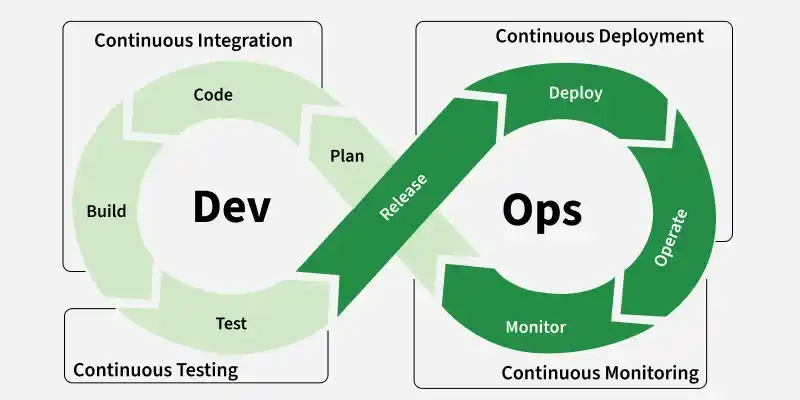
DevOps is a software development approach that combines Development (Dev) and IT Operations (Ops) to automate and streamline the software development, testing, deployment, and maintenance process.
- It focuses on collaboration, automation, and continuous improvement, allowing businesses to deliver software faster, more efficiently, and with fewer errors.
- DevOps integrates Continuous Integration/Continuous Deployment (CI/CD), Infrastructure as Code (IaC), monitoring, and automation to ensure that software is built, tested, and released seamlessly.
2. What is a DevOps Engineer?
A DevOps Engineer is a professional who combines software development (Dev) and IT operations (Ops) skills to improve and streamline the process of developing, testing, and releasing software.
Their goal is to ensure that software is delivered quickly, efficiently, and reliably. They work to automate and integrate the processes between software development and IT teams, allowing for continuous delivery and continuous integration of software.
3. What are the top programming and scripting languages which is important to learn too become DevOps Engineer?
For becoming a successful DevOps Engineer it is essential to learn both the programming and scripting languages. You must learn the following languages:
- Programming languages: Golang, Java,Ruby
- Scripting: Bash, Python, Groovy, Powershell
4. What is the use of SSH?
SSH (Secure Shell) is a cryptographic network protocol used to securely connect and communicate between two systems over an unsecured network. It provides encrypted communication, ensuring that data such as passwords and commands cannot be intercepted by attackers.
With SSH, users can:
- Remote Login: Access and control servers securely from anywhere.
- Secure File Transfer: Move files safely using tools like
scporsftp. - Port Forwarding & Tunneling: Securely forward ports or create encrypted tunnels for other applications.
- Automation: Use SSH keys to log in without typing passwords, enabling scripts and configuration tools (like Ansible) to work seamlessly.
5. What is CI/CD?
CI And CD is the practice of automating the integration of code changes from multiple developers into a single codebase. It is a software development practice where the developers commit their work frequently to the central code repository (Github or Stash).
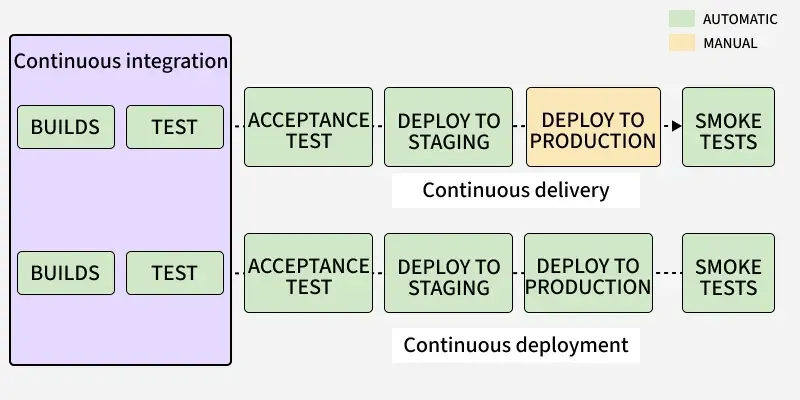
- Continuous Integration: With Continuous Integration, developers frequently commit to a shared common repository using a version control system such as Git. A continuous integration pipeline can automatically run builds, store the artifacts, run unit tests, and even conduct code reviews using tools like Sonar.
- Continuous Delivery: Continuous delivery helps developers test their code in a production-similar environment, hence preventing any last-moment or post-production surprises. These tests may include UI testing, load testing, integration testing, etc. It helps developers discover and resolve bugs preemptively.
6. What is the difference between Horizontal and Vertical Scaling?
We will discuss about the difference between horizontal and vertical scaling one-by-one:
Horizontal Scaling
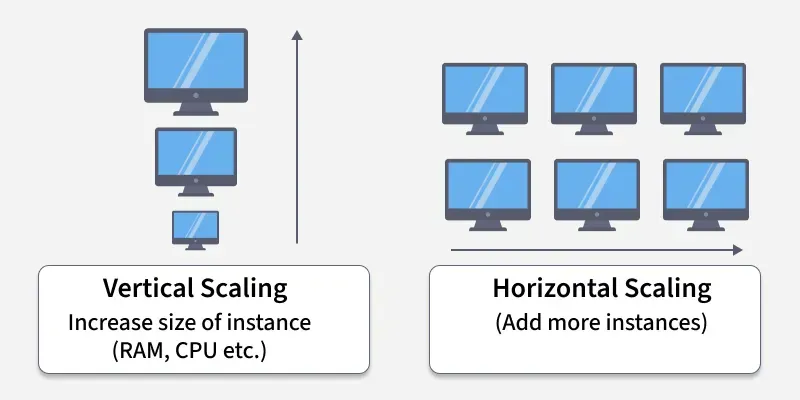
Horizontal scaling means adding more machines or servers to handle the load. Instead of making one server stronger, you use several servers to share the work.
- It’s like opening more checkout counters at a grocery store to serve more customers at once. This method is great for handling a large number of users or traffic because you can keep adding servers as needed.
- It also offers better reliability—if one server fails, others can still keep things running. However, setting up and managing multiple servers can be more complex and might require tools like load balancers to distribute traffic evenly.
Vertical Scaling
Vertical scaling means making a single machine more powerful. You do this by adding more memory (RAM), a faster processor (CPU), or bigger storage to one server.
- It's like upgrading your personal computer to make it run faster — you don’t change the computer, just improve its parts. This method is easy to set up and manage because you’re only dealing with one machine. It works well for smaller applications or systems with steady traffic.
- However, there’s a limit to how much you can upgrade a machine. Also, during upgrades, you might need to restart the server, which can cause a short downtime.
7. What is the Blue/Green Deployment Pattern?
Blue Green Deployment is just like we deploy two versions of our application, one is the stable version, and another is a new feature or bug fix let’s say, forwarding a certain percentage of traffic to the second version as well in production to ensure that everything is working fine.
- Blue Deployment: It’s the primary Deployment that is stable, and being used as production.
- Green Deployment: It’s a kind of clone version, but it has additional changes in it, we can route the traffic to the Green deployment so that if any issues are there in the Deployment we can fix them and then promote it to Blue, so that reducing the chances of failures in production environment.
8. What's the difference between DevOps & Agile?
DevOps and Agile both aim to improve software delivery, but they focus on different parts of the software development lifecycle.
Agile
- Focuses on iterative software development and continuous customer feedback.
- Primarily used during the planning, development, and testing phases.
- Organizes work into short iterations called sprints.
- Encourages collaboration between developers, testers, and stakeholders.
- Answers the question: "How can we build better software faster?"
- Common practices include Scrum, Kanban, Sprint Planning, Daily Stand-ups, and Retrospectives.
- Goal: Deliver high-quality software quickly through continuous improvement.
DevOps
- Focuses on automating software delivery and managing operations.
- Covers the entire software lifecycle, including development, deployment, monitoring, and maintenance.
- Emphasizes Continuous Integration (CI) and Continuous Delivery/Deployment (CD).
- Encourages collaboration between development, operations, and security teams.
- Answers the question: "How can we deliver and operate software faster and more reliably?"
- Common tools include Jenkins, Docker, Kubernetes, Git, Ansible, Terraform, and Prometheus.
- Goal: Deliver software rapidly, reliably, and with minimal downtime.
9. What is the continuous testing process?
Continuous testing is a process of automated testing done on software continuously as soon as a piece of code is delivered by the developers. This testing is done at every stage starting from the initial stages of development until the deployment of software.
10. What is the role of AWS in DevOps?
AWS is a DevOps powerhouse, offering CI/CD automation, infrastructure as code (IaC), container orchestration, monitoring, and security to streamline software development and deployment.
- Key services like AWS CodePipeline, CodeBuild, and CodeDeploy automate CI/CD workflows, while CloudFormation and Terraform enable seamless infrastructure provisioning.
- Amazon ECS, EKS, and Fargate manage containerized applications, and CloudWatch, X-Ray, and CloudTrail ensure real-time monitoring and security.
- With Auto Scaling, ELB, and AWS Lambda, AWS enhances scalability, high availability, and serverless computing. Its integrations with Jenkins, GitHub, and Terraform make it a cost-effective, high-performance solution for cloud DevOps, ensuring faster deployments, optimized workflows, and secure cloud infrastructure.
11. What do you mean by Configuration Management?
The process of controlling and documenting change for the development system is called Configuration Management. Configuration Management is part of the overall change management approach. It allows large teams to work together in s stable environment while still providing the flexibility required for creative work.
12. What is Infrastructure as Code (IaC)?
Infrastructure as Code (IaC) is a method of managing and provisioning IT infrastructure using code, rather than manual configuration. It allows teams to automate the setup and management of their infrastructure, making it more efficient and consistent. This is particularly useful in the DevOps environment, where teams are constantly updating and deploying software.
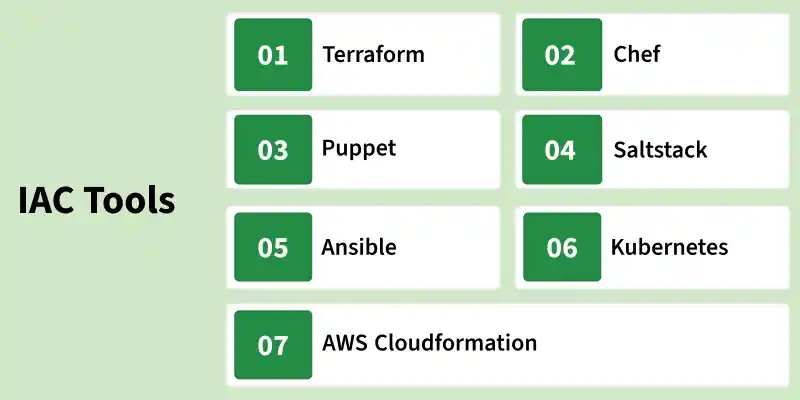
Instead of clicking through dashboards or configuring systems by hand, you define the desired infrastructure in code files (using tools like Terraform, Ansible, or CloudFormation). These files can then be version-controlled, reused, tested, and automated—just like application code.
IAC Benefits are:
- Consistency: Same configuration every time, reducing errors.
- Automation: Fast setup and tear-down of environments.
- Scalability: Easily scale infrastructure up or down with code.
- Versioning: Track and roll back changes using Git or other version control.
13. Explain the concept of branching in Git.
Branching in Git is a way to create separate lines of development within a project. A branch is like a pointer to a specific commit in the Git history.
By default, Git starts with a main branch (commonly called main or master). When you create a new branch, you’re making a copy of the project’s history at that point. This allows you to work on new features, bug fixes, or experiments without affecting the main codebase.
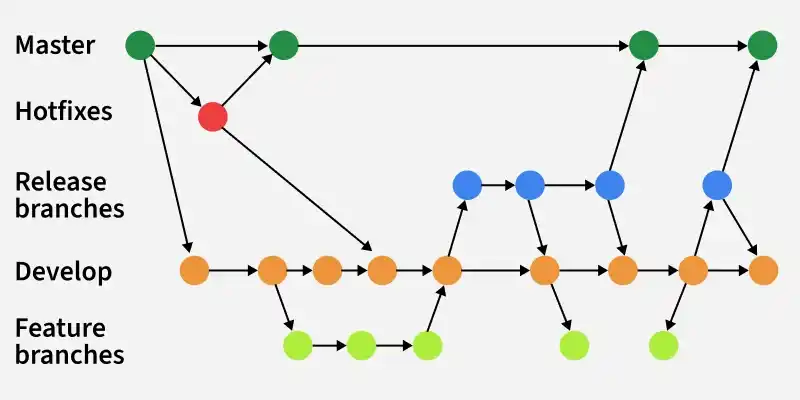
- Each branch is independent, so changes don’t interfere with others until merged.
- Branches make parallel development possible (e.g., multiple developers working on different features).
- You can easily merge branches to combine work or delete branches after completion.
- Common branching strategies include Feature Branching, Git Flow, and Trunk-Based Development.
Example:
mainbranch → stable production code.feature/loginbranch → new login feature under development.- After testing,
feature/loginis merged back intomain.
14. What is Git stash?
The Git stash command can be used to accomplish this if a developer is working on a project and wants to preserve the changes without committing them. This will allow him to switch branches and work on other projects without affecting the existing modifications. You can roll back modifications whenever necessary, and it stores the current state and rolls back developers to a prior state.
15. What is a GIT Repository?
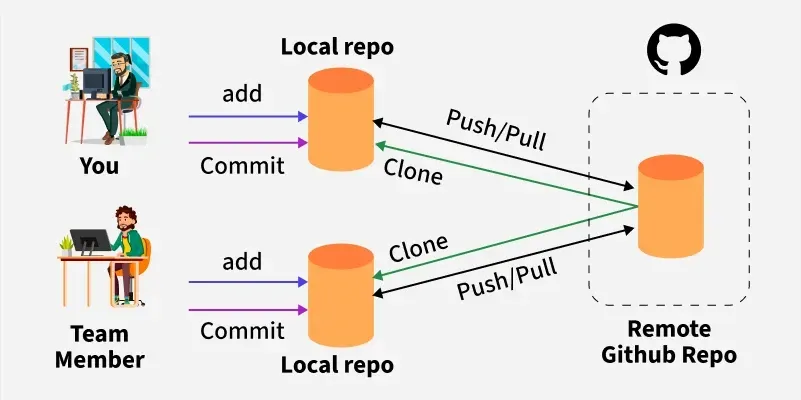
Repositories in GIT contain a collection of files of various versions of a Project. These files are imported from the repository into the local server of the user for further updations and modifications in the content of the file. A VCS or the Version Control System is used to create these versions and store them in a specific place termed a repository.
16. Name three important DevOps KPIs
Here are three key DevOps KPIs:
- Deployment Frequency (DF):This tells you how often new code gets released to production. A higher frequency means smoother development and faster delivery.
- Mean Time to Recovery (MTTR): This measures how quickly a system recovers from failures. The faster the recovery, the better the system's resilience.
- Change Failure Rate (CFR): This shows the percentage of deployments that cause issues in production. Lower failure rates mean more stable and reliable software releases.
Tracking these KPIs helps teams release faster, fix issues quicker, and maintain high software quality.
17. What Is Jenkins?
Jenkins is an open-source automation server used to build, test, and deploy software. It is written in Java and runs on Java Runtime Environment (JRE). With Jenkins, developers can implement Continuous Integration (CI) and Continuous Delivery (CD) by automating repetitive tasks in the software development lifecycle.
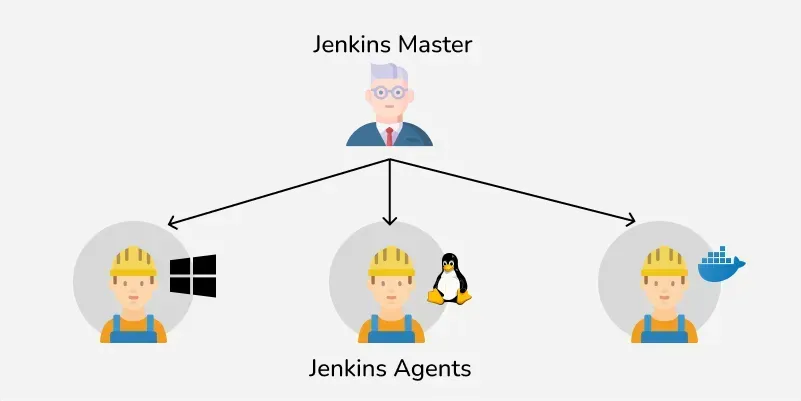
It supports hundreds of plugins that integrate with various tools like Git, Maven, Docker, and Kubernetes, making it highly flexible. Jenkins helps teams detect issues early, improve code quality, and speed up delivery by automating workflows from code commit to production deployment.
18. What is the use of the cherry-pick command in git?
Git cherry-pick in git means choosing a commit from one branch and applying it to another branch. This is in contrast with other ways such as merge and rebases which normally apply many commits into another branch.
The command for Cherry-pick is as follows:
git cherry-pick<commit-hash>
19. What is sudo command in Linux?
Sudo (Super User DO) command in Linux is generally used as a prefix for some commands that only superusers are allowed to run. If you prefix any command with “sudo”, it will run that command with elevated privileges or in other words allow a user with proper permissions to execute a command as another user, such as the superuser. This is the equivalent of the “run as administrator” option in Windows.
20. What's the Difference Between Git Fetch and Git Pull ?
Git Fetch
- Downloads the latest changes from the remote repository without modifying your working directory.
- Updates the remote-tracking branches stored in the .git directory.
- Does not automatically merge changes into your current branch.
- Lets you review commits and changes before integrating them.
- Safer when you want to inspect updates before merging.
- Command: git fetch <remote>
Git Pull
- Downloads the latest changes from the remote repository and merges them into the current branch.
- Updates both the local repository and the working directory.
- Automatically performs a merge (or rebase if configured).
- Applies changes immediately, making them available in your local branch.
- Best suited when you want to synchronize your branch with the remote repository.
- Command: git pull <remote> <branch>
21. What are the components of Selenium?
Selenium is a powerful tool for controlling web browser through program. It is functional for all browsers, works on all major OS and its scripts are written in various languages i.e Python, Java, C#, etc, we will be working with Python. Selenium has four major components :-
- Selenium IDE
- Selenium RC
- Selenium Web driver
- Selenium GRID
22. What is a Puppet in DevOps?
Puppet is an open-source configuration management automation tool. Puppet permits system administrators to type in infrastructure as code, using the Puppet Descriptive Language rather than utilizing any customized and individual scripts to do so. This means in case the system administrator erroneously alters the state of the machine, at that point puppet can uphold the change and guarantee that the framework returns to the required state.
23. What is Ansible?
Ansible is an open-source automation tool used for configuration management, application deployment, and task automation. It helps system administrators and DevOps teams manage multiple servers from a single control machine without needing to install any agents on the target systems.
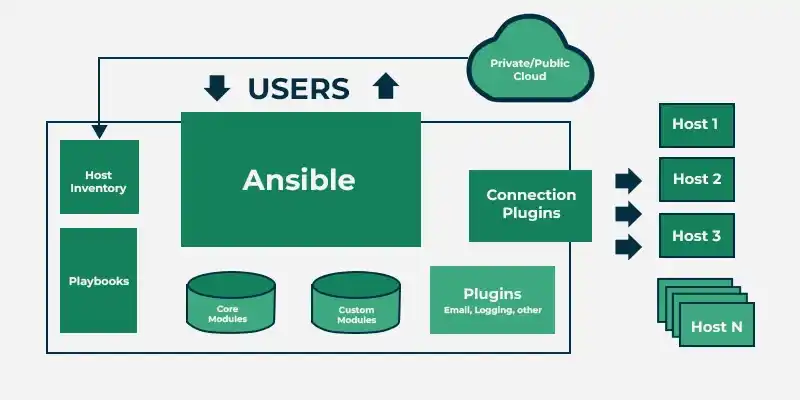
- Agentless: Works over SSH, no extra software required on client machines.
- Simple Language: Uses YAML (called Playbooks) to describe automation tasks in human-readable form.
- Scalable: Can manage from a few servers to thousands.
- Flexible: Supports tasks like provisioning, patching, orchestration, and cloud automation.
Example Use Case: Deploying a web application across 50 servers with one command, ensuring every server has the same configuration..
24. What is Automation Testing?
Automated Testing is a technique where the Tester writes scripts on their own and uses suitable Software or Automation Tool to test the software. It is an Automation Process of a Manual Process. It allows for executing repetitive tasks without the intervention of a Manual Tester.
25. What is the importance of continuous feedback in DevOps?
Continuous Feedback in software testing is trying out an iterative process that involves presenting everyday comments, reviews, and critiques during the software program improvement lifecycle. It ensures that builders get an equal message approximately the quality and functionality of their code. Let’s delve deeper into this concept little by little and discover the variations associated with it.
26. What is Git Bash?
Git Bash is a command-line interface (CLI) application for Windows that lets you communicate with Git, the version control system. Clone the repositories, commit changes, push and pull changes, and more are all possible using Git Bash. Git Bash can automate manual tasks with the scripts written by you. Git Bash helps you in a greater way to learn about Git and version control.
27. What is Git Squashing?
Squashing combines multiple commits into a single commit based on your commit history. With the help of squashing you can clean your branch history and can maintain an organized commit timeline. It is used before pulling requests or merging feature branches.
29. What is a merge conflict in Git?
Merge Conflicts are the conflicts that occur when a developer is editing a file in a particular branch and the other developer is also editing that same file or when developer A edits some line of code and that same line of code is being edited by another developer B that leads to conflicts while merging.
30. What is Git prune?
Git prune is a command that deletes all the files that are not reachable from the current branch. The prune command is useful when you have a lot of files in your working directory that you don’t want to keep. The primary use of git prune is to clean up your working directory after you have finished working on a project. What actually git prune does is, suppose you have an object or commit that is no longer reachable from the current branch.
Command:
git fetch –prune <remote>31. What's the difference between HTTP and HTTPS?
HTTP and HTTPS are protocols used for transferring data over the web, but HTTPS provides an additional layer of security through encryption.
HTTP (HyperText Transfer Protocol)
- Transfers data in plain text, making it easier to intercept and read.
- Does not encrypt communication between the browser and the server.
- Does not require SSL/TLS certificates.
- More vulnerable to attacks such as eavesdropping and data tampering.
- URLs begin with http://.
- Does not provide ranking benefits in search engines.
- Suitable for websites that do not handle sensitive information.
HTTPS (HyperText Transfer Protocol Secure)
- Encrypts data before transmission using SSL/TLS protocols.
- Transfers data in encrypted (ciphertext) form for better security.
- Requires an SSL/TLS certificate to establish a secure connection.
- Protects against data interception, tampering, and man-in-the-middle attacks.
- URLs begin with https://.
- Helps improve search engine rankings.
- Essential for websites that handle passwords, payments, or personal data.
32. What are Virtual machines (VMs) ?
In DevOps, Virtual Machines (VMs) are used to create isolated environments for development, testing, and deployment. A VM abstracts the hardware of a physical machine (CPU, memory, storage, NIC) and allows multiple OS instances to run independently on a single system, managed by a hypervisor (like VirtualBox, VMware, or KVM). VMs are widely used in cloud computing, CI/CD pipelines, and infrastructure automation.
However, modern DevOps prefers containers (like Docker) over VMs because they are lightweight, faster, and more scalable for microservices and cloud-native applications.
33. What is the difference between Continuous Deployment and Continuous Delivery?
Continuous Delivery and Continuous Deployment are CI/CD practices that automate software releases. The key difference is whether the final deployment to production requires human approval.
Continuous Delivery
- Ensures code is always ready for production deployment.
- Automates building, testing, and preparing releases.
- Requires manual approval before deploying to production.
- Gives teams full control over when updates go live.
- Allows additional reviews and quality checks before release.
- Provides slower feedback due to the manual deployment step.
- Best suited for regulated industries or teams that need controlled releases.
- Commonly used by organizations that prefer scheduled or manual production deployments.
- Setup difficulty: Medium, as deployment is manual while the rest of the pipeline is automated.
Continuous Deployment
- Automatically deploys code to production after all tests pass.
- Fully automates the build, test, and deployment process.
- Does not require manual approval for production releases.
- Delivers updates to users as soon as they are validated.
- Requires highly reliable automated testing and monitoring.
- Provides faster feedback and more frequent releases.
- Best suited for teams that release updates frequently, such as SaaS platforms and web applications.
- Commonly adopted by organizations with mature CI/CD pipelines and extensive test automation.
- Setup difficulty: High, as it depends on comprehensive automation and continuous monitoring.
34. Explain the different phases in DevOps methodology.
DevOps is a combination of practices that help teams deliver software faster and more reliably. It has several phases that work together like a loop, not a straight line. There are 6 phases of DevOps methodology:
- Planning : The first step where everyone comes together to understand the project requirements and goals. The aim is to set a clear direction for development. This phase ensures that the team knows what needs to be done and how to manage the entire process. Tools like Google Apps or Asana help in organizing tasks and keeping the team aligned.
- Development: This is when the actual coding happens. Developers write the code, create features, and define tests. The code is stored in a shared place called a "repository" where the team can work together, make changes, and track different versions of the code. Think of it as building the product step-by-step. Tools like Git, Eclipse, or IntelliJ help developers collaborate efficiently.
- Continuous Integration (CI): After developers write the code, this phase helps automate checking, testing, and building the software. It ensures that changes don’t break anything and that the system is working smoothly from the start. It’s like a quality check to catch issues early. Jenkins or CircleCI are used for this automated process.
- Deployment: Once the code is ready, it's time to release it. This phase automates the process of making the code live, which means the product gets updated automatically without needing manual intervention. Cloud services, like AWS or Azure, help in managing these deployments and scaling the product as needed.
- Operations: This phase happens continuously throughout the product’s life. The team keeps an eye on the software, making sure it’s running smoothly. Operations include maintaining the infrastructure, handling issues, and ensuring the software is available and scalable. Tools like Loggly or AppDynamics are used to monitor the performance of the product.
- Monitoring: The final phase is all about keeping track of the software’s performance and health. It’s an ongoing process where the team watches for any problems, collects data, and analyzes how the software is performing. This helps identify areas for improvement. Tools like Nagios or Splunk are used for monitoring the system’s status and fixing any issues that arise.
35. What are antipatterns in devops and how to avoid them?
DevOps antipatterns are common practices that appear helpful in the short term but create long-term problems such as poor collaboration, technical debt, unreliable deployments, and inefficient workflows. Identifying and avoiding these antipatterns helps teams build scalable and reliable DevOps processes.
Siloed Teams
- Development and operations teams work independently with little collaboration.
- Leads to communication gaps, delays, and blame during failures.
- How to avoid: Build cross-functional teams, encourage shared ownership, and promote regular communication.
Manual Deployments
- Software is deployed manually, making releases slow and error-prone.
- Can result in inconsistent environments and deployment failures.
- How to avoid: Automate build, testing, and deployment using CI/CD tools such as Jenkins, GitHub Actions, or GitLab CI/CD.
One-Person Knowledge
- Critical knowledge is held by a single team member.
- Creates a single point of failure if that person is unavailable.
- How to avoid: Maintain documentation, encourage pair programming, perform knowledge-sharing sessions, and cross-train team members.
Ignoring Monitoring and Logging
- Applications are deployed without proper monitoring or log collection.
- Makes it difficult to detect, investigate, and resolve production issues.
- How to avoid: Implement monitoring tools such as Prometheus and Grafana, and centralized logging solutions like the ELK Stack or Loki with automated alerts.
Too Much Focus on Tools
- Teams adopt DevOps tools without changing their processes or culture.
- Automation alone cannot solve collaboration and workflow problems.
- How to avoid: Prioritize collaboration, communication, continuous improvement, and automation together to build a strong DevOps culture.
36. What is Component-Based Model (CBM) in DevOps?
The component-based assembly model uses object-oriented technologies. In object-oriented technologies, the emphasis is on the creation of classes. Classes are the entities that encapsulate data and algorithms. In component-based architecture, classes (i.e., components required to build application) can be uses as reusable components.
37. How to Make a CI-CD Pipeline in Jenkins?
DevOps professionals mostly work with pipelines because pipelines can automate processes like building, testing, and deploying the application. With the help of Continuous Integration / Continuous Deployment (CI/CD) Pipeline scripts we can automate the whole process which will increase productivity save lots of time for the organization and deliver quality applications to the end users.
- Install Jenkins and required plugins (Git, Pipeline, Maven/Gradle, Docker if needed).
- Configure tools in Jenkins (JDK, Maven/Node, Docker, etc.).
- Set up credentials for Git, servers, and registries.
- Create a Jenkins job (Pipeline or Multibranch Pipeline).
- Add a
Jenkinsfilein the repo defining stages: Build → Test → Deploy. - Connect Jenkins to Git (via webhook or polling) for automatic triggers.
- Stage 1 – Build: Compile/package the application.
- Stage 2 – Test: Run automated tests and publish results.
- Stage 3 – Deploy: Deploy artifact to server, Docker, or Kubernetes.
- Monitor & secure: Use reports, logs, approvals, and secure credentials.
.png)
.png)
38. What's the difference between Chef and Puppet?
Chef
- Uses Ruby as its configuration language.
- Requires knowledge of Ruby for writing and managing infrastructure code.
- Follows a procedural (imperative) approach, where you define how tasks should be executed.
- Uses Cookbooks and Recipes to configure systems.
- Preferred by teams that need greater flexibility and customization.
- Commonly adopted by small and medium-sized organizations.
- Provides less immediate error visibility during installation and configuration.
- Communication between the Chef server and clients is generally slower compared to Puppet.
Puppet
- Uses a Domain-Specific Language (DSL) for configuration management.
- Does not require extensive Ruby knowledge for most configurations.
- Follows a declarative approach, where you define the desired system state.
- Uses Manifests and Modules to manage infrastructure.
- Easier to learn and maintain for standardized infrastructure.
- Widely used by large enterprises to manage large-scale environments.
- Provides better error visibility during installation and configuration.
- Communication between the Puppet server and agents is generally faster than Chef.
39. What is Git Rebase?
Rebasing in Git is a process of integrating a series of commits on top of another base tip. It takes all the commits of a branch and appends them to the commits of a new branch.The main aim of rebasing is to maintain a progressively straight and cleaner project history. Rebasing gives rise to a perfectly linear project history that can follow the end commit of the feature all the way to the beginning of the project without even forking. This makes it easier to navigate your project.
The technical syntax of rebase command is:
git rebase [-i | --interactive] [ options ] [--exec cmd] [--onto newbase | --keep-base] [upstream [branch]]40. What is Selenium Tool Suite?
Selenium is a very well-known open-source software suite, mainly used for testing web browsers and web applications by automating some processes. It comes with a set of tools and libraries that allow developers or testers to automate some functions related to web browsers and web applications. Selenium Tool suite consists of 4 major components:
- Selenium IDE (Integrated Development Environment)
- Selenium WebDriver
- Selenium Grid
- Selenium Remote Control (Deprecated)
41. What is Selenium IDE?
Selenium IDE (Integrated Development Environment) is an open-source web testing solution. Selenium IDE is like a tool that records what you do on a website. Subsequently, these recorded interactions can be replayed as automated tests. You don’t need much programming skills to use it. Even if you’re not great at programming, you can still make simple automated tests with it.
42. What is Banker’s Algorithm in OS?
The banker’s algorithm is a resource allocation and deadlock avoidance algorithm that tests for safety by simulating the allocation for the predetermined maximum possible amounts of all resources, then makes an “s-state” check to test for possible activities, before deciding whether allocation should be allowed to continue.
43. How do you create a backup and copy files in Jenkins?
In Jenkins, create a backup by copying the JENKINS_HOME directory, which contains all configurations and job data. To copy files, use the sh or bat command in a pipeline script, such as sh 'cp source_file destination' for Unix or bat 'copy source_file destination' for Windows. Use plugins like "ThinBackup" for scheduled backups
44. Explain how you can set up a Jenkins job?
To set up a Jenkins job:
- Open Jenkins and log in with your credentials.
- Click "New Item" from the dashboard.
- Enter a name for your job and select the job type (e.g., Freestyle project).
- Click "OK" to create the job.
- Configure your job by adding a description, source code management details (e.g., Git repository), and build triggers.
- Add build steps, such as shell commands or invoking scripts.
- Save the job and click "Build Now" to run it.
45. Explain the architecture of Docker.
Docker architecture consists of several key components:
- Docker Client: Issues commands to the Docker daemon via a command-line interface (CLI).
- Docker Daemon (dockerd): Runs on the host machine, managing Docker objects like images, containers, networks, and volumes.
- Docker Images: Read-only templates used to create Docker containers.
- Docker Containers: Lightweight, portable, and executable instances created from Docker images.
- Docker Registry: Stores and distributes Docker images; Docker Hub is a popular public registry.
- Docker Compose: A tool for defining and running multi-container Docker applications using a YAML file.
- Docker Networking: Allows containers to communicate with each other and with non-Docker environments.
46. What is the DevOps life cycle?
DevOps Lifecycle is the set of phases that includes DevOps for taking part in Development and Operation group duties for quicker software program delivery. DevOps follows positive techniques that consist of code, building, testing, releasing, deploying, operating, displaying, and planning. DevOps lifecycle follows a range of phases such as non-stop development, non-stop integration, non-stop testing, non-stop monitoring, and non-stop feedback. 7 Cs of DevOps are:
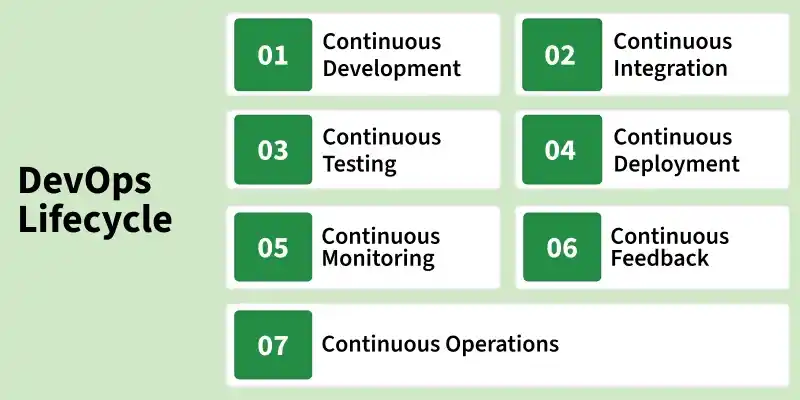
- Continuous Development
- Continuous Integration
- Continuous Testing
- Continuous Deployment/Continuous Delivery
- Continuous Monitoring
- Continuous Feedback
- Continuous Operations
47. What is the difference between Git Merge and Git Rebase?
Git Merge and Git Rebase are both used to integrate changes from one branch into another, but they handle commit history differently.
Git Merge
- Combines two branches by creating a new merge commit.
- Preserves the complete commit history of both branches.
- Does not rewrite existing commit history.
- Makes it easy to see when branches were merged.
- Safer for shared branches where multiple developers are collaborating.
- Easier to understand and use for beginners.
- Best suited for projects where preserving branch history is important.
Git Rebase
- Moves or reapplies commits from one branch onto another, creating a linear history.
- Rewrites commit history by creating new commits with new commit IDs.
- Produces a cleaner and more readable project history.
- Avoids unnecessary merge commits.
- Should be used carefully, especially on shared branches, as it rewrites history.
- Slightly more advanced than Git Merge.
- Best suited for active projects where maintaining a clean, linear commit history is preferred.
48. What's the difference between DataOps and DevOps?
DataOps
- Focuses on managing, processing, and delivering high-quality data efficiently.
- Primarily used in data engineering, analytics, and machine learning workflows.
- Works with databases, data warehouses, data lakes, ETL/ELT pipelines, and data catalogs.
- Emphasizes collaboration between data engineers, data scientists, and business analysts.
- Automates data integration, validation, testing, governance, and pipeline monitoring.
- Ensures reliable, accurate, and timely data for analytics and decision-making.
- Platform-independent and applicable wherever data pipelines are used.
- Goal: Deliver trusted data continuously for business intelligence and AI applications.
DevOps
- Focuses on developing, testing, deploying, and maintaining software applications.
- Primarily used in software development and IT operations.
- Works with source code, CI/CD pipelines, infrastructure, containers, and cloud platforms.
- Encourages collaboration between development, operations, and security teams.
- Automates code building, testing, deployment, infrastructure provisioning, and monitoring.
- Ensures faster, more reliable, and frequent software releases.
- Platform-independent and widely adopted across on-premises and cloud environments.
- Goal: Continuously deliver reliable software with minimal manual intervention.
49. What are the 7Cs of DevOps?
The 7 Cs of DevOps are:
- Continuous Integration: Regularly merging code changes into a shared repository.
- Continuous Testing: Automatically running tests to ensure code quality.
- Continuous Delivery: Ensuring code is always in a deployable state.
- Continuous Deployment: Automatically deploying code to production.
- Continuous Monitoring: Tracking system performance and issues in real-time.
- Continuous Feedback: Gathering and responding to user and system feedback.
- Continuous Operations: Maintaining system stability and uptime through automated processes.
50. Explain the “Shift left to reduce failure” concept in DevOps?
In DevOps, "shift left" means bringing testing and security audits earlier in the development cycle. Problems are recognized and resolved early, which reduces the likelihood of errors and failures in subsequent phases, boosting the efficiency and dependability of the development pipeline.
51. Explain the concept of Infrastructure as Code (IaC) and discuss the benefits and challenges of implementing IaC in a large-scale production environment.
Infrastructure as Code (IaC) is the practice of managing and provisioning computing infrastructure through machine-readable definition files, rather than physical hardware configuration. Its benefits include faster deployment, consistency, scalability, and easier management. Challenges may include initial learning curve, complexity in maintaining code, and ensuring security and compliance across diverse environments.
52. What strategies can be employed to achieve zero-downtime deployments, and how does the Blue/Green Deployment pattern fit into these strategies?
To achieve zero-downtime deployments, strategies like canary releases and rolling updates are used. Blue/Green Deployment is a method where you maintain two identical production environments, with only one active at a time. Updates are deployed to the inactive "blue" environment, then traffic is switched to it, ensuring seamless transitions and mitigating downtime.
53. How do you ensure security and compliance in a CI/CD pipeline, particularly when integrating with multiple cloud providers and third-party services?
To ensure security and compliance in a CI/CD pipeline with multiple cloud providers and third-party services, implement robust authentication and authorization mechanisms. Utilize encryption for data in transit and at rest, and regularly audit access controls. Employ automated security scanning and testing throughout the pipeline to catch vulnerabilities early. Lastly, maintain clear documentation and communication channels to stay abreast of evolving compliance requirements.
54. Discuss the importance of monitoring and logging in a DevOps environment. What tools and practices do you recommend for effective observability and incident management?
Monitoring and logging in DevOps ensure system health and performance. Tools like Prometheus and Grafana offer real-time insights, while ELK stack provides robust logging. Adopting practices like centralized logging and automated alerting enhances observability and incident response efficiency.
55. Explain the concept of immutable infrastructure and how it contrasts with traditional infrastructure management. What are the benefits and potential drawbacks of adopting immutable infrastructure in a DevOps workflow?
Immutable infrastructure is a paradigm where servers and components are never modified after deployment, but instead replaced with updated versions. Unlike traditional methods, where systems are continually altered, immutable infrastructure ensures consistency and reliability.
Benefits include easier deployment, improved scalability, and better fault tolerance. Drawbacks may include initial setup complexity and challenges in managing stateful applications.
56. Explain the concept of serverless computing and its implications for DevOps practices.
Serverless computing is a cloud computing model where the cloud provider dynamically manages the allocation and provisioning of servers. Users only pay for the actual resources consumed by their applications, without worrying about server management.
This model simplifies infrastructure management, allowing developers to focus solely on writing code. For DevOps, serverless reduces the overhead of managing servers, enabling faster development cycles and easier deployment, while emphasizing automation and monitoring for efficient resource utilization.
57. What are Blue-Green and Canary Deployments in DevOps?
In DevOps, both Blue-Green Deployment and Canary Deployment are strategies used to deploy new updates with minimal downtime and risk. They help prevent failures and ensure a smooth transition when releasing new versions of an application.
Blue-Green Deployment: In a Blue-Green Deployment, there are two identical environments:
- Blue (Current/Old version)
- Green (New version with updates)
At any given time, users access the Blue environment (stable version). When a new update is ready, it is deployed to the Green environment. Once tested, traffic is switched from Blue to Green, making the new version live instantly. If issues occur, traffic is quickly switched back to Blue (rollback).
Canary Deployment: In a Canary Deployment, the new version is gradually released to a small percentage of users before rolling out to everyone.
Example:
- 1% of users get the new update while others use the old version.
- If no issues arise, increase rollout to 10%, 50%, and then 100%.
- If problems occur, rollback is done without affecting all users.
58. How do you optimize a Docker container for performance?
To optimize a Docker container for performance, you need to focus on reducing image size, improving resource efficiency, and minimizing startup time. Here are key strategies:
- Use a Lightweight Base Image: Instead of
ubuntuordebian, use smaller images likealpineorscratchto reduce the container size and improve speed. - Minimize Layers in Dockerfile: Combine multiple
RUNcommands using&&to reduce the number of image layers, making the container more efficient. - Use Multi-Stage Builds: Build applications in one stage and copy only the necessary files to the final image, reducing bloat.
- Optimize Dependencies: Remove unnecessary libraries, packages, and tools that are not required for production.
- Enable Docker Caching: Structure the
Dockerfilein a way that rarely changing layers come first, so Docker can reuse cached layers instead of rebuilding everything.
59. How do you handle rollbacks in Kubernetes?
To handle rollbacks in Kubernetes:
- Use
kubectl rollout undo deployment <deployment-name>to revert to the previous version. - Set revision history limit in Deployment (
spec.revisionHistoryLimit). - Use Helm rollback (
helm rollback <release> <revision>).
60. How do you optimize a CI/CD pipeline for faster deployments?
To optimize a CI/CD pipeline for faster deployments, focus on reducing build times, improving test efficiency, and automating deployments while maintaining reliability. Caching dependencies, Docker layers, and artifacts helps avoid unnecessary rebuilds, significantly improving speed. Using parallel execution for running unit, integration, and functional tests ensures that different test stages don’t slow down the pipeline. Implementing incremental builds, where only modified components are recompiled instead of the entire application, also speeds up the process.
Containerization with Docker and orchestration with Kubernetes allows consistent and rapid deployments across environments. Reducing the number of stages in the pipeline and executing non-critical steps asynchronously can further streamline execution. Setting up blue-green or canary deployments minimizes downtime and rollback risks.
61. What are Sidecar Containers in Kubernetes?
In Kubernetes, a Sidecar Container is an additional container that runs alongside the main application container within the same pod. It helps enhance the functionality of the main application by handling logging, monitoring, security, networking, or proxying tasks without modifying the main application itself.
Since all containers in a pod share the same network and storage, the sidecar container can interact with the main application efficiently. The sidecar container can log data, collect metrics, manage security, or act as a service proxy while the primary container focuses on application logic.
62. How are monolithic,SOA and microservices architecture different?
Monolithic Architecture
- Entire application is built as a single, tightly coupled codebase.
- Components communicate through internal function or method calls.
- Typically developed and maintained by a single team.
- Any change requires rebuilding and redeploying the entire application.
- Scaling requires scaling the whole application, even if only one module needs more resources.
- Usually uses a single technology stack and database.
- A failure in one component can impact the entire application.
- Best suited for small applications, prototypes, or projects with simple requirements.
SOA (Service-Oriented Architecture)
- Application is divided into reusable services connected through a central Enterprise Service Bus (ESB).
- Services communicate using standardized protocols such as SOAP and XML.
- Different teams can work on different services, although services often depend on shared infrastructure.
- Supports partial deployments, but managing ESB dependencies can make deployment complex.
- Individual services can be scaled, but shared components may become bottlenecks.
- Allows multiple technologies while following enterprise standards.
- Failures in shared components like the ESB can affect multiple services.
- Best suited for large enterprise systems that require integration across many applications.
Microservices Architecture
- Application is divided into many small, independent services, each responsible for a specific business function.
- Services communicate using lightweight protocols such as REST APIs, gRPC, or messaging systems like RabbitMQ and Kafka.
- Each microservice is developed, tested, and maintained independently, often by separate teams.
- Services can be deployed independently without affecting the rest of the application.
- Individual services can be scaled based on demand.
- Each service can use its own programming language, framework, and database.
- Failures are isolated, allowing the rest of the application to continue functioning.
- Best suited for large-scale, cloud-native applications that require high scalability, flexibility, and rapid releases.
