

Serialization is the process of converting Python objects into JSON-compatible data. Python's built-in json module provides methods to serialize data into a JSON file or a JSON string.
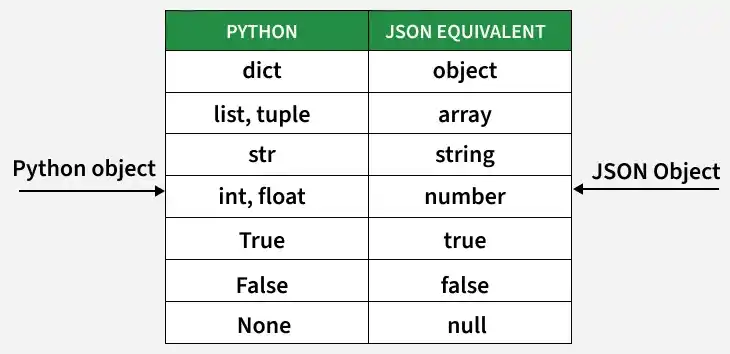
Methods for Serializing JSON Data
Using json.dump()
The json.dump() method serializes a Python object and writes the resulting JSON data to a file. Below is the syntax
json.dump(dict, file_pointer)
Parameters:
- dictionary – name of dictionary which should be converted to JSON object.
- file pointer – pointer of the file opened in write or append mode.
import json
data = {
    "user": {
        "name": "satyam kumar",
        "age": 21,
        "Place": "Patna",
        "Blood group": "O+"
    }
}

with open( "datafile.json" , "w" ) as write:
    json.dump( data , write )
Output:

Explanation:
- json provides functions for working with JSON data.
- data stores the Python dictionary.
- open() creates or opens data.json in write mode.
- json.dump() writes the dictionary to the JSON file.
Using json.dumps()
The json.dumps() method converts a Python object into a JSON-formatted string without writing it to a file. Below is the syntax
json.dumps(dict)
Parameters:
- dictionary – name of dictionary which should be converted to JSON object.
Below is the implementation:
Converting python object into json string.
import json
data = {
    "user": {
        "name": "satyam kumar",
        "age": 21,
        "Place": "Patna",
        "Blood group": "O+"
    }

res = json.dumps(data )
print( res )
Output:

Explanation:
- data stores the Python dictionary.
- json.dumps() converts the dictionary into a JSON-formatted string.
- result stores the converted string.
- print() displays the JSON string.
