

A decimal number uses base 10 and digits from 0 to 9, while a binary number uses base 2 and only the digits 0 and 1. The decimal-to-binary conversion can be performed using repeated division by 2 or the C++ std::bitset class.
- Repeated division by 2 generates the binary digits as remainders.
- std::bitset provides a convenient way to represent an integer in binary form.
Examples
Input: 10
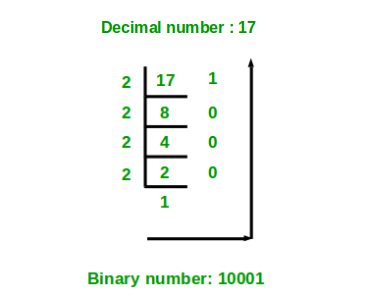
Output: 1010Input: 17
Output: 10001
Approaches to Convert Decimal to Binary
The decimal number can be converted to binary using the following approaches:
1. Using Repeated Division by 2
The idea is to repeatedly divide the decimal number by 2 and store the remainder obtained at each step.
1. Initialize an array to store the binary digits.
2. While the decimal number is greater than 0:
- Find the remainder using n % 2.
- Store the remainder in the array.
- Divide n by 2.
3. Print the stored digits in reverse order.
#include <iostream>
using namespace std;

// Function to convert decimal to binary
void decToBinary(int n)
{
    // Handle the special case of 0
    if (n == 0) {
        cout << 0;
        return;
    }

    int binaryNum[32];
    int i = 0;

    // Store binary digits from right to left
    while (n > 0) {
        binaryNum[i] = n % 2;
        n /= 2;
        i++;
    }

    // Print the digits in reverse order
    for (int j = i - 1; j >= 0; j--)
        cout << binaryNum[j];
}

int main()
{
    int n = 10;

    decToBinary(n);

    return 0;
}
Output
1010
Explanation: For n = 10, repeated division by 2 gives remainders 0, 1, 0, 1.
- Reverse the remainders: 1010
- Hence, 10₁₀ = 1010₂
2. Using std::bitset
The std::bitset class can represent an integer using a fixed number of bits. We can initialize a bitset with the decimal number and print it to obtain its binary representation.
- Include the <bitset> header.
- Create a bitset with the required number of bits.
- Initialize it with the decimal number.
- Print the bitset.
#include <bitset>
#include <iostream>
using namespace std;

int main()
{
    int decimalNumber = 10;

    // Store the number using 8 bits
    bitset<8> binaryRepresentation(decimalNumber);

    cout << "Binary representation: "
         << binaryRepresentation << endl;

    return 0;
}
Output
Binary representation: 00001010
Explanation: bitset<8> represents 10 as 00001010. The leading zeros are added because the bitset has a fixed size of 8 bits.
