

A decimal number uses base 10, while an octal number uses base 8 and digits from 0 to 7.
- Repeated division by 8 can be used to convert a decimal number to octal.
- C++ also provides the oct stream manipulator for direct octal output.
Example:
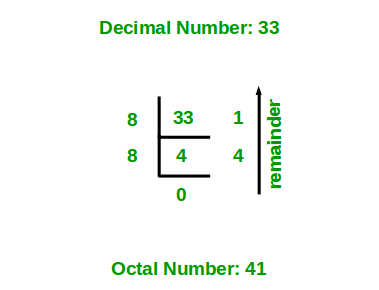
Input: 33
Output: 41Explanation:
33 ÷ 8 = 4 remainder 1
4 ÷ 8 = 0 remainder 4Reading the remainders from bottom to top gives: 41
Approaches to Convert Decimal to Octal
The conversion can be performed using the following two approaches:
1. Using Repeated Division by 8
The standard method for converting a decimal number to octal is to repeatedly divide the number by 8. The remainder obtained in each step represents an octal digit.
Steps:
- Initialize an array or string to store the octal digits.
- Divide the decimal number by 8.
- Store the remainder.
- Divide the quotient by 8 again.
- Repeat until the quotient becomes 0.
- Print the stored remainders in reverse order.
#include <iostream>
using namespace std;

// Function to convert decimal to octal
void decimalToOctal(int n)
{
    if (n == 0)
    {
        cout << 0;
        return;
    }

    int octalNum[100];
    int i = 0;

    while (n > 0)
    {
        // Store the remainder as an octal digit
        octalNum[i++] = n % 8;

        // Reduce the number
        n /= 8;
    }

    // Print digits in reverse order
    for (int j = i - 1; j >= 0; j--)
        cout << octalNum[j];
}

int main()
{
    int n = 33;

    decimalToOctal(n);

    return 0;
}
Output
41
Explanation:
- For n = 33, the program repeatedly divides the number by 8 and stores the remainders.
- 33 ÷ 8 = 4 with remainder 1.
- 4 ÷ 8 = 0 with remainder 4.
- The remainders are obtained from right to left, so they are printed in reverse order.
- Therefore, the octal equivalent of decimal 33 is 41.
2. Using the oct Stream Manipulator
C++ provides the oct stream manipulator to display an integer in octal format. Instead of manually calculating and storing the remainders, we can simply insert oct into the output stream before printing the number.
#include <iostream>
using namespace std;

int main()
{
    int n = 33;

    cout << oct << n;

    return 0;
}
Output
41
Explanation: The oct manipulator changes the number base used by the output stream from decimal to octal. Therefore, when n contains 33, cout << oct << n directly prints its octal representation as 41.
Note: oct only changes how the integer is displayed. It does not modify the value stored in n.
