

Binary numbers use only 0 and 1, while decimal numbers use digits from 0 to 9.
- A binary number can be converted by processing each bit according to its power of 2.
- C++ also provides std::bitset for convenient conversion of fixed-size binary values.
Example:
Input: 1010
Output: 10
The below diagram explains how to convert (1010) to an equivalent decimal value.
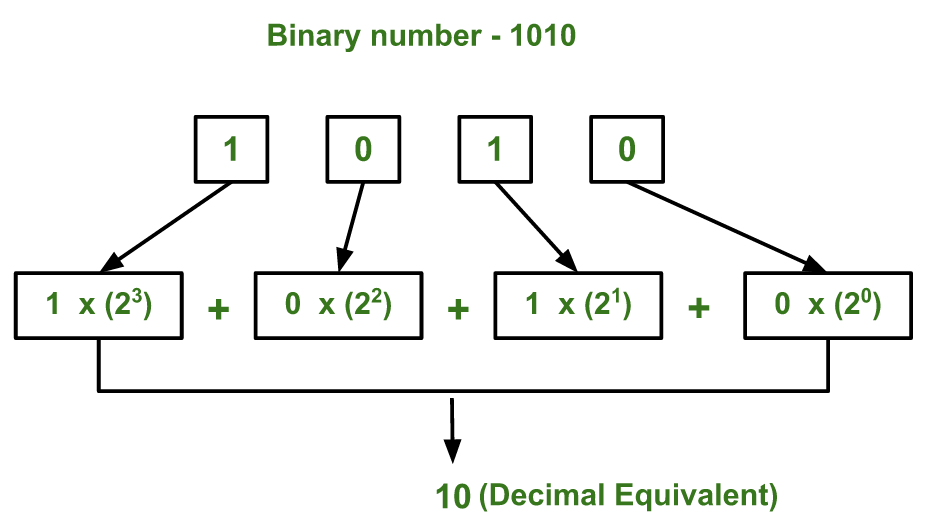
Approaches to Convert Binary to Decimal
The conversion can be performed using the following approaches:
1. Using a Loop
This approach processes the binary digits from right to left. A base variable keeps track of the current power of 2.
Steps:
- Initialize decimalValue to 0 and base to 1.
- Start from the rightmost binary digit.
- If the current digit is 1, add base to decimalValue.
- Double base for the next position.
- Continue until all binary digits are processed.
#include <iostream>
#include <string>
using namespace std;

int main()
{
    string binary = "1010";

    int decimalValue = 0;
    int base = 1;

    for (int i = binary.length() - 1; i >= 0; i--) {
        if (binary[i] == '1')
            decimalValue += base;

        base *= 2;
    }

    cout << decimalValue << endl;

    return 0;
}
Output
10
Explanation: For 1010, the rightmost digit represents 2⁰, followed by 2¹, 2², and 2³. Whenever the current digit is 1, its corresponding power of 2 is added to the result.
2. Handling Large Binary Input Using a String
A binary value may contain more digits than can safely fit in a standard integer type. In such cases, the binary number can be stored as a string and processed character by character.
Steps:
- Store the binary number as a string.
- Start from the rightmost character.
- Add the corresponding power of 2 whenever the character is 1.
- Double the power of 2 after each position.
- Store the resulting decimal value in an integer type large enough for the expected result.
#include <iostream>
#include <string>
using namespace std;

int main()
{
    string binary = "10101001";

    unsigned long long decimalValue = 0;
    unsigned long long base = 1;

    for (int i = binary.length() - 1; i >= 0; i--) {
        if (binary[i] == '1')
            decimalValue += base;

        base *= 2;
    }

    cout << decimalValue << endl;

    return 0;
}
Output
169
Explanation: The string allows the program to process binary values digit by digit without first converting the input into an integer. However, the decimal result still has to fit within the chosen integer type. For binary values whose decimal result exceeds the range of built-in integer types, a larger-number representation is required.
3. Using std::bitset
C++ provides the std::bitset class for representing a fixed number of bits. Its to_ulong() and to_ullong() functions can convert the stored binary value to an unsigned integer.
Steps:
- Include the <bitset> header.
- Create a bitset with the required number of bits.
- Initialize it with the binary string.
- Use to_ulong() or to_ullong() to obtain the decimal value.
#include <bitset>
#include <iostream>
#include <string>
using namespace std;

int main()
{
    string binary = "1101";

    bitset<4> bits(binary);
    unsigned long decimalValue = bits.to_ulong();

    cout << decimalValue << endl;

    return 0;
}
Output
13
Explanation: The bitset<4> object stores 1101 as a 4-bit binary value. The to_ulong() function converts this value to its decimal representation, which is 13.
Note: bitset<N> has a fixed size, so the number of bits must be known when the bitset is declared. Also, to_ulong() or to_ullong() can throw std::overflow_error if the stored value cannot fit in the corresponding return type.
