

An array is a collection of elements of the same data type stored in contiguous memory locations. Besides primitive data types such as int, char, float, and double, C++ arrays can also store user-defined data types such as structures, classes, and objects.
- Arrays provide random access to elements using indices.
- Objects of a class can also be stored in arrays, creating what is known as an array of objects.
Example: Let's consider an example of taking random integers from the user.
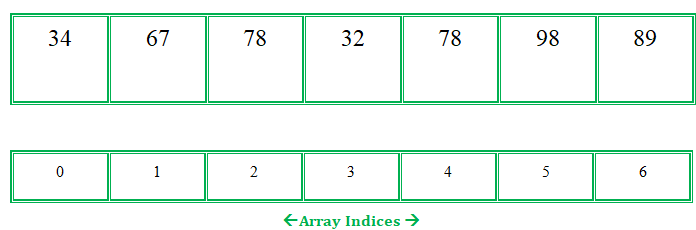
Syntax
ClassName objectName[size];
Here:
ClassNameis the name of the class.objectNameis the array of objects.sizeis the number of objects in the array.
The Array of Objects stores objects. An array of a class type is also known as an array of objects.
Example 1: Storing more than one Employee data. Let's assume there is an array of objects for storing employee data emp[50].
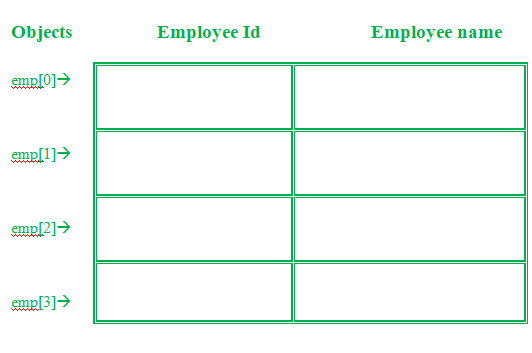
Below is the C++ program for storing data of one Employee:
#include<iostream>
using namespace std;

class Employee
{
  int id;
  char name[30];
  public:
  void getdata();//Declaration of function
  void putdata();//Declaration of function
};
void Employee::getdata(){//Defining of function
  cout<<"Enter Id : ";
  cin>>id;
  cout<<"Enter Name : ";
  cin>>name;
}
void Employee::putdata(){//Defining of function
  cout<<id<<" ";
  cout<<name<<" ";
  cout<<endl;
}
int main(){
  Employee emp; //One member
  emp.getdata();//Accessing the function
  emp.putdata();//Accessing the function
  return 0;

}
An Employee class contains id and name, with two functions: getdata() to take input and putdata() to display it. Since the program handles only one employee, an array of objects can be used to store and manage data for multiple employees.
#include<iostream>
using namespace std;

class Employee
{
  int id;
  char name[30];
  public:

  // Declaration of function
  void getdata();

  // Declaration of function
  void putdata();
};

// Defining the function outside
// the class
void Employee::getdata()
{
  cout << "Enter Id : ";
  cin >> id;
  cout << "Enter Name : ";
  cin >> name;
}

// Defining the function outside
// the class
void Employee::putdata()
{
  cout << id << " ";
  cout << name << " ";
  cout << endl;
}

// Driver code
int main()
{
  // This is an array of objects having
  // maximum limit of 30 Employees
  Employee emp[30];
  int n, i;
  cout << "Enter Number of Employees - ";
  cin >> n;

  // Accessing the function
  for(i = 0; i < n; i++)
    emp[i].getdata();

  cout << "Employee Data - " << endl;

  // Accessing the function
  for(i = 0; i < n; i++)
    emp[i].putdata();
}
Output:
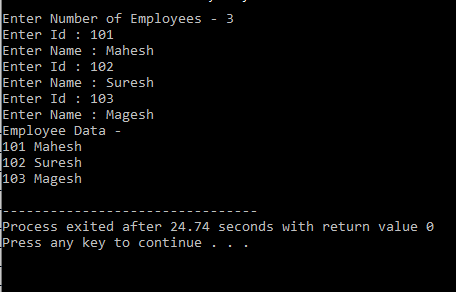
Explanation:In this example, more than one Employee's details with an Employee id and name can be stored. Employee emp[30] - This is an array of objects having a maximum limit of 30 Employees. Two for loops are being used-
- First one to take the input from user by calling emp[i].getdata() function.
- Second one to print the data of Employee by calling the function emp[i].putdata() function.
Example 2:
#include<iostream>
using namespace std;
class item
{
  char name[30];
  int price;
  public:
  void getitem();
  void printitem();
};

// Function to get item details
void item::getitem()
{
  cout << "Item Name = ";
  cin >> name;
  cout << "Price = ";
  cin >> price;
}

// Function to print item
// details
void item ::printitem()
{
  cout << "Name : " << name <<
          "\n";
  cout << "Price : " << price <<
          "\n";
}

const int size = 3;

// Driver code
int main()
{
  item t[size];
  for(int i = 0; i < size; i++)
  {
    cout << "Item  : " <<
            (i + 1) << "\n";
    t[i].getitem();
  }

  for(int i = 0; i < size; i++)
  {
    cout << "Item Details : " <<
             (i + 1) << "\n";
    t[i].printitem();
  }
}
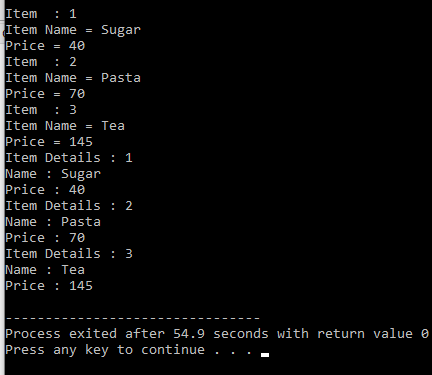
Output:
Advantages of Array of Objects:
- The array of objects represent storing multiple objects in a single name.
- In an array of objects, the data can be accessed randomly by using the index number.
- Reduce the time and memory by storing the data in a single variable.
Disadvantages of Array of Objects:
The main disadvantage of an array of objects is that the constructor runs for every object. If the default constructor is unsuitable, constructor arguments must be specified for each object, unlike an array of object pointers where objects can be created as needed.
#include <iostream>
using namespace std;

class Employee {
    int id;
    char name[30];

public:
    Employee() { cout << "Constructor Run\n"; }
    void getdata(); // Declaration of function
    void putdata(); // Declaration of function
};
void Employee::getdata()
{ // Defining of function
    cout << "Enter Id : ";
    cin >> id;
    cout << "Enter Name : ";
    cin >> name;
}
void Employee::putdata()
{ // Defining of function
    cout << id << " ";
    cout << name << " ";
    cout << endl;
}
int main()
{
    Employee emp[5]; // One member
    return 0;
}
Output
Constructor Run
Constructor Run
Constructor Run
Constructor Run
Constructor Run
