

Socket programming enables two programs to communicate over a network. Here, we create a simple client–server application in C where the server sends a message to the client when a connection is established. The communication uses TCP sockets for reliable data transmission.
Client
In socket programming, the client application initiates communication with the server. It establishes a connection, sends requests, and receives responses that are then presented to the user. Typically:
- A client communicates with one server at a time
- Interacts directly with the user
- Sends requests and receives responses
Client Socket Workflow
1. Create a socket:
- The socket() function creates a communication endpoint.
- Parameters:- Domain: AF_INET (IPv4), Type: SOCK_STREAM (TCP), Protocol: 0 (default)
2. Connect to the server: The connect() function establishes a connection with the server using its IP address and port number.
3.Receive data: The recv() function receives data sent by the server.
4. Display the message: The received data is printed on the client terminal.
Client Code
#include <netinet/in.h> //structure for storing address information
#include <stdio.h>
#include <stdlib.h>
#include <sys/socket.h> //for socket APIs
#include <sys/types.h>

int main(int argc, char const* argv[])
{
    int sockD = socket(AF_INET, SOCK_STREAM, 0);

    struct sockaddr_in servAddr;

    servAddr.sin_family = AF_INET;
    servAddr.sin_port
        = htons(9001); // use some unused port number
    servAddr.sin_addr.s_addr = INADDR_ANY;

    int connectStatus
        = connect(sockD, (struct sockaddr*)&servAddr,
                  sizeof(servAddr));

    if (connectStatus == -1) {
        printf("Error...\n");
    }

    else {
        char strData[255];

        recv(sockD, strData, sizeof(strData), 0);

        printf("Message: %s\n", strData);
    }

    return 0;
}
Server
In a client–server architecture, the server program runs continuously and listens for connection requests from clients. After establishing a connection, it processes the request and returns the required data. Servers typically:
- Run continuously
- Handle requests from multiple clients
- Provide services such as data access or computation
Server Socket Workflow
1. Create a socket: Similar to the client using the socket() function.
2. Bind the socket: The bind() function associates the socket with a specific IP address and port number.
3. Listen for connections: The listen() function puts the server in passive mode, waiting for client connections.
4. Accept a client connection: The accept() function accepts the incoming connection and returns a new socket for communication with the client.
5. Send data to the client: The send() function sends the message to the connected client.
Server Code
#include <netinet/in.h> //structure for storing address information
#include <stdio.h>
#include <stdlib.h>
#include <sys/socket.h> //for socket APIs
#include <sys/types.h>

int main(int argc, char const* argv[])
{

    // create server socket similar to what was done in
    // client program
    int servSockD = socket(AF_INET, SOCK_STREAM, 0);

    // string store data to send to client
    char serMsg[255] = "Message from the server to the "
                       "client \'Hello Client\' ";

    // define server address
    struct sockaddr_in servAddr;

    servAddr.sin_family = AF_INET;
    servAddr.sin_port = htons(9001);
    servAddr.sin_addr.s_addr = INADDR_ANY;

    // bind socket to the specified IP and port
    bind(servSockD, (struct sockaddr*)&servAddr,
         sizeof(servAddr));

    // listen for connections
    listen(servSockD, 1);

    // integer to hold client socket.
    int clientSocket = accept(servSockD, NULL, NULL);

    // send's messages to client socket
    send(clientSocket, serMsg, sizeof(serMsg), 0);

    return 0;
}
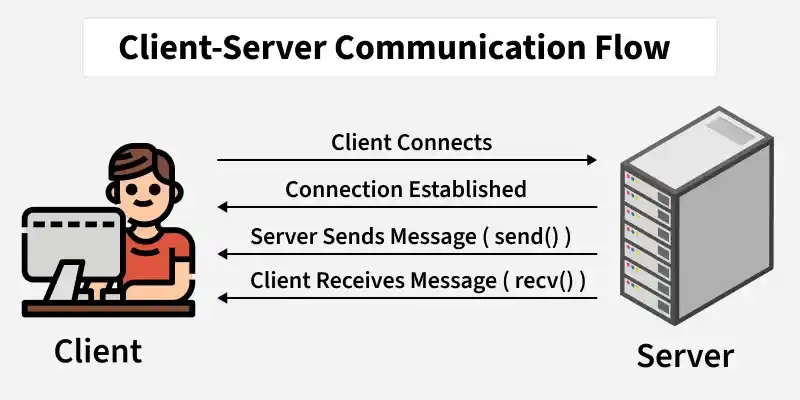
Client–Server Communication Flow
- Server creates a socket
- Binds socket to IP address and port
- Listens for incoming connections
- Client creates a socket and sends connection request
- Server accepts the connection
- Server sends message to client
- Client receives and displays message
Instructions to Execute
1. Open two terminals.
2. Compile the server program:
gcc server.c -o server
3. Compile the client program:
gcc client.c -o client
4. Run the server first:
./server
5. Run the client in another terminal:
./client
6. The client terminal will display:
Message: Message from the server to the client 'Hello Client'

Reference
http://pirate.shu.edu/~wachsmut/Teaching/CSAS2214/Virtual/Lectures/lecture17.html