

OpenVAS is an advanced vulnerability scanner that examines systems for known vulnerabilities using thousands of Network Vulnerability Tests (NVTs). These tests compare services, software versions, operating systems and configurations against an extensive vulnerability database to identify potential security risks.
- Massive NVT Database: Relies on over 100,000 regularly updated Network Vulnerability Tests (NVTs) to check for missing patches, misconfigurations and known CVEs.
- Authenticated and Unauthenticated Scanning: Performs deep, credentialed scans (via SSH or RDP) for internal endpoints, alongside unauthenticated perimeter scans to expose publicly accessible weaknesses.
- Risk Prioritization & Reporting: Produces detailed reports-often integrating CVSS (Common Vulnerability Scoring System) scores-to help security teams prioritize the most critical threats first.
- Compliance Auditing: Evaluates systems against industry-standard security policies and regulations (such as HIPAA and PCI-DSS).
OpenVAS Architecture
OpenVAS consists of several components working together.
- OpenVAS Scanner: Performs vulnerability detection using Network Vulnerability Tests.
- Greenbone Vulnerability Manager (GVMD): Manages scan configurations, targets, users, reports and vulnerability data.
- Greenbone Security Assistant (GSA): Provides a web-based interface for configuring scans and reviewing reports.
- Feed Synchronization: Downloads the latest vulnerability tests and security intelligence from Greenbone feeds.
- PostgreSQL Database: Stores scan configurations, reports, vulnerability information and scan history.
Installing OpenVAS in Kali Linux
Update the package repository:
sudo apt updateInstall OpenVAS:
sudo apt install gvm -y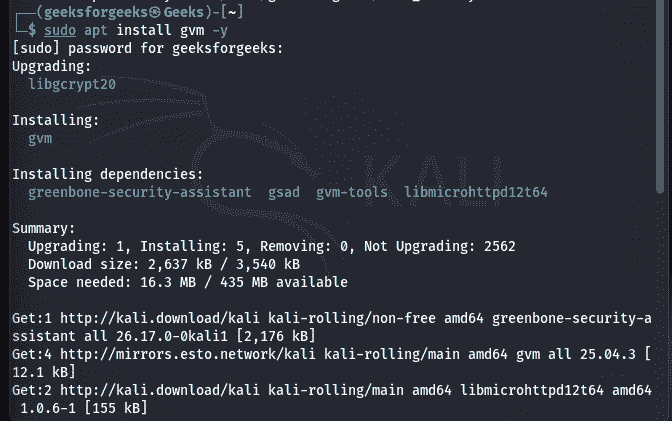
Verify the Installation:
sudo gvm-check-setup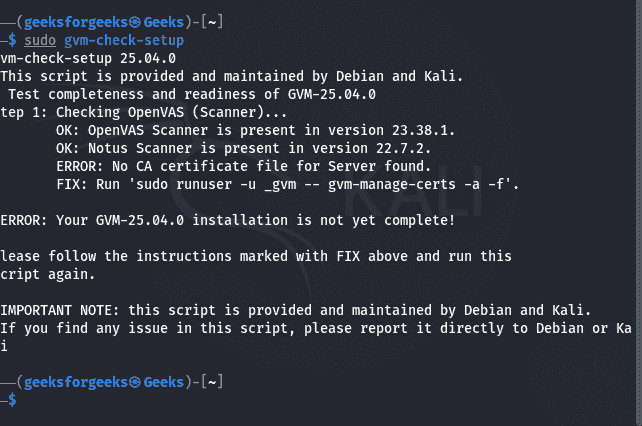
Starting OpenVAS Services:
sudo gvm-start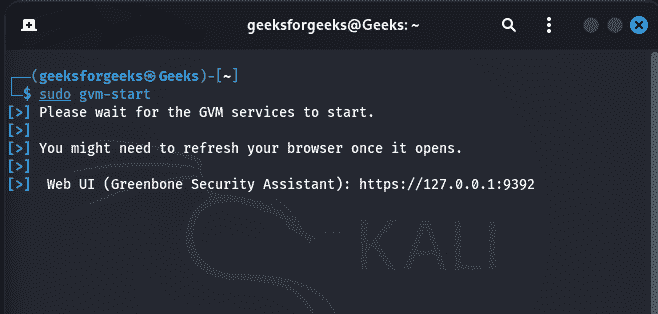
Updating the Vulnerability Database
Keeping vulnerability feeds current is essential for accurate assessments. Update all feeds:
sudo greenbone-feed-syncOr synchronize specific feeds when supported:
sudo greenbone-feed-sync --type GVMD_DATA
sudo greenbone-feed-sync --type SCAP
sudo greenbone-feed-sync --type CERT
Creating a Scan Target
Before scanning, define the target system. Specify: Target name, IP address, Hostname, IP range, Credentials (optional for authenticated scans). Examples:
Single host
192.168.1.20Subnet
192.168.1.0/24Multiple hosts
192.168.1.10,192.168.1.15Running a Vulnerability Scan
- Target Density: Scanning a /24 subnet (254 hosts) takes significantly longer than a single IP.
- Service Variety: Open ports with complex services (like web servers) require more intense probing.
- Network Latency: High ping times or packet drop rates slow down request-response times.
- Configuration Depth: Full and fast scans skip intensive tests, while deep scans check everything.
- Credential Access: Authenticated scans run local commands directly, often finishing faster than external brute-forcing.
Understanding Scan Results
OpenVAS categorizes vulnerabilities according to severity.
- Critical: Immediate remediation is required because exploitation could lead to complete system compromise.
- High: Serious vulnerabilities that may provide unauthorized access or privilege escalation.
- Medium: Moderate security weaknesses requiring remediation to reduce overall risk.
- Low: Minor vulnerabilities with limited security impact.
- Log: Informational findings that may assist administrators but do not represent direct vulnerabilities.
Authenticated vs. Unauthenticated Scans
- Authenticated Scan: Uses valid credentials to inspect the internal configuration of the target system. Benefits include: Detects missing security patches, Finds insecure configurations, Identifies weak permissions.
- Unauthenticated Scan: Performs assessment without credentials. Benefits include: Simulates an external attacker, No credentials required, Suitable for perimeter assessments.
Common Scan Configurations
OpenVAS includes predefined scan profiles.
- Full and Fast: Performs a broad vulnerability assessment while balancing speed and coverage.
- Full and Very Deep: Conducts extensive testing for maximum vulnerability detection.
- Discovery: Identifies active hosts and running services without performing a complete vulnerability assessment.
- Host Discovery: Determines which systems are online before launching detailed scans.
Limitations of OpenVAS
- Time-Consuming Setup: Initial deployment and synchronization of the Greenbone Community Feed (NVTs, CVEs and SCAP data) can take several hours depending on your internet bandwidth.
- High System Resource Demands: Deep vulnerability scans and large target scopes consume significant CPU, RAM and disk space.
- Complex Credential Management: Authenticated (credentialed) scans provide much deeper visibility into installed software and internal configuration errors, but require valid SSH, SMB or SNMP credentials.
- Lengthy Deep Scans: Running "Full and Fast" configurations on thousands of IPs or using aggressive concurrent NVT limits can stretch a scan into a 4 to 8-hour process (or longer).
- False Positives & Manual Verification: OpenVAS reports what it finds based on known signatures, but distinguishing between a true exploitable vulnerability and an isolated false positive requires human judgment.
