

C# is a modern programming language developed by Microsoft and widely used for application development on the .NET platform. Its versatility and strong programming capabilities make it a popular choice for software development and automation.
- Covers core areas such as OOP, collections, exception handling, and LINQ.
- Includes modern concepts such as generics, delegates, and asynchronous programming.
- Provides interview questions for freshers, intermediate-level candidates, and experienced professionals.
C# Interview Questions for Freshers
Beginner-level C# interview questions focus on fundamental programming concepts, syntax, and object-oriented principles. They help assess whether candidates understand core C# features and can explain programming concepts clearly.
1. What is C#?
C# is a modern, object-oriented programming language developed by Microsoft for building applications on the .NET platform. It is widely used to develop web, desktop, cloud, mobile, enterprise, and automation applications.
- Supports object-oriented programming concepts such as encapsulation, inheritance, polymorphism, and abstraction.
- Provides features such as strong typing, exception handling, generics, collections, LINQ, and asynchronous programming.
- Commonly used in .NET development, software testing, and test automation.
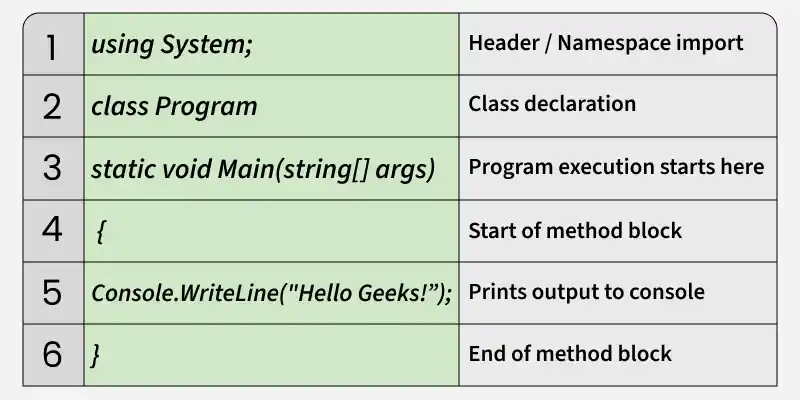
Example of a basic C# program
2. What is .NET Framework (or .NET) and how does it work?
.NET is a software development platform developed by Microsoft for creating and running applications across different platforms. It provides the runtime, libraries, and tools required to develop applications using languages such as C#.
- CLR: Manages code execution, memory, garbage collection, and exceptions.
- BCL: Provides reusable APIs for collections, file handling, networking, and other common operations.
- Language Support: Allows languages such as C#, F#, and Visual Basic to work with the same .NET platform.
How it works:
C# Code -> Compiler -> Intermediate Language (IL) -> .NET Runtime -> Machine Code -> Execution
3. What is the Common Language Runtime (CLR)?
The Common Language Runtime (CLR) is the execution environment of the .NET platform that runs managed code. It handles essential runtime services to provide secure, reliable, and efficient program execution.
- Code Execution: Converts Intermediate Language (IL) into machine code using Just-In-Time (JIT) compilation.
- Memory Management: Automatically manages memory and removes unused objects through garbage collection.
- Exception Handling: Detects and manages runtime errors using .NET's exception-handling mechanism.
4. What is Intermediate Language (IL/MSIL)?
Intermediate Language (IL), also called Microsoft Intermediate Language (MSIL) or Common Intermediate Language (CIL), is CPU-independent code generated by the C# compiler. The .NET runtime later converts IL into native machine code using Just-In-Time (JIT) compilation.
- CPU Independent: IL is not specific to a particular processor architecture.
- JIT Compilation: The CLR converts IL into native machine code at runtime.
- Assembly Storage: IL is stored in .NET assemblies such as .dll and .exe files.
5. What is the difference between Managed and Unmanaged Code?
Managed code runs under the control of the .NET runtime, while unmanaged code is not managed by the CLR and typically interacts directly with the operating system.
- Memory Management: Managed code uses automatic memory management, while unmanaged code requires explicit memory management.
- Runtime Services: Managed code receives services such as garbage collection and exception handling, while unmanaged code does not.
- Examples: C# code running on .NET is generally managed, while native C/C++ code is typically unmanaged.
6. What are Value Types and Reference Types?
Value types store the actual data, while reference types store a reference to an object in memory. This difference affects how data is stored, copied, and passed between variables.
- Value Types: Include int, float, bool, char, struct, and enum.
- Reference Types: Include class, string, array, interface, and delegate.
- Key Difference: Assigning a value type copies the value, while assigning a reference type copies the reference to the same object.
7. What is the difference between var, dynamic and explicit type declaration?
var, dynamic, and explicit type declarations are ways to declare variables in C#. The main difference is when the type is determined and how type checking is performed.
- var: The compiler determines the type at compile time, and the type cannot change afterward.
- dynamic: The type is resolved at runtime, allowing operations that are checked during execution.
- Explicit Type: The programmer specifies the type directly, such as int, string, or bool, providing clear compile-time type checking.
Example:
var age = 25; // Compiler infers int
dynamic value = 25; // Type resolved at runtime
string name = "John"; // Explicitly declared as string
8. What is Boxing and Unboxing?
Boxing is the process of converting a value type into a reference type, typically object. Unboxing extracts the value type from the boxed object.
- Boxing: Converts a value type into an object and stores it on the managed heap.
- Unboxing: Explicitly converts the boxed object back to its original value type.
- Performance: Frequent boxing and unboxing can increase memory usage and reduce performance.
Example:
int number = 10;
object obj = number; // Boxing
int value = (int)obj; // Unboxing
9. What is the difference between const and readonly?
const and readonly define fields whose values cannot be changed after initialization, but they differ in when the value is assigned.
- const: Assigned at declaration and evaluated at compile time.
- readonly: Assigned at declaration or in a constructor and cannot be reassigned afterward.
- Usage: Use const for fixed values and readonly for values that may vary between objects.
10. What are the different parameter types in C#.?
C# provides different parameter-passing mechanisms that determine how arguments are passed to methods and whether the method can modify the original variable.
- Value: Passes a copy of the argument; changes inside the method do not affect the original variable.
- ref: Passes the argument by reference; the variable must be initialized before the method call.
- out: Passes the argument by reference; initialization before the call is not required, but the method must assign a value before returning.
- in: Passes the argument by readonly reference; the method cannot modify the argument.
Example: The example below demonstrates how value, ref, out, and in parameters behave when passed to methods.
using System;

class Program
{
    static void ValueParameter(int number)
    {
        number = 20;
    }

    static void RefParameter(ref int number)
    {
        number = 20;
    }

    static void OutParameter(out int number)
    {
        number = 20;
    }

    static void InParameter(in int number)
    {
        Console.WriteLine(number);
    }

    static void Main()
    {
        int a = 10;
        ValueParameter(a);
        Console.WriteLine(a); // 10

        int b = 10;
        RefParameter(ref b);
        Console.WriteLine(b); // 20

        int c;
        OutParameter(out c);
        Console.WriteLine(c); // 20

        int d = 10;
        InParameter(in d); // 10
    }
}
Output
10
20
20
10
Explanation:
- A value parameter passes a copy, so changes do not affect the original variable.
- ref allows the method to modify an already initialized variable.
- out allows the method to assign a value to an uninitialized variable.
- in passes a variable by readonly reference, preventing modification inside the method.
11. What is method overloading?
Method overloading is a feature that allows multiple methods to have the same name but different parameter lists. It is an example of compile-time polymorphism.
- Different Parameters: Methods can differ in the number, type, or order of parameters.
- Same Name: Overloaded methods use the same name for related operations.
- Compile Time: The compiler determines which method to call based on the supplied arguments.
- Return Type: Methods cannot be overloaded based only on their return type.
Example: The example below demonstrates method overloading using different numbers of parameters.
using System;

class Calculator
{
    public int Add(int a, int b)
    {
        return a + b;
    }

    public int Add(int a, int b, int c)
    {
        return a + b + c;
    }

    static void Main()
    {
        Calculator calculator = new Calculator();

        Console.WriteLine(calculator.Add(10, 20));
        Console.WriteLine(calculator.Add(10, 20, 30));
    }
}
Output
30
60
Explanation:
- Both methods have the same name, Add().
- The first accepts two int parameters.
- The second accepts three int parameters.
- The compiler selects the appropriate method based on the arguments passed.
12. What is recursion and when should it be used?
Recursion is a technique where a method calls itself to solve a problem by breaking it into smaller subproblems. It should be used when the problem naturally has a recursive structure and a clear termination condition.
- Base Case: Stops the recursion and prevents infinite calls.
- Recursive Case: Calls the same method with a smaller or simpler input.
- Use Cases: Commonly used for tree traversal, directory structures, divide-and-conquer algorithms, and mathematical problems.
- Consideration: Excessive recursion can cause a StackOverflowException due to limited call-stack space.
Example: The example below calculates the factorial of a number using recursion
using System;

class Program
{
    static int Factorial(int number)
    {
        if (number <= 1)
            return 1;

        return number * Factorial(number - 1);
    }

    static void Main()
    {
        Console.WriteLine(Factorial(5));
    }
}
Output
120
Explanation:
- Factorial() calls itself with number - 1.
- number <= 1 is the base case.
- Each call reduces the input until the base case is reached.
- The results are then returned through the previous recursive calls.
13. What is the difference between for and foreach loops?
Both for and foreach loops are used to iterate over collections or repeated operations, but they differ in how elements are accessed and controlled.
- for: Uses an index or counter, giving direct control over the starting point, condition, and iteration step.
- foreach: Iterates through each element of a collection without requiring an index.
- Usage: Use for when you need index-based access or custom iteration; use foreach when you simply need to process each element.
Example: The example below demonstrates both loops for iterating through an array.
using System;

class Program
{
    static void Main()
    {
        int[] numbers = { 10, 20, 30 };

        for (int i = 0; i < numbers.Length; i++)
        {
            Console.WriteLine(numbers[i]);
        }

        foreach (int number in numbers)
        {
            Console.WriteLine(number);
        }
    }
}
Output
10
20
30
10
20
30
Explanation:
- The
forloop uses an index to access and control each iteration. - The
foreachloop directly accesses each element in the collection. - Use
forwhen index control is needed andforeachfor simple collection iteration.
14. What is the difference between break, continue and return?
break, continue, and return are control-flow statements used to change the normal execution of a program. Each one has a different effect on loops and methods.
- break: Immediately exits the current loop or switch statement.
- continue: Skips the remaining code in the current loop iteration and proceeds to the next iteration.
- return: Exits the current method and can optionally return a value to the caller.
Example: The example below demonstrates how each statement affects program execution.
using System;

class Program
{
    static int Test()
    {
        for (int i = 1; i <= 5; i++)
        {
            if (i == 2)
                continue;

            if (i == 4)
                break;

            Console.WriteLine(i);
        }

        return 100;
    }

    static void Main()
    {
        int result = Test();
        Console.WriteLine(result);
    }
}
Output
1
3
100
Explanation:
- continue skips 2 and moves to the next iteration.
- break stops the loop when i reaches 4.
- return 100 exits Test() and sends 100 back to Main().
15. What is the difference between Arrays and Lists?
Arrays and List<T> are collection types used to store multiple values of the same type. The main difference is that arrays have a fixed size, while lists can grow or shrink dynamically.
- Array: Has a fixed length that is defined when the array is created.
- List: Provides a dynamic size and methods such as Add(), Remove(), and Contains().
- Usage: Use arrays when the number of elements is known and fixed; use lists when the collection size may change.
Example: The example below demonstrates the fixed size of an array and the dynamic size of a List<T>.
using System;
using System.Collections.Generic;

class Program
{
    static void Main()
    {
        // Array
        int[] numbers = { 10, 20, 30 };

        // List
        List<int> values = new List<int> { 10, 20, 30 };
        values.Add(40);

        Console.WriteLine(numbers.Length); // 3
        Console.WriteLine(values.Count);   // 4
    }
}
Output
3
4
Explanation:
- numbers.Length returns the fixed number of elements in the array.
- values.Add(40) increases the number of elements in the list.
- Length is used for arrays, while Count is used for List<T>.
16. What is the difference between string and StringBuilder?
string and StringBuilder are used to work with text in C#. The key difference is that string is immutable, whereas StringBuilder is mutable.
- string: Any modification creates a new string object.
- StringBuilder: Modifies its existing character buffer, making it more suitable for repeated changes.
- Usage: Use string for simple or infrequent changes and StringBuilder for frequent string modifications.
Example: string creates a new object when modified, while StringBuilder efficiently appends or modifies text.
using System;
using System.Text;

class Program
{
    static void Main()
    {
        string text = "Hello";
        text += " World";

        StringBuilder builder = new StringBuilder("Hello");
        builder.Append(" World");

        Console.WriteLine(text);
        Console.WriteLine(builder);
    }
}
Output
Hello World
Hello World
Explanation:
stringis immutable, so modifying it creates a new string object.StringBuilderis mutable, so it can modify text without creating a new object for every change.StringBuilderis generally more efficient when performing frequent string modifications.
17. What is a class and what is an object?
A class is a blueprint that defines the data and behavior of objects. An object is a runtime instance of a class that contains its own state and can use the members defined by the class.
- Class: Defines members such as fields, properties, and methods.
- Object: Is an instance of a class created using the new keyword.
- Relationship: Multiple objects can be created from the same class, each with its own data.
18. What are constructors and why are they used?
A constructor is a special member of a class that is automatically called when an object is created. It is mainly used to initialize the object's fields or properties with required values.
- Initialization: Sets the initial state of an object.
- Automatic Invocation: Runs automatically when an object is created using new.
- Types: Common types include parameterless, parameterized, and static constructors.
19. What is constructor overloading?
Constructor overloading allows a class to have multiple constructors with different parameter lists. It provides different ways to initialize objects depending on the values available during object creation.
- Multiple Constructors: A class can define multiple constructors.
- Different Signatures: Constructors must differ in the number, type, or order of parameters.
- Compile-Time Selection: The compiler selects the appropriate constructor based on the arguments supplied.
20. What are properties in C#?
Properties in C# provide a controlled way to access and modify the data of a class. They use get and set accessors to read and assign values while supporting encapsulation.
- get: Retrieves the property's value.
- set: Assigns a value to the property.
- Encapsulation: Allows controlled access to internal class data without exposing fields directly.
Example: Properties allow reading and updating an object's data using get and set accessors.
using System;

class Employee
{
    public string Name { get; set; }
    public int Age { get; set; }
}

class Program
{
    static void Main()
    {
        Employee emp = new Employee();

        emp.Name = "Robin";
        emp.Age = 25;

        Console.WriteLine(emp.Name);
        Console.WriteLine(emp.Age);
    }
}
Output
Robin
25
Explanation:
- get is used to read the value of a property.
- set is used to assign or update the value of a property.
- Properties provide controlled access to an object's data.
C# Interview Questions Intermediate-Level
Intermediate-level C# interview questions assess candidates’ practical understanding of C# concepts and their ability to write efficient, maintainable, and reliable code.
21. What are access modifiers in C#?
Access modifiers in C# define the accessibility of classes and their members. They control where a type or member can be accessed from within an application.
- public: Accessible from any code that can access the containing type.
- private: Accessible only within the containing type.
- protected: Accessible within the containing type and its derived classes.
- internal: Accessible within the same assembly.
- protected internal: Accessible from the same assembly or from derived classes in other assemblies.
- private protected: Accessible within the containing type and derived classes in the same assembly.
using System;

class Employee
{
    public string Name = "John";
    private int Salary = 50000;
    protected string Department = "QA";
    internal string Company = "ABC";

    public void Display()
    {
        Console.WriteLine(Name);
        Console.WriteLine(Salary);
        Console.WriteLine(Department);
        Console.WriteLine(Company);
    }
}

class Program
{
    static void Main()
    {
        Employee emp = new Employee();

        Console.WriteLine(emp.Name);    // Accessible
        // Console.WriteLine(emp.Salary);    // Not accessible
        // Console.WriteLine(emp.Department); // Not accessible
        Console.WriteLine(emp.Company); // Accessible
    }
}
Output
John
ABC
Explanation:
- public members can be accessed from anywhere the containing type is accessible.
- private members can be accessed only within the same class.
- protected members can be accessed within the class and its derived classes.
- internal members can be accessed anywhere within the same assembly.
22. Explain the four pillars of Object-Oriented Programming (OOP).
The four pillars of OOP are Encapsulation, Abstraction, Inheritance, and Polymorphism. Together, they help create code that is modular, reusable, maintainable, and easier to extend.
- Encapsulation: Bundles data and the methods that operate on it within a class while restricting direct access to internal state. In C#, this is commonly achieved using access modifiers and properties.
- Abstraction: Hides implementation details and exposes only the essential functionality. In C#, it is commonly implemented using interfaces and abstract classes.
- Inheritance: Allows a derived class to reuse and extend the members of a base class, promoting code reuse and establishing an is-a relationship.
- Polymorphism: Allows the same operation or interface to produce different behavior depending on the object. In C#, it is commonly achieved through method overloading, method overriding, and interfaces.
23. What is the difference between an Abstract Class and an Interface?
An abstract class provides a common base with shared state and implementation, while an interface defines a contract that implementing types must follow. The choice depends on whether you need shared behavior or a capability/contract.
- Abstract Class: Can contain fields, constructors, properties, concrete methods, and abstract methods. A class can inherit from only one base class.
- Interface: Defines a contract through members such as methods, properties, and events. A class can implement multiple interfaces.
- Usage: Use an abstract class when related classes share common state or implementation; use an interface when different classes need to follow the same contract.
24. When should you use an Interface instead of an Abstract Class?
Use an interface when you need to define a contract or capability that can be implemented by different or unrelated classes. Use an abstract class when related classes need to share common state, behavior, or implementation.
Use an Interface when:
- We need to define a contract without requiring a shared class hierarchy.
- Multiple unrelated classes should provide the same capability.
- A class needs to implement multiple contracts.
- You want loose coupling and easier dependency substitution.
Use an Abstract Class when:
- Related classes share common state or implementation.
- You need constructors, fields, or protected members.
- You want to provide common functionality for derived classes
25. What is the difference between Method Overloading and Method Overriding?
Method overloading and method overriding are forms of polymorphism in C#. Overloading provides multiple methods with the same name but different parameters, while overriding allows a derived class to provide a new implementation of a base-class method.
- Method Overloading: Uses the same method name with different parameter lists and is resolved at compile time.
- Method Overriding: Uses the same method signature in a derived class and requires virtual/override (or related overriding mechanisms); it is resolved at runtime.
- Inheritance: Overloading does not require inheritance, while overriding requires a base–derived class relationship.
Example: The Add() methods demonstrate overloading, while Dog overriding the Sound() method demonstrates overriding.
using System;

class Calculator
{
    public int Add(int a, int b)
    {
        return a + b;
    }

    public int Add(int a, int b, int c)
    {
        return a + b + c;
    }
}

class Animal
{
    public virtual void Sound()
    {
        Console.WriteLine("Animal makes a sound.");
    }
}

class Dog : Animal
{
    public override void Sound()
    {
        Console.WriteLine("Dog barks.");
    }
}

class Program
{
    static void Main()
    {
        // Method Overloading
        Calculator calculator = new Calculator();
        Console.WriteLine(calculator.Add(10, 20));
        Console.WriteLine(calculator.Add(10, 20, 30));

        // Method Overriding
        Animal animal = new Dog();
        animal.Sound();
    }
}
Output
30
60
Dog barks.
Explanation:
- Add() is overloaded because it has different parameter lists.
- Sound() is overridden because Dog provides its own implementation of the base-class method.
- calculator.Add() is selected at compile time, while animal.Sound() invokes the Dog implementation at runtime.
26. What is the this keyword?
The this keyword refers to the current instance of a class. It is mainly used to access instance members and distinguish them from local variables or parameters with the same name.
- Current Instance: Refers to the object on which the method or constructor is operating.
- Name Conflict: Distinguishes an instance field or property from a parameter with the same name.
- Member Access: Can be used to explicitly access instance members of the current object.
Example: The example below uses base to call the base class constructor and method.
using System;

class Employee
{
    private string name;

    public Employee(string name)
    {
        this.name = name;
    }

    public void Display()
    {
        Console.WriteLine(this.name);
    }
}

class Program
{
    static void Main()
    {
        Employee employee = new Employee("Emma");
        employee.Display();
    }
}
Output
Emma
Explanation:
- name refers to the constructor parameter.
- this.name refers to the instance field of the current Employee object.
- this.name = name assigns the parameter value to the object's field.
27. What is the base keyword?
The base keyword is used to access members of the immediate base class from a derived class.
- Accesses a base class method, property, or field.
- Calls a base class constructor.
- Useful when a derived class overrides a base class member.
- Helps distinguish base-class members from derived-class members with the same name.
Example: A derived class can use base to call the constructor or access members of its immediate base class.
using System;

class Animal
{
    public Animal(string name)
    {
        Console.WriteLine("Animal: " + name);
    }

    public virtual void Sound()
    {
        Console.WriteLine("Animal makes a sound.");
    }
}

class Dog : Animal
{
    public Dog(string name) : base(name)
    {
    }

    public override void Sound()
    {
        base.Sound();
        Console.WriteLine("Dog barks.");
    }
}

class Program
{
    static void Main()
    {
        Dog dog = new Dog("Buddy");
        dog.Sound();
    }
}
Output
Animal: Buddy
Animal makes a sound.
Dog barks.
Explanation:
- base(name) calls the constructor of the Animal base class.
- base.Sound() calls the Sound() method defined in the base class.
- base refers to the immediate parent class of the current derived class
28. What is a static class, and when should it be used?
A static class is a class that cannot be instantiated and can contain only static members. It is useful for grouping functionality that does not depend on the state of a specific object.
- No Instance: Cannot be instantiated using the new keyword.
- Static Members: Its methods, properties, fields, and events must be static.
- Usage: Best suited for stateless utility or helper operations.
Example: The example below demonstrates a static class used for a calculation.
using System;

static class Calculator
{
    public static int Add(int a, int b)
    {
        return a + b;
    }
}

class Program
{
    static void Main()
    {
        int result = Calculator.Add(10, 20);
        Console.WriteLine(result);
    }
}
Output
30
Explanation:
- Calculator cannot be instantiated because it is a static class.
- Add() is called directly using Calculator.Add().
- The method does not depend on object-specific state.
- Static classes are appropriate when object creation and instance state are unnecessary.
29. What is a static constructor?
A static constructor is a special constructor used to initialize static members or perform one-time type-level initialization. It is called automatically by the runtime before the type is first used.
- Has no parameters and cannot have an access modifier.
- Executes automatically and cannot be called explicitly.
- Runs only once for the type.
- Commonly used for initializing static fields or performing type-level setup.
Example: The example below demonstrates a static constructor initializing a static field.
using System;

class Configuration
{
    public static string Environment;

    static Configuration()
    {
        Environment = "Production";
        Console.WriteLine("Static constructor executed.");
    }

    public static void Display()
    {
        Console.WriteLine("Environment: " + Environment);
    }
}

class Program
{
    static void Main()
    {
        Configuration.Display();
        Configuration.Display();
    }
}
Output
Static constructor executed.
Environment: Production
Environment: Production
Explanation:
- The first call to Display() triggers the static constructor.
- The constructor initializes Environment before Display() executes.
- The second call uses the already-initialized type, so the constructor does not run again.
30. What is a destructor (finalizer) and how does it work?
A destructor, more accurately called a finalizer in C#, is a special method that the Garbage Collector may execute before reclaiming an object's memory.
- Declared using ~ClassName().
- Cannot have parameters or an access modifier.
- Cannot be called directly.
- Execution timing is determined by the Garbage Collector.
- A class can have only one finalizer.
Example: The example below demonstrates a finalizer being invoked during garbage collection.
using System;

class ResourceHandler
{
    ~ResourceHandler()
    {
        Console.WriteLine("Finalizer executed.");
    }
}

class Program
{
    static void Main()
    {
        CreateObject();

        GC.Collect();
        GC.WaitForPendingFinalizers();

        Console.WriteLine("Program completed.");
    }

    static void CreateObject()
    {
        ResourceHandler resource = new ResourceHandler();
    }
}
Output
Finalizer executed.
Program completed.
Explanation:
- CreateObject() creates a ResourceHandler object.
- After the method ends, the object has no remaining references.
- GC.Collect() requests garbage collection.
- GC.WaitForPendingFinalizers() waits for pending finalizers to complete.
- The finalizer may then execute before the object's memory is reclaimed.
C# Interview Questions for Experienced
Experience-based C# interview questions assess a candidate’s practical programming experience and problem-solving skills in designing, optimizing, debugging, and maintaining real-world C# applications.
31. What are Generics and why are they useful?
Generics allow you to define classes, methods, interfaces, and collections with a type parameter, enabling the same code to work with different data types while maintaining type safety.
Why are Generics useful?
- Type Safety: Detects incompatible types at compile time.
- Code Reusability: Allows one implementation to work with multiple types.
- Performance: Reduces boxing and unboxing for value types.
- No Unnecessary Casting: Values are retrieved using their specified type.
- Maintainability: Produces cleaner and more reusable code.
Example: The example below demonstrates a generic class working with different data types.
using System;

public class Repository<T>
{
    public T GetItem(T item)
    {
        return item;
    }
}

public class Program
{
    public static void Main()
    {
        Repository<int> intRepository = new Repository<int>();
        int result = intRepository.GetItem(100);

        Repository<string> stringRepository = new Repository<string>();
        string name = stringRepository.GetItem("Emma");

        Console.WriteLine(result);
        Console.WriteLine(name);
    }
}
Output
100
Emma
Explanation:
- Repository<T> uses T as a type parameter.
- Repository<int> creates a version for int.
- Repository<string> creates a version for string.
- The same GetItem() implementation works with both types.
- Generics provide type safety and code reuse without unnecessary casting.
32. What is the difference between List<T> and ArrayList?
List<T> and ArrayList are collection types in C#. The main difference is that List<T> is generic and type-safe, while ArrayList is non-generic and stores elements as object
| Feature | List<T> | ArrayList |
|---|---|---|
| Type | Generic collection | Non-generic collection |
| Type Safety | Type-safe | Not type-safe |
| Data Types | Stores a specific type | Can store different types |
| Performance | Generally better | Can be slower due to boxing/unboxing |
| Type Casting | Usually not required | Required when retrieving values |
| Recommended | Yes, for modern C# | Mostly for legacy code |
33. What is the difference between Dictionary<TKey, TValue> and Hashtable?
Dictionary<TKey, TValue> and Hashtable store data as key-value pairs. The main difference is that Dictionary<TKey, TValue> is generic and type-safe, while Hashtable is non-generic.
| Feature | Dictionary<TKey, TValue> | Hashtable |
|---|---|---|
| Type | Generic | Non-generic |
| Type Safety | Compile-time type safety | No compile-time type safety |
| Key/Value Types | Explicitly specified | Stored as object |
| Casting | Usually not required | May be required |
| Performance | Generally better for value types | Can have boxing/unboxing overhead |
| Modern Usage | Preferred | Mainly used for legacy code |
Example: The example below demonstrates storing key-value pairs using both collections.
using System;
using System.Collections;
using System.Collections.Generic;

public class Program
{
    public static void Main()
    {
        Dictionary<int, string> employees = new Dictionary<int, string>();
        employees.Add(101, "Emma");
        employees.Add(102, "Robin");

        Hashtable employeeTable = new Hashtable();
        employeeTable.Add(101, "Emma");
        employeeTable.Add(102, "Robin");

        Console.WriteLine(employees[101]);
        Console.WriteLine(employeeTable[101]);
    }
}
Output
Emma
Emma
Explanation:
- Dictionary<int, string> explicitly defines int keys and string values.
- Hashtable stores keys and values as object.
- Dictionary<TKey, TValue> provides compile-time type checking.
- Hashtable may require casting when retrieving values.
- Dictionary<TKey, TValue> is generally preferred in modern C# applications.
34. When would you use HashSet<T>?
HashSet<T> is a generic collection used to store unique elements. It is useful when you need to prevent duplicate values and perform fast search, insertion, and deletion operations.
When would you use HashSet<T>?
- Automatically prevents duplicate elements.
- Provides generally O(1) average-time lookup, insertion, and removal.
- Supports set operations such as UnionWith(), IntersectWith(), and ExceptWith().
- Does not provide index-based access.
- Useful for removing duplicates and checking membership.
Example: The example below demonstrates how HashSet<T> prevents duplicate values.
using System;
using System.Collections.Generic;

public class Program
{
    public static void Main()
    {
        HashSet<int> numbers = new HashSet<int>();

        numbers.Add(10);
        numbers.Add(20);
        numbers.Add(10);

        Console.WriteLine(numbers.Count);
        Console.WriteLine(numbers.Contains(20));
    }
}
Output
2
True
Explanation:
- The second 10 is ignored because it already exists.
- Count returns 2 because only unique values are stored.
- Contains() efficiently checks whether a value exists.
35. What are Stack and Queue collections?
Stack<T> and Queue<T> are generic collection classes used to store and manage elements based on different ordering principles.
- Stack<T>: Follows LIFO (Last In, First Out). The last element added is the first one removed.
- Queue<T>: Follows FIFO (First In, First Out). The first element added is the first one removed.
- Stack<T> uses Push() to add and Pop() to remove elements.
- Queue<T> uses Enqueue() to add and Dequeue() to remove elements.
- Both provide Peek() to view the next element without removing it.
Example: The example below demonstrates the removal order of both collections.
using System;
using System.Collections.Generic;

public class Program
{
    public static void Main()
    {
        Stack<int> stack = new Stack<int>();
        stack.Push(10);
        stack.Push(20);
        stack.Push(30);

        Console.WriteLine(stack.Pop());

        Queue<int> queue = new Queue<int>();
        queue.Enqueue(10);
        queue.Enqueue(20);
        queue.Enqueue(30);

        Console.WriteLine(queue.Dequeue());
    }
}
Output
30
10
Explanation:
- Stack<T> removes 30 first because it was added last.
- Queue<T> removes 10 first because it was added first.
- Use Stack<T> for LIFO scenarios such as undo operations and backtracking.
- Use Queue<T> for FIFO scenarios such as task processing and buffering.
36. What is Exception Handling in C#?
Exception handling is a mechanism used to detect and handle runtime errors without terminating the program unexpectedly. It is implemented using try, catch, and optionally finally blocks.
Example: The example below handles an exception caused by division by zero.
using System;

public class Program
{
    public static void Main()
    {
        try
        {
            int number = 10;
            int result = number / 0;
            Console.WriteLine(result);
        }
        catch (DivideByZeroException)
        {
            Console.WriteLine("Cannot divide by zero.");
        }
        finally
        {
            Console.WriteLine("Execution completed.");
        }
    }
}
Output
Cannot divide by zero.
Execution completed.
Explanation:
- The code inside the try block attempts to perform the division.
- Dividing by zero throws a DivideByZeroException.
- The catch block handles the exception.
- The finally block executes regardless of whether an exception occurs.
- Exception handling helps prevent unexpected application termination and allows errors to be handled appropriately.
- Exception handling should be used for exceptional conditions, not as a replacement for normal program flow.
37. What is the purpose of the finally block?
The finally block is used to execute cleanup code that should normally run regardless of whether an exception occurs. It is commonly used to release resources such as files, database connections, or network connections.
- Executes after the try block and, if present, the catch block.
- Normally executes whether an exception occurs or not.
- Used for resource cleanup and releasing resources.
- Helps ensure important cleanup operations are performed.
- It can be used with try-catch or with try alone.
- It generally executes even when the try or catch block contains a return statement.
Example: The example below shows that the finally block executes even when no exception occurs.
using System;

public class Program
{
    public static void Main()
    {
        try
        {
            int result = 10 / 2;
            Console.WriteLine(result);
        }
        catch (DivideByZeroException)
        {
            Console.WriteLine("Cannot divide by zero.");
        }
        finally
        {
            Console.WriteLine("Cleanup completed.");
        }
    }
}
Output
5
Cleanup completed.
Explanation:
- The
tryblock performs the division. - Since no exception occurs, the
catchblock is skipped. - The
finallyblock still executes. - Therefore,
finallyis useful when cleanup or other necessary code should run regardless of whether an exception occurs.
38. How do you create and use a Custom Exception?
A custom exception is a user-defined exception class created by inheriting from the built-in Exception class. It is useful when you need to represent application-specific error conditions that are not adequately described by standard .NET exceptions.
Steps to create and use a custom exception:
- Create a class that inherits from Exception.
- Provide a constructor that accepts an error message.
- Use the throw keyword to raise the custom exception.
- Use a try-catch block to handle the custom exception.
Example: The example below creates and handles a custom exception when an age is below the required minimum.
using System;

public class InvalidAgeException : Exception
{
    public InvalidAgeException(string message) : base(message)
    {
    }
}

public class Program
{
    public static void Main()
    {
        try
        {
            int age = 16;

            if (age < 18)
            {
                throw new InvalidAgeException("Age must be 18 or above.");
            }

            Console.WriteLine("Eligible to vote.");
        }
        catch (InvalidAgeException ex)
        {
            Console.WriteLine(ex.Message);
        }
    }
}
Output
Age must be 18 or above.
Explanation:
- InvalidAgeException is a custom exception that inherits from Exception.
- The constructor passes the custom error message to the base Exception class.
- throw is used to raise the custom exception when age is below 18.
- The catch block catches specifically InvalidAgeException.
- Custom exceptions make application-specific errors more meaningful and easier to handle.
39. What is LINQ?
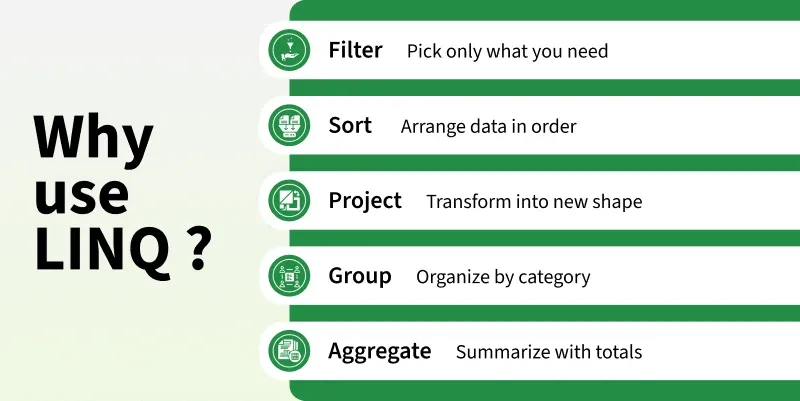
LINQ (Language Integrated Query) is feature that provides a consistent way to query and manipulate data from different data sources such as collections, databases, XML, and other objects using C# syntax.
- LINQ stands for Language Integrated Query.
- Provides a consistent syntax for querying different data sources.
- Supports operations such as filtering, sorting, grouping, joining, and projection.
- Can be written using query syntax or method syntax.
- Provides compile-time type checking and IntelliSense support.
- Commonly used with collections such as List<T>, arrays, and other IEnumerable<T> sources.
Example: The example below uses LINQ to find even numbers from a list.
using System;
using System.Collections.Generic;
using System.Linq;

public class Program
{
    public static void Main()
    {
        List<int> numbers = new List<int> { 1, 2, 3, 4, 5, 6 };

        var evenNumbers = numbers.Where(n => n % 2 == 0);

        foreach (var number in evenNumbers)
        {
            Console.WriteLine(number);
        }
    }
}
Output
2
4
6
Explanation:
- numbers contains a collection of integers.
- Where() is a LINQ method used to filter elements based on a condition.
- n => n % 2 == 0 is a lambda expression that selects even numbers.
- evenNumbers contains only the elements that satisfy the condition.
- LINQ makes data querying more concise, readable, and type-safe.
40. What is the difference between Query Syntax and Method Syntax in LINQ?
LINQ provides two ways to write queries Query Syntax and Method Syntax. Both can be used to perform operations such as filtering, sorting, grouping, and selecting data.
| Feature | Query Syntax | Method Syntax |
|---|---|---|
| Style | SQL-like syntax | Uses method calls |
| Based on | C# query expressions | LINQ extension methods |
| Readability | Often easier for complex queries | Often concise for simple operations |
| Lambda Expressions | Usually not required | Commonly used |
| Operations | Some operations have dedicated query keywords | Provides access to all LINQ methods |
| Flexibility | More limited | More flexible |
Example: The example below demonstrates the same LINQ query using both Query Syntax and Method Syntax.
using System;
using System.Collections.Generic;
using System.Linq;

public class Program
{
    public static void Main()
    {
        List<int> numbers = new List<int> { 1, 2, 3, 4, 5, 6 };

        // Query Syntax
        var queryResult = from n in numbers
                          where n % 2 == 0
                          select n;

        // Method Syntax
        var methodResult = numbers.Where(n => n % 2 == 0);

        Console.WriteLine("Query Syntax:");
        foreach (var number in queryResult)
        {
            Console.WriteLine(number);
        }

        Console.WriteLine("Method Syntax:");
        foreach (var number in methodResult)
        {
            Console.WriteLine(number);
        }
    }
}
Output
Query Syntax:
2
4
6
Method Syntax:
2
4
6
Explanation:
- Query Syntax uses SQL-like keywords such as from, where, and select.
- Method Syntax uses LINQ extension methods such as Where(), Select(), and OrderBy().
- Both approaches can produce the same result.
- Query Syntax can be easier to read for complex queries involving multiple joins and query clauses.
- Method Syntax provides access to the complete set of LINQ extension methods.
- In practice, developers often use Method Syntax because it is concise and works naturally with lambda expressions.
41. What are the most commonly used LINQ methods?
LINQ provides many methods for querying, filtering, sorting, grouping, and aggregating data from collections.
Where():Filters elements based on a condition.Select():Projects each element into a new form.OrderBy():Sorts elements in ascending order.FirstOrDefault():Returns the first matching element or the default value.Any():Checks whether at least one element satisfies a conditionCount():Returns the number of elements.GroupBy():Groups elements based on a specified key.Join():Combines elements from two sequences based on matching keys.
42. What are Extension Methods?
Extension methods allow you to add new methods to an existing type without modifying, inheriting from, or recompiling the original type. They are defined as static methods inside a static class, with the this keyword applied to the first parameter.
- Defined inside a static class.
- The extension method itself must be static.
- The first parameter uses the this keyword to specify the type being extended.
- Allows adding functionality to existing classes and types.
- Can be called using instance-method syntax.
- Commonly used by LINQ to provide methods such as Where(), Select(), and OrderBy().
Example: The example below adds a custom extension method to the string type.
using System;

public static class StringExtensions
{
    public static int WordCount(this string text)
    {
        return text.Split(' ', StringSplitOptions.RemoveEmptyEntries).Length;
    }
}

public class Program
{
    public static void Main()
    {
        string message = "Hello World from CSharp";

        int count = message.WordCount();

        Console.WriteLine(count);
    }
}
Output
4
Explanation:
- StringExtensions is a static class containing the extension method.
- WordCount() is declared as a static method.
- The this string text parameter makes WordCount() an extension method for the string type.
- The method can be called directly on a string object using message.WordCount().
- Extension methods provide a convenient way to add functionality to existing types without changing their source code.
43. What are Anonymous Types?
Anonymous types in C# are read-only types created automatically by the compiler without explicitly defining a class or type name. They are commonly used to temporarily group related values, especially in LINQ queries.
- Created using the new { } syntax.
- Do not require an explicitly defined class.
- Properties are read-only after initialization.
- The compiler automatically generates the type.
- Commonly used with LINQ projections.
- Typically used for temporary data within a method or local scope.
Example: The example below creates an anonymous type containing an employee's name and department.
using System;

public class Program
{
    public static void Main()
    {
        var employee = new
        {
            Name = "Emma",
            Department = "QA"
        };

        Console.WriteLine(employee.Name);
        Console.WriteLine(employee.Department);
    }
}
Output
Emma
QA
Explanation:
- new { } creates an anonymous type.
- The compiler automatically creates the type based on the specified properties.
- var is used because the anonymous type has no explicit name that can be declared in source code.
- The properties can be accessed using employee.Name and employee.Department.
- Anonymous types are useful when data is needed temporarily and creating a separate named class would be unnecessary.
44. What is the using statement in C#, and why is it used?
The using statement is used to automatically manage and release resources held by objects that implement the IDisposable interface. It ensures that the object's Dispose() method is called when the using block is completed.
- Automatically calls Dispose() when the using block ends.
- Ensures resources are released even when an exception occurs.
- Helps prevent resource leaks.
- Commonly used with files, streams, database connections, and other disposable resources.
- Provides a cleaner alternative to manually writing a try-finally block for resource cleanup.
Example: The example below uses a using statement to automatically dispose of a StreamWriter.
using System;
using System.IO;

public class Program
{
    public static void Main()
    {
        using (StreamWriter writer = new StreamWriter("example.txt"))
        {
            writer.WriteLine("Hello, C#");
        }

        Console.WriteLine("File written successfully.");
    }
}
Output
File written successfully.
Explanation:
- StreamWriter implements the IDisposable interface.
- The using statement ensures that Dispose() is called when the block ends.
- The file resource is released automatically.
- If an exception occurs inside the using block, the resource is still disposed of.
- The using statement is essentially a convenient way to implement resource cleanup using a try-finally pattern.
45. What are Delegates in C#?
A delegate is a type-safe reference to a method. It allows methods to be passed as arguments, stored in variables, and invoked dynamically. Delegates are commonly used for callbacks, events, and LINQ operations.
- Provides a type-safe way to reference methods.
- Can reference methods with a compatible signature.
- Can be used to pass methods as parameters.
- Supports single-cast and multicast delegates.
- Commonly used with events and callbacks.
- Built-in delegates such as Action, Func, and Predicate<T> are frequently used.
Example: The example below demonstrates how a delegate can reference and invoke a method.
using System;

public delegate void MessageHandler(string message);

public class Program
{
    public static void DisplayMessage(string message)
    {
        Console.WriteLine(message);
    }

    public static void Main()
    {
        MessageHandler handler = DisplayMessage;

        handler("Hello from delegate!");
    }
}
Output
Hello from delegate!
Explanation:
- MessageHandler is a delegate that can reference methods accepting a string parameter and returning void.
- DisplayMessage() matches the delegate's signature.
- handler stores a reference to the DisplayMessage() method.
- Calling handler() invokes the referenced method.
- Delegates provide a flexible way to implement callbacks and event-driven programming.
46. What is the difference between a Delegate and an Event?
A delegate is a type-safe reference to a method, while an event is a mechanism built on delegates that allows a class to notify other classes when something happens.
| Feature | Delegate | Event |
|---|---|---|
| Purpose | References and invokes methods | Provides notification between objects |
| Invocation | Can generally be invoked by code that has access to it | Can only be raised from within the declaring class |
| Assignment | Can be assigned or replaced | External code can only use += and -= |
| Usage | Callbacks, method references | Event-driven programming |
| Access | More flexible | More controlled and encapsulated |
Example: The example below demonstrates how an event uses a delegate to notify subscribers.
using System;

public delegate void NotifyHandler(string message);

public class Publisher
{
    public event NotifyHandler Notify;

    public void SendNotification()
    {
        Notify?.Invoke("Notification received.");
    }
}

public class Program
{
    public static void Main()
    {
        Publisher publisher = new Publisher();

        publisher.Notify += message => Console.WriteLine(message);

        publisher.SendNotification();
    }
}
Output
Notification received.
Explanation:
- NotifyHandler is a delegate that defines the method signature.
- Notify is an event based on that delegate.
- The subscriber registers a handler using +=.
- SendNotification() raises the event using Notify?.Invoke().
- External code cannot directly raise the event; it can only subscribe or unsubscribe.
- Therefore, delegates provide method references, while events provide controlled notification mechanisms built on delegates.
47. What are Multicast Delegates?
A multicast delegate is a delegate that can reference and invoke multiple methods. It uses the += and -= operators to add or remove methods from its invocation list.
- Can reference multiple methods with the same signature.
- Uses += to add methods to the invocation list.
- Uses -= to remove methods.
- Invokes the registered methods in the order they were added.
- Commonly used for implementing callbacks and event handling.
Example: The example below demonstrates a multicast delegate calling multiple methods.
using System;

public delegate void MessageHandler();

public class Program
{
    public static void MessageOne()
    {
        Console.WriteLine("Message One");
    }

    public static void MessageTwo()
    {
        Console.WriteLine("Message Two");
    }

    public static void Main()
    {
        MessageHandler handler = MessageOne;
        handler += MessageTwo;

        handler();
    }
}
Output
Message One
Message Two
Explanation:
- MessageHandler is a delegate with a void return type and no parameters.
- handler initially references MessageOne().
- += adds MessageTwo() to the delegate's invocation list.
- Calling handler() invokes both methods in the order they were added.
- Multicast delegates are useful when multiple methods need to respond to the same operation or notification.
48. What are Lambda Expressions?
Lambda expressions are anonymous functions that provide a concise way to define methods or expressions without explicitly declaring a method. They are commonly used with delegates, LINQ, and collection operations.
- Provide a concise syntax for writing anonymous functions.
- Use the => operator, called the lambda operator.
- Can accept zero or more parameters.
- Can contain an expression or a statement block.
- Commonly used with Func, Action, Predicate<T>, and LINQ methods.
Example: The example below uses a lambda expression to filter even numbers from a collection.
using System;
using System.Collections.Generic;
using System.Linq;

public class Program
{
    public static void Main()
    {
        List<int> numbers = new List<int> { 1, 2, 3, 4, 5, 6 };

        var evenNumbers = numbers.Where(n => n % 2 == 0);

        foreach (int number in evenNumbers)
        {
            Console.WriteLine(number);
        }
    }
}
Output
2
4
6
Explanation:
- n => n % 2 == 0 is a lambda expression.
- n represents each element in the collection.
- => separates the parameter from the expression.
- The expression checks whether the number is even.
- Where() uses the lambda expression to filter the collection.
- Lambda expressions are widely used in LINQ, delegates, callbacks, and event handling.
49. What are Func, Action and Predicate delegates?
Func, Action, and Predicate are built-in generic delegate types in C# that make it easier to work with methods as parameters without defining custom delegate types.
| Delegate | Return Type | Parameters | Common Use |
|---|---|---|---|
| Func<T, TResult> | Returns a value | 0–16 input parameters | Calculations, transformations, LINQ |
| Action<T> | void | 0–16 parameters | Performing an action |
| Predicate<T> | bool | Exactly 1 parameter | Testing a condition |
Example: The example below demonstrates the use of Func, Action, and Predicate delegates with lambda expressions.
using System;

public class Program
{
    public static void Main()
    {
        Func<int, int> square = x => x * x;
        Action<string> display = message => Console.WriteLine(message);
        Predicate<int> isEven = x => x % 2 == 0;

        Console.WriteLine(square(5));
        display("Hello, C#");
        Console.WriteLine(isEven(10));
    }
}
Output
25
Hello, C#
True
Explanation:
- Func<int, int> takes an int and returns an int.
- Action<string> takes a string and returns void.
- Predicate<int> takes an int and returns a bool.
- Lambda expressions are assigned to these delegates.
50. What is Reflection?
Reflection is a mechanism that allows a program to inspect and interact with types, assemblies, methods, properties, fields, and other metadata at runtime. It is provided mainly through the System.Reflection namespace.
- Allows inspection of types and their members at runtime.
- Can retrieve information about classes, methods, properties, fields, and constructors.
- Can dynamically create objects and invoke methods.
- Commonly used by dependency injection containers, serializers, ORMs, testing frameworks, and plugins.
- Provides flexibility for runtime-based programming, but excessive use can impact performance and reduce compile-time safety.
51. What are Attributes in C#?
Attributes are metadata annotations that can be applied to classes, methods, properties, fields, and other program elements. They provide additional information about code that can be inspected at runtime using Reflection.
- Can be built-in or custom.
- Custom attributes can be created by inheriting from Attribute.
- Commonly used in serialization, validation, testing frameworks, and configuration.
52. What are Nullable Value Types and Nullable Reference Types?
Nullable value types and nullable reference types allow programs to represent values that may be null, but they work differently.
- Nullable Value Types: Allow value types such as int, double, and bool to contain null. They are declared using ?, such as int?.
- Nullable Reference Types: Enable the compiler to identify possible null references and provide warnings to help prevent NullReferenceException. They are enabled using nullable context with #nullable enable or project settings.
- Nullable value types are implemented using Nullable<T>.
- Nullable reference types do not create a different runtime type; they primarily provide compile-time null-safety analysis.
- The null-coalescing operator ?? can be used to provide a default value when a nullable value is null.
53. What is Pattern Matching in C#?
Pattern matching is allows you to test whether a value matches a specific pattern and perform an action based on the result. It provides a concise way to write type-based and conditional logic.
- Supports type, constant, relational, property, and positional patterns.
- Can combine patterns with logical operators such as and, or, and not.
- Commonly used with is expressions and switch expressions.
54. What are the is and as operators?
The is and as operators are used for type checking and type conversion. The is operator checks whether an object is compatible with a specified type, while the as operator attempts to convert an object to a specified reference or nullable value type.
- is checks whether an object is compatible with a specified type and returns true or false.
- as attempts a type conversion and returns null if the conversion fails.
- is can perform type checking and pattern matching.
- as does not throw an exception when a reference-type conversion fails.
- as cannot be used with non-nullable value types.
Example: The example below demonstrates how the is operator checks a type and the as operator safely attempts a type conversion.
#nullable enable

using System;

public class Program
{
    public static void Main()
    {
        object value = "Hello";

        if (value is string)
        {
            Console.WriteLine("Value is a string.");
        }

        string? text = value as string;

        Console.WriteLine(text);
    }
}
Output
Value is a string.
Hello
Explanation:
value is stringchecks whethervalueis compatible withstring.value as stringattempts to convertvaluetostring.- Since
valuecontains a string, the conversion succeeds. - If the
asconversion fails, it returnsnullinstead of throwing an exception. - Use
iswhen you need to check a type, andaswhen you want to attempt a safe reference-type conversion.
55. What is the difference between == and .Equals()?
Both == and .Equals() can be used to compare values in C#, but their behavior depends on the type and how equality is implemented.
| Feature | == Operator | .Equals() Method |
|---|---|---|
| Type | Operator | Method |
| Purpose | Compares values or references depending on the type | Determines whether two objects are equal |
| Customization | Can be overloaded | Can be overridden |
| Null Handling | Can compare two null references safely | Calling it on a null reference causes NullReferenceException |
| Common Usage | Simple equality comparisons | Object/value equality |
Example: The example below demonstrates the difference between reference equality and value equality.
using System;

public class Person
{
    public string Name { get; set; }

    public override bool Equals(object obj)
    {
        return obj is Person person && Name == person.Name;
    }

    public override int GetHashCode()
    {
        return Name.GetHashCode();
    }
}

public class Program
{
    public static void Main()
    {
        Person person1 = new Person { Name = "Saurabh" };
        Person person2 = new Person { Name = "Saurabh" };

        Console.WriteLine(person1 == person2);
        Console.WriteLine(person1.Equals(person2));
    }
}
Output
False
True
Explanation:
- == compares the two Person references because Person does not overload the == operator.
- person1 and person2 are different objects, so == returns false.
- .Equals() is overridden to compare the Name values, so it returns true.
- For reference types, the exact behavior of both depends on whether equality operators or Equals() have been overridden.
- For strings, == and .Equals() both perform content-based comparison.
56. What is Garbage Collection (GC)?
Garbage Collection (GC) is an automatic memory management feature of .NET that identifies unreachable objects and reclaims the memory they occupy.
- Automatically manages memory on the managed heap.
- Removes objects that are no longer reachable.
- Uses Gen 0, Gen 1, and Gen 2 to optimize collection.
- Runs automatically based on the runtime's memory requirements.
- Reduces the need for manual memory management.
Example: In the example below, the object becomes eligible for garbage collection after its reference is removed.
using System;

public class Employee
{
    public string Name { get; set; }
}

public class Program
{
    public static void Main()
    {
        Employee employee = new Employee();
        employee = null;

        Console.WriteLine("Object is eligible for garbage collection.");
    }
}
Output
Object is eligible for garbage collection.
Explanation:
- The Employee object is created on the managed heap.
- Setting employee to null removes its reference.
- If no other references exist, the object becomes eligible for garbage collection.
- The GC automatically determines when to reclaim its memory.
57. What is the IDisposable interface?
IDisposable is an interface used to provide a standard way to release unmanaged resources or perform cleanup that should happen deterministically. It defines a single Dispose() method.
- Declares the Dispose() method.
- Used for deterministic resource cleanup.
- Commonly used with files, streams, database connections, and other disposable resources.
- Works with the using statement to ensure Dispose() is called automatically.
Example: The example below demonstrates implementing IDisposable and releasing a resource using Dispose()
using System;

public class Resource : IDisposable
{
    public void Dispose()
    {
        Console.WriteLine("Resource released.");
    }
}

public class Program
{
    public static void Main()
    {
        using (Resource resource = new Resource())
        {
            Console.WriteLine("Resource is in use.");
        }
    }
}
Output
Resource is in use.
Resource released.
Explanation:
- Resource implements the IDisposable interface.
- Dispose() contains the cleanup logic.
- The using statement automatically calls Dispose() when the block ends.
- IDisposable is used when resources need deterministic cleanup, rather than waiting for garbage collection.
58. What is the difference between Dispose() and Finalize()?
Dispose() and Finalize() are both related to resource cleanup, but they differ in when and how cleanup occurs.
| Feature | Dispose() | Finalize() |
|---|---|---|
| Purpose | Deterministic cleanup | Backup cleanup for unmanaged resources |
| Called by | Code or using statement | Garbage Collector |
| Timing | Explicit and predictable | Non-deterministic |
| Interface | Implemented through IDisposable | Implemented using a finalizer |
| Performance | Generally more efficient | Adds GC overhead |
| Recommended | Preferred for resource cleanup | Use only when necessary |
59. What is Multithreading?
Multithreading is a technique in which a program uses multiple threads to execute different parts of work concurrently within the same process.
- A thread is an independent path of execution.
- Multiple threads can make progress concurrently.
- Threads within the same process share memory and resources.
- Useful for improving application responsiveness and handling multiple tasks.
- Requires synchronization when multiple threads access shared data.
Example: The example below creates two threads that execute separate methods.
using System;
using System.Threading;

public class Program
{
    static void Task1()
    {
        Console.WriteLine("Task 1");
    }

    static void Task2()
    {
        Console.WriteLine("Task 2");
    }

    public static void Main()
    {
        Thread thread1 = new Thread(Task1);
        Thread thread2 = new Thread(Task2);

        thread1.Start();
        thread2.Start();

        thread1.Join();
        thread2.Join();
    }
}
Output
Task 2
Task 1
Explanation:
- Two separate threads are created for Task1() and Task2().
- Start() begins execution of each thread.
- Join() waits for both threads to complete.
- The execution order may vary because thread scheduling is managed by the operating system.
60. What is the difference between a Thread and a Task?
A Thread represents an actual execution thread, while a Task represents a unit of work that is managed by the .NET Task Parallel Library (TPL).
| Feature | Thread | Task |
|---|---|---|
| Abstraction | Low-level | High-level |
| Management | Manually managed | Runtime-managed |
| Return Value | Not directly supported | Supported with Task<T> |
| async/await | Not designed for it | Fully supported |
| Usage | Specialized threading needs | Modern asynchronous/concurrent operations |
Example: The example below runs a task asynchronously.
using System;
using System.Threading;
using System.Threading.Tasks;

public class Program
{
    public static void Main()
    {
        Thread thread = new Thread(() =>
        {
            Console.WriteLine("Running on Thread");
        });

        thread.Start();
        thread.Join();

        Task task = Task.Run(() =>
        {
            Console.WriteLine("Running on Task");
        });

        task.Wait();
    }
}
Output
Running on Thread
Running on Task
Explanation:
- Thread gives direct control over an individual operating-system thread.
- Task represents a unit of work and lets the runtime manage how that work is executed.
- Tasks integrate naturally with async/await, cancellation, continuations, and composition.
- For most modern application code, Task is preferred over manually creating Thread objects.
61. What are async and await?
async and await are C# keywords used for asynchronous programming. They allow a method to perform an asynchronous operation without blocking the calling thread while waiting for the operation to complete.
- async marks a method as asynchronous.
- await pauses the method until the awaited operation completes without blocking the thread.
- Commonly used for I/O-bound operations such as API calls, file operations, and database queries.
- Typically used with Task and Task<T>.
Example: The example below demonstrates how async and await perform an asynchronous operation without blocking the calling thread.
using System;
using System.Threading.Tasks;

public class Program
{
    static async Task GetDataAsync()
    {
        await Task.Delay(1000);
        Console.WriteLine("Data received.");
    }

    public static async Task Main()
    {
        await GetDataAsync();
    }
}
Output
Data received.
Explanation:
- async allows GetDataAsync() to use await.
- Task.Delay() simulates an asynchronous operation.
- await waits for the task to complete without blocking the calling thread.
- Task represents the ongoing asynchronous operation.
62. What is a Race Condition?
A race condition occurs when multiple threads access and modify shared data concurrently, and the program's result depends on the timing or order of execution.
- Can produce unpredictable or incorrect results.
- Common when at least one thread modifies the shared data.
- Can be prevented using synchronization mechanisms such as lock, Monitor, or other thread-safe constructs.
Example: The example below demonstrates a race condition when multiple threads update the same variable.
using System;
using System.Threading.Tasks;

public class Program
{
    static int counter = 0;

    public static void Main()
    {
        Parallel.For(0, 10000, i =>
        {
            counter++;
        });

        Console.WriteLine(counter);
    }
}
Output
10000
Explanation:
- Multiple threads modify the shared counter variable.
- counter++ is not an atomic operation.
- Threads can overwrite each other's updates.
- The final result can vary between executions.
- Synchronization is required when multiple threads modify shared state.
63. What is Thread Synchronization and how does the lock keyword work?
Thread synchronization coordinates access to shared resources so that only one thread can execute a protected section of code at a time. The lock keyword provides mutual exclusion by allowing only one thread to enter the locked block.
- Allows only one thread to enter a lock block at a time.
- Other threads wait until the lock becomes available.
- The lock is automatically released when the block exits.
- Uses a dedicated synchronization object, commonly private readonly object.
Example: The example below uses lock to safely update a shared counter.
using System;
using System.Threading.Tasks;

public class Program
{
    static int counter = 0;
    static readonly object syncLock = new object();

    public static void Main()
    {
        Parallel.For(0, 10000, i =>
        {
            lock (syncLock)
            {
                counter++;
            }
        });

        Console.WriteLine(counter);
    }
}
Output
10000
Explanation:
- syncLock acts as the synchronization object.
- lock ensures exclusive access to the counter update.
- Threads that cannot acquire the lock wait until it is released.
- The lock is automatically released after the protected code finishes
64. What are the SOLID principles?
SOLID is a set of five object-oriented design principles that help create software that is maintainable, flexible, scalable, and easier to test.
- S -> Single Responsibility Principle (SRP): A class should have one responsibility and one reason to change.
- O -> Open/Closed Principle (OCP): Software entities should be open for extension but closed for modification.
- L -> Liskov Substitution Principle (LSP): Derived classes should be substitutable for their base classes without changing the expected behavior.
- I -> Interface Segregation Principle (ISP): Clients should not be forced to depend on methods they do not use.
- D -> Dependency Inversion Principle (DIP): High-level modules should depend on abstractions rather than concrete implementations.
65. Explain the architecture of a typical .NET application.
A typical .NET application is organized into multiple layers, where each layer has a specific responsibility. This separation improves maintainability, testability, and scalability.
- Presentation Layer: Handles user interaction and HTTP requests/responses. Examples include ASP.NET Core MVC, Razor Pages, and Web APIs.
- Business Logic Layer: Contains business rules, validations, and application logic.
- Data Access Layer: Handles communication with databases and external data sources using technologies such as Entity Framework Core or ADO.NET.
- Domain/Model Layer: Defines entities, domain models, and core business concepts.
- Infrastructure Layer: Provides implementations for external concerns such as databases, file systems, messaging, logging, and third-party services.
