

Postman is a widely used API development and testing tool that enables developers and testers to create, send, and analyze HTTP requests and responses. It simplifies API testing by providing an intuitive interface for interacting with REST, SOAP, and other web APIs.
- Simplifies creating and testing HTTP requests without writing code.
- Supports all major HTTP methods such as GET, POST, PUT, PATCH, and DELETE.
- Displays response details including status codes, headers, response body, and response time for easy API validation.
HTTP Request in Postman
An HTTP request is a message sent by a client, such as Postman or a web browser, to a server to request a specific action or resource. It contains information such as the request method, URL, headers, and optional body, enabling communication between the client and the server.
Components of an HTTP Request
An HTTP request consists of several components that provide the server with the information needed to process the request. Each component serves a specific purpose in defining what action should be performed and what data should be sent.
- Request URL: Specifies the API endpoint that the client wants to access.
- HTTP Method: Defines the action to perform, such as GET, POST, PUT, PATCH, or DELETE.
- Headers: Carry additional information such as content type, authentication, and accepted response format
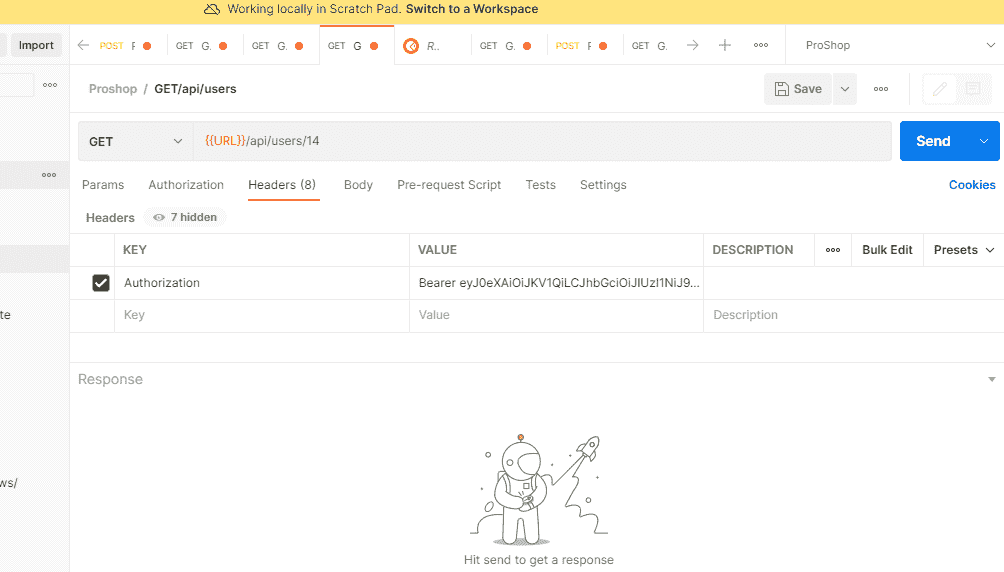
- Query Parameters: Pass optional data in the URL to filter or customize the request.
- Request Body: Contains the data sent to the server, typically used with POST, PUT, and PATCH requests.
HTTP Response in Postman
An HTTP response is the message returned by a server after it processes an HTTP request from a client, such as Postman. It indicates whether the request was successful and includes the requested data or error information.
Components of an HTTP Response
An HTTP response consists of several components that provide information about the result of an HTTP request. These components help the client understand whether the request was successful and process the returned data.
- Status Code: Indicates the outcome of the request, such as 200 OK, 404 Not Found, or 500 Internal Server Error.
- Response Headers: Contain metadata about the response, such as content type, server information, and caching details.
- Response Body: Contains the data returned by the server, typically in JSON or XML format.
- Response Time: Shows the time taken by the server to process the request and return a response.
- Response Size: Displays the size of the response data received from the server.
Environment Variables in Postman
Some requests in POSTMAN require some specific information. You can make changes to these variables all at once instead of changing the variables in the endpoint manually. In the top right corner, you will get the option to set the environment variable. You can follow the steps given below to set the environment variable.
- In the top right corner click on Manage Environment from Settings.
- Click on ADD button.
- Mention the Name of the environment.
- Mention key and value. This will be used as a variable in the collection late
Add Collection
Collections are groups of related API requests that help keep testing organized. You can create your own, import collections from others, or export them to share with teammates. This makes reusing requests and collaborating on API testing much easier.
HTTP Request in Postman
We make HTTP calls sending the HTTP Request. In HTTP request method includes Request Method, Request URL, Request Headers, Request Body, Pre-request Script, and Tests.
Request Methods.
- GET: Retrieve data from the server.
- POST: Send data to create resources on the server.
- PUT: Update existing resources.
- PATCH: Make partial updates to resources.
- DELETE: Remove resources from the server.
When creating a request, you can include:
- URL / Endpoint: The API address you are sending the request to. It defines which resource you want to access.
- HTTP Method: The action you want to perform on the resource, such as GET, POST, PUT, PATCH, or DELETE.
- Headers: Metadata that provides additional information about the request, like
Content-Type,Authorization, or custom headers required by the API. - Body: Data sent to the server in requests like POST, PUT, or PATCH. Formats include JSON, XML, form-data, or plain text.
- Params (Query Parameters): Key-value pairs appended to the URL to filter, sort, or customize the request.
- Authorization: Credentials or tokens required to access protected resources, such as Bearer tokens, API keys, or OAuth.
- Pre-request Scripts: Optional JavaScript code that runs before the request is sent, useful for setting dynamic variables or authentication tokens.
- Tests / Scripts: JavaScript code executed after receiving a response to validate data, status codes, or automate workflows.
Example
In the example we want to get user details from an API:
- Method: GET
- URL:
https://api.example.com/users/123 - Headers:
Authorization: Bearer <token>
Postman Request–Response Workflow
The Postman request–response workflow shows how Postman sends an HTTP request to an API server and receives an HTTP response. This process helps developers and testers verify API functionality and analyze the server's response.
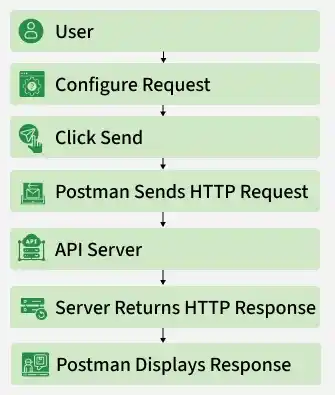
- User: The workflow begins when the user opens Postman and prepares to send an API request.
- Configure Request: The user enters the API URL, selects an HTTP method, and configures headers and the request body if required.
- Click Send: Clicking the Send button instructs Postman to submit the configured request to the API server.
- Postman Sends HTTP Request: Postman converts the request into an HTTP message and transmits it to the server.
- API Server Processes the Request: The server receives the request, validates it, performs the requested operation, and prepares a response.
- Server Returns HTTP Response: The server sends back an HTTP response containing the status code, response headers, and response body.
- Postman Displays Response: Postman displays the response details, including the response body, status code, headers, and response time for analysis and validation.
Advantages of Using Postman
Postman simplifies API development and testing by providing an intuitive interface for creating, sending, and validating HTTP requests. It helps developers and testers improve productivity while ensuring API reliability.
- Supports authentication methods like API Key, Bearer Token, OAuth 2.0, and Basic Auth.
- Enables automated API testing using JavaScript test scripts.
- Organizes requests into collections for easy management and reuse.
- Supports environment variables for testing across multiple environments.
- Allows API documentation generation and collaboration with team members.
- Integrates with CI/CD pipelines using Newman for automated API testing.
Common Errors and Troubleshooting
While testing APIs in Postman, you may encounter errors caused by incorrect requests, authentication issues, or server-side problems. Understanding these common errors helps you quickly identify and resolve API testing issues.
| Error | Troubleshooting |
|---|---|
| 400 Bad Request | Verify the request URL, parameters, headers, and request body for invalid or missing data. |
| 401 Unauthorized | Check that the authentication credentials or access token are valid and correctly configured. |
| 403 Forbidden | Ensure your account or API key has permission to access the requested resource. |
| 404 Not Found | Confirm that the API endpoint URL is correct and the requested resource exists. |
| 405 Method Not Allowed | Verify that you are using the correct HTTP method (GET, POST, PUT, PATCH, or DELETE). |
| 415 Unsupported Media Type | Set the correct Content-Type header, such as application/json, before sending the request. |
| 500 Internal Server Error | This is a server-side issue. Review server logs or contact the API provider if the problem persists. |
| Request Timeout | Check your network connection, server availability, or increase the request timeout if necessary. |
